
Vue模板语法(二)
Vue基础模板语法 二
1. 样式绑定
1.1 class绑定
使用方式:v-bind:class="expression"
expression的类型:字符串、数组、对象
1.2 style绑定
v-bind:style="expression"
expression的类型:字符串、数组、对象
2. 事件处理器
Vue通过由点(.)表示的指令后缀来调用修饰符,
.stop
.prevent
.capture
.self
.once
<!-- 阻止单击事件冒泡 -->
<a v-on:click.stop="doThis"></a>
<a v-on:click.once="doThis"></a>
Vue允许为v-on在监听键盘事件时添加按键修饰符:
<input v-on:keyup.13="submit">
<!-- 同上 -->
<input v-on:keyup.enter="submit">
.enter
.tab
.delete (捕获 "删除" 和 "退格" 键)
.esc
.space
.up
.down
.left
.right
.ctrl
.alt
.shift
.meta
3. vue表单
用v-model指令在表单控件元素上创建双向数据绑定
文本框/密码框/文本域/隐藏域
单选复选框/多选复选框
4、代码
只演示部分功能
 <!DOCTYPE html>

 <html>

     <head>

         <meta charset="utf-8">

         <title>vue样式绑定和事件处理</title>

         <script src="https://cdn.bootcss.com/vue/2.6.10/vue.js"></script>

         <style type="text/css">

             .a {

                 color: red;

             }

             .b {

                 color: blue;

             }

             .c {

                 font-size: 60px;

             }

             /* div {

                 padding: 60px;

             } */

         </style>

     </head>

     <body>

         <div id="app">

             <ul>

                 <li>

                     <h3>样式绑定</h3>

                     <span :class='aClz'>好好学习,</span>

                     <span :class='bClz'>好好学习,</span>

                     <span :class='cClz'>好好学习,天天向上。</span>

                 </li>

                 <li>

                     <h3>事件处理-阻止冒泡</h3>

                     <div style="background-color: red;width: 600px;height: 600px;" @click.stop="a">

                         <div style="background-color: blue;width: 500px;height: 500px;" @click.stop="b">

                             <div style="background-color: yellow;width: 300px;height: 300px;" @click.stop="c">

                                 <div style="background-color: pink;width: 200px;height: 200px;" @click.stop="d">

                                 </div>

                             </div>

                         </div>

                     </div>

                 </li>

                 <li>

                     <h3>事件处理-按钮只能点击一次</h3>

                     {{info}}<input type="text" v-model="msg" />

                     <button @click="e">无限点击</button>

                     <button @click.once="e">单次点击</button>

                 </li>

                 <li>

                     <h3>按键修饰符-回车键提交事件</h3>

                     {{info}}<input type="text" v-model="msg" v-on:keyup.enter="e" />

                     <button @click="e">无限点击</button>

                     <button @click.once="e">单次点击</button>

                 </li>

                 <li>

                     <h3>select标签</h3>

                     <select name="hobby" v-model="selectedIds">

                         <option v-for="d in datas" :value="d.id">{{d.name}}</option>

                     </select>

                     选中的值:{{selectedIds}}

                 </li>

                 <li>

                     <h3>checkbox-复选框标签</h3>

                     <div v-for="d in datas">

                         <input type="checkbox" :value="d.id" name="likes" v-model="selectedIdArr" />{{d.name}}

                     </div>

                     选中的值:{{selectedIdArr}}

                 </li>

             </ul>

         </div>

     </body>

     <script type="text/javascript">

         new Vue({

             el: "#app",

             data: {

                 aClz: 'a',

                 bClz: 'b',

                 cClz: ['b', 'c'],

                 msg: '',

                 info: '',

                 datas: [{

                         id: 1,

                         name: '吃'

                     },

                     {

                         id: 2,

                         name: '喝'

                     },

                     {

                         id: 3,

                         name: '玩'

                     }

                 ],

                 selectedIds:'',

                 selectedIdArr:[]

             },

             methods: {

                 a() {

                     alert('a事件触发');

                     alert(this.selectedIds);

                 },

                 b() {

                     alert('b事件触发');

                 },

                 c() {

                     alert('c事件触发');

                 },

                 d() {

                     alert('d事件触发');

                 },

                 e() {

                     this.info = this.msg;

                     this.msg = '';

                 }

             }

         })

     </script>

 </html>
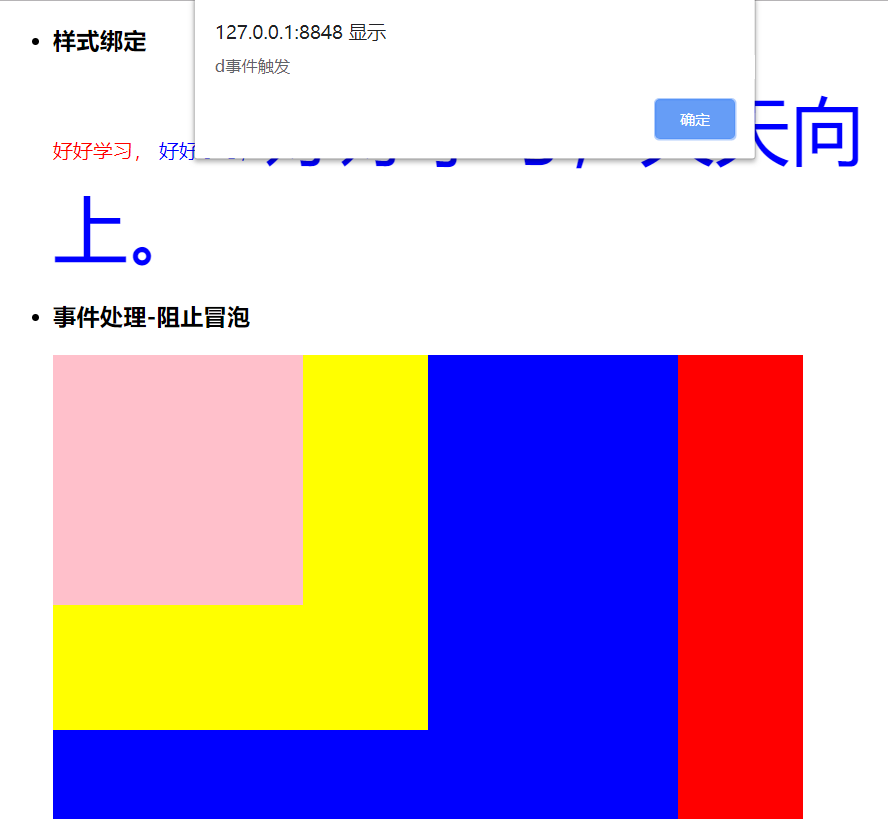
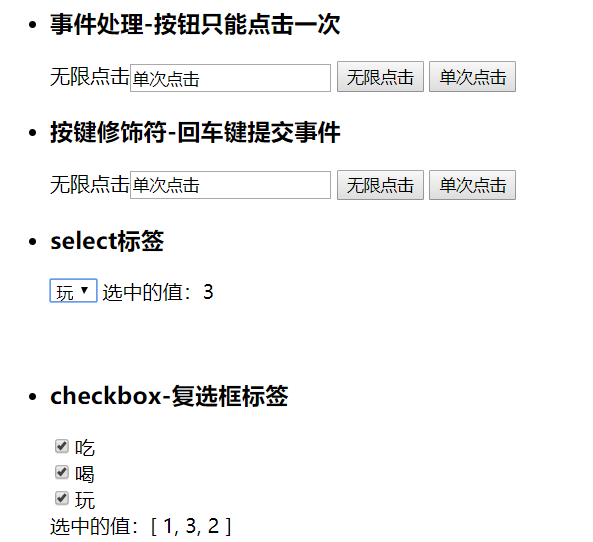
运行效果
图一 :
图二 :
5. vue组件
5.1 组件简介
组件(Component)是Vue最强大的功能之一
组件可以扩展HTML元素,封装可重用的代码
组件系统让我们可以用独立可复用的小组件来构建大型应用,几乎任意类型的应用的界面都可以抽象为一个组件树
全局组件:Vue.component(tagName, options),tagName为组件名,options为配置选项。
局部组件: new Vue({el:'#d1',components:{...}})
注册后,我们可以使用以下方式来调用组件:
<tagName></tagName>
6. 自定义事件
监听事件:$on(eventName)
触发事件:$emit(eventName)
vue中父组件通过prop传递数据给子组件,而想要将子组件的数据传递给父组件,则可以通过自定义事件的绑定
父Vue实例->Vue实例,通过prop传递数据
子Vue实例->父Vue实例,通过事件传递数据
不同于组件和prop,事件名不存在任何自动化的大小写转换。而是触发的事件名需要完全匹配监听这个事件所用的名称
建议使用“短横线分隔命名”,例如:three-click
 <!DOCTYPE html>

 <html>

     <head>

         <meta charset="utf-8">

         <title>组件</title>

         <script src="https://cdn.bootcss.com/vue/2.6.10/vue.js"></script>

     </head>

     <body>

         <div id="app">

             <ul>

                 <li>

                     <h3>局部组件的注册</h3>

                     <!-- 具有侵入性 -->

                     <my-button></my-button>

                 </li>

                 <li>

                     <h3>全局组件的注册</h3>

                     <my-button2></my-button2>

                 </li>

                 <li>

                     <h3>组件的通信(父传子)</h3>

                     <my-button m='zs'></my-button>

                 </li>

                 <li>

                     <h3>组件的通信(子传父)</h3>

                     <my-button m='ls' @three-click='xxx'></my-button>

                 </li>

             </ul>

         </div>

     </body>

     <script type="text/javascript">

         Vue.component('my-button2', {

             template: '<button @click="doSubmit">被点击了{{n}}次</button>',

             data() {

                 return {

                     n: 0

                 }

             },

             methods: {

                 doSubmit() {

                     this.n += 1;

                 }

             }

         })

         new Vue({

             el: "#app",

             data() {

                 return {

                 }

             },

             components: {

                 'my-button': {

                     props:['m'],

                     template: '<button @click="doSubmit">被{{m}}点击了{{n}}次</button>',

                     data() {

                         return {

                             n: 0,

                             zhedie:'折叠效果'

                         }

                     },

                     methods: {

                         doSubmit() {

                             this.n += 1;

                             // 注册一个事件,让外部调用,然后顺便接受内部的值

                             if(this.n%3==0){

                                 this.$emit('three-click',this.zhedie);

                             }

                         }

                     }

                 }

             },

             methods:{

                 xxx(v){

                         alert(v);

                 }

             }

         })

     </script>

 </html>
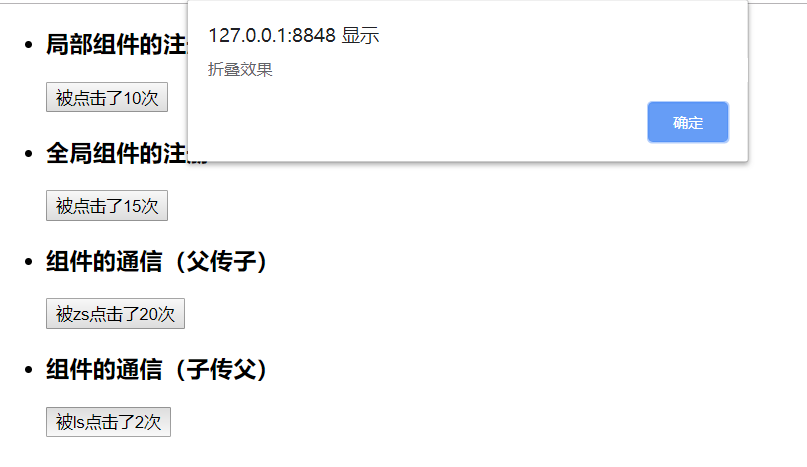
运行效果:
Vue是一个很有趣的东西,你越去扩展就会越觉得有趣!
谢谢观看!!!
Vue模板语法(二)的更多相关文章
- Vue模板语法(二)
Vue模板语法(二) 样式绑定 class绑定 使用方式:v-bind:class="expression" expression的类型:字符串.数组.对象 1.2 style绑 ...
- Vue模板语法(一)
Vue模板语法 一.插值 1.1.1 文本 {{msg}} 1.1.2 html 使用v-html指令用于输出html代码 1.1.3 属性 HTML属性中的值应使用v-bind指令 1.1.4 表达 ...
- Vue模板语法(一)
Vue模板语法 一 vue简介 Vue.js是一套构建用户界面的渐进式框架. 与其他重量级框架不同的是,Vue 采用自底向上增量开发的设计. Vue 的核心库只关注视图层,并且非常容易学习,非常容易与 ...
- Vue 模板语法 && 数据绑定
1 <!DOCTYPE html> 2 <html> 3 <head> 4 <meta charset="UTF-8" /> 5 & ...
- 初始Vue、Vue模板语法、数据绑定(2022/7/3)
文章目录 1.Vue简介 1.1.Vue的安装使用 1.2.实际的运用案例 1.3.vue开发工具的使用(这个需要在浏览器中安装) 2.初始Vue 2.1 .基础知识 2.1 .代码实例 2.2 .页 ...
- Vue模板语法与常用指令
Vue.js 使用了基于 HTML 的模板语法,允许开发者声明式地将 DOM 绑定至底层 Vue 实例的数据.在底层的实现上,Vue 将模板编译成虚拟 DOM 渲染函数,结合相应系统,在应用状态改变时 ...
- (Vue)vue模板语法
Vue.js 使用了基于 HTML 的模版语法,允许开发者声明式地将 DOM 绑定至底层 Vue 实例的数据.Vue.js 的核心是一个允许你采用简洁的模板语法来声明式的将数据渲染进 DOM 的系统. ...
- (32)Vue模板语法
模板语法 文本: <span>Message: {{ msg }}</span> v-once 一次性地插值,当数据改变时,插值处的内容不会更新 <span v-once ...
- 11 - Vue模板语法
Vue.js 使用了基于 HTML 的模板语法,允许开发者声明式地将 DOM 绑定至底层 Vue 实例的数据. 所有 Vue.js 的模板都是合法的 HTML ,所以能被遵循规范的浏览器和 HTML ...
随机推荐
- 关于TI公司DSP工程调用DELAY_US()进入非法中断问题的解决
最近笔者在调试一个DSP程序时,发现在ad外设初始化时无法正常执行,单步检查,发现当执行到调用 DELAY_US(1000);语句时,就跳入非法. 进一步追查,DELAY_US()是宏定义函数,在笔者 ...
- java实现rabbitMQ消息收发方式
定义:消息队列(MQ)是一种应用程序对应用程序的通信方法是AMQP协议. jar包依赖: <!-- 加入mq消息依赖包 --> <dependency> &l ...
- Markdown新手入门
目录 Markdown新手入门 一.字体样式 二. 标题 三.列表 四.引用和代码块 五.插入图片和超链接 六.创建表格 七. 上标和下标 八.着重显示和高亮显示 我是尾巴 Markdown新手入门 ...
- zipkin的安装与搭建
下载与部署 jar中yaml文件配置 启动传入并参数 web界面 目录 zipkin是分布式链路调用监控系统,聚合各业务系统调用延迟数据,达到链路调用监控跟踪. 下载与部署 wget -O zipki ...
- GOF 的23种JAVA常用设计模式 学习笔记 持续更新中。。。。
前言: 设计模式,前人总结下留给后人更好的设计程序,为我们的程序代码提供一种思想与认知,如何去更好的写出优雅的代码,23种设计模式,是时候需要掌握它了. 1.工厂模式 大白话:比如你需要一辆汽车,你无 ...
- Unity的学习笔记(UGUI文本逐个字输出)
之前在网上找过各种的逐个输出字,我可能理解能力不好,照着代码复制没有能使用成功,于是自己研究了很多网上说的思路,各种改良出了一个能用的,写完自己测试,觉得还真好用,于是记录下来 用法:将用代码组件挂上 ...
- ICO学习说明
IOC叫做控制反转,可以理解为我要做一件事,分为1,2,3,4这4部,我们可以在一个函数实现这四步,控制反转就是将这个流程体现在框架中.将原来实现在应用程序流程控制转移到框架中,框架利用一个引擎驱动整 ...
- 转 如何在调用WCF服务之前弹出一个确认对话框
自定义InteractiveChannelInitializer(InvocationConfirmationInteractiveChannelInitializer)定义如下.我们在BeginDi ...
- cefsharp System.IO.FileNotFoundException: 未能加载文件或程序集“CefSharp.Core.dll”或它的某一个依赖项。
解决办法 安装vc++ 2015 Redistributable 64位系统安装x64 如果还报错先装x64版本再装x86版本 https://files.cnblogs.com/files/xuej ...
- 如何在Unity中创造真实的水
你将要创造什么 Unity是由Unity Technologies开发的多平台游戏引擎,用于为控制台,移动设备,计算机甚至网站等多种设备创建视频游戏和应用程序.Unity的核心优势在于其稳健性,可移植 ...