
kubernetes CRI 前世今生
在学习kubernetes的过程中,我们会遇到CRI、CNI、CSI、OCI 等术语,本文试图先通过分析k8s目前默认的一种容器运行时架构,来帮助我们更好理解k8s 运行时背后设计逻辑。进而引出CRI、OCI的提出背景。
一、k8s 架构
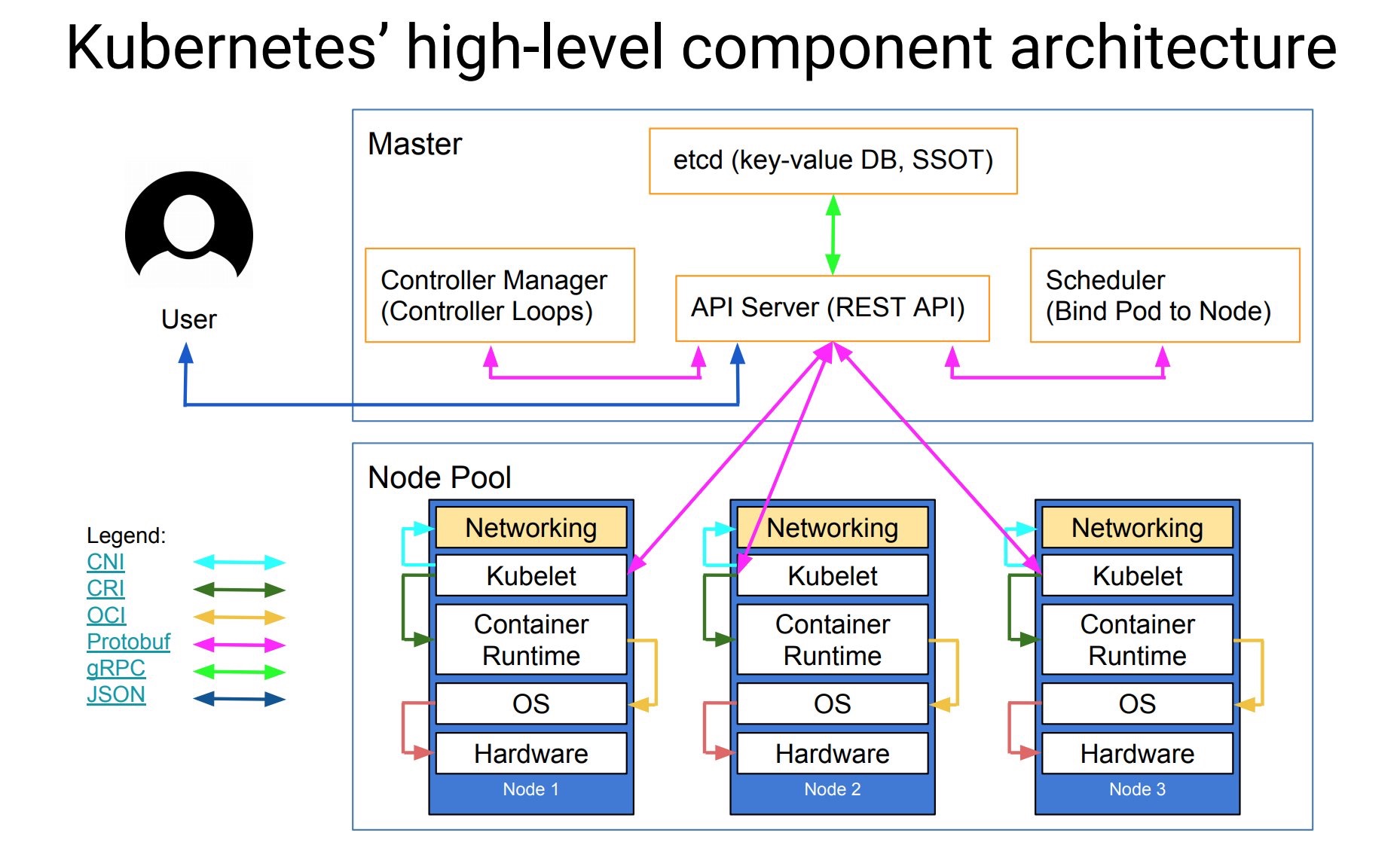
我们在构建k8s集群的时候首先需要搭建master节点、其次需要创建node节点并将node节点加入到k8s集群中。当我们构建好k8s集群后,我们可以通过kubectl create -f nginx.yml 命令的方式来创建应用对应的pod。当我们执行命令
后,命令会提交给API server,它会解析yml文件,并将其以API对象的形式存到 etcd里。这时master组件中的Controller Manager会通过控制循环的方式来做编排工作,创建应用所需要的Pod。Scheduler 会 watch etcd中新Pod 的变化。如
果他发现有一个新的Pod 出现,Scheduler会运行调度算法,通过调度算法最终选择出最佳的Node节点,并将这个Node节点的名字写到pod对象的NodeName字段上面,这一步就是所谓的Bind Pod to Node(下图的标注),然后把bind的结果写回到etcd。
其次,当我们在构建k8s集群的时候,默认每个节点上都会初始化创建一个kubelet进程,kubelet进程的会watch etcd中的pod的变化,当kubelet进程watch到pod的bind的更新操作,并且bind的节点是本节点时,它会接管接下来的
所做的事情,如镜像下载,容器创建等。
二、k8s 默认容器运行时架构
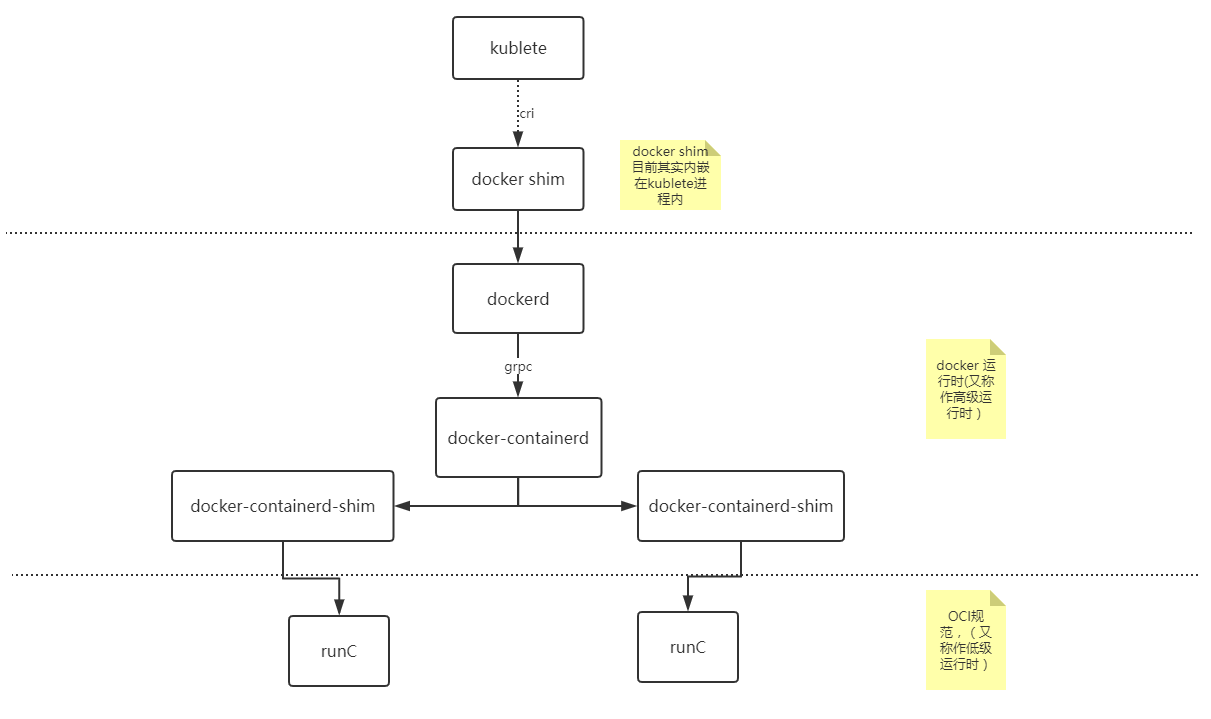
接下来将通过k8s默认集成的容器运行时架构来看kublete如何创建一个容器(如下图所示)。
1. kubelet 通过 CRI(Container Runtime Interface) 接口(gRPC) 调用 dockershim, 请求创建一个容器, 这一步中, Kubelet 可以视作一个简单的 CRI Client, 而 dockershim 就是接收请求的 Server.
2. dockershim 收到请求后, 通过适配的方式,适配成 Docker Daemon 的请求格式, 发到 Docker Daemon 上请求创建一个容器。在docker 1.12后版本中,docker daemon被拆分成dockerd和containerd,containerd负责操作容器。
3. dockerd收到请求后, 调用containerd进程去创建一个容器。
4. containerd 收到请求后, 并不会自己直接去操作容器, 而是创建一个叫做 containerd-shim 的进程, 让 containerd-shim 去操作容器. 创建containered-shim的目的主要有:
1)让containerd-shim做诸如收集状态, 维持 stdin 等 fd 打开等工作.
2)允许容器运行时(runC)启动容器后退出,不必为每个容器一直运行一个容器运行时runC。
3)即使在 containerd 和 dockerd 都挂掉的情况下,容器的标准 IO 和其它的文件描述符也都是可用的。
4)向 containerd 报告容器的退出状态
5)在不中断容器运行的情况下升级或重启 dockerd
5. 而containerd-shim 在这一步需要调用 runC 这个命令行工具, 来启动容器,runC是OCI(Open Container Initiative, 开放容器标准) 的一个参考实现。主要用来设置 namespaces 和 cgroups, 挂载 root filesystem等操作。
6.runC启动完容器后本身会直接退出, containerd-shim 则会成为容器进程的父进程, 负责收集容器进程的状态, 上报给 containerd, 并在容器中 pid 为 1 的进程退出后接管容器中的子进程进行清理, 确保不会出现僵尸进程(关闭进程描述符等)。
三、容器与容器编排背景简述
从k8s的容器运行时可以看出,kubelet启动容器的过程经过了很长的一段调用链路。这个是由于在容器及编排领域各大厂商与docker之间的竞争以及docker公司为了抢占paas领域市场,对架构做出的一系列调整。其实 k8s 最开始
的运行时架构链路调用没有这么复杂: kubelet 想要创建容器直接通过 docker api 调用 Docker Daemon,Docker Daemon 调 libcontainer 这个库来启动容器。为了防止docker垄断以及受控docker运行时, 各大厂商于是就联合起来制定出开
放容器标准OCI(Open Containers Initiative).大家可以基于这个标准开发自己的容器运行时。Docker公司则把 libcontainer做了一层封装, 变成 runC 捐献给CNCF作为 OCI 的参考实现.
接下来就是 Docker 要搞 Swarm 进军 PaaS 市场, 于是做了个架构切分, 把容器操作都移动到一个单独的 Daemon 进程 containerd 中去, 让 Docker Daemon 专门负责上层的封装编排. 最终swarm败给了k8s, 于是
Docker 公司就把 containerd 捐给 CNCF ,专注于搞 Docker 企业版了.
与此同时,容器领域,core os公司推出了个rkt容器运行时。希望 k8s 原生支持 rkt 作为运行时, 由于core os与google的关系,最终rkt运行时的支持在2016年也被合并进kubelet主干代码里. 这样做后反而给k8s中负责维护 kubelet 的小
组 SIG-Node带来了更大的负担,每一次kubelet的更新都要维护docker和rkt两部分代码。与此同时,随着虚拟化技术强隔离容器技术runV(Kata Containers前身,后与intel clear container 合并)的逐渐成熟。k8s上游对虚拟化容器的支持很
快被提上了日程。为了从集成每一种运行时都要维护一份代码中解放出来,k8s SIG-Node工作组决定对容器的操作统一地抽象成一个接口,这样kubelet只需要跟这个接口
打交道,而具体地容器运行时,他们只需要实现该接口,并对kubelet暴露gRPC服务即可。这个统一地抽象地接口就是k8s中俗称的 CRI。
四、CRI(容器运行时接口)
CRI 基于 gRPC 定义了 RuntimeService 和 ImageService 等两个 gRPC 服务,分别用于容器运行时和镜像的管理。如下所示:
// Runtime service defines the public APIs for remote container runtimes

service RuntimeService {

    // Version returns the runtime name, runtime version, and runtime API version.

    rpc Version(VersionRequest) returns (VersionResponse) {}

    // RunPodSandbox creates and starts a pod-level sandbox. Runtimes must ensure

    // the sandbox is in the ready state on success.

    rpc RunPodSandbox(RunPodSandboxRequest) returns (RunPodSandboxResponse) {}

    // StopPodSandbox stops any running process that is part of the sandbox and

    // reclaims network resources (e.g., IP addresses) allocated to the sandbox.

    // If there are any running containers in the sandbox, they must be forcibly

    // terminated.

    // This call is idempotent, and must not return an error if all relevant

    // resources have already been reclaimed. kubelet will call StopPodSandbox

    // at least once before calling RemovePodSandbox. It will also attempt to

    // reclaim resources eagerly, as soon as a sandbox is not needed. Hence,

    // multiple StopPodSandbox calls are expected.

    rpc StopPodSandbox(StopPodSandboxRequest) returns (StopPodSandboxResponse) {}

    // RemovePodSandbox removes the sandbox. If there are any running containers

    // in the sandbox, they must be forcibly terminated and removed.

    // This call is idempotent, and must not return an error if the sandbox has

    // already been removed.

    rpc RemovePodSandbox(RemovePodSandboxRequest) returns (RemovePodSandboxResponse) {}

    // PodSandboxStatus returns the status of the PodSandbox. If the PodSandbox is not

    // present, returns an error.

    rpc PodSandboxStatus(PodSandboxStatusRequest) returns (PodSandboxStatusResponse) {}

    // ListPodSandbox returns a list of PodSandboxes.

    rpc ListPodSandbox(ListPodSandboxRequest) returns (ListPodSandboxResponse) {}

    // CreateContainer creates a new container in specified PodSandbox

    rpc CreateContainer(CreateContainerRequest) returns (CreateContainerResponse) {}

    // StartContainer starts the container.

    rpc StartContainer(StartContainerRequest) returns (StartContainerResponse) {}

    // StopContainer stops a running container with a grace period (i.e., timeout).

    // This call is idempotent, and must not return an error if the container has

    // already been stopped.

    // TODO: what must the runtime do after the grace period is reached?

    rpc StopContainer(StopContainerRequest) returns (StopContainerResponse) {}

    // RemoveContainer removes the container. If the container is running, the

    // container must be forcibly removed.

    // This call is idempotent, and must not return an error if the container has

    // already been removed.

    rpc RemoveContainer(RemoveContainerRequest) returns (RemoveContainerResponse) {}

    // ListContainers lists all containers by filters.

    rpc ListContainers(ListContainersRequest) returns (ListContainersResponse) {}

    // ContainerStatus returns status of the container. If the container is not

    // present, returns an error.

    rpc ContainerStatus(ContainerStatusRequest) returns (ContainerStatusResponse) {}

    // UpdateContainerResources updates ContainerConfig of the container.

    rpc UpdateContainerResources(UpdateContainerResourcesRequest) returns (UpdateContainerResourcesResponse) {}

    // ReopenContainerLog asks runtime to reopen the stdout/stderr log file

    // for the container. This is often called after the log file has been

    // rotated. If the container is not running, container runtime can choose

    // to either create a new log file and return nil, or return an error.

    // Once it returns error, new container log file MUST NOT be created.

    rpc ReopenContainerLog(ReopenContainerLogRequest) returns (ReopenContainerLogResponse) {}

    // ExecSync runs a command in a container synchronously.

    rpc ExecSync(ExecSyncRequest) returns (ExecSyncResponse) {}

    // Exec prepares a streaming endpoint to execute a command in the container.

    rpc Exec(ExecRequest) returns (ExecResponse) {}

    // Attach prepares a streaming endpoint to attach to a running container.

    rpc Attach(AttachRequest) returns (AttachResponse) {}

    // PortForward prepares a streaming endpoint to forward ports from a PodSandbox.

    rpc PortForward(PortForwardRequest) returns (PortForwardResponse) {}

    // ContainerStats returns stats of the container. If the container does not

    // exist, the call returns an error.

    rpc ContainerStats(ContainerStatsRequest) returns (ContainerStatsResponse) {}

    // ListContainerStats returns stats of all running containers.

    rpc ListContainerStats(ListContainerStatsRequest) returns (ListContainerStatsResponse) {}

    // UpdateRuntimeConfig updates the runtime configuration based on the given request.

    rpc UpdateRuntimeConfig(UpdateRuntimeConfigRequest) returns (UpdateRuntimeConfigResponse) {}

    // Status returns the status of the runtime.

    rpc Status(StatusRequest) returns (StatusResponse) {}

}

// ImageService defines the public APIs for managing images.

service ImageService {

    // ListImages lists existing images.

    rpc ListImages(ListImagesRequest) returns (ListImagesResponse) {}

    // ImageStatus returns the status of the image. If the image is not

    // present, returns a response with ImageStatusResponse.Image set to

    // nil.

    rpc ImageStatus(ImageStatusRequest) returns (ImageStatusResponse) {}

    // PullImage pulls an image with authentication config.

    rpc PullImage(PullImageRequest) returns (PullImageResponse) {}

    // RemoveImage removes the image.

    // This call is idempotent, and must not return an error if the image has

    // already been removed.

    rpc RemoveImage(RemoveImageRequest) returns (RemoveImageResponse) {}

    // ImageFSInfo returns information of the filesystem that is used to store images.

    rpc ImageFsInfo(ImageFsInfoRequest) returns (ImageFsInfoResponse) {}

}
具体容器运行时则需要实现 CRI 定义的接口(即 gRPC server,通常称为 CRI shim)。容器运行时在启动 gRPC server 时需要监听在本地的 Unix Socket (Windows 使用 tcp 格式)。
五、 容器运行时实现
除了上面介绍的默认的容器运行时的实现,目前容器运行时主要有:
- cri-o:同时兼容OCI和CRI的容器运行时
- cri-containerd:基于Containerd的Kubernetes CRI 实现
- rkt:由CoreOS主推的用来跟docker抗衡的容器运行时
- frakti:基于hypervisor的CRI
- Clear Containers:由Intel推出的同时兼容OCI和CRI的容器运行时
- Kata Containers:符合OCI规范同时兼容CRI
- gVisor:由谷歌推出的容器运行时沙箱(Experimental)
参考文档:
https://github.com/kubernetes/cri-api/blob/master/pkg/apis/runtime/v1alpha2/api.proto
https://feisky.gitbooks.io/kubernetes/plugins/CRI.html
https://aleiwu.com/post/cncf-runtime-landscape/
https://www.infoq.cn/article/r*ikOvovTHhADAWw1Hb1
kubernetes CRI 前世今生的更多相关文章
- [Kubernetes] CRI 的设计与工作原理
咱们来看看,有了 CRI 之后, Kubernetes 的架构图: 我们可以看到, CRI 机制能够发挥作用的核心,在于每一个容器项目现在都可以自己实现一个 CRI shim ,自行对 CRI 请求进 ...
- CRI 与 ShimV2:一种 Kubernetes 集成容器运行时的新思路
摘要: 关于 Kubernetes 接口化设计.CRI.容器运行时.shimv2.RuntimeClass 等关键技术特性的设计与实现. Kubernetes 项目目前的重点发展方向,是为开发 ...
- [Kubernetes]关于 Kubernetes ,你想要的,都在这儿了
陆陆续续,关于 Kubernetes 写了有 20+ 篇文章了. 今天这篇文章来一个整合,从实践到理论,可以按需查看(我是按照博客发表时间来排序的,如果后续有想要更新的内容,也会及时更新到这篇文章中) ...
- Kubernetes 概述和搭建(多节点)
一.Kubernetes整体概述和架构 Kubernetes是什么 Kubernetes是一个轻便的和可扩展的开源平台,用于管理容器化应用和服务.通过Kubernetes能够进行应用的自动化部署和扩缩 ...
- 了解Kubernetes主体架构(二十八)
前言 Kubernetes的教程一直在编写,目前已经初步完成了以下内容: 1)基础理论 2)使用Minikube部署本地Kubernetes集群 3)使用Kubeadm创建集群 接下来还会逐步完善本教 ...
- Kubernetes概述
1. Kubernetes是什么 Kubernetes是一个可移植的.可扩展的.用于管理容器化工作负载和服务的开源平台,它简化(促进)了声明式配置和自动化.它有一个庞大的.快速增长的生态系统.Kube ...
- kubernetes架构和组件
一.Kubernetes整体架构 Kubernetes属于主从分布式架构,主要由Master Node和Worker Node组成,以及包括客户端命令行工具kubectl和其它附加项. Master ...
- 零基础入门 Kubernetes,你需要知道这些
Kubernetes是什么? 大概很多人对此都有疑问,不过在容器领域,Kubernetes却无人不晓. 阿里.字节跳动.腾讯.百度等中国互联网行业巨擘们,近年来都在深耕容器领域,而Kubernetes ...
- 1、kubernetes简介
Kubernetes简介 文档信息 中文官网:https://kubernetes.io/zh 中文社区:https://www.kubernetes.org.cn/ Kubernetes是容器集群管 ...
随机推荐
- oracle表连接的优化
多表连接的三种方式: HASH JOIN,MERGE JOIN,NESTED LOOP NESTED LOOP: 嵌套循环连接,适用于内表数据量较小时.外表返回的每一行都要在内表中检索找到与它匹配的行 ...
- MySQL 王者晋级之路
3.2 Query Cache: 3.3 存储引擎 一.TokuDB的特点: – 插入性能加快20到80倍– 压缩数据减少存储空间– 数据量可扩展到几个TB– 不会产生索引碎片– 支持Hot Colu ...
- CF1010D Mars rover
CF1010D Mars rover 洛谷评测传送门 题目描述 Natasha travels around Mars in the Mars rover. But suddenly it broke ...
- Ubuntu16.04 UltraEdit 安装&破解&使用
(1)下载:登录到官网(http://www.ultraedit.com/downloads/uex.html)选在对应的版本进行下载. (2)安装: (使用命令行方式安装)在本地路径进行安装:sud ...
- SqlServer断开所有连接
有时候我们在使用SqlServer管理工具操作数据库的时候,需要对数据库进行改名,但是如果当前数据库还有连接未释放的话,是不能改名的. 有很多方式可以断开所有连接,这里介绍一种个人觉得比较简单的方式. ...
- C 指针(pointer)
C 指针(pointer) /* * pointer.c * 指针在C中的应用 * */ #include <stdio.h> int main(void) { /* * i是一个int类 ...
- 怎样把ndarray转换为PyQt中的QPixmap
找不到文档,只在网上找到一些语焉不详,执行错误的代码,鼓捣了一个晚上,研(luan)究(gao)成功 def img2pixmap(self, image): Y, X = image.shape[: ...
- WinCC中通过脚本禁用或启用Windows快捷键
有些项目要求WinCC全屏运行,并禁止通过操作系统快捷键切换到桌面,这时只需要在WinCC的计算机属性中勾选“禁用用于进行操作系统访问的快捷键”.此后当WinCC运行时,按Win键或Ctrl+Alt+ ...
- 大话设计模式Python实现-外观模式
外观模式(Facade Pattern):为子系统中的一组接口提供一个一致界面,此模式定义一个高层接口,使得子系统更加容易使用 下面是一个外观模式的demo: #!/usr/bin/env pytho ...
- Python 下载图片的三种方法
import os os.makedirs('./image/', exist_ok=True) IMAGE_URL = "http://image.nationalgeographic.c ...