
可拖拽dialog
指令的封装转自https://blog.csdn.net/sinat_21902709/article/details/86545444
可拖拽dialog应用于很多弹出框,所以需要作用于全局
在插件文件夹中创建一个文件dialogDrag存放公共的指令

import Vue from "vue";

// v-dialogDrag: 弹窗拖拽属性

Vue.directive("dialogDrag", {

  bind(el, binding, vnode, oldVnode) {

    const dialogHeaderEl = el.querySelector(".el-dialog__header");

    const dragDom = el.querySelector(".el-dialog");

    //dialogHeaderEl.style.cursor = 'move';

    dialogHeaderEl.style.cssText += ";cursor:move;";

    dragDom.style.cssText += ";top:0px;";

    // 获取原有属性 ie dom元素.currentStyle 火狐谷歌 window.getComputedStyle(dom元素, null);

    const sty = (function() {

      if (window.document.currentStyle) {

        return (dom, attr) => dom.currentStyle[attr];

      } else {

        return (dom, attr) => getComputedStyle(dom, false)[attr];

      }

    })();

    dialogHeaderEl.onmousedown = e => {

      // 鼠标按下,计算当前元素距离可视区的距离

      const disX = e.clientX - dialogHeaderEl.offsetLeft;

      const disY = e.clientY - dialogHeaderEl.offsetTop;

      const screenWidth = document.body.clientWidth; // body当前宽度

      const screenHeight = document.documentElement.clientHeight; // 可见区域高度(应为body高度,可某些环境下无法获取)

      const dragDomWidth = dragDom.offsetWidth; // 对话框宽度

      const dragDomheight = dragDom.offsetHeight; // 对话框高度

      const minDragDomLeft = dragDom.offsetLeft;

      const maxDragDomLeft = screenWidth - dragDom.offsetLeft - dragDomWidth;

      const minDragDomTop = dragDom.offsetTop;

      const maxDragDomTop = screenHeight - dragDom.offsetTop - dragDomheight;

      // 获取到的值带px 正则匹配替换

      let styL = sty(dragDom, "left");

      let styT = sty(dragDom, "top");

      // 注意在ie中 第一次获取到的值为组件自带50% 移动之后赋值为px

      if (styL.includes("%")) {

        styL = +document.body.clientWidth * (+styL.replace(/\%/g, "") / );

        styT = +document.body.clientHeight * (+styT.replace(/\%/g, "") / );

      } else {

        styL = +styL.replace(/\px/g, "");

        styT = +styT.replace(/\px/g, "");

      }

      document.onmousemove = function(e) {

        // 通过事件委托,计算移动的距离

        let left = e.clientX - disX;

        let top = e.clientY - disY;

        // 边界处理

        if (-left > minDragDomLeft) {

          left = -minDragDomLeft;

        } else if (left > maxDragDomLeft) {

          left = maxDragDomLeft;

        }

        if (-top > minDragDomTop) {

          top = -minDragDomTop;

        } else if (top > maxDragDomTop) {

          top = maxDragDomTop;

        }

        // 移动当前元素

        dragDom.style.cssText += `;left:${left + styL}px;top:${top + styT}px;`;

      };

      document.onmouseup = function(e) {

        document.onmousemove = null;

        document.onmouseup = null;

      };

    };

  }

});
在main.js文件中引入公共指令
// 引入自定义指令

import "./plugins/dialogDrag/directives";
然后直接就可以在组件中使用
<!--直接使用 自定义指令  v-dialogDrag-->

<template>

  <div id="addExpressDialog"

       v-show="isShowExpressDialog"

       v-dialogDrag>

    <el-dialog :visible.sync="isShowExpress"

               class="dialog_container"

               center>

      <div slot="title"

           class="dialog-title">

        {{title}}

      </div>

      <div class="dialog_content">

        内容

      </div>

    </el-dialog>

  </div>

</template>

<script>

import Vue from 'vue'

import { Dialog } from 'element-ui'

Vue.use(Dialog)

export default {

  name: 'addExpressDialog',

  props: {

    title: {

      type: String

    },

    isShowExpressDialog: {

      type: Boolean,

      default: false

    },

    dialogType: {

      type: String

    }

  },

  data() {

    return {}

  },

  mounted() {},

  computed: {

    isShowExpress: {

      get() {

        return this.isShowExpressDialog

      },

      set(v) {

        this.$emit('closeExpressDialog', v)

      }

    }

  },

  watch: {},

  methods: {}

}

</script>

<style lang="scss">

.v-modal {

  z-index: 0 !important;

}

#addExpressDialog {

  .el-dialog {

    width: 431px;

    height: 222px;

    position: relative;

    margin: 0 auto;

    margin-top: 0px !important;

    margin-bottom: 0px !important;

    background: url('../../../../assets/images/sysinformation/bg_popup_del.png')

      no-repeat;

    .el-dialog__header {

      padding: 5px 0px 0px 0px;

      .el-dialog__headerbtn {

        top: 5px;

      }

    }

  }

}

</style>

<style lang="scss" scoped>

#addExpressDialog {

  position: fixed;

  height: calc(100% - 80px);

  top: 80px;

  bottom: 0px;

  left: 0px;

  right: 0px;

  z-index: 9999 !important;

  .dialog_container {

    height: calc(100% - 80px);

    top: 80px !important;

    overflow: hidden;

    .dialog-title {

      color: rgba(255, 255, 255, 1);

    }

  }

}

</style>
简单效果图
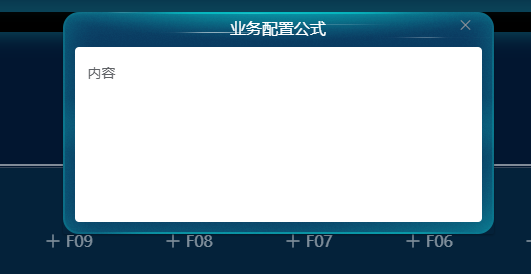
可以拖拽
可拖拽dialog的更多相关文章
- EasyUI, Dialog 在框架页(ifrmae)的Top页面弹出时,拖拽Dialog边缘(以改变窗口大小),UI界面被卡死的解决办法
将Dialog的modal属性设置为true,可以解决卡死的问题(但会给用户使用体验带来影响) var par = { title: This.title, width: This.width, he ...
- element-ui dialog组件添加可拖拽位置 可拖拽宽高
edge浏览器下作的gifhttp://www.lanourteam.com/%E6... 有几个点需要注意一下 每个弹窗都要有唯一dom可操作 指令可以做到 拖拽时要添加可拖拽区块 header 由 ...
- 使dialog可拖拽指令
在项目开发过程中,需要支持dialog弹窗可拖拽,则需要对dialog添加指令.具体操作说明如下: (1)在用于存放指令的文件夹内,新建拖拽指令文件夹,例如命名为:el-dragDialog,如下所示 ...
- Vue. 之 Element dialog 拖拽
Vue. 之 Element dialog 拖拽 默认情况下,在使用Element的Dialog模块时,弹出框是不能移动的,且 一旦点击遮罩层区域,弹框就会消失. 解决方案: 1 在 utils 中新 ...
- wpf图片查看器,支持鼠标滚动缩放拖拽
最近项目需要,要用到一个图片查看器,类似于windows自带的图片查看器那样,鼠标滚动可以缩放,可以拖拽图片,于是就写了这个简单的图片查看器. 前台代码: <Window x:Class=&qu ...
- Javascript 事件对象进阶(二)拖拽的应用 - 登录框的拖拽
<!doctype html> <html> <head> <meta charset="utf-8"> <title> ...
- 纯JS实现可拖拽表单
转载注明出处!!! 转载注明出处!!! 转载注明出处!!! 因为要用到可拖拽表单,个人要比较喜欢自己动手,不怎么喜欢在不懂实现或者原理的情况下用插件,所以查找资料实现了一个. 思路:放入:用mouse ...
- js实现登陆页面的拖拽功能
<!DOCTYPE html><html> <head> <meta charset="UTF-8"> <title>登 ...
- C# 图片盖章功能实现,支持拖拽-旋转-放缩-保存
实现图片盖章功能,在图片上点击,增加“图章”小图片,可以拖拽“图章”到任意位置,也可以点击图章右下角园框,令图片跟着鼠标旋转和放缩. 操作方法:1.点击增加“图章”2.选中移动图标3.点中右下角放缩旋 ...
随机推荐
- 在Visual Studio中直接编译Fluent的UDF
VS版本:Visual Studio 2013 Fluent版本:Fluent18.2 首先我们启动VS Studio中直接编译Fluent的UDF" title="在Visual ...
- rust 函数的使用
fn main() { println!("Hello, world!"); another_function(2,3); let y ={ let x =3; //表达式的结尾没 ...
- a标签伪类选择器+过度模块
a标签的伪类选择器 1.什么是a标签的伪类选择器?a标签的伪类选择器是专门用来修改a标签不同状态的样式的. 2.格式: 1):link 修改从未被访问过状态下的样式. 2):visited 修改被访问 ...
- 解决:E: Could not get lock /var/lib/dpkg/lock
问题: ubuntu16 执行 sudo apt install aria2 命令时,提示如下错误 E: Could not get lock /var/lib/dpkg/lock - open (1 ...
- zipkin exec下载地址
zipkin exec下载地址 https://repo1.maven.org/maven2/io/zipkin/java/zipkin-server/1.20.1/zipkin-server-1.2 ...
- https://www.cnblogs.com/LBSer/p/3310455.html
https://www.cnblogs.com/LBSer/p/3310455.html
- http各类型请求方法工具总结
本文为博主原创,未经允许不得转载: 在项目中会用到各种类型的http请求,包含put,get,post,delete,formData等各种请求方式,在这里总结一下 用过比较好的请求工具,使用serv ...
- EFProf用法
SQL Server Profiler用来跟踪应用程序发送到SQL Server中的SQL语句,用于检测性能,查找问题.Entity Framework 也有它的跟踪工具EFProf,用于跟踪Enti ...
- 使用GridSearchCV进行网格搜索微调模型
import numpy as np import pandas as pd from sklearn.feature_extraction.text import TfidfVectorizer f ...
- 【Python学习之五】函数
环境 虚拟机:VMware 10 Linux版本:CentOS-6.5-x86_64 客户端:Xshell4 FTP:Xftp4 python3.6 Python不但能非常灵活地定义函数,而且本身内置 ...