
Box2d刚体轨迹预测
前言
在游戏开发中经常会接触到各种物理引擎,虽然开源的引擎各种各样,但是基本原理是相通的。实质上物理引擎只是以时间为单位的刷新物理世界中的刚体的位置(其中运用了大量物理公式和知识),然后刷新刚体关联的物品(节点)的位置来达到模拟效果。其中的细节是我们开发者不需要知道,也不知道的。所以刚体轨迹预测成为了难题。
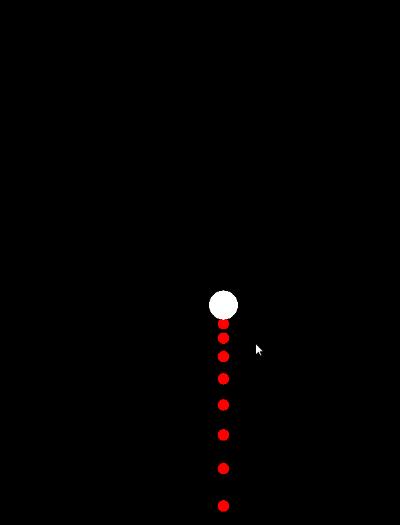
效果
物理公式
在开始之前先补一下高中基础物理公式(主要涉及匀加速直线运动):
- 速度公式
- 距离公式
- 阻尼公式
(比较贴近)
是指运动物体的
初始速度, 是指运动物体的
运动时间, 是指运动物体的
结束速度, 是指运动物体
运动距离, 是指运动物体的
运动加速度, 是指运动物体的
阻尼系数(模拟的空气阻尼等)。
即:
//速度公式

    v(v0, a, t) {

        return v0 + a * t;

    }

    //距离公式

    s(v0, a, t) {

        return v0 * t + (a * t * t) / 2;

    }

    //阻尼公式

    let damping = -this.linear_Damping * this.v_y * dt;

    this.v_y = this.v(this.v_y, this.a_y, dt) + damping;
运动分解
运动比较复杂,但是可以简单的拆解为X轴运动和Y轴运动,把运动简单化。
- Y轴
阻尼系数:
typescript this.linear_Damping = this.RigidBody.linearDamping;
加速度为物理世界重力*刚体的重力缩放(PTM_RATIO为单位换算比):
typescript let world_y = cc.director.getPhysicsManager().gravity.y; this.a_y =(-this.RigidBody.gravityScale * world_y) /cc.PhysicsManager.PTM_RATIO;
速度为物体初始速度(PTM_RATIO为单位换算比):
typescript this.v_y =-this.RigidBody.linearVelocity.y / cc.PhysicsManager.PTM_RATIO;
刚体Y轴位置:
typescript this.y = this.RigidBody.node.y;
经过dt时间,物体Y轴运动为(PTM_RATIO为单位换算比):
typescript this.y -= this.s(this.v_y, this.a_y, dt)*cc.PhysicsManager.PTM_RATIO; let damping = -this.linear_Damping * this.v_y * dt; this.v_y = this.v(this.v_y, this.a_y, dt) + damping;
- X轴
同理...
关键代码
const { ccclass, property } = cc._decorator;

@ccclass

export default class RigidBodyaPrediction extends cc.Component {

    @property(cc.RigidBody)

    RigidBody: cc.RigidBody = null;

    @property(cc.Prefab)

    show_prefab: cc.Prefab = null;

    @property(cc.Node)

    result: cc.Node = null;

    //米/秒^2

    a_y = 0;

    a_x = 0;

    //米/秒

    v_y = 0;

    v_x = 0;

    //位置

    x = 0;

    y = 0;

    //阻尼

    linear_Damping = 0;

    status = true;

    pool: cc.Node[] = new Array<cc.Node>();

    onLoad() {

        for (let index = 0; index < 25; index++) {

            let tmp = cc.instantiate(this.show_prefab);

            this.pool.push(tmp);

            this.result.addChild(tmp);

        }

    }

    init() {

        let world_y = cc.director.getPhysicsManager().gravity.y;

        let world_x = cc.director.getPhysicsManager().gravity.x;

        this.a_y =

            (-this.RigidBody.gravityScale * world_y) /

            cc.PhysicsManager.PTM_RATIO;

        this.a_x =

            (this.RigidBody.gravityScale * world_x) /

            cc.PhysicsManager.PTM_RATIO;

        this.v_y =

            -this.RigidBody.linearVelocity.y / cc.PhysicsManager.PTM_RATIO;

        this.v_x =

            this.RigidBody.linearVelocity.x / cc.PhysicsManager.PTM_RATIO;

        this.x = this.RigidBody.node.x;

        this.y = this.RigidBody.node.y;

        this.linear_Damping = this.RigidBody.linearDamping;

    }

    start() {

        this.RigidBody.node.on(

            cc.Node.EventType.TOUCH_CANCEL,

            function() {

                this.RigidBody.type = cc.RigidBodyType.Dynamic;

                this.status = false;

            },

            this

        );

        this.RigidBody.node.on(

            cc.Node.EventType.TOUCH_MOVE,

            function(event: cc.Touch) {

                let vec2 = this.RigidBody.node.convertToNodeSpaceAR(

                    event.getLocation()

                );

                this.RigidBody.linearVelocity = new cc.Vec2(

                    -vec2.x,

                    -vec2.y * 2

                );

            },

            this

        );

    }

    show() {

        this.init();

        this.node.removeChild(this.RigidBody.node, false);

        this.node.addChild(this.RigidBody.node, 9999);

        for (let index = 0; index < 25; index++) {

            let tmp = this.pool[index];

            tmp.x = this.x;

            tmp.y = this.y;

            this.updatePostion(0.15);

        }

    }

    updateX(dt) {

        this.x += this.s(this.v_x, this.a_x, dt) * cc.PhysicsManager.PTM_RATIO;

        let damping = -this.linear_Damping * this.v_x * dt;

        this.v_x = this.v(this.v_x, this.a_x, dt) + damping;

    }

    updateY(dt) {

        this.y -= this.s(this.v_y, this.a_y, dt) * cc.PhysicsManager.PTM_RATIO;

        let damping = -this.linear_Damping * this.v_y * dt;

        this.v_y = this.v(this.v_y, this.a_y, dt) + damping;

    }

    updatePostion(dt) {

        this.updateX(dt);

        this.updateY(dt);

    }

    v(v0, a, t) {

        return v0 + a * t;

    }

    s(v0, a, t) {

        return v0 * t + (a * t * t) / 2;

    }

    update() {

        if (this.status) {

            this.show();

        }

    }

}
例子
Box2d刚体轨迹预测的更多相关文章
- CVPR 2019轨迹预测竞赛冠军方法总结
背景 CVPR 2019 是机器视觉方向最重要的学术会议,本届大会共吸引了来自全世界各地共计 5160 篇论文,共接收 1294 篇论文,投稿数量和接受数量都创下了历史新高,其中与自动驾驶相关的论文. ...
- 关于CCSprite改变box2d刚体位置以及角度。
同事今天在讨论一个事情,box2d中,body不可以直接设置位置,这样是不合理的,因为在物理的世界,你去左右它的物理检测.它就没有存在的必要了.但是,有人就想直接用box2d的碰撞.不用物理模拟.怎么 ...
- HTML5之2D物理引擎 Box2D for javascript Games 系列 第二部分
这是系列第二部分,之前部分在本博客中找 源码demo存放在https://github.com/willian12345/Box2D-for-Javascript-Games 向世界添加刚体 刚体(B ...
- 基于单细胞测序数据构建细胞状态转换轨迹(cell trajectory)方法总结
细胞状态转换轨迹构建示意图(Trapnell et al. Nature Biotechnology, 2014) 在各种生物系统中,细胞都会展现出一系列的不同状态(如基因表达的动态变化等),这些状态 ...
- 多目标跟踪方法 NOMT 学习与总结
多目标跟踪方法 NOMT 学习与总结 ALFD NOMT MTT 读 'W. Choi, Near-Online Multi-target Tracking with Aggregated Local ...
- 文献阅读报告 - 3DOF Pedestrian Trajectory Prediction
文献 Sun L , Yan Z , Mellado S M , et al. 3DOF Pedestrian Trajectory Prediction Learned from Long-Term ...
- GDC2016【For Honor-荣耀战魂】的次世代动画技术
生成自然丰富,反应灵敏的动作的“Motion Matching”是什么? Ubisoft在2016年内预定发售的[荣誉战魂],是基于MOBA类集团战斗,并加入了高度紧张的剑斗动作的多人 ...
- hadoop基础教程免费分享
提起Hadoop相信大家还是很陌生的,但大数据呢?大数据可是红遍每一个角落,大数据的到来为我们社会带来三方面变革:思维变革.商业变革.管理变革,各行业将大数据纳入企业日常配置已成必然之势.阿里巴巴创办 ...
- [AI开发]基于深度学习的视频多目标跟踪实现
据我目前了解掌握,多目标跟踪大概有两种方式: Option1 基于初始化帧的跟踪,在视频第一帧中选择你的目标,之后交给跟踪算法去实现目标的跟踪.这种方式基本上只能跟踪你第一帧选中的目标,如果后续帧中出 ...
随机推荐
- css 序
盒模型 1.属性:width :内容的宽度 书写内容的宽度 height:内容的高度 书写内容的宽度 padding:内边框 内容到边框的距离 可以有 background-color borde ...
- 代码审计-strcmp比较字符串
<?php $flag = "flag{xxxxx}"; if (isset($_GET['a'])) { if (strcmp($_GET['a'], $flag) == ...
- python预科前三天:计算器知识、Python下载和安装、Pycharm下载安装激活设置、解释型和编译型、git、思维导图、显示隐藏文件、隐藏已知文件扩展名、创建组织、创建项目、提交作业、排BUG技巧
1.计算机组成结构:CPU.硬盘.内存.输入输出设备.主板.电源. 2.硬件之间的协作关系:是CPU运算完后给操作系统.专业术语叫指令. 3.键盘输入a之后发生的事情:键盘-CPU-操作系统-显卡-显 ...
- vscode使用插件来添加文件说明和函数说明——42header——psioniq File Header——koroFileHeader
安装号以后,设置快捷键如下: 同时需要根据自己的需要的修改json文件 // 文件头部注释 "fileheader.customMade": { "Description ...
- Linux作为l2tp client 连接l2tp server
cat /etc/xl2tpd/xl2tpd.conf [global] debug tunnel = yes [lac name] lns = xxx.xxx.xxx.xxx pppoptfile ...
- uuid模块
UUID即通用唯一标识符,对于所有的UUID它可以保证在空间和时间上的唯一性.它是通过MAC地址.时间戳.命名空间.随机数.伪随机数来保证生成ID的唯一性,有着固定的大小(128 bit).它的唯一性 ...
- Python搭建HTTP服务
我们平时可能会需要HTTP服务,本机搭建一个服务器来完成有些过于繁琐,这时就可以用python帮我们搭建一个HTTP服务器,省时高效. python 2.x 输入命令:python -m Simple ...
- [LeetCode] 450. Delete Node in a BST 删除二叉搜索树中的节点
Given a root node reference of a BST and a key, delete the node with the given key in the BST. Retur ...
- shell脚本中“$?”标记的用途是什么?
在写一个shell脚本时,如果你想要检查前一命令是否执行成功,在if条件中使用“$?”可以来检查前一命令的结束状态.
- [转载]3.2 UiPath鼠标操作文本的介绍和使用
一.鼠标(mouse)操作的介绍 模拟用户使用鼠标操作的一种行为,例如单击,双击,悬浮.根据作用对象的不同我们可以分为对元素的操作.对文本的操作和对图像的操作 二.鼠标对文本的操作在UiPath中的使 ...