
anyproxy学习3-修改返回内容(beforeSendResponse)
前言
fiddler可以抓包打断点后,修改返回的内容,便于模拟各种返回结果。anyproxy也可以通过写rule模块规则,模拟返回状态码、头部、body
beforeSendResponse
beforeSendResponse(requestDetail, responseDetail)
- AnyProxy向客户端发送请求前,会调用
beforeSendResponse,并带上参数requestDetailresponseDetail requestDetail同beforeSendRequest中的参数- responseDetail
response {object} 服务端的返回信息,包括statusCode header body三个字段
_res {object} 原始的服务端返回对象
举例,请求 http://httpbin.org/get 时,responseDetail参数内容大致如下
{

  response: {

    statusCode: 200,

    header: {

      'Content-Type': 'image/gif',

      Connection: 'close',

      'Cache-Control': '...'

    },

    body: '...'

  },

  _res: { /* ... */ }

}
修改返回内容
以下几种返回都是合法的
不做任何处理,返回null
return null;
修改返回的状态码
var newResponse = Object.assign({}, responseDetail.response);

newResponse.statusCode = 404;

return {

  response: newResponse

};
修改返回的内容
var newResponse = Object.assign({}, responseDetail.response);

newResponse.body += '--from anyproxy--';

return {

  response: newResponse

};
rule案例
这里提供一些样例,来讲解规则模块的常见用法
你可以通过 anyproxy --rule http://....js 来加载模块并体验
用curl发请求测试的方法如下
- 直接请求服务器:curl http://httpbin.org/
- 通过代理服务器请求:curl http://httpbin.org/ --proxy http://127.0.0.1:8001
返回本地json格式body
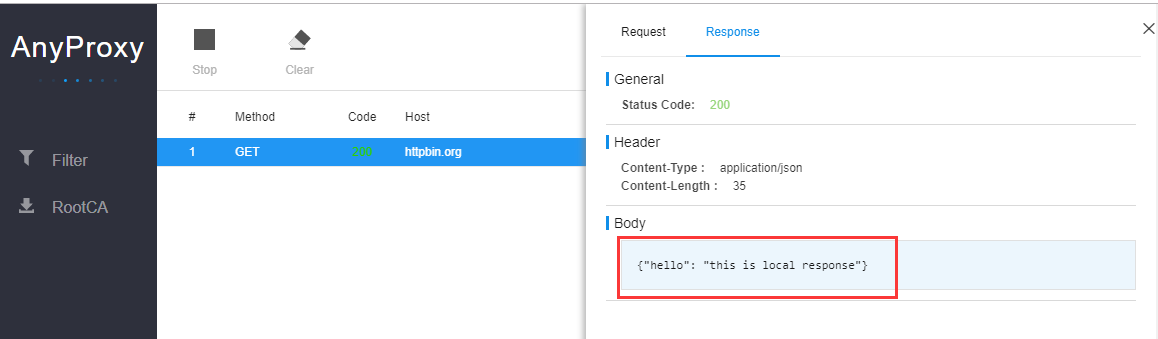
使用本地数据,拦截发送到 http://httpbin.org 的请求,使用本地数据代替服务端返回,sample_use_local_response.js规则
/*

  sample:

    intercept all requests toward httpbin.org, use a local response

  test:

    curl http://httpbin.org/user-agent --proxy http://127.0.0.1:8001

*/

module.exports = {

  *beforeSendRequest(requestDetail) {

    const localResponse = {

      statusCode: 200,

      header: { 'Content-Type': 'application/json' },

      body: '{"hello": "this is local response"}'

    };

    if (requestDetail.url.indexOf('http://httpbin.org') === 0) {

      return {

        response: localResponse

      };

    }

  },

};
加载rule规则的js文件
anyproxy -i --rule sample_use_local_response.js
使用curl测试http://httpbin.org
C:\Users\dell>curl http://httpbin.org/user-agent --proxy http://127.0.0.1:8001
{"hello": "this is local response"}
模拟返回状态码
模拟返回404状态码,sample_modify_response_statuscode.js规则如下
/*

  sample:

    modify all status code of http://httpbin.org/ to 404

  test:

    curl -I 'http://httpbin.org/user-agent' --proxy http://127.0.0.1:8001

  expected response:

    HTTP/1.1 404 Not Found

*/

module.exports = {

  *beforeSendResponse(requestDetail, responseDetail) {

    if (requestDetail.url.indexOf('http://httpbin.org') === 0) {

      const newResponse = responseDetail.response;

      newResponse.statusCode = 404;

      return {

        response: newResponse

      };

    }

  }

};
模拟返回头部
修改返回的头部,sample_modify_response_header.js规则如下
/*

  sample:

    modify response header of http://httpbin.org/user-agent

  test:

    curl -I 'http://httpbin.org/user-agent' --proxy http://127.0.0.1:8001

  expected response:

    X-Proxy-By: AnyProxy

*/

module.exports = {

  *beforeSendResponse(requestDetail, responseDetail) {

    if (requestDetail.url.indexOf('http://httpbin.org/user-agent') === 0) {

      const newResponse = responseDetail.response;

      newResponse.header['X-Proxy-By'] = 'AnyProxy';

      return {

        response: newResponse

      };

    }

  }

};
修改返回body
修改返回的body里面部分内容,sample_modify_response_data.js规则如下
/*

  sample:

    modify response data of http://httpbin.org/user-agent

  test:

    curl 'http://httpbin.org/user-agent' --proxy http://127.0.0.1:8001

  expected response:

    { "user-agent": "curl/7.43.0" } -- AnyProxy Hacked! --

*/

module.exports = {

  *beforeSendResponse(requestDetail, responseDetail) {

    if (requestDetail.url === 'http://httpbin.org/user-agent') {

      const newResponse = responseDetail.response;

      newResponse.body += '-- AnyProxy Hacked! --';

      return new Promise((resolve, reject) => {

        setTimeout(() => { // delay the response for 5s

          resolve({ response: newResponse });

        }, 5000);

      });

    }

  },

};
更多学习资料参考https://github.com/alibaba/anyproxy/blob/master/docs/cn/src_doc.md
anyproxy学习3-修改返回内容(beforeSendResponse)的更多相关文章
- Fiddler 修改返回内容 OnBeforeResponse 无效 没用
Fiddler自定义脚本可以实现很强大的内容替换,包括很有意义的——修改返回内容. 具体的方法可以参考官网:http://docs.telerik.com/fiddler/KnowledgeBase/ ...
- nginx日志模块与HTTP过滤模块与sub模块修改返回内容
日志格式使用指令 指令介绍 Syntax: log_format name [escape=default|json|none] string ...; Default: log_format com ...
- Charles抓包工具断点修改返回内容
在测试过程中,往往需要让服务器返回指定的内容,测试一些特殊情况.例如列表内容为空.数据异常的情况等.如果通过操作服务器配合构造相应的数据会比较麻烦,甚至不好构造数据.此时,可以使用Charles的断点 ...
- Visual Studio 2017中使用正则修改部分内容 如何使用ILAsm与ILDasm修改.Net exe(dll)文件 C#学习-图解教程(1):格式化数字字符串 小程序开发之图片转Base64(C#、.Net) jquery遍历table为每一个单元格取值及赋值 。net加密解密相关方法 .net关于坐标之间一些简单操作
Visual Studio 2017中使用正则修改部分内容 最近在项目中想实现一个小工具,需要根据类的属性<summary>的内容加上相应的[Description]特性,需要实现的效 ...
- Web 在线文件管理器学习笔记与总结(5)修改文件内容
① 读出要修改的文件的内容 ② 进行修改 ③ 将修改后的内容写进文件 index.php: <?php require 'dir.func.php'; require 'file.func.ph ...
- Charles系列三:Charles打断点(包含修改请求,修改返回的内容),模拟慢速网络(弱网测试),域名映射,过滤请求,接口调试,打压测试
一:Charles断点的使用(包含修改请求,修改返回的数据) 设置断点来修改请求和返回的数据,在开发过程中可以模拟多种响应.步骤如下: 1.添加断点方法有两种: 方法1:找到Charles中菜单项Pr ...
- Ionic3学习笔记(四)修改返回按钮文字、颜色
本文为原创文章,转载请标明出处 目录 修改返回按钮文字 修改返回按钮颜色 1. 修改返回按钮文字 参考官网 Ionic API---Config 文档 可在 ./src/app/app.module. ...
- anyproxy学习2-rule模块实现接口mock功能
前言 AnyProxy不仅仅可以抓包,还可以拦截请求并修改服务端响应,实现接口mock功能. 面试时候经常会问到第三方支付如何测试这种,如果对接的第三方没提供测试环境,那么就需要搭建一个mock服务器 ...
- WPF Paragraph获取或修改文本内容
一.说明 Paragraph继承自Block,Block继承自TextElement,在TextElement中 // // 摘要: // 获取表示元素中内容末尾的 System.Windows.Do ...
随机推荐
- QT+OPENCV实现录屏功能
本文使用QT+opencv来实现对指定窗体画面录制,并保存为avi文件. (1)获取窗体界面 QScreen类有一个grabWindow函数,可以用来获取窗体的画面,这个函数使用很简单,就是传入窗体句 ...
- 《ucore lab1 exercise5》实验报告
资源 ucore在线实验指导书 我的ucore实验代码 题目:实现函数调用堆栈跟踪函数 我们需要在lab1中完成kdebug.c中函数print_stackframe的实现,可以通过函数print_s ...
- [转帖]Hyperledger Fabric 学习一:简介
Hyperledger Fabric 学习一:简介 https://www.jianshu.com/p/f971858b70f3?utm_campaign=maleskine&utm_cont ...
- ZLC众利币系统APP开发
开发版本:APP 开发语言:php,java,.net 下面我们来看一下tp5 分页具体怎么用: 一, 分页简洁版 简洁分页仅仅只有上下页的分页输出,可以使用下面的简洁分页代码: // 查询状态为1的 ...
- Python之路【第二十九篇】:django ORM模型层
ORM简介 MVC或者MVC框架中包括一个重要的部分,就是ORM,它实现了数据模型与数据库的解耦,即数据模型的设计不需要依赖于特定的数据库,通过简单的配置就可以轻松更换数据库,这极大的减轻了开发人员的 ...
- 超全、超详的Spring Boot配置讲解笔记
springboot默认加载配置 SpringBoot使用两种全局的配置文件,全局配置文件可以对一些默认配置进行修改. application.properties application.yml 这 ...
- zookeeper+kafka集群的安装
时效性要求很高的数据,库存,采取的是数据库+缓存双写的技术方案,也解决了双写的一致性的问题 缓存数据生产服务,监听一个消息队列,然后数据源服务(商品信息管理服务)发生了数据变更之后,就将数据变更的消息 ...
- Java操作JSON数据(2)--Gson操作JSON数据
Gson是Google公司发布的一个开发源码的Java库,可用于将Java对象转换为JSON字符串,也可用于将JSON字符串转换为对应的Java对象.本介绍下Gson的基本使用方法,包括序列化和反序列 ...
- 2019 携程旅行网java面试笔试题 (含面试题解析)
本人5年开发经验.18年年底开始跑路找工作,在互联网寒冬下成功拿到阿里巴巴.今日头条.蚂蚁金服等公司offer,岗位是Java后端开发,因为发展原因最终选择去了携程,入职一年时间了,也成为了面试官 ...
- Spring中BeanFactory与FactoryBean的区别
在Spring中有BeanFactory和FactoryBean这2个接口,从名字来看很相似,比较容易搞混. 一.BeanFactory BeanFactory是一个接口,它是Spring中工厂的顶层 ...