
elasticsearch 7版本 基础操作
elasticsearch 7版本 基础操作
首先我们浏览器http://localhost:5601/进入 kibana里的Console中输入
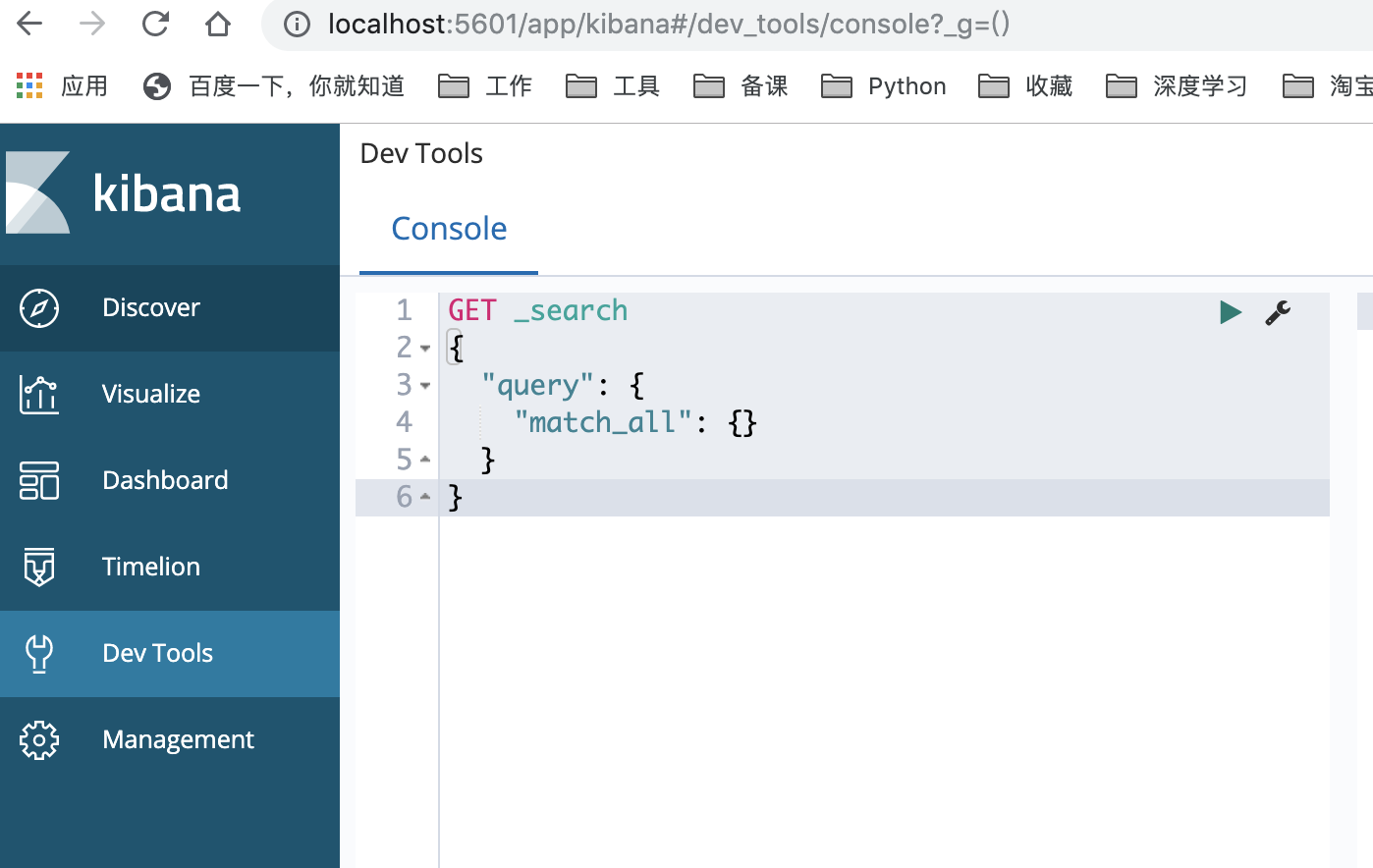
首先让我们在 Console 中输入:
PUT t1/type1/1

{

  "name":"春生",

  "age":16

}
返回结果 (是以REST ful 风格返回的 ):
{

  "_index" : "t1",

  "_type" : "type1",

  "_id" : "1",

  "_version" : 1,

  "result" : "created",

  "_shards" : {

    "total" : 2,

    "successful" : 1,

    "failed" : 0

  },

  "_seq_no" : 0,

  "_primary_term" : 1

}
我们来简要的说一下命令栏和返回结果栏都是表示什么意思:
| 命令栏 | 描述 | 结果栏 | 描述 |
|---|---|---|---|
| PUT | 创建命令 | _index | 索引 |
| t1 | 索引 | _type | 类型 |
| type1 | 类型 | _id | id |
| 1 | id | _version | 版本 |
| name | 属性 | result | 操作类型 |
| age | 属性 | _shards | 分片信息 |
| method | url地址 | 描述 |
|---|---|---|
| PUT | localhost:9200/索引名称/类型名称/文档id | 创建文档(指定文档id) |
| POST | localhost:9200/索引名称/类型名称 | 创建文档(随机文档id) |
| POST | localhost:9200/索引名称/类型名称/文档id/_update | 修改文档 |
| DELETE | localhost:9200/索引名称/类型名称/文档id | 删除文档 |
| GET | localhost:9200/索引名称/类型名称/文档id | 查询文档通过文档id |
| POST | localhost:9200/索引名称/类型名称/_search | 查询所有数据 |
字段类型指定:
PUT t1/type1/1

{

  "name":"春生",

  "age":16

}
那么 name这个字段 用不用指定类型呢。毕竟我们关系型数据库 是需要指定类型的啊
- 字符串类型
text 、 keyword - 数值类型
long, integer, short, byte, double, float, half_float, scaled_float - 日期类型
date - te布尔值类型
boolean - 二进制类型
binary - 范围类型
integer_range , float_range, long_range, double_range, date_range
指定字段类型:
PUT db

{

  "mappings": {

  "properties": {

    "name":{

      "type":"text"

    },

    "age":{

      "type": "long"

    },

    "birthday":{

      "type":"date"

    }

  }

  }

}
查看一下索引字段:
GET db/
返回结果:
{

  "db" : {

    "aliases" : { },

    "mappings" : {

      "properties" : {

        "age" : {

          "type" : "long"

        },

        "birthday" : {

          "type" : "date"

        },

        "name" : {

          "type" : "text"

        }

      }

    },

    "settings" : {

      "index" : {

        "creation_date" : "1572247546224",

        "number_of_shards" : "1",

        "number_of_replicas" : "1",

        "uuid" : "g-QMzIELQL2bOU1d4pDaKA",

        "version" : {

          "created" : "7030299"

        },

        "provided_name" : "db"

      }

    }

  }

}
我们看上列中 字段类型是我自己定义的 那么 我们不定义类型 会是什么情况呢。
默认字段类型
PUT test3/_doc/1

{

  "name":"春生",

  "age":13,

  "ddd":"1997-3-3"

}
查看一下test3索引:
GET test3
返回结果:
{

  "test3" : {

    "aliases" : { },

    "mappings" : {

      "properties" : {

        "age" : {

          "type" : "long"

        },

        "ddd" : {

          "type" : "text",

          "fields" : {

            "keyword" : {

              "type" : "keyword",

              "ignore_above" : 256

            }

          }

        },

        "name" : {

          "type" : "text",

          "fields" : {

            "keyword" : {

              "type" : "keyword",

              "ignore_above" : 256

            }

          }

        }

      }

    },

    "settings" : {

      "index" : {

        "creation_date" : "1572248744742",

        "number_of_shards" : "1",

        "number_of_replicas" : "1",

        "uuid" : "ebwFzh6-R32SOhZSj1S0pQ",

        "version" : {

          "created" : "7030299"

        },

        "provided_name" : "test3"

      }

    }

  }

}
我们看上列没有给字段指定类型 那么es就会默认给我配置 如字段类型 分片 以及id 就会默认给我们配置 。
对比关系型数据库 :
PUT t1/type1/1 : 索引t1 相当于关系型数据库的 库,类型type1就相当于表 ,1 代表数据中的主键id
补充(注意):
这里需要补充的是 ,在elastisearch5版本前,一个索引下可以创建多个类型,但是在elastisearch5后,一个索引只能对应一个类型,而id相当于关系型数据库的主键id若果不指定就会默认生成一个20位的uuid,属性相当关系型数据库的column(列)。
而结果中的 result 则是操作类型,现在是 created ,表示第一次创建。如果我们再次点击执行该命令,那么result 则会是 updated 。我们细心则会发现 _version 开始是1,现在你每点击一次就会增加一次。表示第几次更改。
我们在来学一条命令(elasticsearch 中的索引的情况):
GET _cat/indices?v
返回结果:

查看我们所有索引的状态健康情况 分片,数据储存大小等等。
那么怎么删除一条索引呢(库)呢?
DELETE /t1
返回结果:
{

  "acknowledged" : true

}

# 表示删除成功了
基础增删改查
创建数据PUT
第一条数据:
PUT test/chunsheng/1

{

  "name":"春生",

  "age":18,

  "from":"gu",

  "desc":"皮肤黑,武器长,性格直",

  "tags":["黑","长","直"]

}

# 注意 逗号 一定是英文的 ,
第二条数据:
PUT test/chunsheng/2

{

  "name":"大娘子",

  "age":18,

  "from":"sheng",

  "desc":"肤白貌美,就是腿长",

  "tags":["白","富","美"]

}
第三条数据:
PUT test/chunsheng/3

{

  "name":"龙套偏房",

  "age":22,

  "from":"gu",

  "desc":"mmp,没看怎么看,不知道怎么形容",

  "tags":["造数据", "真","难"]

}
注意⚠️:当执行 命令时,如果数据不存在,则新增该条数据,如果数据存在则修改该条数据。
咱们通过 GET 命令查询一下:
GET test/chunsheng/1
返回结果:
{

  "_index" : "test",

  "_type" : "chunsheng",

  "_id" : "1",

  "_version" : 1,

  "_seq_no" : 0,

  "_primary_term" : 1,

  "found" : true,

  "_source" : {

    "name" : "春生",

    "age" : 18,

    "from" : "gu",

    "desc" : "皮肤黑,武器长,性格直",

    "tags" : [

      "黑",

      "长",

      "直"

    ]

  }

}
如果你想更新数据 可以覆盖这条数据:
PUT test/chunsheng/1

{

  "name":"春生",

  "age":18,

  "from":"gu",

  "desc":"皮肤黄,武器长,性格直",

  "tags":["黄","长","直"]

}
返回结果:
{

  "_index" : "test",

  "_type" : "chunsheng",

  "_id" : "1",

  "_version" : 2,

  "result" : "updated",

  "_shards" : {

    "total" : 2,

    "successful" : 1,

    "failed" : 0

  },

  "_seq_no" : 3,

  "_primary_term" : 1

}
查看结果:
{

  "_index" : "test",

  "_type" : "chunsheng",

  "_id" : "1",

  "_version" : 2,

  "_seq_no" : 3,

  "_primary_term" : 1,

  "found" : true,

  "_source" : {

    "name" : "春生",

    "age" : 18,

    "from" : "gu",

    "desc" : "皮肤黄,武器长,性格直",

    "tags" : [

      "黄",

      "长",

      "直"

    ]

  }

}
已经修改了 那么 PUT 可以更新数据但是。麻烦的是 原数据你还要重写一遍要 这不符合我们规矩。
更新数据POST:
POST test/chunsheng/1/_update # 加了个_update

{

  "doc": {

    "desc":"皮肤黄,富二代,就有钱",

    "tags":["黄","富","钱"]

  }

}
返回结果:
{

  "_index" : "test",

  "_type" : "chunsheng",

  "_id" : "1",

  "_version" : 3,

  "_seq_no" : 4,

  "_primary_term" : 1,

  "found" : true,

  "_source" : {

    "name" : "春生",

    "age" : 18,

    "from" : "gu",

    "desc" : "皮肤黄,富二代,就有钱",

    "tags" : [

      "黄",

      "富",

      "钱"

    ]

  }

}
上例中,我们使用 POST 命令,在 id 后面跟 _update ,要修改的内容放到 doc 文档(属性)中即可。
查询GET
简单的查询,我们上面已经不知不觉的使用熟悉了:
GEt test/chunsheng/1
条件查询 _search?q=
GET test/chunsheng/_search?q=from:gu
通过 _serarch?q = from:gu 查询条件是from属性是gu有那些数据。
别忘 了 _search 和 from 属性中间的分隔符 ? 。
返回结果:
{

  "took" : 19,

  "timed_out" : false,

  "_shards" : {

    "total" : 1,

    "successful" : 1,

    "skipped" : 0,

    "failed" : 0

  },

  "hits" : {

    "total" : {

      "value" : 2,               # 一共两条数据

      "relation" : "eq"

    },

    "max_score" : 0.35667494,

    "hits" : [

      {

        "_index" : "test",

        "_type" : "chunsheng",

        "_id" : "3",

        "_score" : 0.35667494,

        "_source" : {

          "name" : "龙套偏房",

          "age" : 22,

          "from" : "gu",

          "desc" : "mmp,没看怎么看,不知道怎么形容",

          "tags" : [

            "造数据",

            "真",

            "难"

          ]

        }

      },

      {

        "_index" : "test",

        "_type" : "chunsheng",

        "_id" : "1",

        "_score" : 0.35667494,

        "_source" : {

          "name" : "春生",

          "age" : 18,

          "from" : "gu",

          "desc" : "皮肤黄,富二代,就有钱",

          "tags" : [

            "黄",

            "富",

            "钱"

          ]

        }

      }

    ]

  }

}
我们看一下结果 返回并不是 数据本身,是给我们了一个 hits ,还有 _score得分,就是根据算法算出和查询条件匹配度高得分就搞。后面我们单独机会讲这个算法。
构建查询
GET test/chunsheng/_search

{

  "query": {

    "match": {

      "from": "gu"

    }

  }

}
上例,查询条件是一步步构建出来的,将查询条件添加到 match 中即可。
返回结果还是一样的:
{

  "took" : 19,

  "timed_out" : false,

  "_shards" : {

    "total" : 1,

    "successful" : 1,

    "skipped" : 0,

    "failed" : 0

  },

  "hits" : {

    "total" : {

      "value" : 2,               # 一共两条数据

      "relation" : "eq"

    },

    "max_score" : 0.35667494,

    "hits" : [

      {

        "_index" : "test",

        "_type" : "chunsheng",

        "_id" : "3",

        "_score" : 0.35667494,

        "_source" : {

          "name" : "龙套偏房",

          "age" : 22,

          "from" : "gu",

          "desc" : "mmp,没看怎么看,不知道怎么形容",

          "tags" : [

            "造数据",

            "真",

            "难"

          ]

        }

      },

      {

        "_index" : "test",

        "_type" : "chunsheng",

        "_id" : "1",

        "_score" : 0.35667494,

        "_source" : {

          "name" : "春生",

          "age" : 18,

          "from" : "gu",

          "desc" : "皮肤黄,富二代,就有钱",

          "tags" : [

            "黄",

            "富",

            "钱"

          ]

        }

      }

    ]

  }

}
除此之外,我们还可以查询跟顾老二相关的所有数据,那就是查询全部:
GET test/chunsheng/_search #这是一个 但是没有条件
GET test/chunsheng/_search #查询所有的数据

{

  "query": {

    "match_all": {}

  }

}
match_all的值为空,表示没有查询条件,就像select * from table_name一样。
返回结果:
#! Deprecation: [types removal] Specifying types in search requests is deprecated.

{

  "took" : 1,

  "timed_out" : false,

  "_shards" : {

    "total" : 1,

    "successful" : 1,

    "skipped" : 0,

    "failed" : 0

  },

  "hits" : {

    "total" : {

      "value" : 3,

      "relation" : "eq"

    },

    "max_score" : 1.0,

    "hits" : [

      {

        "_index" : "test",

        "_type" : "chunsheng",

        "_id" : "2",

        "_score" : 1.0,

        "_source" : {

          "name" : "大娘子",

          "age" : 18,

          "from" : "sheng",

          "desc" : "肤白貌美,就是腿长",

          "tags" : [

            "白",

            "富",

            "美"

          ]

        }

      },

      {

        "_index" : "test",

        "_type" : "chunsheng",

        "_id" : "3",

        "_score" : 1.0,

        "_source" : {

          "name" : "龙套偏房",

          "age" : 22,

          "from" : "gu",

          "desc" : "mmp,没看怎么看,不知道怎么形容",

          "tags" : [

            "造数据",

            "真",

            "难"

          ]

        }

      },

      {

        "_index" : "test",

        "_type" : "chunsheng",

        "_id" : "1",

        "_score" : 1.0,

        "_source" : {

          "name" : "春生",

          "age" : 18,

          "from" : "gu",

          "desc" : "皮肤黄,富二代,就有钱",

          "tags" : [

            "黄",

            "富",

            "钱"

          ]

        }

      }

    ]

  }

}
如果有个需求,我们仅是需要查看 name 和 desc 两个属性,其他的不要怎么办?
GET test/chunsheng/_search

{

  "query": {

    "match_all": {}

  },

  "_source": ["name","age"]

}
如上例所示,在查询中,通过 _source 来控制仅返回 name 和 age 属性。
返回结果:
#! Deprecation: [types removal] Specifying types in search requests is deprecated.

{

  "took" : 2,

  "timed_out" : false,

  "_shards" : {

    "total" : 1,

    "successful" : 1,

    "skipped" : 0,

    "failed" : 0

  },

  "hits" : {

    "total" : {

      "value" : 3,

      "relation" : "eq"

    },

    "max_score" : 1.0,

    "hits" : [

      {

        "_index" : "test",

        "_type" : "chunsheng",

        "_id" : "2",

        "_score" : 1.0,

        "_source" : {

          "name" : "大娘子",

          "age" : 18

        }

      },

      {

        "_index" : "test",

        "_type" : "chunsheng",

        "_id" : "3",

        "_score" : 1.0,

        "_source" : {

          "name" : "龙套偏房",

          "age" : 22

        }

      },

      {

        "_index" : "test",

        "_type" : "chunsheng",

        "_id" : "1",

        "_score" : 1.0,

        "_source" : {

          "name" : "春生",

          "age" : 18

        }

      }

    ]

  }

}
Python推荐
一般的,我们推荐使用构建查询,以后在与Python交互时的查询等也是使用构建查询方式处理查询条件,因为该方 式可以构建更加复杂的查询条件,也更加一目了然
排序查询
我们说到排序 有人就会想到:正序 或 倒序 那么我们先来倒序:
倒序
GET test/chunsheng/_search

{

  "query": {

    "match_all": {}

  },

  "sort": [

    {

      "age": {

        "order": "desc"

      }

    }

  ]

}
上例,在条件查询的基础上,我们又通过 sort 来做排序,排序对象是 age , order 是 desc 降序。
返回结果:
#! Deprecation: [types removal] Specifying types in search requests is deprecated.

{

  "took" : 21,

  "timed_out" : false,

  "_shards" : {

    "total" : 1,

    "successful" : 1,

    "skipped" : 0,

    "failed" : 0

  },

  "hits" : {

    "total" : {

      "value" : 3,

      "relation" : "eq"

    },

    "max_score" : null,

    "hits" : [

      {

        "_index" : "test",

        "_type" : "chunsheng",

        "_id" : "3",

        "_score" : null,

        "_source" : {

          "name" : "龙套偏房",

          "age" : 22,

          "from" : "gu",

          "desc" : "mmp,没看怎么看,不知道怎么形容",

          "tags" : [

            "造数据",

            "真",

            "难"

          ]

        },

        "sort" : [

          22

        ]

      },

      {

        "_index" : "test",

        "_type" : "chunsheng",

        "_id" : "2",

        "_score" : null,

        "_source" : {

          "name" : "大娘子",

          "age" : 18,

          "from" : "sheng",

          "desc" : "肤白貌美,就是腿长",

          "tags" : [

            "白",

            "富",

            "美"

          ]

        },

        "sort" : [

          18

        ]

      },

      {

        "_index" : "test",

        "_type" : "chunsheng",

        "_id" : "1",

        "_score" : null,

        "_source" : {

          "name" : "春生",

          "age" : 18,

          "from" : "gu",

          "desc" : "皮肤黄,富二代,就有钱",

          "tags" : [

            "黄",

            "富",

            "钱"

          ]

        },

        "sort" : [

          18

        ]

      }

    ]

  }

}
正序
就是 desc 换成了 asc
GET test/chunsheng/_search

{

  "query": {

    "match_all": {}

  },

  "sort": [

    {

      "age": {

        "order": "asc"

      }

    }

  ]

}
返回结果:
#! Deprecation: [types removal] Specifying types in search requests is deprecated.

{

  "took" : 1,

  "timed_out" : false,

  "_shards" : {

    "total" : 1,

    "successful" : 1,

    "skipped" : 0,

    "failed" : 0

  },

  "hits" : {

    "total" : {

      "value" : 3,

      "relation" : "eq"

    },

    "max_score" : null,

    "hits" : [

      {

        "_index" : "test",

        "_type" : "chunsheng",

        "_id" : "2",

        "_score" : null,

        "_source" : {

          "name" : "大娘子",

          "age" : 18,

          "from" : "sheng",

          "desc" : "肤白貌美,就是腿长",

          "tags" : [

            "白",

            "富",

            "美"

          ]

        },

        "sort" : [

          18

        ]

      },

      {

        "_index" : "test",

        "_type" : "chunsheng",

        "_id" : "1",

        "_score" : null,

        "_source" : {

          "name" : "春生",

          "age" : 18,

          "from" : "gu",

          "desc" : "皮肤黄,富二代,就有钱",

          "tags" : [

            "黄",

            "富",

            "钱"

          ]

        },

        "sort" : [

          18

        ]

      },

      {

        "_index" : "test",

        "_type" : "chunsheng",

        "_id" : "3",

        "_score" : null,

        "_source" : {

          "name" : "龙套偏房",

          "age" : 22,

          "from" : "gu",

          "desc" : "mmp,没看怎么看,不知道怎么形容",

          "tags" : [

            "造数据",

            "真",

            "难"

          ]

        },

        "sort" : [

          22

        ]

      }

    ]

  }

}
注意:在排序的过程中,只能使用可排序的属性进行排序。那么可以排序的属性有哪些呢?
- 数字
- 日期
- ID
其他都不行
分页查询
GET test/chunsheng/_search

{

  "query": {

    "match_all": {}

  },

  "sort": [

    {

      "age": {

        "order": "asc"

      }

    }

  ],

  "from": 0, # 从第n条开始

  "size": 1  # 返回n条数据

}
返回结果:
#! Deprecation: [types removal] Specifying types in search requests is deprecated.

{

  "took" : 1,

  "timed_out" : false,

  "_shards" : {

    "total" : 1,

    "successful" : 1,

    "skipped" : 0,

    "failed" : 0

  },

  "hits" : {

    "total" : {

      "value" : 3,

      "relation" : "eq"

    },

    "max_score" : null,

    "hits" : [

      {

        "_index" : "test",

        "_type" : "chunsheng",

        "_id" : "2",

        "_score" : null,

        "_source" : {

          "name" : "大娘子",

          "age" : 18,

          "from" : "sheng",

          "desc" : "肤白貌美,就是腿长",

          "tags" : [

            "白",

            "富",

            "美"

          ]

        },

        "sort" : [

          18

        ]

      }

    ]

  }

}
就返回了一条数据 是从第0条开始的返回一条数据 。
学到这里,我们也可以看到,我们的查询条件越来越多,开始仅是简单查询,慢慢增加条件查询,增加排序,对返回 结果进行限制。所以,我们可以说:对elasticsearch于 来说,所有的查询条件都是可插拔的,彼此之间用 分 割。比如说,我们在查询中,仅对返回结果进行限制:
GET test/chunsheng/_search

{

  "query": {

    "match_all": {}

  },

  "from": 0,

  "size": 2

}
返回结果:
#! Deprecation: [types removal] Specifying types in search requests is deprecated.

{

  "took" : 0,

  "timed_out" : false,

  "_shards" : {

    "total" : 1,

    "successful" : 1,

    "skipped" : 0,

    "failed" : 0

  },

  "hits" : {

    "total" : {

      "value" : 3,

      "relation" : "eq"

    },

    "max_score" : 1.0,

    "hits" : [

      {

        "_index" : "test",

        "_type" : "chunsheng",

        "_id" : "2",

        "_score" : 1.0,

        "_source" : {

          "name" : "大娘子",

          "age" : 18,

          "from" : "sheng",

          "desc" : "肤白貌美,就是腿长",

          "tags" : [

            "白",

            "富",

            "美"

          ]

        }

      },

      {

        "_index" : "test",

        "_type" : "chunsheng",

        "_id" : "3",

        "_score" : 1.0,

        "_source" : {

          "name" : "龙套偏房",

          "age" : 22,

          "from" : "gu",

          "desc" : "mmp,没看怎么看,不知道怎么形容",

          "tags" : [

            "造数据",

            "真",

            "难"

          ]

        }

      }

    ]

  }

}
布尔查询
must (and)
我要查询所有from属性为“gu“的数据:must
GET test/chunsheng/_search

{

  "query": {

    "bool": {

      "must": [

        {

          "match": {

            "from": "gu"

          }

        },

        {

          "match": {

            "age": 18

          }

        }

      ]

    }

  }

}
我们通过在 bool 属性内使用 must 来作为查询条件,那么条件是什么呢 age :18 ,from:gu 结果就有一条数据。
是不是 有点像 and 的感觉
返回结果:
#! Deprecation: [types removal] Specifying types in search requests is deprecated.

{

  "took" : 1,

  "timed_out" : false,

  "_shards" : {

    "total" : 1,

    "successful" : 1,

    "skipped" : 0,

    "failed" : 0

  },

  "hits" : {

    "total" : {

      "value" : 1,

      "relation" : "eq"

    },

    "max_score" : 1.3566749,

    "hits" : [

      {

        "_index" : "test",

        "_type" : "chunsheng",

        "_id" : "1",

        "_score" : 1.3566749,

        "_source" : {

          "name" : "春生",

          "age" : 18,

          "from" : "gu",

          "desc" : "皮肤黄,富二代,就有钱",

          "tags" : [

            "黄",

            "富",

            "钱"

          ]

        }

      }

    ]

  }

}
should (or)
那么我要查询from为gu,和 age 为18的 的条件
GET test/chunsheng/_search

{

  "query": {

    "bool": {

      "should": [

        {

          "match": {

            "from": "gu"

          }

        },

        {

          "match": {

            "age": 18

          }

        }

      ]

    }

  }

}
返回结果:
#! Deprecation: [types removal] Specifying types in search requests is deprecated.

{

  "took" : 2,

  "timed_out" : false,

  "_shards" : {

    "total" : 1,

    "successful" : 1,

    "skipped" : 0,

    "failed" : 0

  },

  "hits" : {

    "total" : {

      "value" : 3,

      "relation" : "eq"

    },

    "max_score" : 1.3566749,

    "hits" : [

      {

        "_index" : "test",

        "_type" : "chunsheng",

        "_id" : "1",

        "_score" : 1.3566749,

        "_source" : {

          "name" : "春生",

          "age" : 18,

          "from" : "gu",

          "desc" : "皮肤黄,富二代,就有钱",

          "tags" : [

            "黄",

            "富",

            "钱"

          ]

        }

      },

      {

        "_index" : "test",

        "_type" : "chunsheng",

        "_id" : "2",

        "_score" : 1.0,

        "_source" : {

          "name" : "大娘子",

          "age" : 18,

          "from" : "sheng",

          "desc" : "肤白貌美,就是腿长",

          "tags" : [

            "白",

            "富",

            "美"

          ]

        }

      },

      {

        "_index" : "test",

        "_type" : "chunsheng",

        "_id" : "3",

        "_score" : 0.35667494,

        "_source" : {

          "name" : "龙套偏房",

          "age" : 22,

          "from" : "gu",

          "desc" : "mmp,没看怎么看,不知道怎么形容",

          "tags" : [

            "造数据",

            "真",

            "难"

          ]

        }

      }

    ]

  }

}
我们的返回结果 是不是 出现了一个 age :22的 说明 我们 查出了。符合age 是18 和 from 是gu的 都行了
是不是有点像 **or ** 呢
must_not (not)
我想要查询 年龄不是 18 的 数据
GET test/chunsheng/_search

{

  "query": {

    "bool": {

      "must_not": [

        {

          "match": {

            "age": 18

          }

        }

      ]

    }

  }

}
返回结果:
#! Deprecation: [types removal] Specifying types in search requests is deprecated.

{

  "took" : 8,

  "timed_out" : false,

  "_shards" : {

    "total" : 1,

    "successful" : 1,

    "skipped" : 0,

    "failed" : 0

  },

  "hits" : {

    "total" : {

      "value" : 1,

      "relation" : "eq"

    },

    "max_score" : 0.0,

    "hits" : [

      {

        "_index" : "test",

        "_type" : "chunsheng",

        "_id" : "3",

        "_score" : 0.0,

        "_source" : {

          "name" : "龙套偏房",

          "age" : 22,

          "from" : "gu",

          "desc" : "mmp,没看怎么看,不知道怎么形容",

          "tags" : [

            "造数据",

            "真",

            "难"

          ]

        }

      }

    ]

  }

}
Fitter
我要查询 from为gu的,age大于18的数据
GET test/chunsheng/_search

{

  "query":{

    "bool": {

      "must": [

        {

          "match": {

            "from": "gu"

          }

        }

      ],

      "filter": {

        "range": {

          "age": {

            "gt": 18

          }

        }

      }

    }

  }

}
这里就用到了 filter 条件过滤查询,过滤条件的范围用 range 表示, gt 表示大于,大于多少呢?是18。 结果如下:
gt 表示大于
gte 表示大于等于
lt 表示小于
lte 表示小于等于
返回结果:
#! Deprecation: [types removal] Specifying types in search requests is deprecated.

{

  "took" : 0,

  "timed_out" : false,

  "_shards" : {

    "total" : 1,

    "successful" : 1,

    "skipped" : 0,

    "failed" : 0

  },

  "hits" : {

    "total" : {

      "value" : 1,

      "relation" : "eq"

    },

    "max_score" : 0.47000363,

    "hits" : [

      {

        "_index" : "test",

        "_type" : "chunsheng",

        "_id" : "3",

        "_score" : 0.47000363,

        "_source" : {

          "name" : "龙套偏房",

          "age" : 22,

          "from" : "gu",

          "desc" : "mmp,没看怎么看,不知道怎么形容",

          "tags" : [

            "造数据",

            "真",

            "难"

          ]

        }

      }

    ]

  }

}
要查询 from 是 gu , age 在 25~30 之间的怎么查?
GET test/chunsheng/_search

{

  "query":{

    "bool": {

      "must": [

        {

          "match": {

            "from": "gu"

          }

        }

      ],

      "filter": {

        "range": {

          "age": {

            "gte": 25,

            "lte": 30

          }

        }

      }

    }

  }

}
*如果在filter过滤条件中建议用must代替
短语检索
我要查询 tags为黑的数据
GET test/chunsheng/_search

{

  "query":{

    "match": {

      "tags": "黑"

    }

  }

}
返回结果:
#! Deprecation: [types removal] Specifying types in search requests is deprecated.

{

  "took" : 0,

  "timed_out" : false,

  "_shards" : {

    "total" : 1,

    "successful" : 1,

    "skipped" : 0,

    "failed" : 0

  },

  "hits" : {

    "total" : {

      "value" : 1,

      "relation" : "eq"

    },

    "max_score" : 1.0596458,

    "hits" : [

      {

        "_index" : "test",

        "_type" : "chunsheng",

        "_id" : "1",

        "_score" : 1.0596458,

        "_source" : {

          "name" : "春生",

          "age" : 18,

          "from" : "gu",

          "desc" : "皮肤黑,武器长,性格直",

          "tags" : [

            "黑",

            "长",

            "直"

          ]

        }

      }

    ]

  }

}
既然按照标签检索,那么,能不能写多个标签呢?又该怎么写呢?
GET test/chunsheng/_search

{

  "query":{

    "match": {

      "tags": "黑 白"

    }

  }

}
多个标签要空格分开
返回结果:
#! Deprecation: [types removal] Specifying types in search requests is deprecated.

{

  "took" : 0,

  "timed_out" : false,

  "_shards" : {

    "total" : 1,

    "successful" : 1,

    "skipped" : 0,

    "failed" : 0

  },

  "hits" : {

    "total" : {

      "value" : 2,

      "relation" : "eq"

    },

    "max_score" : 1.0596458,

    "hits" : [

      {

        "_index" : "test",

        "_type" : "chunsheng",

        "_id" : "1",

        "_score" : 1.0596458,

        "_source" : {

          "name" : "春生",

          "age" : 18,

          "from" : "gu",

          "desc" : "皮肤黑,武器长,性格直",

          "tags" : [

            "黑",

            "长",

            "直"

          ]

        }

      },

      {

        "_index" : "test",

        "_type" : "chunsheng",

        "_id" : "2",

        "_score" : 1.0596458,

        "_source" : {

          "name" : "大娘子",

          "age" : 18,

          "from" : "sheng",

          "desc" : "肤白貌美,就是腿长",

          "tags" : [

            "白",

            "富",

            "美"

          ]

        }

      }

    ]

  }

}
上列中我发现 只要含有这个标签就给我返回这个数据了。
那现在 我要查询。如 “腿长” 有就直接返回 没有不要了 不需要包含
match_phrase
GET test/chunsheng/_search

{

  "query":{

    "match_phrase": {

      "desc": "腿 长"

    }

  }

}
返回结果:
#! Deprecation: [types removal] Specifying types in search requests is deprecated.

{

  "took" : 0,

  "timed_out" : false,

  "_shards" : {

    "total" : 1,

    "successful" : 1,

    "skipped" : 0,

    "failed" : 0

  },

  "hits" : {

    "total" : {

      "value" : 1,

      "relation" : "eq"

    },

    "max_score" : 1.580115,

    "hits" : [

      {

        "_index" : "test",

        "_type" : "chunsheng",

        "_id" : "2",

        "_score" : 1.580115,

        "_source" : {

          "name" : "大娘子",

          "age" : 18,

          "from" : "sheng",

          "desc" : "肤白貌美,就是腿长",

          "tags" : [

            "白",

            "富",

            "美"

          ]

        }

      }

    ]

  }

}
term查询精确查询
term查询是直接通过倒排索引指定的 词条,也就是精确查找。
term和match的区别:
- match是经过分析(analyer)的,也就是说,文档是先被分析器处理了,根据不同的分析器,分析出的结果也会不同,在会根据分词 结果进行匹配。
- term是不经过分词的,直接去倒排索引查找精确的值。
term与match的区别
注意 ⚠️:我们现在 用的es7版本 所以我们用 mappings properties 去给多个字段(fields)指定类型的时候 不能给我们的 索引制定类型:
PUT db_test

{

  "mappings": {

    "properties": {

      "name":{

        "type":"text"

      },

      "hoy":{

        "type": "keyword"

      }

    }

  }

}

# 插入数据

PUT db_test/_doc/1

{

  "name":"我是 name",

  "hoy":"我是 hoy"

}
上述中db_test索引中,字段name在被查询时会被分析器进行分析后匹配查询。而属于keyword类型不会被分析器处理。
我们来验证一下:
GET _analyze

{

  "analyzer": "keyword",

  "text": "我是 name"

}
结果:
{

  "tokens" : [

    {

      "token" : "我是 name",

      "start_offset" : 0,

      "end_offset" : 7,

      "type" : "word",

      "position" : 0

    }

  ]

}
是不是没有被分析啊。就是简单的一个字符串啊。
GET _analyze

{

  "analyzer": "standard",

  "text": "我是 name"

}
结果:
{

  "tokens" : [

    {

      "token" : "我",

      "start_offset" : 0,

      "end_offset" : 1,

      "type" : "<IDEOGRAPHIC>",

      "position" : 0

    },

    {

      "token" : "是",

      "start_offset" : 1,

      "end_offset" : 2,

      "type" : "<IDEOGRAPHIC>",

      "position" : 1

    },

    {

      "token" : "name",

      "start_offset" : 3,

      "end_offset" : 7,

      "type" : "<ALPHANUM>",

      "position" : 2

    }

  ]

}
那么我们看一下 们字符串是不是被分析了啊。
总结:
- keyword 字段类型不会被分析器分析
现在我们来查询一下:
GET db_test/_search # 是通过 被分析器分析 查询

{

  "query": {

    "term": {

      "name":"我"

    }

  }

}

GET db_test/_search  # keyword 不回被分析所以直接查询

{

  "query": {

    "match": {

      "hoy":"我是 hoy"

    }

  }

}
查找多个精确值(terms)
PUT db_test/_doc/2

{

  "t1": "20",

  "t2": "2019-4-16"

}

PUT db_test/_doc/3

{

"t1": "30",

  "t2": "2019-4-17"

}

# 查询  精确查找多个值

GET db_test/_search

{

  "query": {

    "bool": {

      "should": [

        {

          "term": {

            "t1": "20"

          }

        },

        {

          "term": {

            "t1": "30"

          }

        }

      ]

    }

  }

}
除了bool查询之外
GET db_test/_doc/_search

{

  "query": {

    "terms": {

      "t1": ["20", "30"]

    }

} }

GET db_test/_doc/_search

{

  "query": {

    "terms": {

      "t2": ["2019-4-16", "2019-4-17"]

    }

} }
官网:see also:Term Query | 查找多个精确值
高亮显示
GET test/chunsheng/_search

{

  "query":{

    "match": {

      "name": "春生"

    }

  },

  "highlight" :{

    "fields": {

      "name":{}

    }

  }

}
返回结果:
#! Deprecation: [types removal] Specifying types in search requests is deprecated.

{

  "took" : 41,

  "timed_out" : false,

  "_shards" : {

    "total" : 1,

    "successful" : 1,

    "skipped" : 0,

    "failed" : 0

  },

  "hits" : {

    "total" : {

      "value" : 1,

      "relation" : "eq"

    },

    "max_score" : 2.271394,

    "hits" : [

      {

        "_index" : "test",

        "_type" : "chunsheng",

        "_id" : "1",

        "_score" : 2.271394,

        "_source" : {

          "name" : "春生",

          "age" : 18,

          "from" : "gu",

          "desc" : "皮肤黑,武器长,性格直",

          "tags" : [

            "黑",

            "长",

            "直"

          ]

        },

        "highlight" : {

          "name" : [

            "<em>春</em><em>生</em>"

          ]

        }

      }

    ]

  }

}
我们可以看到 "<em>春</em><em>生</em>"已经帮我们加上了一个<em>标签
这是es帮我们加的标签。那我·也可以自己自定义样式
自定义高亮显示
GET test/chunsheng/_search

{

  "query":{

    "match": {

      "name": "春生"

    }

  },

  "highlight" :{

    "pre_tags": "<b class='key' style='color:red'>",

    "post_tags": "</b>",

    "fields": {

      "name":{}

    }

  }

}
返回结果:
#! Deprecation: [types removal] Specifying types in search requests is deprecated.

{

  "took" : 2,

  "timed_out" : false,

  "_shards" : {

    "total" : 1,

    "successful" : 1,

    "skipped" : 0,

    "failed" : 0

  },

  "hits" : {

    "total" : {

      "value" : 1,

      "relation" : "eq"

    },

    "max_score" : 2.271394,

    "hits" : [

      {

        "_index" : "test",

        "_type" : "chunsheng",

        "_id" : "1",

        "_score" : 2.271394,

        "_source" : {

          "name" : "春生",

          "age" : 18,

          "from" : "gu",

          "desc" : "皮肤黑,武器长,性格直",

          "tags" : [

            "黑",

            "长",

            "直"

          ]

        },

        "highlight" : {

          "name" : [

            "<b class='key' style='color:red'>春</b><b class='key' style='color:red'>生</b>"

          ]

        }

      }

    ]

  }

}
需要注意的是:自定义标签中属性或样式中的逗号一律用英文状态的单引号表示,应该与外部 es 语法 的双引号区分开。
Deprecation
注意 elasticsearch 在第一个版本的开始 每个文档都储存在一个索引中,并分配一个 映射类型,映射类型用于表示被索引的文档或者实体的类型,这样带来了一些问题 (详情:https://www.cnblogs.com/Neeo/articles/10393961.html#important)导致后来在 elasticsearch6.0.0 版本中一个文档只能包含一个映射类型,而在 7.0.0 中,映 射类型则将被弃用,到了 8.0.0 中则将完全被删除。
解释一下警告信息:
#! Deprecation: [types removal] Specifying types in document index requests is deprecated, use the typeless endpoints instead (/{index}/_doc/{id}, /{index}/_doc, or /{index}/_create/{id}).

#!Deprecation: [types removal]不支持在文档索引请求中指定类型,而是使用无类型的端点(/{index}/_doc/{id}, /{index}/_doc,或/{index}/_create/{id})。
#! Deprecation: [types removal] Specifying types in search requests is deprecated.

#!Deprecation: [types removal]不赞成在搜索请求中指定类型
我们 7 版本 兼容了 6版本 但是 已经被弃用了 我们的类型还是能用的。在8版本 就完全删除了。
elasticsearch 7版本 基础操作的更多相关文章
- Elasticsearch第二篇:基本概念和基础操作
上一篇文章,我们已经是在Windows10 上搭建了 Elasticsearch 环境已经安装了相关的插件,现在我们就可以像操作webapi一样简单的操作 ElasticSearch 了,有园友说可以 ...
- Elasticsearch学习系列二(基础操作)
本文将分为3块讲解Es的基础操作.分别为:索引(index).映射(mapping).文档(document). 索引操作 创建索引库 语法: PUT /索引名称{ "settings&qu ...
- 使用Hive或Impala执行SQL语句,对存储在Elasticsearch中的数据操作
http://www.cnblogs.com/wgp13x/p/4934521.html 内容一样,样式好的版本. 使用Hive或Impala执行SQL语句,对存储在Elasticsearch中的数据 ...
- Elasticsearch索引和文档操作
列出所有索引 现在来看看我们的索引 GET /_cat/indices?v 响应 health status index uuid pri rep docs.count docs.deleted st ...
- 使用Hive或Impala执行SQL语句,对存储在Elasticsearch中的数据操作(二)
CSSDesk body { background-color: #2574b0; } /*! zybuluo */ article,aside,details,figcaption,figure,f ...
- Git基础操作
配置秘钥 1.检查本机有没有秘钥 检查~/.ssh看看是否有名为d_rsa.pub和id_dsa.pub的2个文件. $ ~/.sshbash: /c/Users/lenovo/.ssh: Is a ...
- 《Genesis-3D开源游戏引擎-官方录制系列视频教程:基础操作篇》
注:本系列教程仅针对引擎编辑器:v1.2.2及以下版本 G3D基础操作 第一课<G3D编辑器初探> G3D编辑器介绍,依托于一个复杂场景,讲解了场景视图及其基本操作,属性面板和工具栏的 ...
- ArcGIS Pro 简明教程(2)基础操作和简单制图
ArcGIS Pro 简明教程(2)基础操作和简单制图 By 李远祥 本章主要介绍ArcGIS Pro如何加载数据并进行简单的地图制作,以基本的操作为主. 上一章节介绍过,ArcGIS Pro是可以直 ...
- 项目实战12.1—企业级监控工具应用实战-zabbix安装与基础操作
无监控,不运维.好了,废话不多说,下面都是干货. 警告:流量党勿入,图片太多!!! 项目实战系列,总架构图 http://www.cnblogs.com/along21/p/8000812.html ...
随机推荐
- nginx日志切割和日志清理
##########################日志切割################################1.上传脚本到/usr/local/nginx/logs/下 2.并附执行权 ...
- Java基础 try...catch...catch 使用Exception,去捕获其子类异常
JDK :OpenJDK-11 OS :CentOS 7.6.1810 IDE :Eclipse 2019‑03 typesetting :Markdown code ...
- Spring 整合 myBatis
思路 数据库连接池交给 Spring 管理 SqlSessionFactory 交给 Spring 管理 从 Spring 容器中直接获得 mapper 的代理对象 步骤 创建工程 导入 jar 创建 ...
- TWA那些事儿
一.参考学习 https://developer.android.google.cn/studio/ https://juejin.im/post/5cf50755e51d455d850d3aa7
- css选择器测试2-用ul和li简单排版
之前的博文:测试了一些css样式的优先级,都是比较常见的选择器 ,这里测试一些其他一些选择方式. *:通配符,所有页面的元素都走这个.设置多个class:一个标签里不能有两个class,如果想要设置多 ...
- [LeetCode] 190. Reverse Bits 翻转二进制位
Reverse bits of a given 32 bits unsigned integer. For example, given input 43261596 (represented in ...
- [LeetCode] 224. Basic Calculator 基本计算器
Implement a basic calculator to evaluate a simple expression string. The expression string may conta ...
- [LeetCode] 298. Binary Tree Longest Consecutive Sequence 二叉树最长连续序列
Given a binary tree, find the length of the longest consecutive sequence path. The path refers to an ...
- 不同编程语言实现输出“HelloWorld!”
对于大多数程序语言,第一个入门编程代码便是"Hello World!",下面分别使用不同的语言输出"Hello World!":1. java语言 public ...
- 【LeetCode】最长公共前缀【二分】
编写一个函数来查找字符串数组中的最长公共前缀. 如果不存在公共前缀,返回空字符串 "". 示例 1: 输入: ["flower","flow" ...