
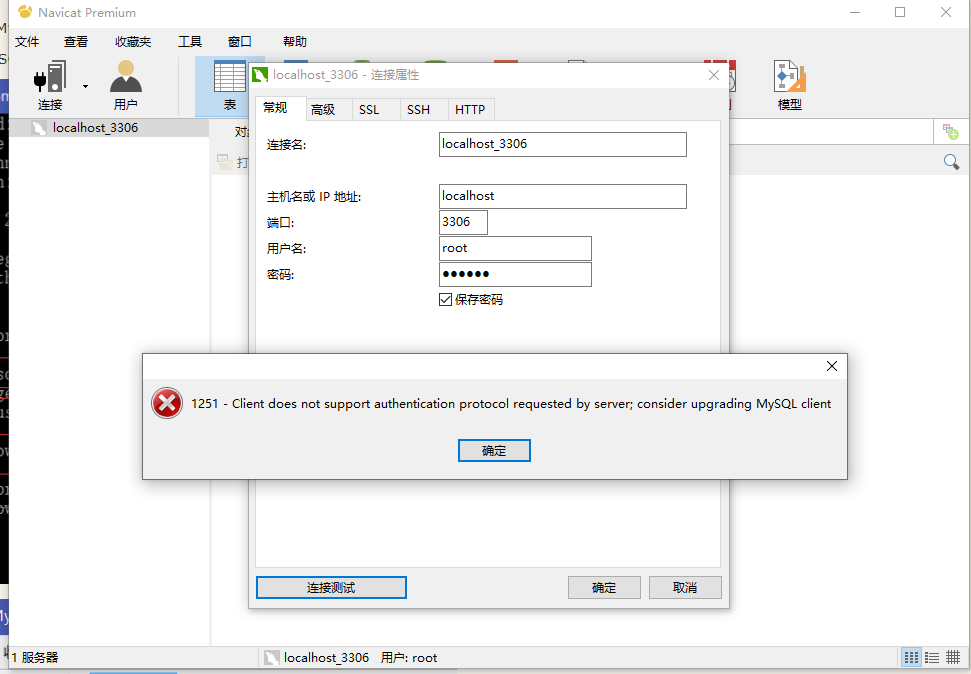
navicat 连接 mysql 提示Client does not support authentication protocol requested by server错误
安装完mysql后,命令行登录没问题,但是用Navicat连接出现提示性错误。Mysql版本为:8.0.15
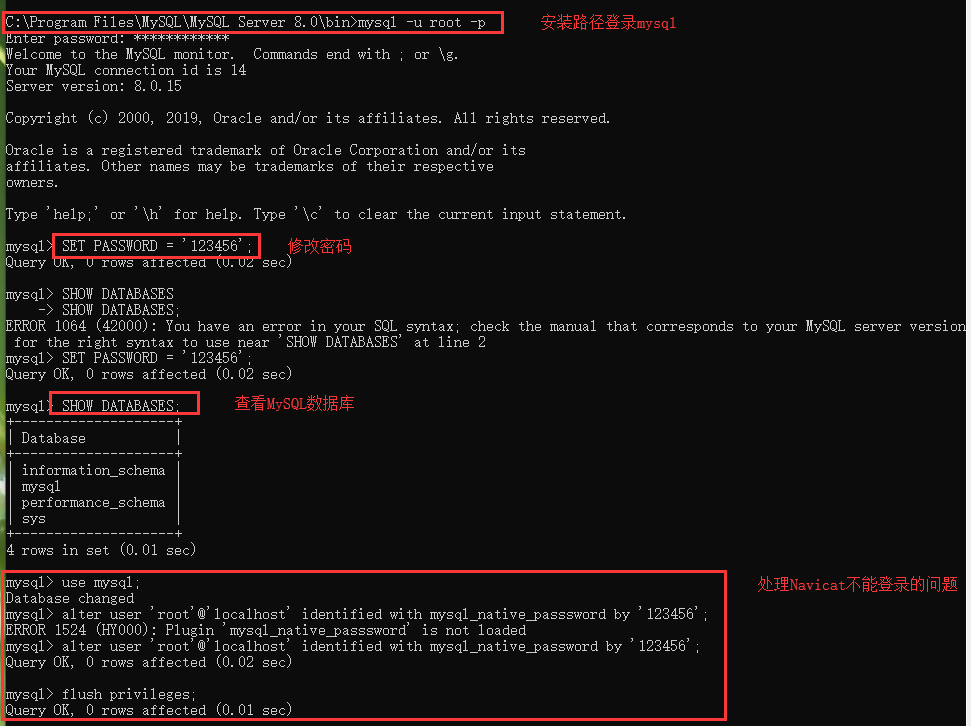
命令如下:
1、use mysql;
2、alter user 'root'@'localhost' identified with mysql_native_password by '********';
3、flush privileges;
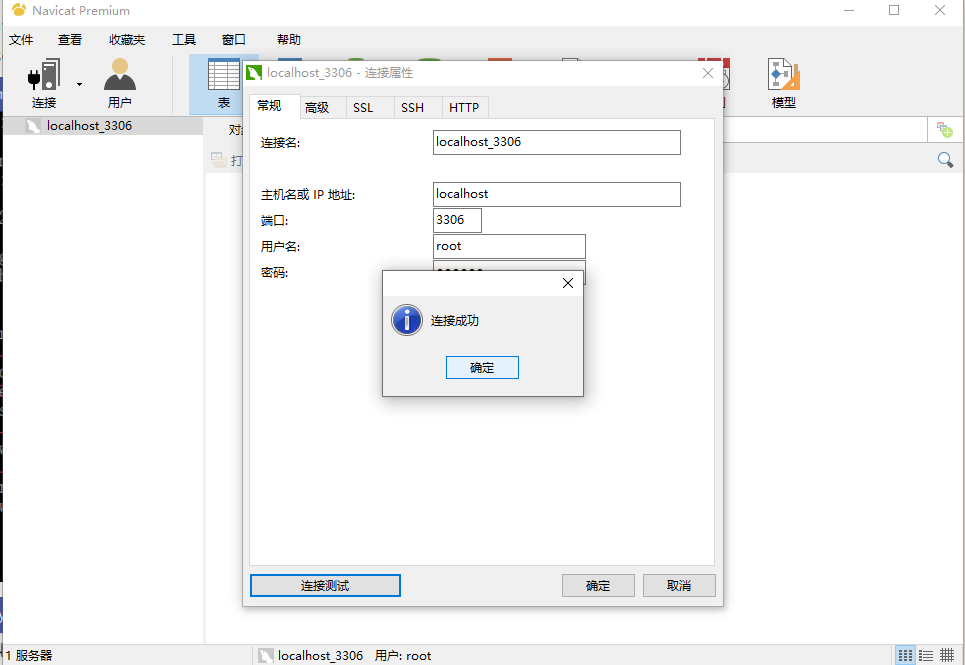
然后重新连接
在MySQL8.0.4以前,执行
SET PASSWORD=PASSWORD('[修改的密码]');
就可以更改密码,但是MySQL8.0.4开始,这样默认是不行的。因为之前,MySQL的密码认证插件是“mysql_native_password”,而现在使用的是“caching_sha2_password”。
因为当前有很多数据库工具和链接包都不支持“caching_sha2_password”,为了方便,我暂时还是改回了“mysql_native_password”认证插件。
修改用户密码,在MySQL中执行命令:
ALTER USER 'root'@'localhost' IDENTIFIED WITH mysql_native_password BY '新密码';
修改密码验证插件,同时修改密码。
navicat 连接 mysql 提示Client does not support authentication protocol requested by server错误的更多相关文章
- navicat 连接 mysql 出现Client does not support authentication protocol requested by server解决方案
安装了navicat 和 mysql,结果最后在navicat中连接mysql时,出现了如下错误提示: Client does not support authentication protocol ...
- navicat连接mysql出现Client does not support authentication protocol requested by server解决方案
USE mysql; '; FLUSH PRIVILEGES; root是用户名 localhost是ip地址127.0.0.1都是特指本机,%表示任何IP都可访问 mysql_native_pass ...
- navicat for mysql 连接 mysql 出现Client does not support authentication protocol requested by server解决方案
一 .桌面左下角windows图标--搜索框内输入cmd,结果如图所示,点击cmd.exe,或者使用快捷键Windows键(在键盘上有个Windows标志的按键)+R输入cmd后回车. 二. 在出来的 ...
- MySQL——navicat 连接 mysql 出现1251Client does not support authentication protocol requested by server的解决方案
前期修改root密码问题(首次安装的root密码是空,直接Enter就行): cmd用管理员身份进入,然后输入 mysqladmin -u root -p password newpassword 需 ...
- Mysql 连接提示 Client does not support authentication protocol requested by server 客户端不支持服务器请求的身份验证协议;考虑升级MySQL客户端
由于查阅了很多百度文档发现很多方法比较复杂,所以写个备忘: 首先,进入MySQL 8.0Command Line Client -Unicode,输入密码,登录进去. 然后,在命令行输入:ALTER ...
- Mysql8 连接提示 Client does not support authentication protocol requested by server; consider upgrading MySQL client 解决方法
USE mysql;ALTER USER 'root'@'localhost' IDENTIFIED WITH mysql_native_password BY 'password';FLUSH PR ...
- Navicat连接Mysql报错:Client does not support authentication protocol requested by server;
Navicat连接Mysql报错:Client does not support authentication protocol requested by server: 刚安装Mysql,想用Nav ...
- navicat连接远程数据库报错'client does not support authentication protocol requested by server consider ...'解决方案
[1.cmd终端连接远程mysql数据库方法] mysql -uhello -pworld -h192.168.1.88 -P3306 -Dmysql_oa mysql -u用户名 -p密码 -h ...
- egg 连接 mysql 的 docker 容器,报错:Client does not support authentication protocol requested by server; consider upgrading MySQL client
egg 连接 mysql 的 docker 容器,报错:Client does not support authentication protocol requested by server; con ...
随机推荐
- shell脚本编程基础之for循环
循环结构 循环需要有进入条件和退出条件,如果没有退出条件,则就会一直循环下去 for 变量 in 列表:do 循环体 done 生成列表及示例 {1..100}:生成1到100的整数列表 `comma ...
- 开启Nginx监控 with-http_stub_status_module
1.开启监控with-http_stub_status_module ./configure --with-openssl=/usr/local/ssl --with-http_stub_stat ...
- SQLServer string_split函数,撕裂函数,撕开函数
declare @name char(1000) --注意:char(10)为10位,要是位数小了会让数据出错 set @name='s{sss}fc{fggh}dghdf{cccs}x' selec ...
- 虚拟机VirtualBox 共享挂载问题:mount: /mnt/xxx: wrong fs type, bad option, bad superblock on xxx
设置好共享文件夹之后,在/mnt下面建立了一个wwwroot文件夹,然后去欢天喜地的去挂载, mount -t vboxsf www /mnt/wwwroot 结果系统提示: mount: /mnt/ ...
- sass、less和stylus 相同与不同
sass.less和stylus的安装使用和入门实践 https://www.jianshu.com/p/1eaf366814e2 stylus 基础教程 https://blog.csdn.net/ ...
- win10 mount error 112 : host is down解决方案
摘自:https://www.baidu.com/link?url=xZrOVRqR9gqGRq0esfVaivByR9E5-ixyAuKsQ_8Hiedl1sY6J7ezBlgSW3oe_X-koo ...
- net::ERR_ABORTED 404 (Not Found)
对于按需加载(on-demand-load)或加载外部资源(external resources)(如图片.文件等)来说,webpack的配置,output.publicPath是很重要的选项.如果指 ...
- [LeetCode] 675. Cut Off Trees for Golf Event 为高尔夫赛事砍树
You are asked to cut off trees in a forest for a golf event. The forest is represented as a non-nega ...
- JS 各种引擎介绍
JS 各种引擎介绍 http://www.oschina.net/project/tag/296/javascript-engine 不同浏览器有不同的JS引擎: WebKit , Safari浏览器 ...
- test String.split
test "map.mergd" do s = :crypto.strong_rand_bytes() # <<, , , , , >> # = >& ...