
Android P(9.0) userdebug版本执行adb remount失败
[DESCRIPTION]
remount failed
DM-verity could be disabled with adb (not fastboot) on userdebug build without unlocking device first.
DM-Verity could not be disabled on user build.
On avb2.0, dm-verity behavior are the same on all build variants.
It’s turned on by default and could only be disabled after device is unlocked.
dm-verity disable flag is moved from system image dm-verity metadata(vboot1.0) to vbmeta image(avb2.0), and you have two ways to disable it: adb and fastboot.


– download preloader with verified boot disabled which location is the same as scatter file //preloader_<PROJECT>_SBOOT_DIS.bin
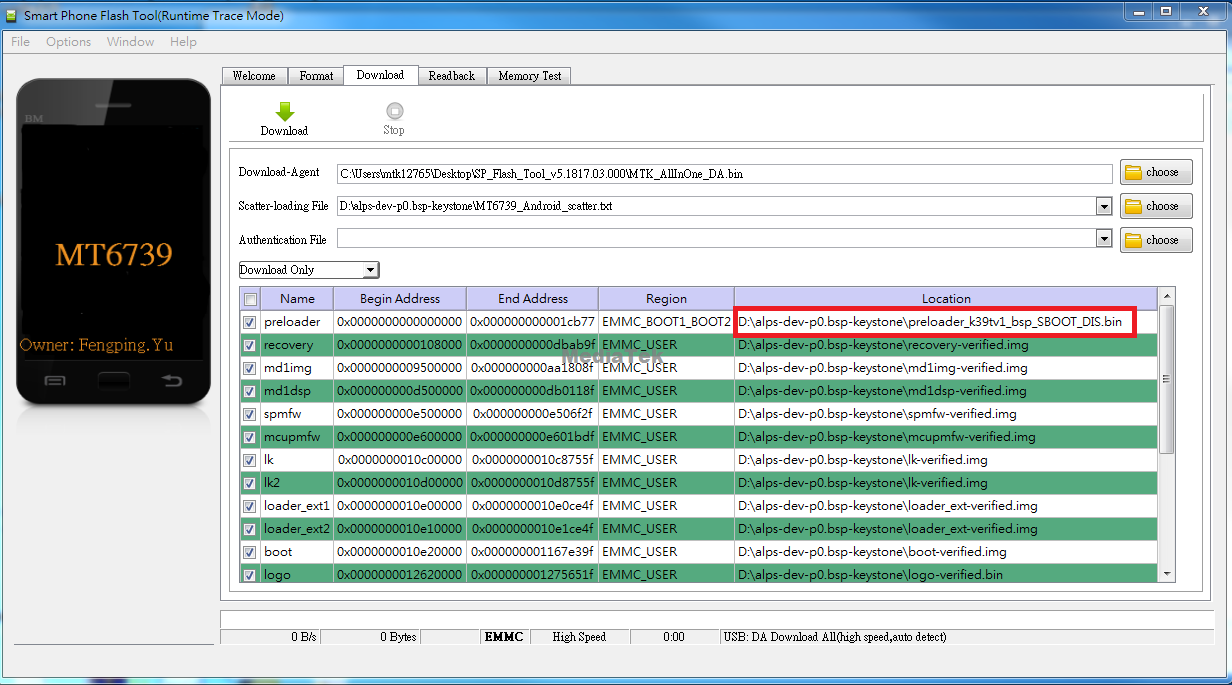
– adb root
– adb disable-verity
– adb reboot
– adb root
– adb remount
* Android P + kernel-4.9 or after
– download preloader with verified boot disabled which location is the same as scatter file. //preloader_<PROJECT>_SBOOT_DIS.bin
– boot to Home Screen
– go to setting -> system -> Developer options -> OEM unlocking
– adb reboot bootloader
– fastboot flashing unlock
– press volume up key
– fastboot reboot
– adb root
– adb disable-verity
– adb reboot
– adb root
– adb remount
https://dl.google.com/android/repository/platform-tools-latest-windows.zip
Mac
https://dl.google.com/android/repository/platform-tools-latest-darwin.zip
Linux
https://dl.google.com/android/repository/platform-tools-latest-linux.zip
refs;
https://ressrc.com/2018/09/21/android-p-how-to-enable-disable-security-boot/
Android P(9.0) userdebug版本执行adb remount失败的更多相关文章
- Android 6.0 M userdebug版本执行adb remount失败
[FAQ18076]Android 6.0 M版本默认会打开system verified boot,即在userdebug和user版本会把system映射到dm-0设备,然后再挂载.挂载前会检查s ...
- Android studio 3.0以上版本无法引入,找不到v4,v7包方案解决
Android studio 3.0以上版本无法引入v4.v7包报红,即找不到v4.v7包,解决方案如下: 步骤: 1,Close Object,点击左上角的关闭工程. 2,点击x,删除项目. 3,重 ...
- Android 设备,如何root,执行adb shell,查看设备中的数据库信息等【转】
原文地址: Android 设备,如何root,执行adb shell,查看设备中的数据库信息等
- 删除Android自带软件方法及adb remount 失败解决方案
删除Android自带软件方法 1.在电脑上打开cmd,然后输入命令 adb remount adb shell su 2.接着就是Linux命令行模式了,输入 cd system/app 3然后输入 ...
- adb remount 失败:remount failed: Operation not permitted
adb remount 失败:remount failed: Operation not permitted 关于ADB的使用,这里再说明下:经常使用命令 adb shell - 登录设备sh ...
- Android Studio 3.0.1 版本包下载
Android Studio 3.0.1 发布了,这是对 Android Studio 3.0 的一个小的更新,包括一般错误修复和性能改进 下载地址: Windows 64 位:https://dl. ...
- android studio 3.0之后版本自定义文件名生成apk文件
修改app模块的build.gradle 在android闭包中添加以下代码 //指定打包后应用名称 android.applicationVariants.all { variant -> v ...
- adb remount 失败remount failed: Operation not permitted
1. 进入shell adb shell 2. shell下输入命令 shell@android:/ $ sushell@android:/ # mount -o rw,remount -t yaff ...
- Android Studio 1.0.2项目实战——从一个APP的开发过程认识Android Studio
Android Studio 1.0.1刚刚发布不久,谷歌紧接着发布了Android Studio 1.0.2版本,和1.0.0一样,是一个Bug修复版本.在上一篇Android Studio 1.0 ...
随机推荐
- CSS布局对齐的小技巧
类似以上这种对齐怎么做? 很简单,上面是的污水开始的位置是由于被"能源种类"顶着,下面没有字怎么办?最差的办法就是用margin-left,因为在不同的机器上,可能会出现兼容性问题 ...
- 如何更新GitHub上的代码?
更新github上的代码 一.克隆代码 1.先是把自己GitHub上的代码克隆到本地(下载到本地) 步骤1.随便创建一个新文件夹(用来存放下载下来的代码) 步骤2.在文件夹中打开cmd 输入下载指令下 ...
- 【JZOJ100208】【20190705】传说之下
题目 三维空间上有一个点,进行了\(n\)次移动 第\(i\)次为在\([0,L_i]\)内随机一个长度\(l_i\),向\(\vec P_i\)方向移动\(l_i\) $\vec P_i $ 表示为 ...
- Spring Boot 2.2.2 发布,新增 2 个新特性!
Spring Boot 2.2.2 发布咯! Spring Boot 2.2.1 发布,一个有点坑的版本! 2.2.1 发布没过一个月,2.2.2 就来了. Maven依赖给大家奉上: <dep ...
- git常用指令汇总
命令行指令 Git 全局设置 git config --global user.name "cqu2003" git config --global user.email &quo ...
- 别再说你不会 ElasticSearch 调优了,都给你整理好了
来源:http://tinyurl.com/y4gnzbje 第一部分:调优索引速度 第二部分-调优搜索速度 第三部分:通用的一些建议 英文原文:https://www.elastic.co/guid ...
- Hive常见错误
1.root is not allowed to impersonate root 修改etc/hadoop/core-site.xml,增加如下配置: <property> <na ...
- Qt应用开发所需
Qt判断当前操作系统? 可使用宏判断,例如: #ifdef Q_OS_MAC //mac ... #endif #ifdef Q_OS_LINUX //linux ... #endif #ifdef ...
- 【java】使用jsp命令查看系统中java运行的程序及进程号
对于java独立运行的程序,他们在进程中的名字都是 Java(TM) Platform SE binary,如图 我们想知道这个进程运行的是哪个程序,怎么办呢? 答案是:可以在命令行下,运行:jps命 ...
- 自定义Yaml解析器替换Properties文件
自定义Yaml解析器替换Properties文件 项目结构 案例代码 配置类SpringConfiguration @Configuration @Import(JdbcCofnig.class) @ ...