
【故障处理】imp-00051,imp-00008
【故障处理】imp-00051,imp-00008
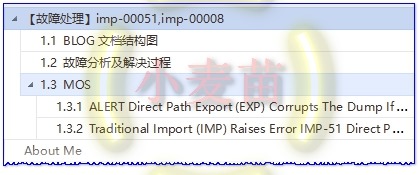
1.1 BLOG文档结构图
1.2 故障分析及解决过程
imp导入报错:
IMP-00051: Direct path exported dump file contains illegal column length
IMP-00008: unrecognized statement in the export file
IMP-00009: abnormal end of export file
[oracle@lhrdb ~]$ oerr imp 51
00051, 00000, "Direct path exported dump file contains illegal column length"
// *Cause: An invalid column length was encountered while processing column
// pieces."
// *Action: Check to make sure the export file is not corrupted, or else
// report this to Oracle Worldwide Support as an Import/Export
// internal bug and submit the
// export file.
由于使用了direct=y的方式导出,所以导入的时候报错。MOS上是针对分区表的某一个空的分区导入的时候会报该错,但是客户这边的表不是分区表,dmp文件太大,不能做具体原因分析。给出的解决方案为:针对报错的表单独导出,并采用parfile参数。
[ZFZHLHRDB1:oracle]:/oracle>more /tmp/scottfile.par
tables=scott.emp,scott.dept
exp \'/ AS SYSDBA\' file=/tmp/test_query_lhr_scott_01.dmp parfile=/tmp/scottfile.par log=/tmp/test_query_lhr_scott_01.log
参考的MOS文档:
Traditional Import (IMP) Raises Error IMP-51 Direct Path Exported Dump File Contains Illegal Column Length (文档 ID 1403865.1)
ALERT Direct Path Export (EXP) Corrupts The Dump If An Empty Table Partition Exists (文档 ID 1604983.1)
The traditional export utility is de-supported beginning with the version 11g and is no more maintained.
exp和imp从11g开始不再维护。
1.3 MOS
1.3.1 ALERT Direct Path Export (EXP) Corrupts The Dump If An Empty Table Partition Exists (文档 ID 1604983.1)
In this Document
| Description |
| Occurrence |
| Symptoms |
| Workaround |
| History |
| References |
APPLIES TO:
Oracle Database - Enterprise Edition - Version 11.2.0.1 and later
Information in this document applies to any platform.
***Checked for relevance on 31-Oct-2016***
DESCRIPTION
You performed a direct path export (table, schema or full) using the traditional export utility (EXP). If the exported objects include an empty table partition, then the export dump is corrupt and cannot be imported.
OCCURRENCE
Only exp versions >= 11.2.0.1 are affected. The traditional export utility is de-supported beginning with the version 11g and is no more maintained.
SYMPTOMS
During import you may see one of the following issues:
Or:
IMP-00008: unrecognized statement in the export file
Or:
Import silently skips a part of the dump, tables are missing and later constraints cannot be created.
This is below demonstrated with a simple test:
create table part001
(
col001 number,
col002 varchar2(100)
)
partition by range (col001)
(
partition p001 values less than (10),
partition p002 values less than (100),
partition p003 values less than (1000)
);
insert into part001 values (5, 'Text 5');
insert into part001 values (500, 'Text 500');
commit;
#> exp test/password file=part001.dmp tables=part001 direct=y
This will show:
. . exporting table PART001
. . exporting partition P001 1 rows exported
. . exporting partition P002 0 rows exported
. . exporting partition P003 1 rows exported
Export terminated successfully without warnings.
but the import breaks with error:
. . importing partition "PART001":"P001" 1 rows imported
. . importing partition "PART001":"P002"
IMP-00009: abnormal end of export file
Import terminated successfully with warnings.
WORKAROUND
If you perform direct path exports using a version greater or equal 11.2.0.1 and you see the messages:
...
. . exporting partition <partition_name> 0 rows exported
...
in the export output (or log file), then you obtain a corrupt dump. You can verify the dump with the commands:
#> imp user/passw full=y
or:
#> imp user/passw full=y show=y
which will show you one of the behaviors listed above.
To workaround this please use:
- conventional path export (exp direct=n)
Or:
- materialize the empty partitions before running direct path exports:
exec dbms_space_admin.materialize_deferred_segments (schema_name => 'TEST', table_name => 'PART001', partition_name => 'P002');
Or:
- DataPump export (expdp)
HISTORY
[03-DEC-2013] - Document created
REFERENCES
BUG:13880226 - IMPORT FAIL WITH IMP-00051 AND IMP-00008
1.3.2 Traditional Import (IMP) Raises Error IMP-51 Direct Path Exported Dump File Contains Illegal Column Length (文档 ID 1403865.1)
In this Document
| Symptoms |
| Cause |
| Solution |
APPLIES TO:
Oracle Server - Enterprise Edition - Version 11.2.0.2 and later
Information in this document applies to any platform.
SYMPTOMS
An original import of an export dump file created from an 11.2.0.2 database with DIRECT=Y fails with:
CAUSE
The exact cause is undetermined in this case.
SOLUTION
Instead of using the traditional export/import, use the DataPump export/import as a workaround.
About Me
...............................................................................................................................
● 本文作者:小麦苗,只专注于数据库的技术,更注重技术的运用
● 本文在itpub(http://blog.itpub.net/26736162)、博客园(http://www.cnblogs.com/lhrbest)和个人微信公众号(xiaomaimiaolhr)上有同步更新
● 本文itpub地址:http://blog.itpub.net/26736162/viewspace-2132064/
● 本文博客园地址:http://www.cnblogs.com/lhrbest/p/6261446.html
● 本文pdf版及小麦苗云盘地址:http://blog.itpub.net/26736162/viewspace-1624453/
微信群:私聊
● 联系我请加QQ好友(642808185),注明添加缘由
● 于 2017-01-05 09:00 ~ 2017-01-05 19:00 在农行完成
● 文章内容来源于小麦苗的学习笔记,部分整理自网络,若有侵权或不当之处还请谅解
● 版权所有,欢迎分享本文,转载请保留出处
...............................................................................................................................
拿起手机使用微信客户端扫描下边的左边图片来关注小麦苗的微信公众号:xiaomaimiaolhr,扫描右边的二维码加入小麦苗的QQ群,学习最实用的数据库技术。


【故障处理】imp-00051,imp-00008的更多相关文章
- 【IMP】IMP导入表的时候,如果表存在怎么办
在imp导入的时候,如果表存在的话,会追加数据在表中, 所以如果不想追加在表中的话,需要将想导入的表truncate掉后,在imp SQL: truncate table TEST1; imp tes ...
- 【exp/imp】将US7ASCII字符集的dmp文件导入到ZHS16GBK字符集的数据库中
[exp/imp]将US7ASCII字符集的dmp文件导入到ZHS16GBK字符集的数据库中 1.1 BLOG文档结构图 1.2 前言部分 1.2.1 导读和注意事项 各位技术爱好者,看完本文后 ...
- Oracle错误——SP2-0734: 未知的命令开头 "imp C##sin..." - 忽略了剩余的行。
错误 在windows的DOS窗口下使用命令导入Oracle数据. 原因 进入sqlplus里是不能执行imp的(sqlplus不认识imp),imp 是个工具,应该在cmd的dos命令提示符下执行.
- 转-【exp/imp】将US7ASCII字符集的dmp文件导入到ZHS16GBK字符集的数据库中
原帖地址:http://blog.csdn.net/lihuarongaini/article/details/71512116 1.2 前言部分 1.2.1 导读和注意事项 各位技术爱好者,看完 ...
- oracle数据库 expdp/impdp 和 exp/imp
--EXPDP导出,需要系统用户权限,一般不使用--sqlplus--1.创建dmp导出逻辑目录 create directory 目录名 as '目录路径' create directory exp ...
- SEL和IMP
http://www.jianshu.com/p/4a09d5ebdc2c SEL : 类成员方法的指针,但不同于C语言中的函数指针,函数指针直接保存了方法的地址,但SEL只是方法编号. IMP:一个 ...
- SP2-0734: 未知的命令开头 "imp scott/..." - 忽略了剩余的行。
Oracle数据导入报错:SP2-0734: 未知的命令开头 "imp scott/..." - 忽略了剩余的行. 原因:进入sqlplus里是不能执行imp的(sqlplus不认 ...
- SP2-0734: 未知的命令开头 "imp scott/..." - 忽略了剩余的行。
Oracle数据导入报错:SP2-0734: 未知的命令开头 "imp scott/..." - 忽略了剩余的行. 原因:进入sqlplus里是不能运行imp的(sqlplus不认 ...
- oracle快速创建用户、imp/exp导入导出dmp文件
1.首先我们可以用管理员用户以sysdba的身份登录oracle sqlplus username/password as sysdba 2.然后我就可以来创建用户了. create user use ...
- imp.load_source的用法
imp.load_source(name,pathname[,file])的作用把源文件pathname导入到name模块中,name可以是自定义的名字或者内置的模块名称. 假设在路径E:/Code/ ...
随机推荐
- 表格插件BootStrap-Table使用教程
Bootstrap table 是一款基于 Bootstrap 的 jQuery 表格插件,功能比较完备,能够实现数据异步获取,编辑,排序等一系列功能. 官网https://bootstrap-tab ...
- 用原生js实现,点击一个列表时,输出对应的索引
var ul = document.querySelector("ul"); ul.addEventListener("mousedown", mouseHan ...
- 【转】C++11新特性——lambda表达式
C++11的一大亮点就是引入了Lambda表达式.利用Lambda表达式,可以方便的定义和创建匿名函数.对于C++这门语言来说来说,“Lambda表达式”或“匿名函数”这些概念听起来好像很深奥,但很多 ...
- 网络协议 10 - Socket 编程(上)
前面一直在说各种协议,偏理论方面的知识,这次咱们就来认识下基于 TCP 和 UDP 协议这些理论知识的 Socket 编程. 说 TCP 和 UDP 的时候,我们是分成客户端和服务端来认识的, ...
- About Her
突然想给黑寡妇写点儿东西......(也许很多都不是我写的,但是能表达我的心意) 1. 众人进量子领域前最后一句话是她笑着说"一分钟后见." 而最终没有回来的,只有她自己一个 2. ...
- Ajax运用与分页
目录 django与ajax的分页处理 ajax + sweetAlert 实现再次确认: 批量数据插入 分页: django与ajax的分页处理 ajax + sweetAlert 实现再次确认: ...
- 2014(5)系统设计,web应用
[案例五](共25分) 阅读以下关于Web应用的叙述,在答题纸上回答问题1至问题2. [说明] 某软件公司拟为其客户开发一套基于Web的电子商务系统,该系统向终端用户提供在线购物功能.近期,项目组召开 ...
- [BZ1925] [SDOI2010]地精部落
[BZ1925] [SDOI2010]地精部落 传送门 一道很有意思的DP题. 我们发现因为很难考虑每个排列中的数是否使用过,所以我们想到只维护相对关系. 当我们考虑新的一个位置时,给新的位置的数分配 ...
- springboot自定义页面拦截
项目结构图 页面拦截代码 @Configuration public class WebConfig implements WebMvcConfigurer { @Override public vo ...
- mysql5.7报错ERROR 1819解决办法
MySQL5.6.6版本之后增加了密码强度验证插件validate_password,相关参数设置的较为严格. 使用了该插件会检查设置的密码是否符合当前设置的强度规则,若不满足则拒绝设置.影响的语句和 ...