
Pycharm use GUP server
1、配置远程服务器信息
Tools——Deployment——Configuration
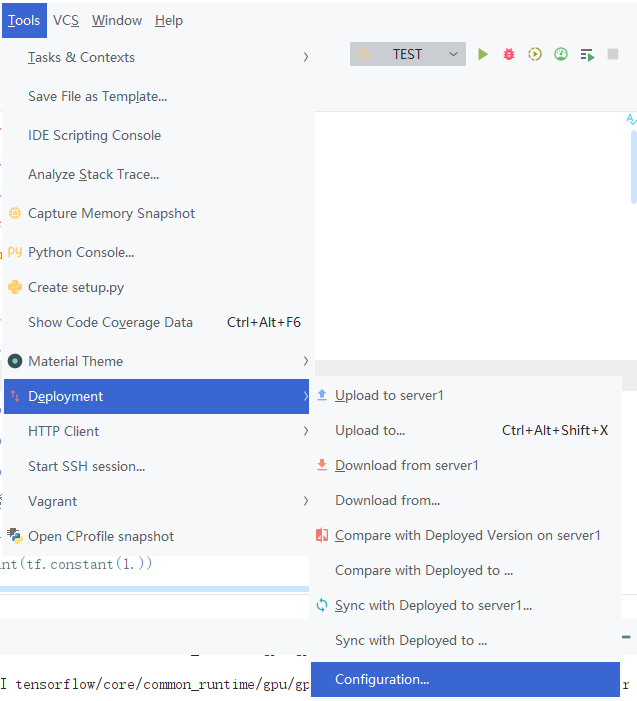
然后,点击加号Add一个远程服务信息。
我这里命名为server1;Type选择SFTP;Host即ip地址,也就是服务器的地址;Port是端口号;User name即用户名;再输一下password,顺便save一下。
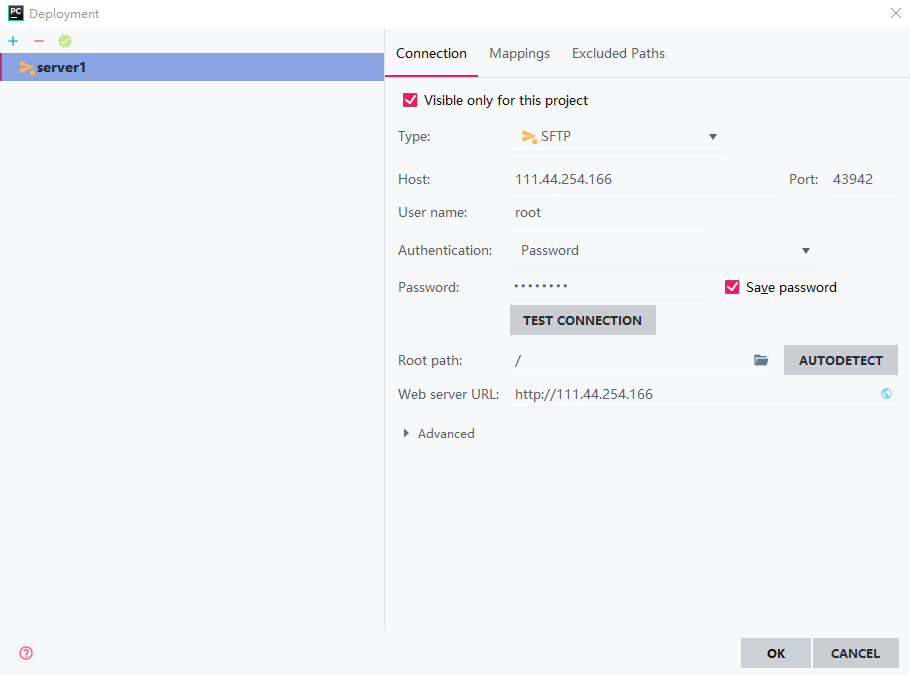
Test一下Connection,然后自动生成一下Root path,OK。

2、添加远程调试环境
File——Settings——Project——Project Interpreter(解释器)
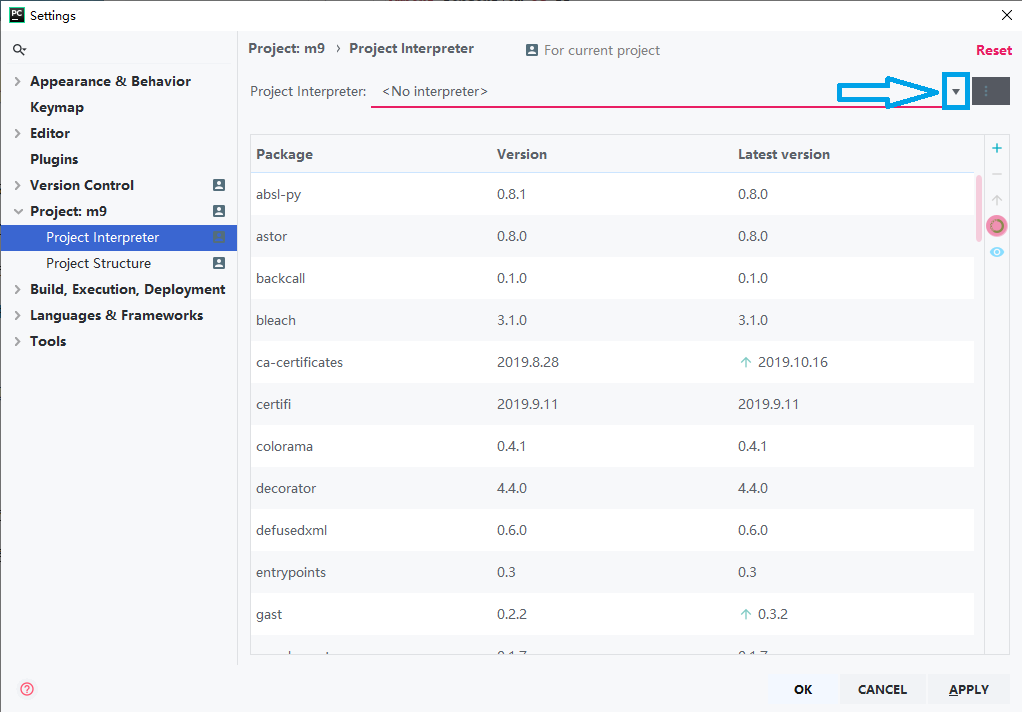
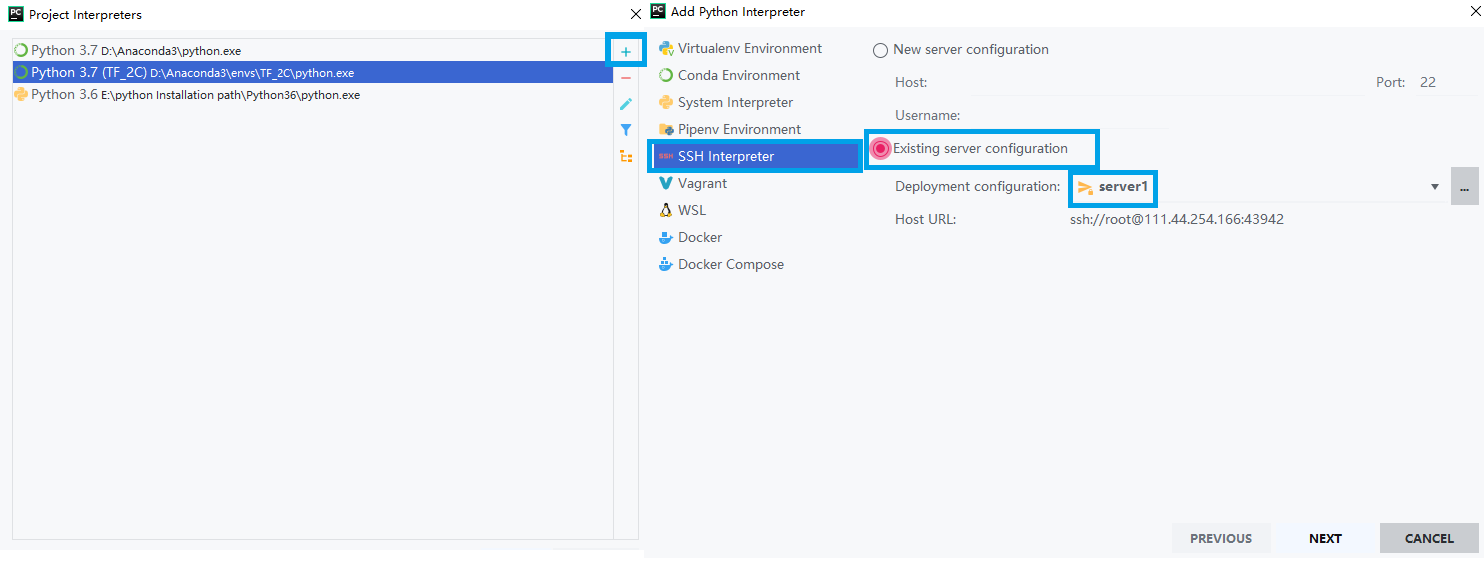
Show all——加号——SSH Interpreter——Existing server configuration——server1——Next——Finish

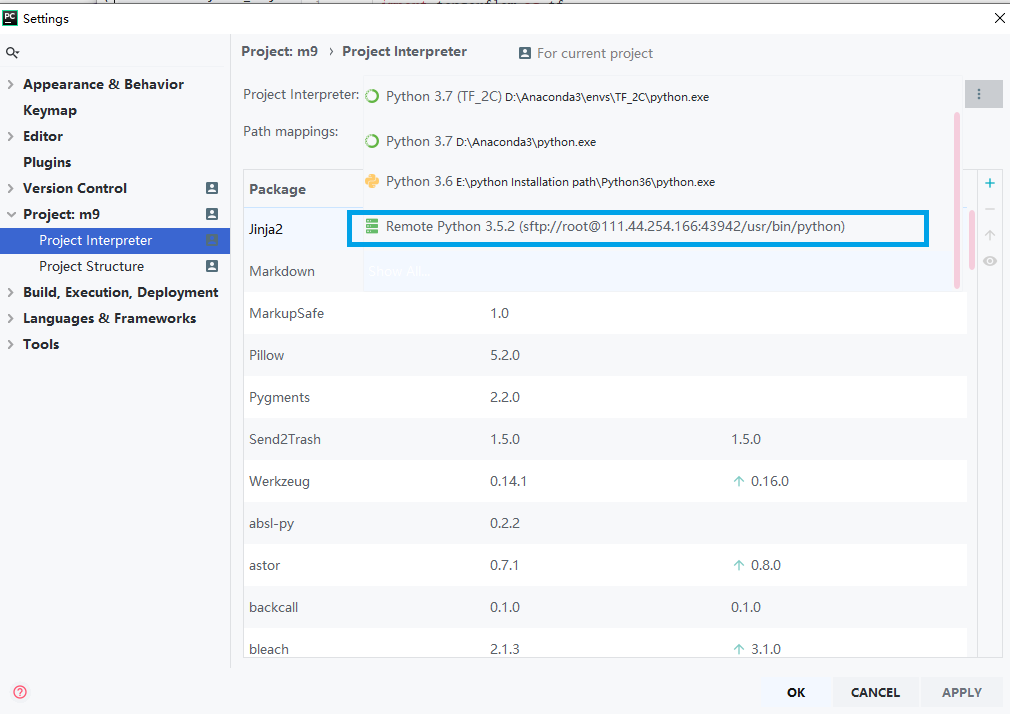
3、Test
新建一个项目文件,跑一下code。
import tensorflow as tf

a = tf.test.is_built_with_cuda()

b = tf.test.is_gpu_available(

    cuda_only=False,

    min_cuda_compute_capability=None

)

print(a)

print(b)
结果:
ssh://root@111.44.254.166:43942/usr/bin/python -u /root/tmp/pycharm_project_928/test.py

-- ::51.954587: I tensorflow/core/platform/cpu_feature_guard.cc:] Your CPU supports instructions that this TensorFlow binary was not compiled to use: AVX2 FMA

-- ::52.058581: I tensorflow/stream_executor/cuda/cuda_gpu_executor.cc:] successful NUMA node read from SysFS had negative value (-), but there must be at least one NUMA node, so returning NUMA node zero

-- ::52.059029: I tensorflow/core/common_runtime/gpu/gpu_device.cc:] Found device  with properties:

name: GeForce RTX  major:  minor:  memoryClockRate(GHz): 1.71

pciBusID: ::00.0

totalMemory: .77GiB freeMemory: .62GiB

-- ::52.059044: I tensorflow/core/common_runtime/gpu/gpu_device.cc:] Adding visible gpu devices:

-- ::52.275783: I tensorflow/core/common_runtime/gpu/gpu_device.cc:] Device interconnect StreamExecutor with strength  edge matrix:

-- ::52.275834: I tensorflow/core/common_runtime/gpu/gpu_device.cc:]

-- ::52.275842: I tensorflow/core/common_runtime/gpu/gpu_device.cc:] :   N

-- ::52.275968: I tensorflow/core/common_runtime/gpu/gpu_device.cc:] Created TensorFlow device (/device:GPU: with  MB memory) -> physical GPU (device: , name: GeForce RTX , pci bus id: ::00.0, compute capability: 7.5)

True

True

Process finished with exit code
Pycharm use GUP server的更多相关文章
- PyCharm激活(License server)
打开激活窗口 选择 Activate new license with: License server (用license server 激活) 在 License sever address 处填入 ...
- pycharm 注册码/License server 2017年最新
两种方法: 1.选License server激活,输入:http://idea.imsxm.com 2.2017年激活码 时效1年BIG3CLIK6F-eyJsaWNlbnNlSWQiOiJCSUc ...
- pycharm pro版server激活
从网上搜集了一些 License server 地址(有钱的一定要支持正版哦) http://idea.iteblog.com/key.php http://intellij.mandroid.cn ...
- pycharm 注册 License server方式
在输入框输入以下内容即可:http://idea.yangyusb.com
- pycharm 设置django server
- [python工具篇][pycharm安装与配置][1]安装与设置
1 官网下载专业版 2 打开pycharm,选择license server 激活,地址输入:http://idea.imsxm.com 3 新建工程(一个大文件夹) 4 设置字体大小(file-&g ...
- 最新JetBrains PyCharm 使用教程--创建或导入项目(二)
Python简介 Python是一种非常流行的开源编程语言.得益于无尽的模块选项,Python今天广泛用于脚本语言.Web开发.移动和桌面在许多领域.随着人工智能的复兴,数据科学的崛起,Python更 ...
- pycharm professional 2019版长效激活
PyCharm是一种Python IDE,带有一整套可以帮助用户在使用Python语言开发时提高其效率的工具,比如调试.语法高亮.Project管理.代码跳转.智能提示.自动完成.单元测试.版本控制. ...
- 【Tools】Pycharm2017 windows安装与修改中文界面教程
[windows] 1.到官网下载Pycharm最新版 https://www.jetbrains.com/pycharm/download/#section=windows 2.安装激活 Pycha ...
随机推荐
- flask入门脚本解释
创建一个最小的flask应用, 稍做编辑如下, 开启debug调试模式后, 服务器自动加载服务器的修改. 如何自己构建一个优雅的url呢 http方法介绍 http访问urls的方法有get, pos ...
- mysql 5.7.21, for Linux (i686) 权限配置
配置权限参数: GRANT语法: GRANT 权限 ON 数据库.* TO 用户名@'登录主机' IDENTIFIED BY '密码' 权限: ALL,ALTER,CREATE,DROP,SELECT ...
- C语言 选择排序算法原理和实现 从数组中 找出最小的元素然后交换位置
#include <stdio.h> int main(void) { /* 选择排序算法 原理:从数组中 找出最小的元素然后交换位置: */ int a[10] = {9,5,10,7, ...
- luogu P1058 立体图
做了这个题后明确了自己的定位... 恩...普及- 题目大意估计都知道.. 给个传送门: luogu 做了半上午 + 一整个下午的题... 占了我今天到的绝大多数时间. 其实此题不难, 核心代码我 ...
- python 之 序列 常用方法
- 影像优化 OptimizeRaster工具包介绍
Esri OptimizeRasters是一个高效.可配置的开源工具包. OptimizeRasters提供了以下功能: 影像格式转换和压缩.支持输出优化栅格格式:MRF.分块TIFF.云存储优化Ge ...
- 《挑战30天C++入门极限》新手入门:C/C++中枚举类型(enum)
新手入门:C/C++中枚举类型(enum) 如果一个变量你需要几种可能存在的值,那么就可以被定义成为枚举类型.之所以叫枚举就是说将变量或者叫对象可能存在的情况也可以说是可能的值一一例举出来. ...
- 网格布局 grid
推荐阅读:http://www.ruanyifeng.com/blog/2019/03/grid-layout-tutorial.html 1. 启动网格布局 div { display: grid; ...
- Python中文件读写read,readline,readlines函数的区别?
read 每次会读取整个文件 readline 每次读取一行信息 readlines 读取整个文件返回一个列表,列表每个元素代表一行
- Android 照片上传
解释全在代码中: // 拍照上传 private OnClickListener mUploadClickListener = new OnClickListener() { public void ...