
Solr 5.x集成中文分词word,mmseg4j
- 使用标准分词器,如图:
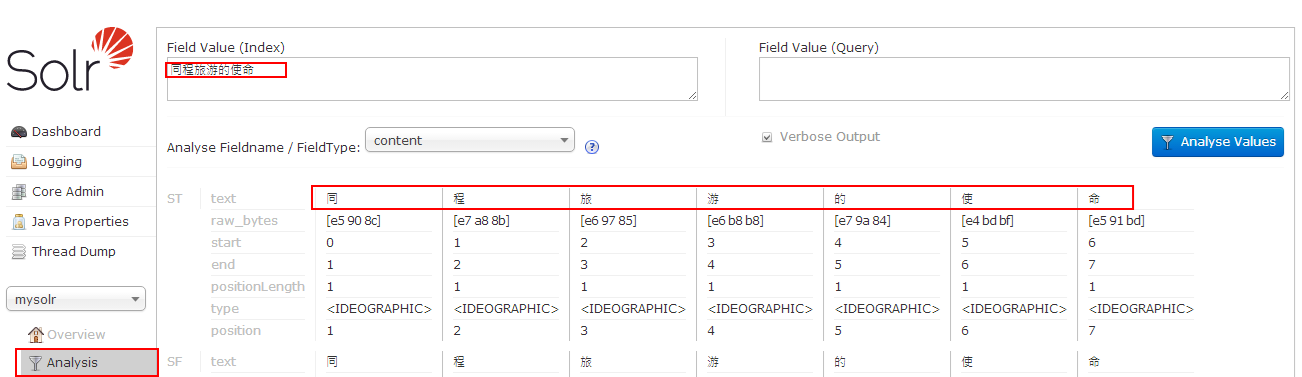
- 使用word分词器
- 下载word-1.3.jar,注意solr的版本和word分词的版本
- 将文件word-1.3.jar拷贝至文件夹C:\workspace\Tomcat7.0\webapps\solr\WEB-INF\lib\下
- 修改如下文件C:\workspace\solr_home\solr\mysolr\conf\schema.xml
在schema节点下添加如下节点:
<fieldType
name="word_cn"
class="solr.TextField"><analyzer
type="index"><tokenizer
class="org.apdplat.word.solr.ChineseWordTokenizerFactory"/></analyzer>
<analyzer
type="query"><tokenizer
class="org.apdplat.word.solr.ChineseWordTokenizerFactory"/></analyzer>
</fieldType>
如图:

- 添加分词字段
<field
name="content_wordsplit"
type="word_cn"
indexed="true"
stored="true"
multiValued="true"/> - 重启tomcat
- 验证分词
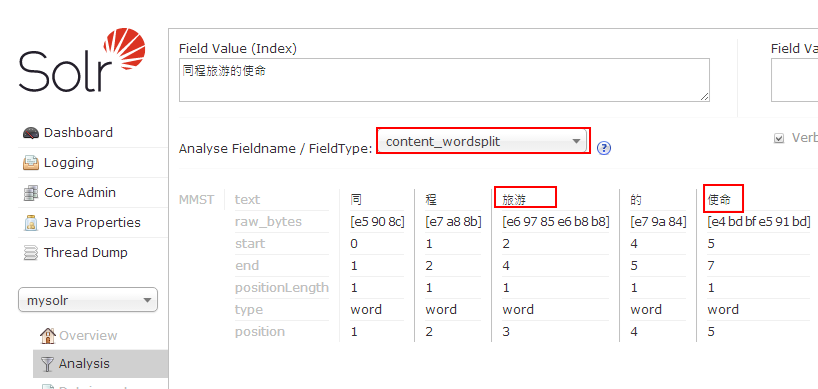
- 发现同程被分词分开了,需要将"同程"添加到词库中
- 编辑C:\workspace\solr_home\solr\mysolr\conf\schema.xml文件,修改如下:
<fieldType
name="word_cn"
class="solr.TextField"><analyzer
type="index"><tokenizer
class="org.apdplat.word.solr.ChineseWordTokenizerFactory"
conf="C:/workspace/solr_home/solr/mysolr/conf/word.local.conf"/></analyzer>
<analyzer
type="query"><tokenizer
class="org.apdplat.word.solr.ChineseWordTokenizerFactory"
conf="C:/workspace/solr_home/solr/mysolr/conf/word.local.conf"/></analyzer>
</fieldType>
- 在文件夹C:\workspace\solr_home\solr\mysolr\conf\下新建文件word.local.conf
- 从github中复制word.conf的配置内容,复制dic.txt,stopwords.txt
- 修改word.local.conf文件
dic.path=classpath:dic.txt,classpath:custom_dic,C:/workspace/solr_home/solr/mysolr/conf/word_dic.txt
stopwords.path=classpath:stopwords.txt,classpath:custom_stopwords_dic,C:/workspace/solr_home/solr/mysolr/conf/word_stopwords.txt
修改后的word.local.conf全部内容如下:
#是否启用自动检测功能,如:用户自定义词典、停用词词典
auto.detect=true
#词典机制实现类,词首字索引式前缀树
#dic.class=org.apdplat.word.dictionary.impl.DictionaryTrie
#前缀树词首字索引分配空间大小,如过小则会导致碰撞增加,减小查询性能
dictionary.trie.index.size=24000
#双数组前缀树,速度稍快一些,内存占用稍少一些
#但功能有限,不支持动态增减单个词条,也不支持批量增减词条
#只支持先clear()后addAll()的动态改变词典方式
dic.class=org.apdplat.word.dictionary.impl.DoubleArrayDictionaryTrie
#双数组前缀树预先分配空间大小,如不够则逐渐递增10%
double.array.dictionary.trie.size=2600000
#词典,多个词典之间逗号分隔开
#如:dic.path=classpath:dic.txt,classpath:custom_dic,d:/dic_more.txt,d:/DIC,D:/DIC2
#自动检测词库变化,包含类路径下的文件和文件夹、非类路径下的绝对路径和相对路径
#HTTP资源:dic.path=http://localhost:8080/word_web/resources/dic.txt
dic.path=classpath:dic.txt,classpath:custom_dic,C:/workspace/solr_home/solr/mysolr/conf/word_dic.txt
#是否利用多核提升分词速度
parallel.seg=true
#词性标注数据:part.of.speech.dic.path=http://localhost:8080/word_web/resources/part_of_speech_dic.txt
part.of.speech.dic.path=classpath:part_of_speech_dic.txt
#词性说明数据:part.of.speech.des.path=http://localhost:8080/word_web/resources/part_of_speech_des.txt
part.of.speech.des.path=classpath:part_of_speech_des.txt
#二元模型路径
#HTTP资源:bigram.path=http://localhost:8080/word_web/resources/bigram.txt
bigram.path=classpath:bigram.txt
bigram.double.array.trie.size=5300000
#三元模型路径
#HTTP资源:trigram.path=http://localhost:8080/word_web/resources/trigram.txt
trigram.path=classpath:trigram.txt
trigram.double.array.trie.size=9800000
#是否启用ngram模型,以及启用哪个模型
#可选值有:no(不启用)、bigram(二元模型)、trigram(三元模型)
#如不启用ngram模型
#则双向最大匹配算法、双向最大最小匹配算法退化为:逆向最大匹配算法
#则双向最小匹配算法退化为:逆向最小匹配算法
ngram=bigram
#停用词词典,多个词典之间逗号分隔开
#如:stopwords.path=classpath:stopwords.txt,classpath:custom_stopwords_dic,d:/stopwords_more.txt
#自动检测词库变化,包含类路径下的文件和文件夹、非类路径下的绝对路径和相对路径
#HTTP资源:stopwords.path=http://localhost:8080/word_web/resources/stopwords.txt
stopwords.path=classpath:stopwords.txt,classpath:custom_stopwords_dic,C:/workspace/solr_home/solr/mysolr/conf/word_stopwords.txt
#用于分割词的标点符号,目的是为了加速分词,只能为单字符
#HTTP资源:punctuation.path=http://localhost:8080/word_web/resources/punctuation.txt
punctuation.path=classpath:punctuation.txt
#分词时截取的字符串的最大长度
intercept.length=16
#百家姓,用于人名识别
#HTTP资源:surname.path=http://localhost:8080/word_web/resources/surname.txt
surname.path=classpath:surname.txt
#数量词
#HTTP资源:quantifier.path=http://localhost:8080/word_web/resources/quantifier.txt
quantifier.path=classpath:quantifier.txt
#是否启用人名自动识别功能
person.name.recognize=true
#是否保留空白字符
keep.whitespace=false
#是否保留标点符号,标点符号的定义见文件:punctuation.txt
keep.punctuation=false
#将最多多少个词合并成一个
word.refine.combine.max.length=3
#对分词结果进行微调的配置文件
word.refine.path=classpath:word_refine.txt
#同义词词典
word.synonym.path=classpath:word_synonym.txt
#反义词词典
word.antonym.path=classpath:word_antonym.txt
#lucene、solr、elasticsearch、luke等插件是否启用标注
tagging.pinyin.full=false
tagging.pinyin.acronym=false
tagging.synonym=false
tagging.antonym=false
#是否启用识别工具,来识别文本(英文单词、数字、时间等)
recognition.tool.enabled=true
#如果你想知道word分词器的词典中究竟加载了哪些词
#可在配置项dic.dump.path中指定一个文件路径
#word分词器在加载词典的时候,顺便会把词典的内容写到指定的文件路径
#可指定相对路径或绝对路径
#如:
#dic.dump.path=dic.dump.txt
#dic.dump.path=dic.dump.txt
#dic.dump.path=/Users/ysc/dic.dump.txt
dic.dump.path=
#redis服务,用于实时检测HTTP资源变更
#redis主机
redis.host=localhost
#redis端口
redis.port=6379
- 修改文件C:/workspace/solr_home/solr/mysolr/conf/word_dic.txt,添加字库:同程
- 重启tomcat
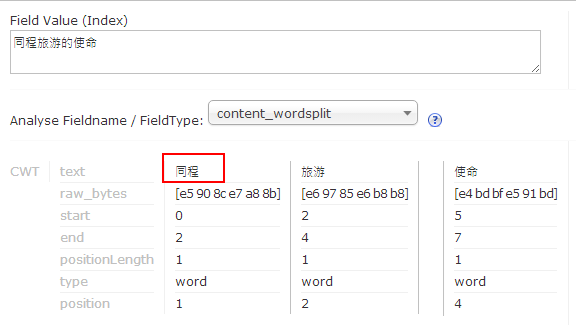
- 验证分词结果,如图:
- 使用mmseg4j分词器
- 下载mmseg4j,如:mmseg4j-core-1.10.1-SNAPSHOT.jar,mmseg4j-solr-2.3.1-SNAPSHOT.jar,字典文件夹:data/
- 将mmseg4j-core-1.10.1-SNAPSHOT.jar,mmseg4j-solr-2.3.1-SNAPSHOT.jar拷贝至文件夹C:\workspace\Tomcat7.0\webapps\solr\WEB-INF\lib\下
- 修改如下文件C:\workspace\solr_home\solr\mysolr\conf\schema.xml
在schema节点下添加如下节点:
<fieldtype
name="textComplex"
class="solr.TextField"
positionIncrementGap="100"><analyzer>
<tokenizer
class="com.chenlb.mmseg4j.solr.MMSegTokenizerFactory"
mode="complex"/></analyzer>
</fieldtype>
<fieldtype
name="textMaxWord"
class="solr.TextField"
positionIncrementGap="100"><analyzer>
<tokenizer
class="com.chenlb.mmseg4j.solr.MMSegTokenizerFactory"
mode="max-word"/></analyzer>
</fieldtype>
<fieldtype
name="textSimple"
class="solr.TextField"
positionIncrementGap="100"><analyzer>
<tokenizer
class="com.chenlb.mmseg4j.solr.MMSegTokenizerFactory"
mode="simple"/></analyzer>
</fieldtype>
- 添加分词字段
<field
name="content_test"
type="textMaxWord"
indexed="true"
stored="true"
multiValued="true"/> - 重启tomcat
- 验证分词

- 添加字典,修改如下文件C:\workspace\solr_home\solr\mysolr\conf\schema.xml
<fieldtype
name="textComplex"
class="solr.TextField"
positionIncrementGap="100"><analyzer>
<tokenizer
class="com.chenlb.mmseg4j.solr.MMSegTokenizerFactory"
mode="complex"
dicPath="data/dic/"/></analyzer>
</fieldtype>
<fieldtype
name="textMaxWord"
class="solr.TextField"
positionIncrementGap="100"><analyzer>
<tokenizer
class="com.chenlb.mmseg4j.solr.MMSegTokenizerFactory"
mode="max-word"
dicPath="data/dic/"/></analyzer>
</fieldtype>
<fieldtype
name="textSimple"
class="solr.TextField"
positionIncrementGap="100"><analyzer>
<tokenizer
class="com.chenlb.mmseg4j.solr.MMSegTokenizerFactory"
mode="simple"
dicPath="data/dic/" /></analyzer>
</fieldtype>
- 将自带的字典拷贝到C:\workspace\solr_home\solr\mysolr\data\dic\文件夹下,如图:

- 修改words.dic,添加"同程"关键字
- 重启tomcat
- 验证分词

Solr 5.x集成中文分词word,mmseg4j的更多相关文章
- solr 7+tomcat 8 + mysql实现solr 7基本使用(安装、集成中文分词器、定时同步数据库数据以及项目集成)
基本说明 Solr是一个开源项目,基于Lucene的搜索服务器,一般用于高级的搜索功能: solr还支持各种插件(如中文分词器等),便于做多样化功能的集成: 提供页面操作,查看日志和配置信息,功能全面 ...
- solr4.5配置中文分词器mmseg4j
solr4.x虽然提供了分词器,但不太适合对中文的分词,给大家推荐一个中文分词器mmseg4j mmseg4j的下载地址:https://code.google.com/p/mmseg4j/ 通过以下 ...
- 全文检索引擎Solr系列——整合中文分词组件mmseg4j
默认Solr提供的分词组件对中文的支持是不友好的,比如:“VIM比作是编辑器之神”这个句子在索引的的时候,选择FieldType为”text_general”作为分词依据时,分词效果是: 它把每一个词 ...
- elasticsearch之集成中文分词器
IK是基于字典的一款轻量级的中文分词工具包,可以通过elasticsearch的插件机制集成: 一.集成步骤 1.在elasticsearch的安装目录下的plugin下新建ik目录: 2.在gith ...
- 对本地Solr服务器添加IK中文分词器实现全文检索功能
在上一篇随笔中我们提到schema.xml中<field/>元素标签的配置,该标签中有四个属性,分别是name.type.indexed与stored,这篇随笔将讲述通过设置type属性的 ...
- Solr学习总结(八)IK 中文分词的配置和使用
最近,很多朋友问我solr 中文分词配置的问题,都不知道怎么配置,怎么使用,原以为很简单,没想到这么多朋友都有问题,所以今天就总结总结中文分词的配置吧. 有的时候,用户搜索的关键字,可能是一句话,不是 ...
- 关于Solr搜索标点与符号的中文分词你必须知道的(mmseg源码改造)
关于Solr搜索标点与符号的中文分词你必须知道的(mmseg源码改造) 摘要:在中文搜索中的标点.符号往往也是有语义的,比如我们要搜索“C++”或是“C#”,我们不希望搜索出来的全是“C”吧?那样对程 ...
- Windows下面安装和配置Solr 4.9(三)支持中文分词器
首先将下载解压后的solr-4.9.0的目录里面F:\tools\开发工具\Lucene\solr-4.9.0\contrib\analysis-extras\lucene-libs找到lucene- ...
- 推荐十款java开源中文分词组件
1:Elasticsearch的开源中文分词器 IK Analysis(Star:2471) IK中文分词器在Elasticsearch上的使用.原生IK中文分词是从文件系统中读取词典,es-ik本身 ...
随机推荐
- halcon学习笔记——(11)Image,region,xld初步
一 读取的3种方式: 读取单张的图片: read_image( image,'filename') //image 是输出对象,后面是输入文件的路径和名称 读取多图: 1,申明一个数组,分别保存路径 ...
- C++混合编程之idlcpp教程(一)
我是C++语言的忠实拥趸,由于在上学时经历了资源匮乏的DOS时代,对C/C++这种更加接近硬件的语言由衷的喜爱.一直以来也是已C++作为工作的语言,对别的语言那是不屑一顾.在java火爆流行的时候,没 ...
- c#中的static
1.C# 不支持静态局部变量(在方法范围内声明的变量). 2.static类一般用于与状态无关的类.那么,什么是与状态无关的类?我的理解是当一个类中没有属性,只有方法的的时候,就可以认为这个类是与状态 ...
- EntityFramework 中支持 BulkInsert 扩展
本文为 Dennis Gao 原创技术文章,发表于博客园博客,未经作者本人允许禁止任何形式的转载. 前言 很显然,你应该不至于使用 EntityFramework 直接插入 10W 数据到数据库中,那 ...
- Window程序的安装与部署
步骤: 1.新建项目—选择安装与部署—安装项目或使用安装向导,再这里我用的是安装向导 2.点击确定—下一步 3.点击下一步,选择主输出 4.点击下一步,添加文件 5.点击完成 设置: 右击安装项目 出 ...
- [MFC] 向文本编辑框写入数据与从其中读取数据
GetDlgItemText(IDC_USER_NAME_EDIT,m_csUserName); SetDlgItemText(IDC_USER_NAME_EDIT,s);
- [WinAPI] 串口读写
#include <stdio.h> #include <stdlib.h> #include <windows.h> HANDLE hComm; OVERLAPP ...
- 升级ruby版本那"不堪回首的经历"
前段时间在玩Chef-一个IT基础设施自动化工具.由于Chef是由Ruby写的一个gem,那么就需要安装Ruby.当然Ruby我早就安装了,并且使用rvm来管理Ruby及Gem.本来一切看似正常,但是 ...
- ActiveReports 9实战教程(3): 图文并茂的报表形式
基于上面2节内容,我们搭建了AR9的开发环境,配置好了数据源.在本节,我们以官方提供的3个中文图文并茂的报表来展示AR9的功能,并通过实战的方式一一分享. 以往做报表相关的工作时,最害怕的是报表的UI ...
- PAAS平台的web应用性能测试与分析
引言 为什么我会写这一篇博客,因为最近很多京东云擎jae的用户反应一个问题就是他们部署在jae上面的应用访问很慢,有极少数应用甚至经常出现504超时现象,当然大家首先想到的是jae性能太差,这也是人之 ...