
android 自定义Dialog背景透明及显示位置设置
先贴一下显示效果图,仅作参考:
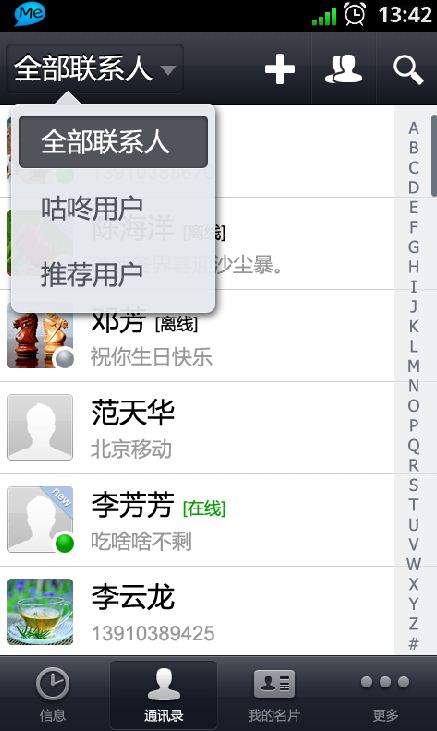
代码如下:
1、自定义Dialog
public class SelectDialog extends AlertDialog{

public SelectDialog(Context context, int theme) {

    super(context, theme);

}

public SelectDialog(Context context) {

    super(context);

}

@Override

protected void onCreate(Bundle savedInstanceState) {

    super.onCreate(savedInstanceState);

    setContentView(R.layout.slt_cnt_type);

}

}
2、布局文件slt_cnt_type.xml代码
<?xml version="1.0" encoding="utf-8"?>

<LinearLayout

  xmlns:android="http://schemas.android.com/apk/res/android"

  android:orientation="vertical"

  android:padding="10dp" android:layout_width="115dp" android:layout_height="wrap_content" android:background="@color/blue">

    <Button android:layout_height="wrap_content" android:background="#00000000" android:layout_width="fill_parent" android:text="全部联系人" android:paddingTop="5dp" android:paddingBottom="5dp" android:paddingLeft="10dp" android:gravity="left|center_vertical" android:id="@+id/btnSltCntAll"></Button>

    <Button android:layout_height="wrap_content" android:background="#00000000" style="@drawable/greenhand_button" android:text="咕咚用户" android:gravity="left|center_vertical" android:paddingBottom="5dp" android:paddingTop="5dp" android:paddingLeft="10dp" android:paddingRight="10dp" android:layout_width="fill_parent" android:id="@+id/btnSltGudongUser"></Button>

    <Button style="@drawable/greenhand_button" android:background="#00000000" android:layout_height="wrap_content" android:layout_width="fill_parent" android:text="推荐用户" android:gravity="left|center_vertical" android:paddingTop="5dp" android:paddingBottom="5dp" android:paddingLeft="10dp" android:id="@+id/btnSltRecommend"></Button>

</LinearLayout>
3、颜色color.xml代码
<?xml version="1.0" encoding="utf-8"?>

<resources>

  <color name="transparent">#00000000</color>

</resources>
4、样式style.xml代码
<?xml version="1.0" encoding="utf-8"?>

<resources>

    <style name="dialog" parent="@android:style/Theme.Dialog">

        <item name="android:windowFrame">@null</item><!--边框-->

        <item name="android:windowIsFloating">true</item><!--是否浮现在activity之上-->

        <item name="android:windowIsTranslucent">false</item><!--半透明-->

        <item name="android:windowNoTitle">true</item><!--无标题-->

        <item name="android:windowBackground">@color/transparent</item><!--背景透明-->

        <item name="android:backgroundDimEnabled">false</item><!--模糊-->

    </style>

</resources>
4、显示Dialog
SelectDialog selectDialog = new SelectDialog(this,R.style.dialog);//创建Dialog并设置样式主题

Window win = selectDialog.getWindow();

LayoutParams params = new LayoutParams();

params.x = -80;//设置x坐标

params.y = -60;//设置y坐标

win.setAttributes(params);

selectDialog.setCanceledOnTouchOutside(true);//设置点击Dialog外部任意区域关闭Dialog

selectDialog.show();
以上仅作参考,如有问题,请大家及时提出来,一起交流学习!
android 自定义Dialog背景透明及显示位置设置的更多相关文章
- Android自定义 Dialog 对话框
Android自定义Dialoghttp://www.cnblogs.com/and_he/archive/2011/09/16/2178716.html Android使用自定义AlertDialo ...
- (转)Android 自定义 spinner (背景、字体颜色)
Android 自定义 spinner (背景.字体颜色) (2012-07-04 17:04:44) 1.准备两张图片,并做好9.png 2.在drawable中定义spinner_sele ...
- Android:自定义Dialog大小,显示圆角
经过测试,可以使用. ----------------------------------------------------------- AlertDialog.Builder builder = ...
- Android如何创建背景透明的Dialog
一:控制Dialog 的背景方法:1.定义一个无背景主题主题<!--去掉背景Dialog--> <style name="NobackDialog" parent ...
- Android 自定义dialog类
首先定制style样式 styles.xml 加入自定义样式 <style name="CustomLoadingDialog"> <item name=&quo ...
- android 自定义Dialog去除黑色边框
在自定义Dialog时显示的界面中老是有黑色的边框,下面就介绍使用style去除黑色边框方法. 首先在values/styles定义自定义样式: <style name="MyDial ...
- Android—自定义Dialog
在 Android 日常的开发中,Dialog 使用是比较广泛的.无论是提示一个提示语,还是确认信息,还是有一定交互的(弹出验证码,输入账号密码登录等等)对话框. 而我们去看一下原生的对话框,虽然随着 ...
- 设置自定义Dialog背景不变暗
设置Dialog弹窗的背景不变暗,有两种方式,一种是通过在style中设置,一种是通过代码设置. 一.在style中设置 <style name="dialog_waiting&quo ...
- Android自定义Dialog(美化界面)
前言:在做项目的时候,发现dialog界面太丑陋,从csdn上下载了一份自定义dialog的源码,在他的基础上对界面进行美化...有需要的朋友可以直接拿走 效果图如下: 主要代码: /** * 自定义 ...
随机推荐
- angular的编辑器tinymce
angular的插件的确挺少的, 编辑器更是少, ui-tinymce是angular-ui推荐的一款编辑器(GIT: https://github.com/angular-ui/ui-tinymce ...
- [JQuery EasyUI系列]简介
一.jQuery EasyUI是一个基于jQuery的框架,继承了各种用户界面插件. 二.jQuery EasyUI框架提供了创建网页所需的一切,可以轻松建立站点. easyui是一个基于jQuery ...
- [转载]NSString中判断中文,英文,数字
曾有需求做个用户名中非法字符的判断,要求是只能输入中英文和数字,其他字符一律非法,故写了下边一个程序mark一下吧~~ NSString *testString = @"春1mianBU觉晓 ...
- 关于checkbox最保险和最模棱两可的方法
最保险的方法: 判断是否是选中的checkbox $('input:checked').length>0 要使checkbox呈现选中状态,最保险的方法,调用input.click()方法 最模 ...
- Ajax 的缺点
1.ajax干掉了back按钮,即对浏览器后退机制的破坏.后退按钮是一个标准的web站点的重要功能,但是它没法和js进行很好的合作.这是ajax所带来的一个比较严重的问题,因为用户往往是希望能够通过后 ...
- sql-where
查询表时不一定每一次都要将表格内的资料都完全抓出.在许多时候,我们会需要选择性地抓资料.就我们的例子来说,我们可能只要抓出营业额超过 $1,000 的资料. 要做到这一点,需要用到 WHERE 这个指 ...
- Nginx Installation、Configuration、Rreverse Proxy、Load Balancing Learning
目录 . Nginx简介 . Nginx安装部署 . Nginx安全配置 . Nginx反向代理实践 . Nginx负载均衡实践 1. Nginx简介 0x1: Nginx的基本特性 Nginx(&q ...
- MySql与Java的时间类型
MySql的时间类型有 Java中与之对应的时间类型date java.sql.DateDatet ...
- 如果您想省略JS里的分号,了解一下JS的分号插入原理吧
仅在}之前.一个或多个换行之后和程序输入的结尾被插入 也就是说你只能在一行.一个代码块和一段程序结束的地方省略分号. 也就是说你可以写如下代码 function square(x) { var n = ...
- 高德地图3D版的使用方法
坐标拾取器: http://lbs.amap.com/console/show/picker 其经纬度与LatLng()方法中的经纬度是对调的 SDK和实例下载: http://lbs.amap.co ...