
.NET Remoting学习笔记(三)信道
目录
参考:♂风车车.Net
.NET Framework 远程处理基础结构提供下列信道实现:
- IpcChannel
- TcpChannel
- HttpChannel
IpcChannel
IPCChannel是.NET Framework 2.0 里面新增的,它使用 Windows 进程间通信 (IPC) 系统在同一计算机上的应用程序域之间传输消息。在同一计算机上的应用程序域之间进行通信时,IPC 信道比 TCP 或 HTTP 信道要快得多。但是IPC只在本机应用之间通信。所以,在客户端和服务端在同一台机器时,我们可以通过注册IPCChannel来提高Remoting的性能。但如果客户端和服务端不在同一台机器时,我们不能注册IPCChannel。
IpcChannel 执行下列功能:
- 使用命名管道在发送方和接收方之间通信。
- 支持以二进制格式和行业标准 SOAP 序列化格式编码负载。
- 生成并使用对象引用的 ChannelDataStore。
- 支持模拟和委托。
- 支持在命名管道上利用访问控制列表 (ACL) 来提供高级访问控制。
TcpChannel
TcpChannel 类使用二进制格式化程序将所有消息序列化为二进制流,并使用 TCP 协议将该流传输至目标统一资源标识符 (URI)。
TcpChannel 执行下列功能:
- 使用 TCP 套接字在发送方和接收方之间通信。
- 支持以二进制格式和行业标准 SOAP 序列化格式编码负载。
- 生成并使用对象引用的 ChannelDataStore。
- 支持模拟和委托。
- 支持 SSPI 加密。
HttpChannel
HttpChannel 类使用 SOAP 协议在远程对象之间传输消息。所有消息都通过 SoapFormatter 传递,此格式化程序会将消息转换为 XML 并进行序列化,同时向数据流中添加所需的 SOAP 标头。如果还指定了二进制格式化程序,则会创建二进制数据流。随后,将使用 HTTP 协议将数据流传输至目标 URI。
HttpChannel 符合 SOAP 1.1 标准,它执行下列功能:
- 通过将 HTTP 协议用作传输在发送方和接收方之间通信。
- 支持以 SOAP(一种 XML 编码标准)和二进制格式编码负载。
- 将接收方设置为通过 ASP.NET 和 TCP 套接字接收 HTTP 请求并发送 HTTP 响应。
- 生成并使用对象引用的 ChannelDataStore。
- 支持模拟和委托。
- 支持 SSPI 加密。
下面贴代码:
1.定义远程对象
using System;

using System.Runtime.Remoting.Metadata;

/*code 释迦苦僧*/

namespace MessageMarshal

{

    /*创建发送消息委托*/

    public delegate void SendMessageHandler(string messge);

    [Serializable]

    public class TestMessageMarshal : MarshalByRefObject

    {

        private Guid ID { get; set; }

        /*新建对象实例时重新创建标识编号*/

        public TestMessageMarshal()

        {

            ID = Guid.NewGuid();

        }

        /*创建发送消息事件*/

        public static event SendMessageHandler SendMessageEvent;

        /*发送消息*/

        [SoapMethod(XmlNamespace = "MessageMarshal", SoapAction = "MessageMarshal#SendMessage")]

        public void SendMessage(string messge)

        {

            if (SendMessageEvent != null)

                SendMessageEvent(ID.ToString() + "\t" + messge);

        }

    }

}
2.定义服务端
using System;

using System.Runtime.Remoting;

using System.Runtime.Remoting.Channels;

using System.Runtime.Remoting.Channels.Http;

using System.Runtime.Remoting.Channels.Ipc;

using System.Runtime.Remoting.Channels.Tcp;

using MessageMarshal;

namespace TestRemotingServer

{

    /*code:释迦苦僧*/

    class Program

    {

        static void Main(string[] args)

        {

            //IpcChannel channel_ipc = new IpcChannel("localhost:8226");

            //HttpChannel channel_http = new HttpChannel(8226);

            TcpChannel channel_tcp = new TcpChannel();

            /*注册通道服务端*/

            ChannelServices.RegisterChannel(channel_tcp, false);

            RemotingConfiguration.ApplicationName = "test";

            RemotingConfiguration.RegisterActivatedServiceType(typeof(TestMessageMarshal));

            Console.WriteLine("started ...");

            /*接收客户端事件*/

            TestMessageMarshal.SendMessageEvent+=new SendMessageHandler(TestMessageMarshal_SendMessageEvent);

            Console.Read();

        }

        static void TestMessageMarshal_SendMessageEvent(string messge)

        {

            Console.WriteLine(messge);

        }

    }

}
3.定义客户端:
using System;

using System.Runtime.Remoting;

using System.Runtime.Remoting.Channels;

using System.Runtime.Remoting.Channels.Http;

using System.Runtime.Remoting.Channels.Ipc;

using System.Runtime.Remoting.Channels.Tcp;

using System.Threading;

/*code 释迦苦僧*/

namespace TestRemotingClient

{

    class Program

    {

        static void Main(string[] args)

        {

            //IpcChannel channel = new IpcChannel();

            //HttpChannel channel_http = new HttpChannel();

            TcpChannel channel_tcp = new TcpChannel();

            ChannelServices.RegisterChannel(channel_tcp, false);

            /*注册通道 的 远程处理类型*/

            //RemotingConfiguration.RegisterActivatedClientType(typeof(MessageMarshal.TestMessageMarshal), "ipc://localhost:8226/test");

            //RemotingConfiguration.RegisterActivatedClientType(typeof(MessageMarshal.TestMessageMarshal), "http://localhost:8226/test");

            RemotingConfiguration.RegisterActivatedClientType(typeof(MessageMarshal.TestMessageMarshal), "tcp://localhost:8226/test");

            /*创建消息实体*/

            MessageMarshal.TestMessageMarshal TestMessage = new MessageMarshal.TestMessageMarshal();

            while (true)

            {

                TestMessage.SendMessage("DateTime.Now:" + System.DateTime.Now.ToString());

                Console.WriteLine("send message...");

                Thread.Sleep();

            }

        }

    }

}
4.测试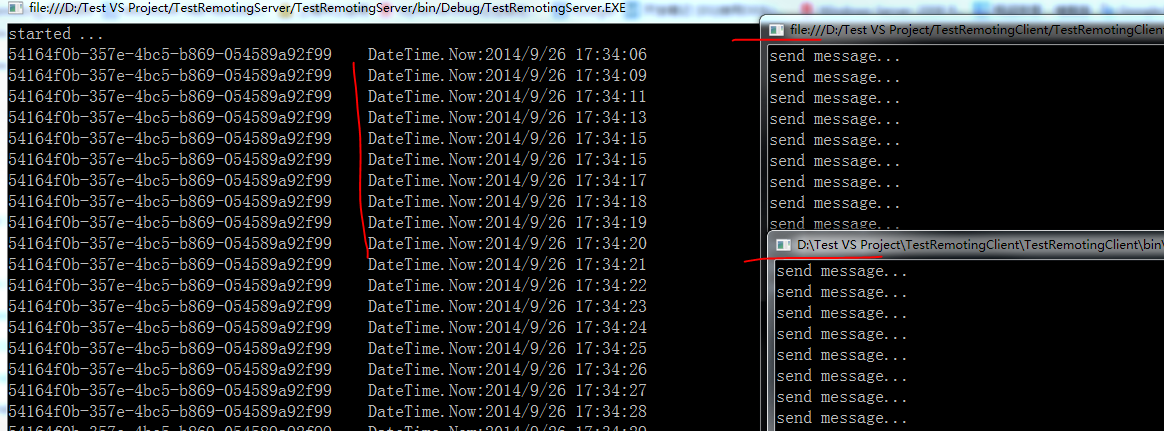
.NET Remoting 咱只写三篇 应该能给大家带来些了解,应对面试
作者:释迦苦僧 出处:http://www.cnblogs.com/woxpp/p/3997984.html 本文版权归作者和博客园共有,欢迎转载,但未经作者同意必须保留此段声明,且在文章页面明显位置给出原文连接。
.NET Remoting学习笔记(三)信道的更多相关文章
- 【转载】.NET Remoting学习笔记(三)信道
目录 .NET Remoting学习笔记(一)概念 .NET Remoting学习笔记(二)激活方式 .NET Remoting学习笔记(三)信道 参考:♂风车车.Net .NET Framework ...
- .NET Remoting学习笔记(二)激活方式
目录 .NET Remoting学习笔记(一)概念 .NET Remoting学习笔记(二)激活方式 .NET Remoting学习笔记(三)信道 参考:百度百科 ♂风车车.Net 激活方式概念 在 ...
- .NET Remoting学习笔记(一)概念
目录 .NET Remoting学习笔记(一)概念 .NET Remoting学习笔记(二)激活方式 .NET Remoting学习笔记(三)信道 背景 自接触编程以来,一直听过这个名词Remotin ...
- 【转载】.NET Remoting学习笔记(二)激活方式
目录 .NET Remoting学习笔记(一)概念 .NET Remoting学习笔记(二)激活方式 .NET Remoting学习笔记(三)信道 参考:百度百科 ♂风车车.Net 激活方式概念 在访 ...
- 【转载】.NET Remoting学习笔记(一)概念
目录 .NET Remoting学习笔记(一)概念 .NET Remoting学习笔记(二)激活方式 .NET Remoting学习笔记(三)信道 背景 自接触编程以来,一直听过这个名词Remotin ...
- Oracle学习笔记三 SQL命令
SQL简介 SQL 支持下列类别的命令: 1.数据定义语言(DDL) 2.数据操纵语言(DML) 3.事务控制语言(TCL) 4.数据控制语言(DCL)
- [Firefly引擎][学习笔记三][已完结]所需模块封装
原地址:http://www.9miao.com/question-15-54671.html 学习笔记一传送门学习笔记二传送门 学习笔记三导读: 笔记三主要就是各个模块的封装了,这里贴 ...
- JSP学习笔记(三):简单的Tomcat Web服务器
注意:每次对Tomcat配置文件进行修改后,必须重启Tomcat 在E盘的DATA文件夹中创建TomcatDemo文件夹,并将Tomcat安装路径下的webapps/ROOT中的WEB-INF文件夹复 ...
- java之jvm学习笔记三(Class文件检验器)
java之jvm学习笔记三(Class文件检验器) 前面的学习我们知道了class文件被类装载器所装载,但是在装载class文件之前或之后,class文件实际上还需要被校验,这就是今天的学习主题,cl ...
随机推荐
- modelsim10.0C编译ISE14.7的xilinx库(xilinx ip核)
1.打开D:\Xilinx\14.7\ISE_DS\ISE\bin\nt64\compxlibgui.exe,nt64表示系统是64位,如果是32位,换成nt,然后按照界面所示一步一步执行, 2.修改 ...
- 基本数据类型范围大小&&字节大小
char -128 ~ +127 short -32767 ~ + 32768 unsigned short 0 ~ 65536 int -2147483648 ~ +2147483647 unsig ...
- 使用commons-logging和log4j记录日志
一,为什么要使用commons-logging+log4j? commons-logging和log4j都是Apache下的开源项目.commons-logging的目的是为“所有的Java日志实现” ...
- FreeBSD_11-系统管理——{Part_0-基础}
Tips: sysctl -d kern.maxvnodes #查看系统控制选项的含义 true > file #清空文件内容 alias ls 'ls -I(大写i)' #取消 root 的 ...
- NOIP2013 题解
转圈游戏 题解:快速幂 #include <cstdio> int n, m, k, x; inline long long QuickPow(int a, int k, int MOD) ...
- andorid lint
(一)Lint简介 Android SDK提供了一个代码扫描工具,称为lint.可以帮助您轻松地识别并纠正问题与结构质量的代码,不必执行应用程序或编写任何测试用例.每个问题检测到该工具报告的一个描述消 ...
- HashMap源码解析
本文转载摘录自http://www.importnew.com/20386.html Java为数据结构中的映射定义了一个接口java.util.Map,此接口主要有四个常用的实现类,分别是HashM ...
- EDMA3随笔
最近查DM814x上两个M3莫名其妙挂掉的问题查了将近两周,最后发现居然是各个模块的dma乱用引起的. A8上的音频mcasp用了两个dma通道…… TI给的simcop里面imx实现的swosd又用 ...
- Robberies(HDU2955):01背包+概率转换问题(思维转换)
Robberies HDU2955 因为题目涉及求浮点数的计算:则不能从正面使用01背包求解... 为了能够使用01背包!从唯一的整数(抢到的钱下手)... 之后就是概率的问题: 题目只是给出被抓的 ...
- 安装完成Windows服务后自动打开
使用DOS进程开启服务 设置serviceProcessInstaller1控件的Account属性为“LocalSystem”设置serviceInstaller1控件的StartType属性为&q ...