
ecshop搜索出现相关商品的效果滑动下拉效果
ecshop搜索栏效果如下
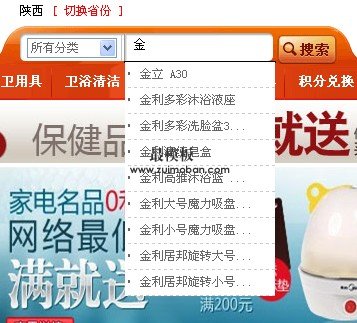
所需要的样式我们可以复制到style.css里:
- /*搜索滑动效果*/
- .Menu {
- position:absolute;
- top:30px;
- left:7px;
- width:150px;
- height:auto;
- z-index:1;
- background:#FFF;
- border:1px solid #000;
- display:none;
- }
- .Menu2 {
- position: absolute;
- left:0;
- top:0;
- width:100%;
- height:auto;
- overflow:hidden;
- z-index:1;
- }
- .Menu2 ul{margin:0;padding:0}
- .Menu2 ul li{width:100%;height:25px;line-height:25px;text-indent:15px;
- border-bottom:1px dashed #ccc;color:#666;cursor:pointer;background:#FFF;
- change:expression(
- this.onmouseover=function(){
- this.style.background="#F2F5EF";
- },
- this.onmouseout=function(){
- this.style.background="";
- }
- )
- }
- input{width:200px}
- .form{width:200px;height:auto;}
- .form div{position:relative;top:0;left:0;margin-bottom:5px}
复制代码
以下代码需要加到输入框普遍 比如page_header.lbi
- <script type="text/javascript">
- function showAndHide(obj,types,text){
- var Layer=window.document.getElementById(obj);
- switch(types){
- case "show":
- if(text!='')
- {
- Layer.style.display="block";
- Ajax.call('search_div.php', 'act=search&text=' + text, changesumResp**e, 'GET', 'JSON');
- }
- break;
- case "hide":
- Layer.style.display="none";
- }
- }
- function getValue(obj,str){
- var input=window.document.getElementById(obj);
- input.value=str;
- }
- function changesumResp**e(res)
- {
- var a='';
- for (var i = 0; i < res.content.length; i++)
- {
- a += "<li onmousedown=getValue('keyword','" + res.content[i].goods_name + "')>" + res.content[i].goods_name + "</li>";
- }
- // alert(a);
- document.getElementById('show_stock').innerHTML = a;
- }
- </script>
复制代码
我们输入框的代码
- <input name="keywords" onkeyup="showAndHide('List1','show',this.value);" onblur="showAndHide('List1','hide');" type="text" id="keyword" value="{$search_keywords|escape}" style=" border:0; margin-left:15px;margin-top:5px; width:130px; height:15px;"/>
- <div class="Menu" id="List1">
- <div class="Menu2">
- <ul style="padding:0px; margin:0px;" id="show_stock">
- </ul>
- </div>
- </div>
复制代码
ajax请求php的代码
search_div.php
- <?php
- define('IN_ECS', true);
- require(dirname(__FILE__) . '/includes/init.php');
- require(dirname(__FILE__) . '/admin/includes/lib_main.php');
- if($_REQUEST['act'] == 'search'){
- $keywords = json_str_iconv(trim($_GET['text']));
- $sql = "SELECT goods_name,goods_id FROM " . $GLOBALS['ecs']->table('goods')." where goods_name like '%$keywords%'";
- $brand_array = $GLOBALS['db']->getall($sql);
- foreach($brand_array as $ids =>$value)
- {
- $brand_array[$ids]['goods_name'] = sub_str_xaphp($brand_array[$ids]['goods_name'],5);
- }
- make_json_result($brand_array);
- }
- function sub_str_xaphp($str, $length = 0, $append = true)
- {
- $str = trim($str);
- $strlength = strlen($str);
- if ($length == 0 || $length >= $strlength)
- {
- return $str;
- }
- elseif ($length < 0)
- {
- $length = $strlength + $length;
- if ($length < 0)
- {
- $length = $strlength;
- }
- }
- if (function_exists('mb_substr'))
- {
- $newstr = mb_substr($str, 0, $length, EC_CHARSET);
- }
- elseif (function_exists('iconv_substr'))
- {
- $newstr = iconv_substr($str, 0, $length, EC_CHARSET);
- }
- else
- {
- //$newstr = trim_right(substr($str, 0, $length));
- $newstr = substr($str, 0, $length);
- }
- if ($append && $str != $newstr)
- {
- $newstr .= '';
- }
- return $newstr;
- }
- ?>
复制代码
在商品少的情况下 我们之间查询 如果多了,最模板建议修改程序
ecshop搜索出现相关商品的效果滑动下拉效果的更多相关文章
- jQuery手写几个常见的滑动下拉菜单 分分秒秒学习JS
一般的企业网站再我们再实际工作中,有些特效,用jQuery来做,显得极其简单,除非一些大的公司,需要封装自己的类. 今天,我们讲解jQuery入门知识,来写几个简单jQuery滑动下拉菜单.感受一下j ...
- jQuery实现折叠下拉效果
<!DOCTYPE html><html lang="en"><head> <meta charset="UTF-8" ...
- Android 聊天表情输入、表情翻页带效果、下拉刷新聊天记录
经过一个星期的折腾,最终做完了这个Android 聊天表情输入.表情翻页带效果.下拉刷新聊天记录.这仅仅是一个单独聊天表情的输入,以及聊天的效果实现.由于我没有写server,所以没有两方聊天的效果. ...
- Easy UI combobox实现类似 Select2的效果,下拉带搜索框
一直在开发一个新系统,其中用Easy UI作为前端框架,少不了用 combobox做为一个 下拉控件,它支持 可编辑 模糊本地数据过滤,也可支持 不可编辑 下拉 选择的功能: $('#ID' ).co ...
- MVC身份验证.MVC过滤器.MVC6关键字Task,Async.前端模拟表单验证,提交.自定义匿名集合.Edge导出到Excel.BootstrapTree树状菜单的全选和反选.bootstrap可搜索可多选可全选下拉框
1.MVC身份验证. 有两种方式.一个是传统的所有控制器继承自定义Control,然后再里面用MVC的过滤器拦截.所以每次网站的后台被访问时.就会先走入拦截器.进行前端和后端的验证 一个是利用(MVC ...
- Android抽屉(SlidingDrawer --类似android通知栏下拉效果)
Android抽屉(SlidingDrawer)的实现发 - 红黑联盟http://www.2cto.com/kf/201301/182507.html 可动态布局的Android抽屉之基础http: ...
- 第六章 使用 Bootstrap Typeahead 组件(百度下拉效果)(续)
官方:http://twitter.github.io/typeahead.js/ 示例:http://twitter.github.io/typeahead.js/examples/(本文展示:Op ...
- html、css实现导航栏5种常用下拉效果
实现的效果:鼠标移入按钮时按钮中的内容就会出现,分别展示不同的出现效果.效果难点:不使用JavaScript,那这个效果的难点就是在于:hover伪类的掌控,以及考验对html的结构掌握. 1. ht ...
- iosselect:一个js picker项目,在H5中实现IOS的下拉效果
iosselect是在webapp下的一个picker组件,可以轻松实现各类选择器效果.比如地区选择 时间选择 日期选择等. 下面是一个地址选择器demo截图,可以访问:http://zhoushen ...
随机推荐
- javaScript学习之ajax
一.xmlHttpRequest对象的创建 ajax的核心的XMLHttpRequest对象,下面的代码给出了兼容各个浏览器的方法实现 function createXHR(){ if(typeof ...
- javascript 函数返回值(return)、定时器(setTimeout、setInterval)
一.函数的返回值:return 1.函数名+括号=return后面的值 <script> function fn1(){ return 100; } alert(fn1()); // 10 ...
- asp.net 登陆验证 Form表单验证的3种方式 FormsAuthentication.SetAuthCookie;FormsAuthentication.RedirectFromLoginPage;FormsAuthenticationTicket
我们在登陆成功后,使用下面的3种方法,都是同一个目的:创建身份验证票并将其附加到 Cookie, 当我们用Forms认证方式的时候,可以使用HttpContext.Current.User.Ident ...
- Singlton设计模式
单例定义: 确保一个类只有一个实例,并提供全局访问点. 适用场景: 1.) 当系统中某个类必须仅有一个实例对象,同时访问该系统的所有访问者必须访问同一个实例对象时,且该对象实例自身占用资源又不大时. ...
- 常用SQL操作(MySQL或PostgreSQL)与相关数据库概念
本文对常用数据库操作及相关基本概念进行总结:MySQL和PostgreSQL对SQL的支持有所不同,大部分SQL操作还是一样的. 选择要用的数据库(MySQL):use database_name; ...
- How to export a template in Visual Studio?
Create a customize template file: 1.template arguments introduction like: 上图只是其中一部分,更多请查看文后的参考资源 tem ...
- bnuoj 44359 快来买肉松饼
http://www.bnuoj.com/contest/problem_show.php?pid=44359 快来买肉松饼 Time Limit: 5000 ms Case Time Lim ...
- websotrm注册码
webStorm : UserName:William ===== LICENSE BEGIN ===== 45550-12042010 00001SzFN0n1bPII7FnAxnt0DDOPJA ...
- [转]JqueryEasyUI教程入门篇
什么是jQueryEasyUI? JqueryUI是一组基于jQuery的UI插件集合 学习jQueryEasyUI的条件? 必须掌握Jquery的基本语法知识 jQueryEasyUI的特点? 1. ...
- javascript 内置对象
什么是对象 javascript中的所有事物都是对象:字符串 数组 数值 函数... 每个对象都带有属性和方法 javascript允许自定义对象 自定义对象: 定义并创建对象实例 使 ...