
CoreLocation框架的使用---地理编码
#import "ViewController.h"

#import <CoreLocation/CoreLocation.h>

@interface ViewController ()

@property (nonatomic, strong) CLGeocoder *geoCoder;

@end

@implementation ViewController

- (CLGeocoder *)geoCoder

{

    if (!_geoCoder) {

         // 1.创建解码器对象

        _geoCoder = [[CLGeocoder alloc]init];

    }

    return _geoCoder;

}

//地理编码 (地方名-->经纬度坐标)

- (IBAction)geoCoder:(UIButton *)sender {//使用sb连线button,点击方法

    NSString *str = @"李店";

   //2.地理编码

    [self.geoCoder geocodeAddressString:str completionHandler:^(NSArray *placemarks, NSError *error) {

        //参数placemarks是一个数组,里面放着地表对象

        for (CLPlacemark *pl in placemarks) {

            //2.获取CLLocation

            CLLocation *loc = pl.location;

            NSLog(@"地址:%@ 纬度:%f  经度:%f ",pl.name,loc.coordinate.latitude,loc.coordinate.longitude);

        }

        /*1.获取第一个地标对象  里面封装了地理位置信息

        CLPlacemark *pl = [placemarks firstObject];

          2.获取CLLocation

        CLLocation *loc = pl.location;

        NSLog(@"%f   %f ",loc.coordinate.latitude,loc.coordinate.longitude);*/

    }];

}

//反地理编码(经纬度坐标-->地方名)

- (IBAction)reverseCoder {

    //随便创建一个经纬度坐标.

    CLLocation *loc = [[CLLocation alloc]initWithLatitude: longitude:];

    [self.geoCoder reverseGeocodeLocation:loc completionHandler:^(NSArray *placemarks, NSError *error) {

                //1.获取地标对象  里面封装了地理位置信息

                CLPlacemark *pl = [placemarks firstObject];

                NSLog(@"地方名:%@ ",pl.name);

    }];

}
以下内容转自:iOS开发拓展篇—CoreLocation地理编码 - 文顶顶 - 博客园
一、简单说明
CLGeocoder:地理编码器,其中Geo是地理的英文单词Geography的简写。
1.使用CLGeocoder可以完成“地理编码”和“反地理编码”
地理编码:根据给定的地名,获得具体的位置信息(比如经纬度、地址的全称等)
反地理编码:根据给定的经纬度,获得具体的位置信息
(1)地理编码方法
- (void)geocodeAddressString:(NSString *)addressString completionHandler:(CLGeocodeCompletionHandler)completionHandler;
(2)反地理编码方法
- (void)reverseGeocodeLocation:(CLLocation *)location completionHandler:(CLGeocodeCompletionHandler)completionHandler;
2.CLGeocodeCompletionHandler
当地理\反地理编码完成时,就会调用CLGeocodeCompletionHandler

这个block传递2个参数
error :当编码出错时(比如编码不出具体的信息)有值
placemarks :里面装着CLPlacemark对象
3.CLPlacemark
说明:CLPlacemark的字面意思是地标,封装详细的地址位置信息
地理位置 @property (nonatomic, readonly) CLLocation *location;
区域 @property (nonatomic, readonly) CLRegion *region;
详细的地址信息 @property (nonatomic, readonly) NSDictionary *addressDictionary;
地址名称 @property (nonatomic, readonly) NSString *name;
城市 @property (nonatomic, readonly) NSString *locality;
二、代码示例:
在storyboard中搭建界面如下:

实现代码:
YYViewController.m文件

  1 //

  2 //  YYViewController.m

  3 //  19-地理编码

  4 //

  5 //  Created by apple on 14-8-11.

  6 //  Copyright (c) 2014年 yangyong. All rights reserved.

  7 //

  8

  9 #import "YYViewController.h"

 10 #import <CoreLocation/CoreLocation.h>

 11

 12 @interface YYViewController ()

 13 @property(nonatomic,strong)CLGeocoder *geocoder;

 14 #pragma mark-地理编码

 15 - (IBAction)geocode;

 16 @property (weak, nonatomic) IBOutlet UITextField *addressField;

 17 @property (weak, nonatomic) IBOutlet UILabel *longitudeLabel;

 18 @property (weak, nonatomic) IBOutlet UILabel *latitudeLabel;

 19 @property (weak, nonatomic) IBOutlet UILabel *detailAddressLabel;

 20

 21 #pragma mark-反地理编码

 22

 23 - (IBAction)reverseGeocode;

 24 @property (weak, nonatomic) IBOutlet UITextField *longitudeField;

 25 @property (weak, nonatomic) IBOutlet UITextField *latitudeField;

 26 @property (weak, nonatomic) IBOutlet UILabel *reverdeDetailAddressLabel;

 27 @end

 28

 29 @implementation YYViewController

 30

 31 #pragma mark-懒加载

 32 -(CLGeocoder *)geocoder

 33 {

 34     if (_geocoder==nil) {

 35         _geocoder=[[CLGeocoder alloc]init];

 36     }

 37     return _geocoder;

 38 }

 39 - (void)viewDidLoad

 40 {

 41     [super viewDidLoad];

 42 }

 43 /**

 44  *  地理编码:地名—>经纬度坐标

 45  */

 46 - (IBAction)geocode {

 47     //1.获得输入的地址

 48     NSString *address=self.addressField.text;

 49     if (address.length==0) return;

 50

 51     //2.开始地理编码

 52     //说明:调用下面的方法开始编码,不管编码是成功还是失败都会调用block中的方法

 53     [self.geocoder geocodeAddressString:address completionHandler:^(NSArray *placemarks, NSError *error) {

 54         //如果有错误信息,或者是数组中获取的地名元素数量为0,那么说明没有找到

 55         if (error || placemarks.count==0) {

 56             self.detailAddressLabel.text=@"你输入的地址没找到,可能在月球上";

 57         }else   //  编码成功,找到了具体的位置信息

 58         {

 59             //打印查看找到的所有的位置信息

 60                 /*

 61                     name:名称

 62                     locality:城市

 63                     country:国家

 64                     postalCode:邮政编码

 65                  */

 66             for (CLPlacemark *placemark in placemarks) {

 67                 NSLog(@"name=%@ locality=%@ country=%@ postalCode=%@",placemark.name,placemark.locality,placemark.country,placemark.postalCode);

 68             }

 69

 70             //取出获取的地理信息数组中的第一个显示在界面上

 71             CLPlacemark *firstPlacemark=[placemarks firstObject];

 72             //详细地址名称

 73             self.detailAddressLabel.text=firstPlacemark.name;

 74             //纬度

 75             CLLocationDegrees latitude=firstPlacemark.location.coordinate.latitude;

 76             //经度

 77             CLLocationDegrees longitude=firstPlacemark.location.coordinate.longitude;

 78             self.latitudeLabel.text=[NSString stringWithFormat:@"%.2f",latitude];

 79             self.longitudeLabel.text=[NSString stringWithFormat:@"%.2f",longitude];

 80         }

 81     }];

 82 }

 83

 84 /**

 85  *  反地理编码:经纬度坐标—>地名

 86  */

 87 - (IBAction)reverseGeocode {

 88     //1.获得输入的经纬度

 89     NSString *longtitudeText=self.longitudeField.text;

 90     NSString *latitudeText=self.latitudeField.text;

 91     if (longtitudeText.length==0||latitudeText.length==0) return;

 92

 93     CLLocationDegrees latitude=[latitudeText doubleValue];

 94     CLLocationDegrees longitude=[longtitudeText doubleValue];

 95

 96     CLLocation *location=[[CLLocation alloc]initWithLatitude:latitude longitude:longitude];

 97     //2.反地理编码

 98     [self.geocoder reverseGeocodeLocation:location completionHandler:^(NSArray *placemarks, NSError *error) {

 99         if (error||placemarks.count==0) {

100             self.reverdeDetailAddressLabel.text=@"你输入的地址没找到,可能在月球上";

101         }else//编码成功

102         {

103             //显示最前面的地标信息

104             CLPlacemark *firstPlacemark=[placemarks firstObject];

105             self.reverdeDetailAddressLabel.text=firstPlacemark.name;

106             //经纬度

107             CLLocationDegrees latitude=firstPlacemark.location.coordinate.latitude;

108             CLLocationDegrees longitude=firstPlacemark.location.coordinate.longitude;

109             self.latitudeField.text=[NSString stringWithFormat:@"%.2f",latitude];

110             self.longitudeField.text=[NSString stringWithFormat:@"%.2f",longitude];

111         }

112     }];

113 }

114

115 -(void)touchesBegan:(NSSet *)touches withEvent:(UIEvent *)event

116 {

117     [self.view endEditing:YES];

118 }

119 @end
实现效果:
(1)地理编码:(地名->经纬度坐标)
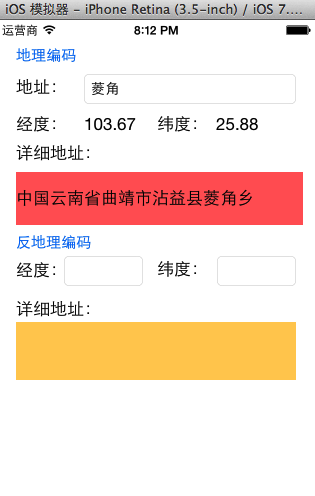
打印输出:

(2)反地理编码:(经纬度—>地名)

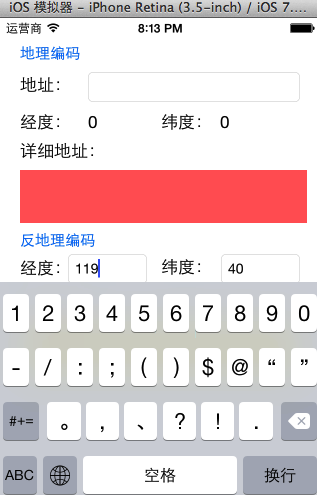
(3)注意:调整键盘
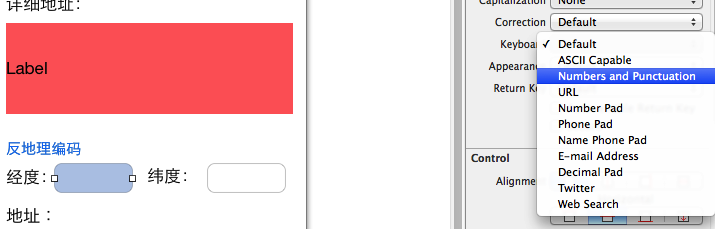
点击经纬度textField进行输入的时候,弹出的键盘如下
(4)注意:搜索的所有结果都是在中国境内的,因为苹果在中国的地图服务商是高德地图。
CoreLocation框架的使用---地理编码的更多相关文章
- 猫猫学iOS 之CoreLocation反地理编码小Demo输入经纬度得到城市
猫猫分享,必须精品 原创文章,欢迎转载.转载请注明:翟乃玉的博客 地址:http://blog.csdn.net/u013357243 一:效果 输入经纬度,能够得到相应的地名 二:思路 跟地里编码差 ...
- AJ学IOS 之CoreLocation反地理编码小Demo输入经纬度得到城市
AJ分享,必须精品 一:效果 输入经纬度,可以得到相应的地名 二:思路 跟地里编码差不多 1.获取用户输入的经纬度 2.根据用户输入的经纬度创建CLLocation对象 3.根据CLLocation对 ...
- iOS地图 -- 地理编码和反地理编码
地理编码和反地理编码 用到的类和方法 CLGeocoder --> 地理编码管理器 - (void)geocodeAddressString:(NSString *)addressString ...
- 【iOS】7.4 定位服务->2.1.3.2 定位 - 官方框架CoreLocation 功能2:地理编码和反地理编码
本文并非最终版本,如果想要关注更新或更正的内容请关注文集,联系方式详见文末,如有疏忽和遗漏,欢迎指正. 本文相关目录: ================== 所属文集:[iOS]07 设备工具 === ...
- IOS CoreLocation框架的使用(用于地理定位)
● 在移动互联网时代,移动app能解决用户的很多生活琐事,比如 ● 导航:去任意陌生的地方 ● 周边:找餐馆.找酒店.找银行.找电影院 ● 在上述应用中,都用到了地图和定位功能,在iOS开发中 ...
- iOS地理反地理编码--CoreLocation
.sidebar{float:left;width:220px;} .container-fluid>.content{margin-left:240px;} a{color:#0069d6;t ...
- iOS开发拓展篇—CoreLocation地理编码
iOS开发拓展篇—CoreLocation地理编码 一.简单说明 CLGeocoder:地理编码器,其中Geo是地理的英文单词Geography的简写. 1.使用CLGeocoder可以完成“地理编码 ...
- 地图定位CoreLocation框架,地理位置编码与反编码
在现代互联网时代,越来越多的应用,都用到了地图定位功能,在iOS开发中,想要加入这种功能,必须基于两个框架进行开发: 1.Map Kit:用于显示地图, 2.CoreLocation:用于显示地理位置 ...
- AJ学IOS 之CoreLocation地理编码小Demo输入城市得到经纬度
AJ分享,必须精品 一:效果 输入地名,可以得到相应的经纬度,知识为了学习写的小Demo 二:实现步骤 一 :首先获取用户输入的位置. 二 :创建地理编码对象. 三 :利用地理编码对象编码,根据传入的 ...
随机推荐
- 异步数据库查询 Z
Introduction Microsoft .NET 4.5 introduced new "async and await" methods to provide an eas ...
- day8-多进程和多线程
Python线程 Threading用于提供线程相关的操作,线程是应用程序中工作的最小单元. import threading import time def sayhi(num): #定义每个线程要 ...
- 伪静态URLRewrite学习笔记
UrlRewrite: UrlRewrite就是我们通常说的地址重写,用户得到的全部都是经过处理后的URL地址,类似于Apache的mod_rewrite.将我们的动态网页地址转化为静态的地址,如ht ...
- 初始化成员列表 ——— 类的const成员和引用成员的初始化
class A { public: A(){}; const int num; CString& s; } A::A() { cout<<A con<<endl; } ...
- JavaScript 为什么要通过原型 prototype 调用函数, 而不是直接调用?
现象 经常在网上或者阅读源码时看到下面的代码: Array.prototype.slice.call(arr, 3); 而不是 arr.slice(3); 原因 这是为什么呢, 毕竟下面这种方法更短, ...
- projecteuler Problem 8 Largest product in a series
The four adjacent digits in the 1000-digit number that have the greatest product are 9 × 9 × 8 × 9 = ...
- MVC5+EF6简单实例---以原有SQLServer数据库两表联合查询为例
有二三年没写代码了,**内的工作就是这样,容易废人!看到园子里这么多大侠朝气蓬勃的,我想也要学点东西并和大家分享,共同进步!快乐每一天,进步每一天!言归正传! 通过最近一段时间对MVC5.EF6的学习 ...
- ado.net access oracle dataset via store procedure
使用存储过程返回结果集,并绑定到ado.net对象中在sql server里面是非常直观的. 1: create procedure GetAllRecords 2: as 3: select * f ...
- 动态生成dropdownlist
<td colspan=" id="td_ddl" runat="server"> </td> 后台代码: #region 动 ...
- C++中四种转换类型的区别
一.四种转换类型比较: 类型转换有c风格的,当然还有c++风格的.c风格的转换的格式很简单(TYPE)EXPRESSION,但是c风格的类型转换有不少的缺点,有的时候用c风格的转换是不合适的,因为它可 ...