
Add sharing to your app via UIActivityViewController
http://www.codingexplorer.com/add-sharing-to-your-app-via-uiactivityviewcontroller/
April 4, 2014
Ever wonder what various apps like Photos or Safari use when you click on the share button? So did I until a few days ago. It is apparently UIActivityViewController. I just learned a bit about how to use it, so I thought I would pass it along.
Update November 10, 2014: Want to see how to use UIActivityViewController in Swift? Check out the my newer post Add sharing to your Swift app via UIActivityViewController
Setting the Icon
While not a HUGE step, I thought I might mention it anyway. For my app, I wanted to use the standard Apple sharing button (which in iOS7 is a box with an arrow pointing up from the center). To get it from Interface Builder, you must use a UIBarButtonItem, so this button can only be in a UINavigationBar (part of UINavigationController) or UIToolbar. You simply add a UIBarButtonItem, and change its “Identifier” in the Attributes Inspector to “Action, as shown in the image.
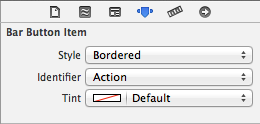
The Identifier is set to Action for the sharing icon.
Now the Code
This is actually surprisingly easy to do. So wire that up to an IBAction, here is the gist of how mine was set up.
|
1
2
3
4
5
6
7
8
9
10
11
12
13
14
15
16
17
18
19
20
21
|
- (IBAction)shareButton:(UIBarButtonItem *)sender
{
NSString *textToShare = @"Look at this awesome website for aspiring iOS Developers!";
NSURL *myWebsite = [NSURL URLWithString:@"http://www.codingexplorer.com/"];
NSArray *objectsToShare = @[textToShare, myWebsite];
UIActivityViewController *activityVC = [[UIActivityViewController alloc] initWithActivityItems:objectsToShare applicationActivities:nil];
NSArray *excludeActivities = @[UIActivityTypeAirDrop,
UIActivityTypePrint,
UIActivityTypeAssignToContact,
UIActivityTypeSaveToCameraRoll,
UIActivityTypeAddToReadingList,
UIActivityTypePostToFlickr,
UIActivityTypePostToVimeo];
activityVC.excludedActivityTypes = excludeActivities;
[self presentViewController:activityVC animated:YES completion:nil];
}
|
That’s about it. You make an NSArray of objects to share, and basically pass that along to the UIActivityViewController when you instantiate it. For my app, I just wanted an NSString, and an NSURL to be shared, so I excluded things where that would make less sense like Printing, AirDropping, Vimeo, etc. You can read more about this at the AppleUIActivity Class Reference. Currently it supports these UIActivityTypes:
- UIActivityTypePostToFacebook
- UIActivityTypePostToTwitter
- UIActivityTypePostToWeibo
- UIActivityTypeMessage
- UIActivityTypeMail
- UIActivityTypePrint
- UIActivityTypeCopyToPasteboard
- UIActivityTypeAssignToContact
- UIActivityTypeSaveToCameraRoll
- UIActivityTypeAddToReadingList
- UIActivityTypePostToFlickr
- UIActivityTypePostToVimeo
- UIActivityTypePostToTencentWeibo
- UIActivityTypeAirDrop
So for my app, I left it able to post to Facebook, Twitter, Weibo, Tencent Weibo, Message, Mail, and copy to the Pasteboard.
Anyway, you then set that to the excludedActivityTypes property, and then tell your current view controller to present the UIActivityViewController. I was very surprised at how easy this was. So when you click on Facebook or Twitter in the UIActivityViewController (as long as you are set up to use Twitter or Facebook), it will show your text, and attach the URL in whatever way is appropriate for that social media choice. If you use Message or copy it to the pasteboard, you should get something similar to “Look at this awesome website for aspiring iOS Developers! http://www.codingexplorer.com/ “.
I will probably update this post as I learn more about UIActivityViewController. I hope you found this article helpful. If you did, don’t hesitate to share this post on twitter or your social media of choice. The blog is still pretty new, and every share helps. Of course, if you have any questions, don’t hesitate to contact me on twitter @CodingExplorer, and I’ll see what I can do. Thanks!
Sources:
This post was heavily influenced by a great tutorial for using AirDrop from the AppCoda Blog at http://www.appcoda.com/ios7-airdrop-programming-tutorial/ written by Simon Ng. Thank you for the great tutorial.
Filed Under: Class Reference
Add sharing to your app via UIActivityViewController的更多相关文章
- [React] Use react-rewards to add microinteractions to React app to reward users for some actions
It's important that our users enjoy using our application or website. One way we can make it happen ...
- 【原创分享·支付宝支付】HBuilder打包APP调用支付宝客户端支付
前言 最近有点空余时间,所以,就研究了一下APP支付.前面很早就搞完APP的微信支付了,但是由于时间上和应用上的情况,支付宝一直没空去研究.然后等我空了的时候,发现支付宝居然升级了支付逻辑,虽然目前还 ...
- [iOS]The app icon set named "AppIcon" did not have any applicable content.
Develop Tools: xCode 5.1 I write a demo for app settings feature. The tutorial url is here. When I a ...
- bug_ _ android.view.WindowManager$BadTokenException: Unable to add window -- token
========4 关于android的一个常见错误:Unable to add window --token is not valid android.view.WindowManage ...
- The app icon set named "AppIcon" did not have any applicable content.
Develop Tools: xCode 5.1 I write a demo for app settings feature. The tutorial url is here. When I a ...
- 支付宝app支付服务器签名代码(C#)
1,引入支付宝的sdk(AopSdk) 支付宝接口文档网站可下载,注意下载C#版本: 2,代码写的比较简单 public static string RSASign(string OrderNo,de ...
- Android Studio搭建系统App开发环境
一.前言 在Android的体系中开发普通app使用Android Studio这一利器会非常的方便.但是开发系统app可能就会有些吃力,不过经过一些配置仍然会 很简单.我们知道系统app因为涉及到一 ...
- Microsoft Azure Tutorial: Build your first movie inventory web app with just a few lines of code
Editor’s Note: The following is a guest post from Mustafa Mahmutović, a Microsoft Student Partner wh ...
- ionic 项目内部更新用到的插件,退出app插件
一 cordova-plugin-app-version插件 用来获取APP版本 ionic plugin add cordova-plugin-app-version -----cordova-p ...
随机推荐
- 在Linux中永久设置Anaconda环境变量的方法
[感谢:http://www.codesec.net/view/459539.html] 如果在安装Anaconda的过程中没有将安装路径添加到系统环境变量中,需要在安装后手工添加: 1.在终端输入$ ...
- 用wamp配置的环境,想用CMD连接mysql怎么连
签:用wamp配置的环境 想用cmd连接mysql怎么连 进到d盘该目录 (cd切不了盘,就输入盘符加冒号回车,再cd到目录) WAMP装好后,mysql数据库运行时没有 mysql 和 ...
- linux命令行与shell脚本编程大全---更多bash shell命令
进程状态:0代表正在运行:S代表在休眠:R代表可运行,正等待运行:Z代表僵化,进程已经结束但父进程已不存在:T代表停止. 查看有那些进程运行:ps -ef 基本的linux文件系统: 1.ext文件 ...
- yum install nginx
先安装nginx的yum源 http://nginx.org/en/linux_packages.html#stable 找到链接,安装: rpm -ivh http://nginx.org/pack ...
- throw和throws的区别
1. 作用不同: throw用于在程序中抛出异常;throws用于声明在该方法内抛出异常, 2. 使用位置不同:throw位于方法体内部,可以作为单独语句使用,throws必须跟着 ...
- sencha touch 入门系列 (二)sencha touch 开发准备
这是本人第一次写博客教程,没什么经验,文笔也不是很好,写这教程一方面为了巩固自己这段时间的学习成果,一方面帮助大家解决问题,欢迎大家多提建议,指出问题.接下来我们就开始我们的sencha touch开 ...
- 关于rand()与srand()函数
rand函数功能为获取一个伪随机数(伪随机数的概念下面会有介绍). 一.函数名: rand(); 二.声明: int rand(); 三.所在头文件: stdlib.h 四.功能: 返回一个伪随机数. ...
- Oracle客户端与服务器字符集不统一的处理
当Oracle客户端与服务器的字符集不统一时. 症状: 如:ORA-00283: ?????????? 提示信息中有好多问号. 解决方法: 1查询服务器的字符集: SQL> conn / as ...
- 炫酷的时钟--canvas初体验
先啥也不说:来张效果图 我是根据:http://www.imooc.com/learn/133 这里的课程进行学习的.大大的感谢liuyubobobo老师的深入浅出的讲解!! 我在这里仅仅提供我自己的 ...
- MySQL 5.7 深度解析: 半同步复制技术
复制架构衍生史 在谈这个特性之前,我们先来看看MySQL的复制架构衍生史. MySQL的复制分为四种: 普通的replication,异步同步. 搭建简单,使用非常广泛,从mysql诞生之初,就产生了 ...