
【Maven】使用Maven构建多模块项目
Maven多模块项目
Maven多模块项目,适用于一些比较大的项目,通过合理的模块拆分,实现代码的复用,便于维护和管理。尤其是一些开源框架,也是采用多模块的方式,提供插件集成,用户可以根据需要配置指定的模块。
项目结构如下:
test-hd-parent (父级)
---pom.xml
---test-hd-api (第三方接口层)
----pom.xml
---test-hd-foundation (基础工具层)
----pom.xml
---test-hd-resource (资源层)
----pom.xml
---test-hd-service (逻辑业务层)
----pom.xml
---test-hd-modules (web层)
----pom.xml
---test-hd-www (web模块1)
----pom.xml
---test-hd-admin (web模块2)
----pom.xml
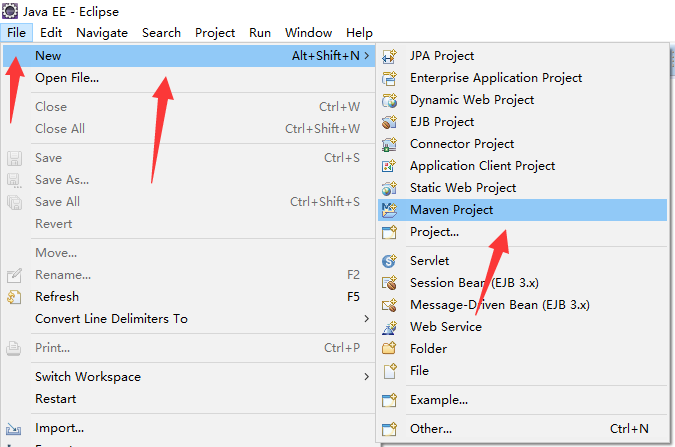
创建一个父maven工程
- 新建一个maven项目,选择存储位置,并选择创建一个简单的maven工程

- 输入Group Id、Artifact Id、Packaging,packaging选择pom包

- 生成父工程,pom.xml如下
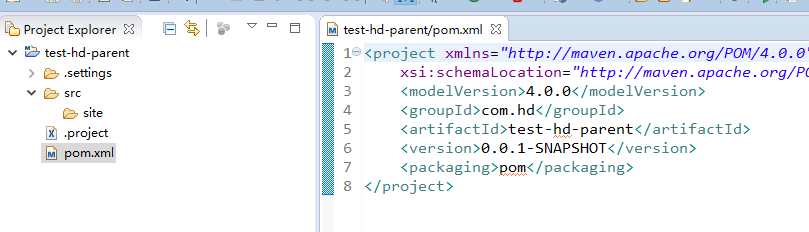
- 删除工程中的src 目录

创建子模块
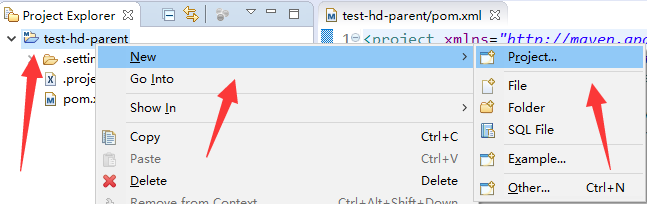
- 右击父工程名---》New---》Project,然后选择新建一个maven module工程

- 设置子工程名以及父工程,再设置快速创建模式
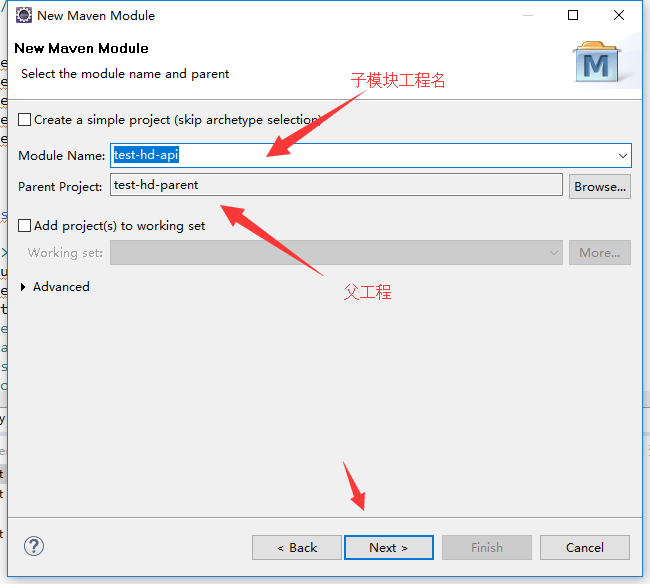
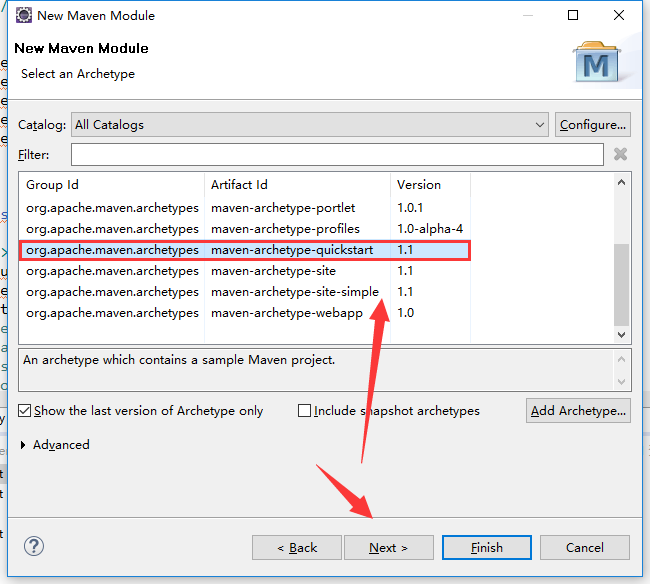
- 得到子工程(test-hd-api,第三方接口层),设置编译的jdk
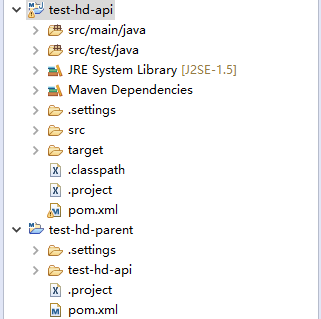
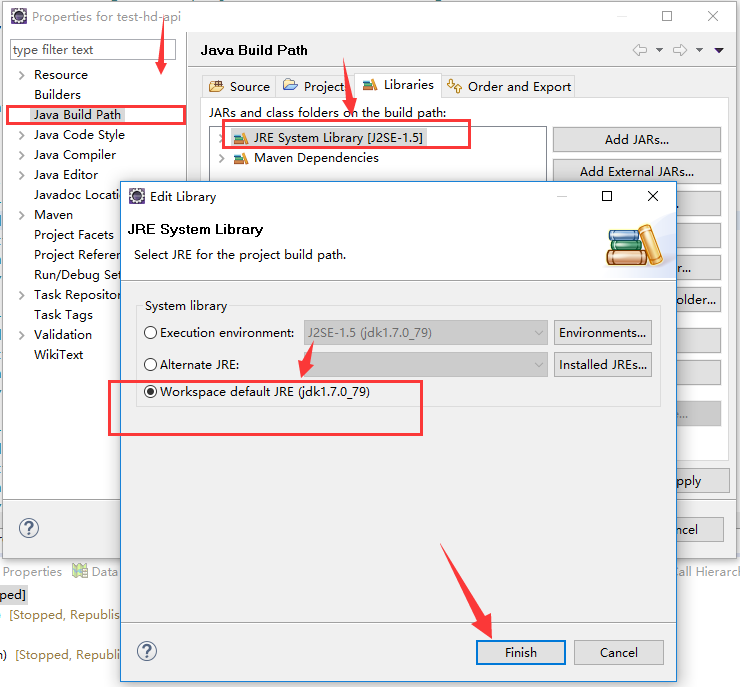
- 同理设置,子模块:test-hd-foundation(基础工具层)、test-hd-resource(资源层) 、test-hd-service(逻辑业务层)
- 新建test-hd-modules (web层),选择创建一个a simple project,输入Group Id、Artifact Id、Packaging,packaging选择pom包


创建web子模块
- web子模块在建在test-hd-modules (web层)里面,右击test-hd-modules 工程名---》New---》Project,然后选择新建一个maven module工程,设置子工程名以及父工程,选择新建web项目
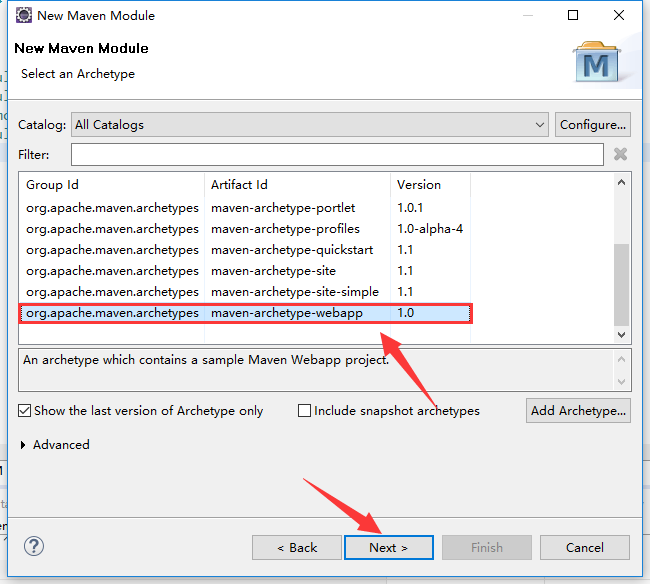
- 配置maven web项目,参照:【Maven】Eclipse 使用Maven创建Java Web项目
- 同理可以配置其他的web子模块 test-hd-admin(web模块2)
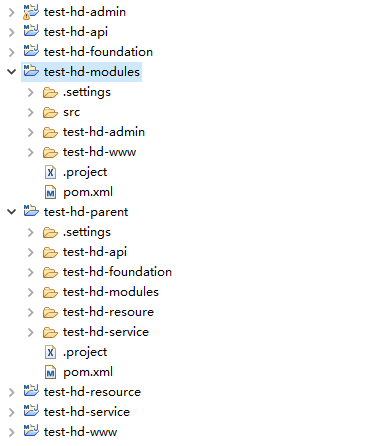
配置个模块的依赖
- 在parent项目pom.xml中建立依赖管理(dependencyManagement)
<project xmlns="http://maven.apache.org/POM/4.0.0" xmlns:xsi="http://www.w3.org/2001/XMLSchema-instance"
xsi:schemaLocation="http://maven.apache.org/POM/4.0.0 http://maven.apache.org/xsd/maven-4.0.0.xsd">
<modelVersion>4.0.0</modelVersion>
<groupId>com.hd</groupId>
<artifactId>test-hd-parent</artifactId>
<version>0.0.1-SNAPSHOT</version>
<packaging>pom</packaging>
<modules>
<module>test-hd-api</module>
<module>test-hd-service</module>
<module>test-hd-resource</module>
<module>test-hd-foundation</module>
<module>test-hd-modules</module>
</modules> <!-- maven依赖 -->
<dependencyManagement> <dependencies>
<!-- hd -->
<dependency>
<groupId>com.hd</groupId>
<artifactId>test-hd-api</artifactId>
<version>0.0.1-SNAPSHOT</version>
</dependency> <dependency>
<groupId>com.hd</groupId>
<artifactId>test-hd-service</artifactId>
<version>0.0.1-SNAPSHOT</version>
</dependency> <dependency>
<groupId>com.hd</groupId>
<artifactId>test-hd-resource</artifactId>
<version>0.0.1-SNAPSHOT</version>
</dependency> <dependency>
<groupId>com.hd</groupId>
<artifactId>test-hd-foundation</artifactId>
<version>0.0.1-SNAPSHOT</version>
</dependency> <!-- Servlet -->
<dependency>
<groupId>javax.servlet</groupId>
<artifactId>javax.servlet-api</artifactId>
<version>3.0.1</version>
<scope>provided</scope>
</dependency>
<dependency>
<groupId>javax.servlet.jsp</groupId>
<artifactId>jsp-api</artifactId>
<version>2.2</version>
<scope>provided</scope>
</dependency> <!-- jstl -->
<dependency>
<groupId>javax.servlet</groupId>
<artifactId>jstl</artifactId>
<version>1.2</version>
</dependency> <dependency>
<groupId>taglibs</groupId>
<artifactId>standard</artifactId>
<version>1.1.2</version>
</dependency> <dependency>
<groupId>junit</groupId>
<artifactId>junit</artifactId>
<version>3.8.1</version>
<scope>test</scope>
</dependency> </dependencies>
</dependencyManagement> </project> - test-hd-foundation中的依赖
 <?xml version="1.0"?>

 <project

     xsi:schemaLocation="http://maven.apache.org/POM/4.0.0 http://maven.apache.org/xsd/maven-4.0.0.xsd"

     xmlns="http://maven.apache.org/POM/4.0.0" xmlns:xsi="http://www.w3.org/2001/XMLSchema-instance">

     <modelVersion>4.0.0</modelVersion>

     <parent>

         <groupId>com.hd</groupId>

         <artifactId>test-hd-parent</artifactId>

         <version>0.0.1-SNAPSHOT</version>

     </parent>

     <artifactId>test-hd-foundation</artifactId>

     <dependencies>

         <!-- servlet -->

         <dependency>

             <groupId>javax.servlet</groupId>

             <artifactId>jstl</artifactId>

         </dependency>

         <dependency>

             <groupId>taglibs</groupId>

             <artifactId>standard</artifactId>

         </dependency>

         <dependency>

             <groupId>junit</groupId>

             <artifactId>junit</artifactId>

         </dependency>

     </dependencies>

     <build>

         <plugins>

             <!-- define the project compile level -->

             <plugin>

                 <groupId>org.apache.maven.plugins</groupId>

                 <artifactId>maven-compiler-plugin</artifactId>

                 <version>2.3.2</version>

                 <configuration>

                     <source>1.7</source>

                     <target>1.7</target>

                 </configuration>

             </plugin>

         </plugins>

     </build>

</project> - test-hd-api中的依赖关系
 <?xml version="1.0"?>

 <project

     xsi:schemaLocation="http://maven.apache.org/POM/4.0.0 http://maven.apache.org/xsd/maven-4.0.0.xsd"

     xmlns="http://maven.apache.org/POM/4.0.0" xmlns:xsi="http://www.w3.org/2001/XMLSchema-instance">

     <modelVersion>4.0.0</modelVersion>

     <parent>

         <groupId>com.hd</groupId>

         <artifactId>test-hd-parent</artifactId>

         <version>0.0.1-SNAPSHOT</version>

     </parent>

     <artifactId>test-hd-api</artifactId>

     <dependencies>

         <dependency>

             <groupId>com.hd</groupId>

             <artifactId>test-hd-foundation</artifactId>

         </dependency>

         <!-- servlet -->

         <dependency>

             <groupId>javax.servlet</groupId>

             <artifactId>jstl</artifactId>

         </dependency>

         <dependency>

             <groupId>taglibs</groupId>

             <artifactId>standard</artifactId>

         </dependency>

         <dependency>

             <groupId>junit</groupId>

             <artifactId>junit</artifactId>

         </dependency>

     </dependencies>

     <build>

         <plugins>

             <!-- define the project compile level -->

             <plugin>

                 <groupId>org.apache.maven.plugins</groupId>

                 <artifactId>maven-compiler-plugin</artifactId>

                 <version>2.3.2</version>

                 <configuration>

                     <source>1.7</source>

                     <target>1.7</target>

                 </configuration>

             </plugin>

         </plugins>

         <finalName>test-hd-api</finalName>

     </build>

</project> - test-hd-resource中的依赖关系
 <?xml version="1.0"?>

 <project

     xsi:schemaLocation="http://maven.apache.org/POM/4.0.0 http://maven.apache.org/xsd/maven-4.0.0.xsd"

     xmlns="http://maven.apache.org/POM/4.0.0" xmlns:xsi="http://www.w3.org/2001/XMLSchema-instance">

     <modelVersion>4.0.0</modelVersion>

     <parent>

         <groupId>com.hd</groupId>

         <artifactId>test-hd-parent</artifactId>

         <version>0.0.1-SNAPSHOT</version>

     </parent>

     <artifactId>test-hd-resource</artifactId>

     <dependencies>

         <dependency>

             <groupId>junit</groupId>

             <artifactId>junit</artifactId>

         </dependency>

     </dependencies>

     <build>

         <plugins>

             <!-- define the project compile level -->

             <plugin>

                 <groupId>org.apache.maven.plugins</groupId>

                 <artifactId>maven-compiler-plugin</artifactId>

                 <version>2.3.2</version>

                 <configuration>

                     <source>1.7</source>

                     <target>1.7</target>

                 </configuration>

             </plugin>

         </plugins>

     </build>

</project> - test-hd-service中的依赖关系
 <?xml version="1.0"?>

 <project

     xsi:schemaLocation="http://maven.apache.org/POM/4.0.0 http://maven.apache.org/xsd/maven-4.0.0.xsd"

     xmlns="http://maven.apache.org/POM/4.0.0" xmlns:xsi="http://www.w3.org/2001/XMLSchema-instance">

     <modelVersion>4.0.0</modelVersion>

     <parent>

         <groupId>com.hd</groupId>

         <artifactId>test-hd-parent</artifactId>

         <version>0.0.1-SNAPSHOT</version>

     </parent>

     <artifactId>test-hd-service</artifactId>

     <dependencies>

         <dependency>

             <groupId>com.hd</groupId>

             <artifactId>test-hd-foundation</artifactId>

         </dependency>

         <dependency>

             <groupId>com.hd</groupId>

             <artifactId>test-hd-api</artifactId>

         </dependency>

         <!-- servlet -->

         <dependency>

             <groupId>javax.servlet</groupId>

             <artifactId>jstl</artifactId>

         </dependency>

         <dependency>

             <groupId>taglibs</groupId>

             <artifactId>standard</artifactId>

         </dependency>

         <dependency>

             <groupId>junit</groupId>

             <artifactId>junit</artifactId>

         </dependency>

     </dependencies>

     <build>

         <plugins>

             <!-- define the project compile level -->

             <plugin>

                 <groupId>org.apache.maven.plugins</groupId>

                 <artifactId>maven-compiler-plugin</artifactId>

                 <version>2.3.2</version>

                 <configuration>

                     <source>1.7</source>

                     <target>1.7</target>

                 </configuration>

             </plugin>

         </plugins>

         <finalName>test-hd-service</finalName>

     </build>

</project> - test-hd-module中的依赖关系
 <?xml version="1.0" encoding="UTF-8"?>

 <project xmlns="http://maven.apache.org/POM/4.0.0" xmlns:xsi="http://www.w3.org/2001/XMLSchema-instance"

     xsi:schemaLocation="http://maven.apache.org/POM/4.0.0 http://maven.apache.org/xsd/maven-4.0.0.xsd">

     <modelVersion>4.0.0</modelVersion>

     <parent>

         <groupId>com.hd</groupId>

         <artifactId>test-hd-parent</artifactId>

         <version>0.0.1-SNAPSHOT</version>

     </parent>

     <artifactId>test-hd-modules</artifactId>

     <packaging>pom</packaging>

     <modules>

         <module>test-hd-www</module>

         <module>test-hd-admin</module>

     </modules>

     <dependencies>

         <dependency>

             <groupId>com.hd</groupId>

             <artifactId>test-hd-foundation</artifactId>

         </dependency>

         <dependency>

             <groupId>com.hd</groupId>

             <artifactId>test-hd-service</artifactId>

         </dependency>

         <dependency>

             <groupId>com.hd</groupId>

             <artifactId>test-hd-api</artifactId>

         </dependency>

         <dependency>

             <groupId>com.hd</groupId>

             <artifactId>test-hd-resource</artifactId>

         </dependency>

         <!-- servlet -->

         <dependency>

             <groupId>javax.servlet</groupId>

             <artifactId>jstl</artifactId>

         </dependency>

         <dependency>

             <groupId>taglibs</groupId>

             <artifactId>standard</artifactId>

         </dependency>

         <dependency>

             <groupId>junit</groupId>

             <artifactId>junit</artifactId>

         </dependency>

     </dependencies>

</project> - test-hd-www中的依赖关系
<?xml version="1.0"?>
<project
xsi:schemaLocation="http://maven.apache.org/POM/4.0.0 http://maven.apache.org/xsd/maven-4.0.0.xsd"
xmlns="http://maven.apache.org/POM/4.0.0" xmlns:xsi="http://www.w3.org/2001/XMLSchema-instance">
<modelVersion>4.0.0</modelVersion>
<parent>
<groupId>com.hd</groupId>
<artifactId>test-hd-modules</artifactId>
<version>0.0.1-SNAPSHOT</version>
</parent>
<artifactId>test-hd-www</artifactId>
<packaging>war</packaging> <build>
<plugins>
<!-- define the project compile level -->
<plugin>
<groupId>org.apache.maven.plugins</groupId>
<artifactId>maven-compiler-plugin</artifactId>
<version>2.3.2</version>
<configuration>
<source>1.7</source>
<target>1.7</target>
</configuration>
</plugin>
</plugins>
<finalName>test-hd-www</finalName>
</build> </project> - 最后使用maven-update整个工程,右击父工程名--》Maven--》Update Project
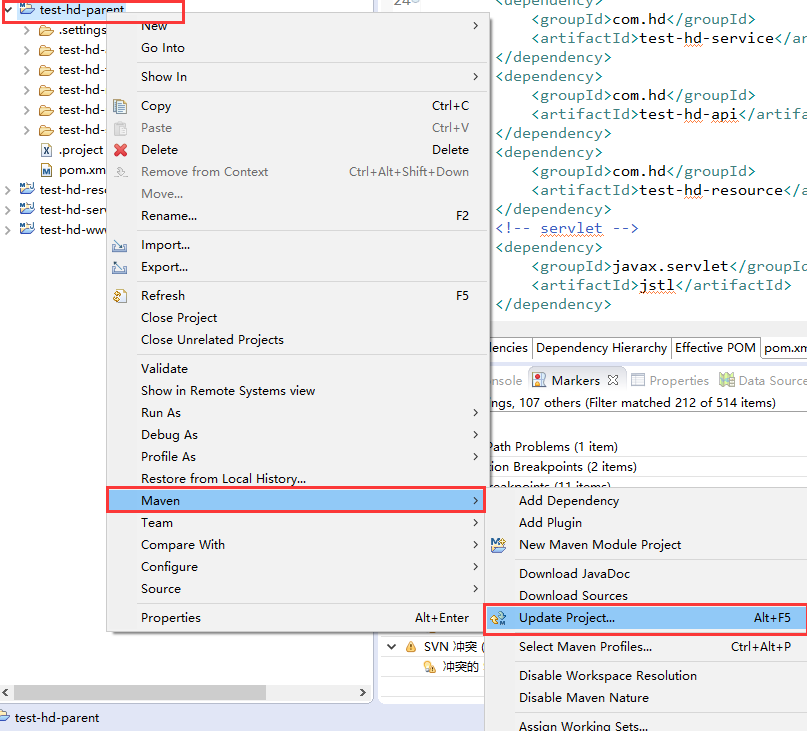
打包和发布
- 打包,右击父工程名 test-hd-parent---->Run As--->Maven Install
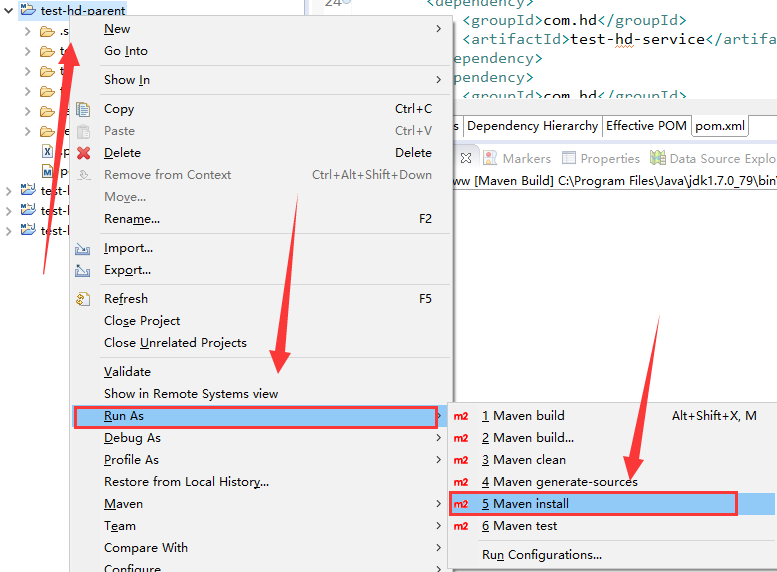
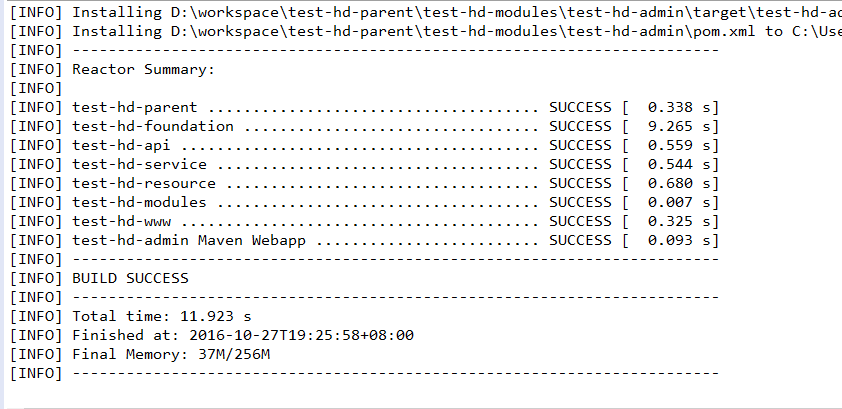
- 打包web子工程,右击工程名test-hd-www--->Run As ---> Maven Build...---> Goals: clean package--->Run
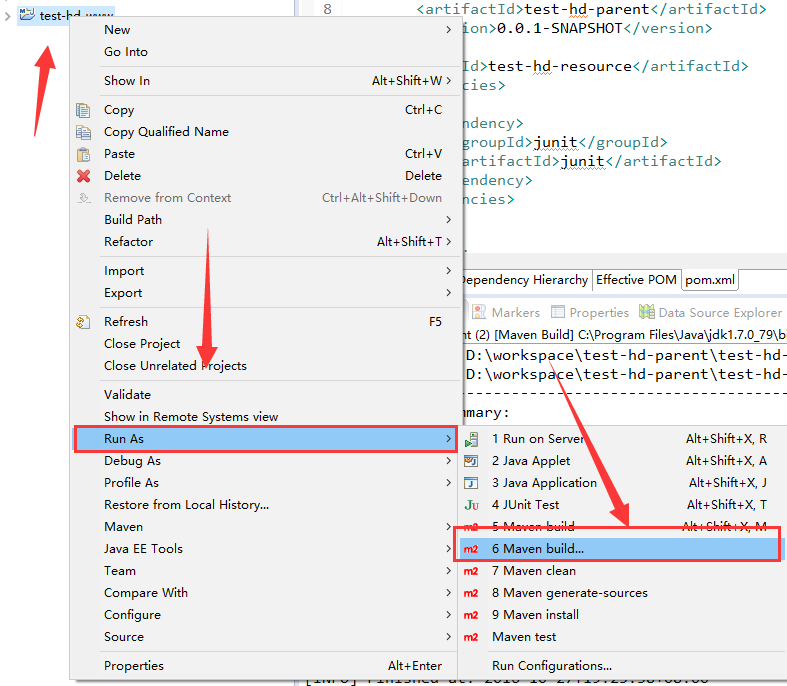
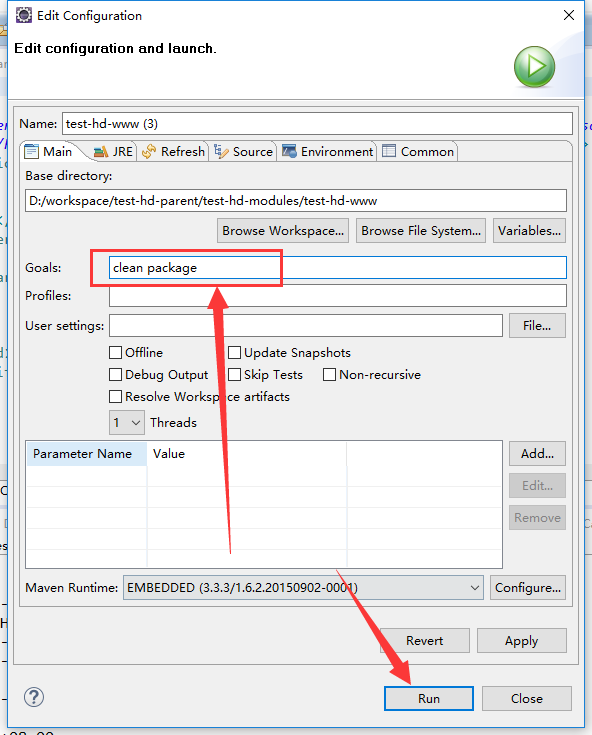
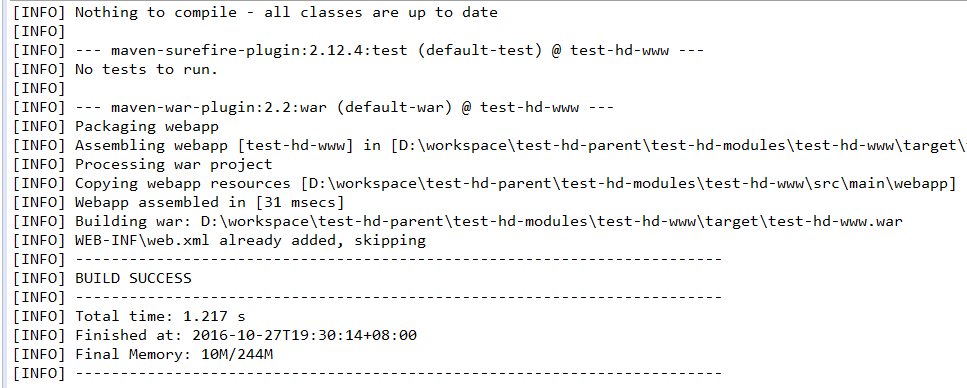
- 右击工程名test-hd-www,进行刷新,找到war包,放到tomcat的webapps中,启动tomcat,即可访问工程http://localhost:8080/test-hd-www
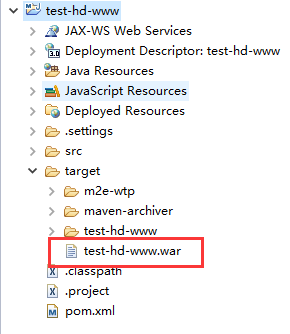
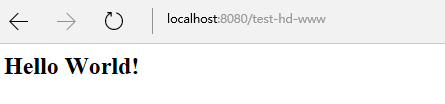
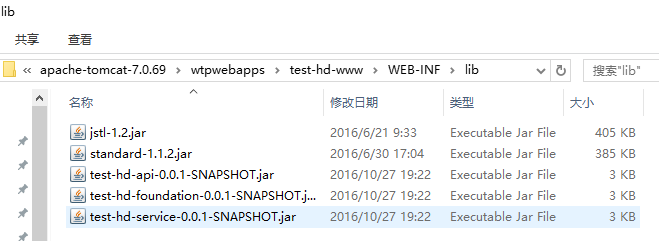
- 可以去tomcat下面webapps》test-hd-www》WEB-INF》lib中,看到引用的jar包
【Maven】使用Maven构建多模块项目的更多相关文章
- 使用Maven构建多模块项目
[转] 使用Maven构建多模块项目 在平时的Javaweb项目开发中为了便于后期的维护,我们一般会进行分层开发,最常见的就是分为domain(域模型层).dao(数据库访问层).service(业务 ...
- maven 单独构建多模块项目中的单个模块
maven 单独构建多模块项目中的单个模块, maven选项说明 -pl, --projects Build specified reactor projects instead of all pro ...
- Maven学习(五)使用Maven构建多模块项目
使用Maven构建多模块项目 一般的web项目构成: 建立解决方案目录parent 首先使用命令进入到我们需要建立maven项目的目录: mvn archetype:generate -DgroupI ...
- Maven单独构建多模块项目中的单个模块
Maven单独构建多模块项目中的单个模块 说明: 1.可能存在的场景,多模块项目没有互相引用,那么此时可以单独构建单个项目,指定到子模块的pom.xml文件即可完成编译. 2.如果多模块项目各自都 ...
- (转)Maven学习总结(八)——使用Maven构建多模块项目
孤傲苍狼只为成功找方法,不为失败找借口! Maven学习总结(八)——使用Maven构建多模块项目 在平时的Javaweb项目开发中为了便于后期的维护,我们一般会进行分层开发,最常见的就是分为doma ...
- Maven构建多模块项目
使用Maven构建多模块项目 转自:http://www.cnblogs.com/xdp-gacl/p/4242221.html 在平时的Javaweb项目 开发中为了便于后期的维护,我们一般会进行分 ...
- Maven学习总结(8)——使用Maven构建多模块项目
Maven学习总结(八)--使用Maven构建多模块项目 在平时的Javaweb项目开发中为了便于后期的维护,我们一般会进行分层开发,最常见的就是分为domain(域模型层).dao(数据库访问层). ...
- Maven 搭建spring boot多模块项目(附源码),亲测可以,感谢原创
原创地址:https://segmentfault.com/a/1190000005020589 我的DEMO码云地址,持续添加新功能: https://gitee.com/itbase/Spring ...
- Maven 搭建spring boot多模块项目
Maven 搭建spring boot多模块项目 备注:所有项目都在idea中创建 1.idea创建maven项目 1-1: 删除src,target目录,只保留pom.xml 1-2: 根目录pom ...
- IDEA + maven 零基础构建 java agent 项目
200316-IDEA + maven 零基础构建 java agent 项目 Java Agent(java 探针)虽说在 jdk1.5 之后就有了,但是对于绝大多数的业务开发 javaer 来说, ...
随机推荐
- 在 Windows上配置NativeScript CLI
1.安装Node.js,到https://nodejs.org/下载安装 2.安装Chocolatey,https://chocolatey.org/,先看一下关于chocolatey的介绍: 安装方 ...
- 加快phpstorm、rubymine、pycharm系列IDE运行速度的方法
对jetbrains公司出品的IDE均有效,以rubymine为例: 打开C:\Program Files\JetBrains\RubyMine 6.3.3\bin,打开 rubymine.exe.v ...
- Android Gradle 技巧之一: Build Variant 相关
Build Variant android gradle 插件,允许对最终的包以多个维度进行组合. BuildVariant = ProductFlavor x BuildType 两个维度 最常见的 ...
- QT学习之路--菜单、工具条、状态栏
下面一些是 Menu Bar,用于显示菜单;再下面一点事 Toolbar areas,用于显示工具条,Status Bar,就是状态栏. Qt 提供了一个 QStatusBar 类来实现状态栏. Qt ...
- 关于Listview布局的一点经验
1.尽量是给item一个固定高度,最外层不要设高度,里面套一层设置一个固定高度:如果用wrap_content的话,之后用alignTop等会出奇怪的问题. 2.如果要使用alignTop align ...
- APP测试点总结
1.功能性测试: ——根据产品需求文档编写测试用例. ——软件设计文档编写用例. 注意:就是根据产品需求文档编写测试用例而进行测试.2.兼容性测试: ——android版本的兼容性 ——手机分辨率兼容 ...
- QueryRunner(common-dbutils.jar)
QueryRunner update方法:* int update(String sql, Object... params) --> 可执行增.删.改语句* int update(Connec ...
- sql条件中比较性能优化
第一个比第二个性能高. 查询语句意义: 如果codelist中tablecode配置为0时, t.Table_Code = 'SV_RETURN_BILL'不生效. 如果codelist中tablec ...
- 如何为IIS增加svg和woff格式文件的支持
字体文件来显示矢量的图标,为了能在IIS上正常显示图标,可以通过增加iis的MIME-TYPE来支持图标字体文件: 增加以下两种文件类型即可: .woff application/x-woff.svg ...
- ubuntu 开机显示错误:无法应用原保存的显示器配置
无法应用原保存的显示器配置CRTC 63:尝试 800x600@60Hz 模式输出在 1366x768@60Hz (通过 0)CRTC 63:尝试 2560x1600@60Hz 模式输出在 1366x ...