
Spring4 MVC文件下载实例
本教程的主要亮点:
下载文件是相当简单的,涉及以下步骤。
- 创建一个InputStream到文件用于下载。
- 查找MIME类型下载文件的内容。
–可以是application/pdf, text/html,application/xml,image/png等等。 - 将内容类型与上述发现的MIME类型响应(HttpServletResponse)。
response.setContentType(mimeType); - 针对以上找到MIME类型设置内容长度。
response.setContentLength(file.getLength());//length in bytes - 为响应设置内容处理标头。
response.setHeader(“Content-Disposition”, “attachment; filename=” + fileName); //随着“附件”文件将下载。可能会显示一个“另存为”基于浏览器的设置对话框。response.setHeader(“Content-Disposition”, “inline; filename=” + fileName);//通过“内联”浏览器将尝试显示内容到浏览器中(图片,PDF,文本,...)。对于其他内容类型,文件将直接下载。
- 从InputStream中复制字节响应到 OutputStream。
- 一旦复制完成后,关闭输入输出流。
完整实施例在下面讨论。
使用到以下技术:
- Spring 4.2.0.RELEASE
- Bootstrap v3.3.2
- Maven 3
- JDK 1.7
- Tomcat 8.0.21
- Eclipse JUNO Service Release 2
现在让我们开始
项目结构

在pom.xml中声明依赖关系
<project xmlns="http://maven.apache.org/POM/4.0.0" xmlns:xsi="http://www.w3.org/2001/XMLSchema-instance"

  xsi:schemaLocation="http://maven.apache.org/POM/4.0.0 http://maven.apache.org/maven-v4_0_0.xsd">

  <modelVersion>4.0.0</modelVersion>

  <groupId>com.yiibai.springmvc</groupId>

  <artifactId>Spring4MVCFileDownloadExample</artifactId>

  <packaging>war</packaging>

  <version>1.0.0</version>

  <name>Spring4MVCFileDownloadExample Maven Webapp</name>

     <properties>

		<springframework.version>4.2.0.RELEASE</springframework.version>

	</properties>

	<dependencies>

		<dependency>

			<groupId>org.springframework</groupId>

			<artifactId>spring-webmvc</artifactId>

			<version>${springframework.version}</version>

		</dependency>

		<dependency>

			<groupId>javax.servlet</groupId>

			<artifactId>javax.servlet-api</artifactId>

			<version>3.1.0</version>

		</dependency>

		<dependency>

			<groupId>javax.servlet</groupId>

			<artifactId>jstl</artifactId>

			<version>1.2</version>

		</dependency>

	</dependencies>

	<build>

		<pluginManagement>

			<plugins>

				<plugin>

					<groupId>org.apache.maven.plugins</groupId>

					<artifactId>maven-war-plugin</artifactId>

					<version>2.4</version>

					<configuration>

						<warSourceDirectory>src/main/webapp</warSourceDirectory>

						<warName>Spring4MVCFileDownloadExample</warName>

						<failOnMissingWebXml>false</failOnMissingWebXml>

					</configuration>

				</plugin>

			</plugins>

		</pluginManagement>

		<finalName>Spring4MVCFileDownloadExample</finalName>

	</build>

</project>
创建控制器
package com.yiibai.springmvc.controller;

import java.io.BufferedInputStream;

import java.io.File;

import java.io.FileInputStream;

import java.io.IOException;

import java.io.InputStream;

import java.io.OutputStream;

import java.net.URLConnection;

import java.nio.charset.Charset;

import javax.servlet.http.HttpServletResponse;

import org.springframework.stereotype.Controller;

import org.springframework.ui.ModelMap;

import org.springframework.util.FileCopyUtils;

import org.springframework.web.bind.annotation.PathVariable;

import org.springframework.web.bind.annotation.RequestMapping;

import org.springframework.web.bind.annotation.RequestMethod;

@Controller

public class FileDownloadController {

	private static final String INTERNAL_FILE="irregular-verbs-list.pdf";

	private static final String EXTERNAL_FILE_PATH="C:/mytemp/SpringMVCHibernateManyToManyCRUDExample.zip";

	@RequestMapping(value={"/","/welcome"}, method = RequestMethod.GET)

	public String getHomePage(ModelMap model) {

		return "welcome";

	}

	/*

	 * Download a file from

	 *   - inside project, located in resources folder.

	 *   - outside project, located in File system somewhere.

	 */

	@RequestMapping(value="/download/{type}", method = RequestMethod.GET)

	public void downloadFile(HttpServletResponse response, @PathVariable("type") String type) throws IOException {

		File file = null;

		if(type.equalsIgnoreCase("internal")){

			ClassLoader classloader = Thread.currentThread().getContextClassLoader();

			file = new File(classloader.getResource(INTERNAL_FILE).getFile());

		}else{

			file = new File(EXTERNAL_FILE_PATH);

		}

		if(!file.exists()){

			String errorMessage = "Sorry. The file you are looking for does not exist";

			System.out.println(errorMessage);

			OutputStream outputStream = response.getOutputStream();

			outputStream.write(errorMessage.getBytes(Charset.forName("UTF-8")));

			outputStream.close();

			return;

		}

		String mimeType= URLConnection.guessContentTypeFromName(file.getName());

		if(mimeType==null){

			System.out.println("mimetype is not detectable, will take default");

			mimeType = "application/octet-stream";

		}

		System.out.println("mimetype : "+mimeType);

        response.setContentType(mimeType);

        /* "Content-Disposition : inline" will show viewable types [like images/text/pdf/anything viewable by browser] right on browser

            while others(zip e.g) will be directly downloaded [may provide save as popup, based on your browser setting.]*/

        response.setHeader("Content-Disposition", String.format("inline; filename=\"" + file.getName() +"\""));

        /* "Content-Disposition : attachment" will be directly download, may provide save as popup, based on your browser setting*/

        //response.setHeader("Content-Disposition", String.format("attachment; filename=\"%s\"", file.getName()));

        response.setContentLength((int)file.length());

		InputStream inputStream = new BufferedInputStream(new FileInputStream(file));

        //Copy bytes from source to destination(outputstream in this example), closes both streams.

        FileCopyUtils.copy(inputStream, response.getOutputStream());

	}

}
该控制器包括两个文件。一个文件是内部应用(内部资源),和其他文件位于外部的应用程序的文件系统。您的项目一定要改变外部文件的路径。仅用于演示的目的,我们已在路径一个额外的路径变量(内部/外部)。我们正在使用Spring FileCopyUtils工具类流从源复制到目的地。
配置
package com.yiibai.springmvc.configuration;

import org.springframework.context.annotation.ComponentScan;

import org.springframework.context.annotation.Configuration;

import org.springframework.web.servlet.config.annotation.EnableWebMvc;

import org.springframework.web.servlet.config.annotation.ResourceHandlerRegistry;

import org.springframework.web.servlet.config.annotation.ViewResolverRegistry;

import org.springframework.web.servlet.config.annotation.WebMvcConfigurerAdapter;

import org.springframework.web.servlet.view.InternalResourceViewResolver;

import org.springframework.web.servlet.view.JstlView;

@Configuration

@EnableWebMvc

@ComponentScan(basePackages = "com.yiibai.springmvc")

public class HelloWorldConfiguration extends WebMvcConfigurerAdapter{

	@Override

    public void configureViewResolvers(ViewResolverRegistry registry) {

        InternalResourceViewResolver viewResolver = new InternalResourceViewResolver();

        viewResolver.setViewClass(JstlView.class);

        viewResolver.setPrefix("/WEB-INF/views/");

        viewResolver.setSuffix(".jsp");

        registry.viewResolver(viewResolver);

    }

    @Override

    public void addResourceHandlers(ResourceHandlerRegistry registry) {

        registry.addResourceHandler("/static/**").addResourceLocations("/static/");

    }

}
初始化
package com.yiibai.springmvc.configuration;

import org.springframework.web.servlet.support.AbstractAnnotationConfigDispatcherServletInitializer;

public class HelloWorldInitializer extends AbstractAnnotationConfigDispatcherServletInitializer {

    @Override

    protected Class<?>[] getRootConfigClasses() {

        return new Class[] { HelloWorldConfiguration.class };

    }

    @Override

    protected Class<?>[] getServletConfigClasses() {

        return null;

    }

    @Override

    protected String[] getServletMappings() {

        return new String[] { "/" };

    }

 }
添加视图
<%@ taglib prefix="form" uri="http://www.springframework.org/tags/form"%>

<%@ taglib prefix="c" uri="http://java.sun.com/jsp/jstl/core" %>

<html>

<head>

	<meta http-equiv="Content-Type" content="text/html; charset=ISO-8859-1">

	<title>Spring 4 MVC File Download Example</title>

	<link href="<c:url value='/static/css/bootstrap.css' />"  rel="stylesheet"></link>

	<link href="<c:url value='/static/css/app.css' />" rel="stylesheet"></link>

</head>

<body>

	<div class="form-container">

		<h1>Welcome to FileDownloader Example</h1>

		Click on below links to see FileDownload in action.<br/><br/>

		<a href="<c:url value='/download/internal' />">Download This File (located inside project)</a>

		<br/>

		<a href="<c:url value='/download/external' />">Download This File (located outside project, on file system)</a>

	</div>

</body>

</html>
构建,部署和运行应用程序
现在构建war(在前面的Eclipse教程)或通过Maven的命令行( mvn clean install)。部署 war 到Servlet3.0容器。或:
打开浏览器,浏览 http://localhost:8080/Spring4MVCFileDownloadExample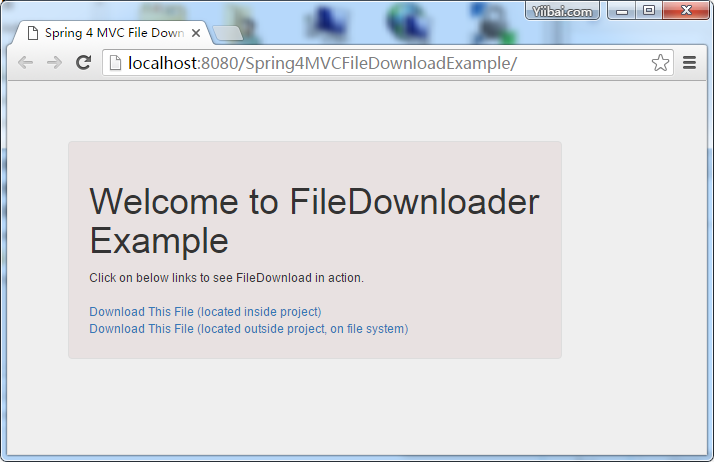

点击第二个链接。外部文件应被下载。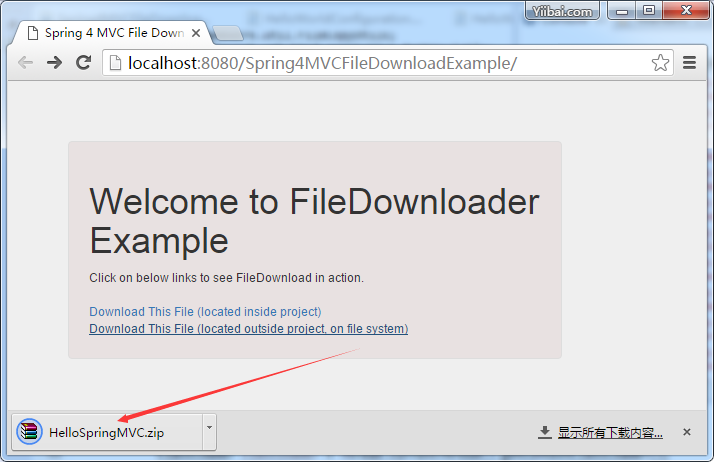

点击第一个链接。内部文件[这是一个PDF]应该显示在浏览器中,这是由于 Content-Disposition: inline. 通过内联,如果内容可以通过浏览器显示,它会显示它在浏览器中。

现在从内联更改内容处置备注。构建并部署。点击第一个链接。这个时候您应该看到 PDF文件被下载。

就这样,完成!
下载代码:http://pan.baidu.com/s/1c1lmeL6
Spring4 MVC文件下载实例的更多相关文章
- Spring4 MVC文件下载实例(javaconfig)
展示如何使用Spring MVC4执行文件下载,我们将看到应用程序从文件系统内部以及外部文件下载文件. 下载文件是相当简单的,涉及以下步骤. 创建一个InputStream到文件用于下载. 查找MIM ...
- Spring4 MVC HelloWord实例
一.创建Web项目 我用的eclipse,创建步骤:file=>New=>Other=>Web=>Dynamic Web project,按照操作创建一个完整的Web项目,下载 ...
- Spring4 MVC ContentNegotiatingViewResolver多种输出格式实例
本文演示支持多种输出格式,这里 Spring4 MVC应用程序使用了 Spring ContentNegotiatingViewResolver .我们将生成应用程序输出XML,JSON,PDF,XL ...
- Spring4 MVC HelloWorld 注解和JavaConfig实例
在这一节中,我们以 Spring4 MVC HelloWorld 注释/JavaConfig为示例,一步一步以简单的方式学习Spring4 MVC 的注解,项目设置,代码,部署和运行. 在先前的 Sp ...
- Spring4 MVC ContentNegotiatingViewResolver多种输出格式实
前段时间在一个项目里面发现,针对Excel的处理没有一个公用的视图,来个下载的需求就要自己去写一堆POI的东西,终于有一天给我也来了几个,还是按照以前的方式来写,写多了真心想吐,后面想想还是有必要整个 ...
- PHP: 手把手编写自己的 MVC 框架实例教程
1 什么是MVC MVC模式(Model-View-Controller)是软件工程中的一种软件架构模式,把软件系统分为三个基本部分:模型(Model).视图(View)和控制器(Controller ...
- Spring4 MVC Hibernate4集成 Annotation
Spring4 MVC Hibernate4集成 Annotation 一.本文所用环境 二.工程目录 三.Maven添加依赖 四.新建数据库表 五.配置文件 六.Model层 七.DAO层 八.Se ...
- Spring4 MVC Hibernate4集成
Spring4 MVC Hibernate4集成 一. 本文所用环境 Spring4.0.3.RELEASE Hibernate4.3.5.Final Mysql 二. 工程目录 三. ...
- .net Mvc文件下载的功能,大文件下载完成之后修改数据库功能
原文:.net Mvc文件下载的功能,大文件下载完成之后修改数据库功能 我服务器上文件只能下载一次,下载了之后就不能下载了,大文件或网速不好时,可能服务端文件流发送完了,客户端还没下载完,导致下载失败 ...
随机推荐
- Jmeter组件执行顺序与作用域
一.Jmeter重要组件: 1)配置元件---Config Element: 用于初始化默认值和变量,以便后续采样器使用.配置元件大其作用域的初始阶段处理,配置元件仅对其所在的测试树分支有效,如,在同 ...
- JJ Ying:越来越跨界的界面设计
2013年6月29号 星期六 小雨 @大众点评 利用非界面设计的专业知识来提升界面设计 向平面设计跨界 向工业设计的跨界 向摄影跨界 向动向的的跨界 向程序跨界 讲师介绍: JJ Ying / ...
- Effective Java 27 Favor generic methods
Static utility methods are particularly good candidates for generification. The type parameter list, ...
- 大写金额字符串生成 C#实现
思路: 中文对金额的描述以四位为一组, 只考虑一万亿以内的数字则每组内以千.百.十和[亿\万\元]区分各位 连续的零按一个处理,组内最低位的零可略去 无角无分说整,有角无分只说角,无角有分说零X分,有 ...
- 深入剖析js命名空间函数namespace
在看阿里员工写的开源数据库连接池的druid的源代码时,发现了其中在jquery的原代码中又定义了一个命名空间的函数:$.namespace(),其代码如下: 网址为:https://github.c ...
- 【mysql】关于临时表
mysql官方的介绍 In some cases, the server creates internal temporary tables while processing queries. Suc ...
- oracle表空间相关
数据库被划分为若干个表空间,每个表空间内保存一组相关的逻辑对象.每个表空间由一个或者多个数据文件组成.oracle中的数据逻辑上存储在表空间里,物理上存储在属于该表空间的数据文件里.表空间是用户和物理 ...
- (四) openwrt单个ipk编译过程
Tags : Makefile 本周是成胖子每周一博的第五周. 更好的阅读体验,请点击这里 [TOC] 前言 前一篇博客中,我们已经知道整个openwrt的编译顺序,本文我们来探讨与开发者息息相关的单 ...
- WCF并发控制与实例模式
WCF实例模式类型与区别 实例化模式 instanceMode percall 单调模式 [ServiceBehavior(InstanceContextMode=InstanceCon ...
- JavaScript功能检测技术和函数构造
Javascript与很多编程语言不同,它不能够控制其运行环境.再写php代码时,只要在服务器端部署了正确的版本,那么程序就绝对能够运行,对于其他python或ruby后端语言来说,也不存在什么灰色区 ...