
android 学习随笔十三(网络:多线程下载)
多线程断点续传下载
1、多线程:快
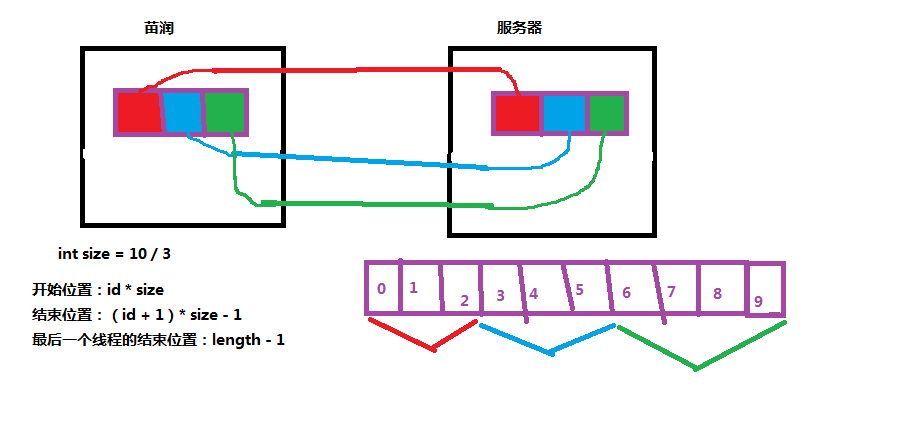
* 原理:抢占服务器资源
* 单线程下载:线程从第0个字节开始下,下到最后一个字节,在本地硬盘的临时文件中从第0个字节开始写,写到最后一个字节,下载完成时,临时文件也写完了,本地就创建了一个与服务器文件一模一样的文件
* 多线程下载:每条线程下载的开始位置和结束位置都是不一样的,每条线程下载的数据合在一起才是服务器的完整的文件
JAVA版的下载代码
public class Main {

    static String path = "http://169.254.244.136:8080/QQPlayer.exe";

    static int threadCount = 3;

    static int finishedThread = 0;

    public static void main(String[] args) {

        //发送http请求,拿到目标文件长度

        try {

            URL url = new URL(path);

            HttpURLConnection conn = (HttpURLConnection) url.openConnection();

            conn.setRequestMethod("GET");

            conn.setConnectTimeout(8000);

            conn.setReadTimeout(8000);

            if(conn.getResponseCode() == 200){

                //获取长度

                int length = conn.getContentLength();

                //创建临时文件

                File file = new File(getNameFromPath(path));
         //rwd可读可写,不经过缓冲区,直接写入硬盘,系统崩溃,数据不会丢失

                RandomAccessFile raf = new RandomAccessFile(file, "rwd");

                //设置临时文件大小与目标文件一致

                raf.setLength(length);

                raf.close();

                //计算每个线程下载区间

                int size = length / threadCount;

                for (int id = 0; id < threadCount; id++) {

                    //计算每个线程下载的开始位置和结束位置

                    int startIndex = id * size;

                    int endIndex = (id + 1) * size - 1;

                    if(id == threadCount - 1){

                        endIndex = length - 1;

                    }

                    System.out.println("线程" + id + "下载的区间:" + startIndex + " ~ " + endIndex);

                    new DownLoadThread(id, startIndex, endIndex).start();

                }

            }

        } catch (Exception e) {

            // TODO Auto-generated catch block

            e.printStackTrace();

        }

    }

    public static String getNameFromPath(String path){

        int index = path.lastIndexOf("/");

        return path.substring(index + 1);

    }

}

class DownLoadThread extends Thread{

    int threadId;

    int startIndex;

    int endIndex;

    public DownLoadThread(int threadId, int startIndex, int endIndex) {

        super();

        this.threadId = threadId;

        this.startIndex = startIndex;

        this.endIndex = endIndex;

    }

    @Override

    public void run() {

        try {
       //创建临时文件,保存下载进度

            File fileProgress = new File(threadId + ".txt");

            int lastProgress = 0;

            if(fileProgress.exists()){

                //读取进度临时文件中的内容,实现断点续传

                FileInputStream fis = new FileInputStream(fileProgress);

                BufferedReader br = new BufferedReader(new InputStreamReader(fis));

                //得到上一次下载进度

                lastProgress = Integer.parseInt(br.readLine());

                //改变下载的开始位置,上一次下过的,这次就不请求了,lastProgress保存下载的总长度,不是索引

                startIndex += lastProgress;

                fis.close();

            }

            //发送http请求,请求要下载的数据

            URL url = new URL(Main.path);

            HttpURLConnection conn = (HttpURLConnection) url.openConnection();

            conn.setRequestMethod("GET");

            conn.setConnectTimeout(8000);

            conn.setReadTimeout(8000);

            //设置请求数据的区间

            conn.setRequestProperty("Range", "bytes=" + startIndex + "-" + endIndex);

            //请求部分数据,成功的响应码是206

            if(conn.getResponseCode() == 206){

                InputStream is = conn.getInputStream();

                byte[] b = new byte[1024];

                int len = 0;

                //当前线程下载的总进度,total不能写为total=0

                int total = lastProgress;

                File file = new File(Main.getNameFromPath(Main.path));

                RandomAccessFile raf = new RandomAccessFile(file, "rwd");

                //设置写入的开始位置

                raf.seek(startIndex);

                while((len = is.read(b)) != -1){

                    raf.write(b, 0, len);

                    total += len;

                    System.out.println("线程" + threadId + "下载了:" + total);

                    //写入一个进度临时文件,保存下载进度

                    RandomAccessFile rafProgress = new RandomAccessFile(fileProgress, "rwd");

                    //每次下载1024个字节,就,就马上把1024写入进度临时文件

                    rafProgress.write((total + "").getBytes());

                    rafProgress.close();

                }

                raf.close();

                System.out.println("线程" + threadId + "下载完毕------------------");

                //3条线程全部下载完毕,才去删除进度临时文件,每个线程执行完加1

                Main.finishedThread++;


         //synchronized看底部解释

                synchronized (Main.path) {

                    if(Main.finishedThread == Main.threadCount){

                        for (int i = 0; i < Main.threadCount; i++) {

                            File f = new File(i + ".txt");

                            f.delete();

                        }

                        Main.finishedThread = 0;

                    }

                }

            }

        }

        catch (Exception e) {

            e.printStackTrace();

        }

    }

}
RandomAccessFile类是随机读取类,它是一个完全独立的类。
它适用于由大小已知的记录组成的文件,所以我们可以使用seek()将记录从一处转移到另一处,然后读取或者修改记录。
文件中记录的大小不一定都相同,只要能够确定哪些记录有多大以及它们在文件中的位置即可。
RandomAccessFile类可以实现对文件内容的读写操作,但是比较复杂。所以一般操作文件内容往往会使用字节流或字符流方式。
synchronized:当它用来修饰一个方法或者一个代码块的时候,能够保证在同一时刻最多只有一个线程执行该段代码
一、当两个并发线程访问同一个对象object中的这个synchronized(this)同步代码块时,一个时间内只能有一个线程得到执行。另一个线程必须等待当前线程执行完这个代码块以后才能执行该代码块。
二、然而,当一个线程访问object的一个synchronized(this)同步代码块时,另一个线程仍然可以访问该object中的非synchronized(this)同步代码块。
三、尤其关键的是,当一个线程访问object的一个synchronized(this)同步代码块时,其他线程对object中所有其它synchronized(this)同步代码块的访问将被阻塞。
四、第三个例子同样适用其它同步代码块。也就是说,当一个线程访问object的一个synchronized(this)同步代码块时,它就获得了这个object的对象锁。结果,其它线程对该object对象所有同步代码部分的访问都被暂时阻塞。
五、以上规则对其它对象锁同样适用.
2、断点续传:
* 下载从上一次下载结束的位置开始
* 原理:每次下载把下载进度保存至一个文本临时文件中,下一次下载时从文本临时文件获取上一次下载的进度,从这个进度开始继续下载
手机端下载代码
package com.itheima.multithreaddownload;

import java.io.BufferedReader;

import java.io.File;

import java.io.FileInputStream;

import java.io.InputStream;

import java.io.InputStreamReader;

import java.io.RandomAccessFile;

import java.net.HttpURLConnection;

import java.net.URL;

import android.os.Bundle;

import android.os.Environment;

import android.os.Handler;

import android.os.Message;

import android.app.Activity;

import android.view.View;

import android.widget.ProgressBar;

import android.widget.TextView;

public class MainActivity extends Activity {

    String path = "http://169.254.88.88:8080/LiebaoFreeWiFi5.1.exe";

    int threadCount = 3;

    int finishedThread = 0;

    //所有线程下载总进度

    int downloadProgress = 0;

    private ProgressBar pb;

    private TextView tv;

    Handler handler = new Handler(){

        public void handleMessage(android.os.Message msg) {

            tv.setText((long)pb.getProgress() * 100 / pb.getMax() + "%");

        }

    };

    @Override

    protected void onCreate(Bundle savedInstanceState) {

        super.onCreate(savedInstanceState);

        setContentView(R.layout.activity_main);

        pb = (ProgressBar) findViewById(R.id.pb);

        tv = (TextView) findViewById(R.id.tv);

    }

    public void click(View v){

        Thread t = new Thread(){

            @Override

            public void run() {

                //发送http请求,拿到目标文件长度

                try {

                    URL url = new URL(path);

                    HttpURLConnection conn = (HttpURLConnection) url.openConnection();

                    conn.setRequestMethod("GET");

                    conn.setConnectTimeout(8000);

                    conn.setReadTimeout(8000);

                    if(conn.getResponseCode() == 200){

                        //获取长度

                        int length = conn.getContentLength();

                        //创建临时文件

                        File file = new File(Environment.getExternalStorageDirectory(), getNameFromPath(path));

                        RandomAccessFile raf = new RandomAccessFile(file, "rwd");

                        //设置临时文件大小与目标文件一致

                        raf.setLength(length);

                        raf.close();

                        //设置进度条的最大值

                        pb.setMax(length);

                        //计算每个线程下载区间

                        int size = length / threadCount;

                        for (int id = 0; id < threadCount; id++) {

                            //计算每个线程下载的开始位置和结束位置

                            int startIndex = id * size;

                            int endIndex = (id + 1) * size - 1;

                            if(id == threadCount - 1){

                                endIndex = length - 1;

                            }

                            System.out.println("线程" + id + "下载的区间:" + startIndex + " ~ " + endIndex);

                            new DownLoadThread(id, startIndex, endIndex).start();

                        }

                    }

                } catch (Exception e) {

                    // TODO Auto-generated catch block

                    e.printStackTrace();

                }

            }

        };

        t.start();

    }

    public String getNameFromPath(String path){

        int index = path.lastIndexOf("/");

        return path.substring(index + 1);

    }

    class DownLoadThread extends Thread{

        int threadId;

        int startIndex;

        int endIndex;

        public DownLoadThread(int threadId, int startIndex, int endIndex) {

            super();

            this.threadId = threadId;

            this.startIndex = startIndex;

            this.endIndex = endIndex;

        }

        @Override

        public void run() {

            try {

                File fileProgress = new File(Environment.getExternalStorageDirectory(), threadId + ".txt");

                int lastProgress = 0;

                if(fileProgress.exists()){

                    //读取进度临时文件中的内容

                    FileInputStream fis = new FileInputStream(fileProgress);

                    BufferedReader br = new BufferedReader(new InputStreamReader(fis));

                    //得到上一次下载进度

                    lastProgress = Integer.parseInt(br.readLine());

                    //改变下载的开始位置,上一次下过的,这次就不请求了

                    startIndex += lastProgress;

                    fis.close();

                    //把上一次下载进度加到进度条进度中

                    downloadProgress += lastProgress;

                    //发送消息,让文本进度条改变

                    handler.sendEmptyMessage(1);

                }

                //发送http请求,请求要下载的数据

                URL url = new URL(path);

                HttpURLConnection conn = (HttpURLConnection) url.openConnection();

                conn.setRequestMethod("GET");

                conn.setConnectTimeout(8000);

                conn.setReadTimeout(8000);

                //设置请求数据的区间

                conn.setRequestProperty("Range", "bytes=" + startIndex + "-" + endIndex);

                //请求部分数据,成功的响应码是206

                if(conn.getResponseCode() == 206){

                    InputStream is = conn.getInputStream();

                    byte[] b = new byte[1024];

                    int len = 0;

                    //当前线程下载的总进度

                    int total = lastProgress;

                    File file = new File(Environment.getExternalStorageDirectory(), getNameFromPath(path));

                    RandomAccessFile raf = new RandomAccessFile(file, "rwd");

                    //设置写入的开始位置

                    raf.seek(startIndex);

                    while((len = is.read(b)) != -1){

                        raf.write(b, 0, len);

                        total += len;

                        System.out.println("线程" + threadId + "下载了:" + total);

                        //创建一个进度临时文件,保存下载进度

                        RandomAccessFile rafProgress = new RandomAccessFile(fileProgress, "rwd");

                        //每次下载1024个字节,就,就马上把1024写入进度临时文件

                        rafProgress.write((total + "").getBytes());

                        rafProgress.close();

                        //每次下载len个长度的字节,马上把len加到下载进度中,让进度条能反应这len个长度的下载进度

                        downloadProgress += len;

                        pb.setProgress(downloadProgress);

                        //发送消息,让文本进度条改变

                        handler.sendEmptyMessage(1);

                    }

                    raf.close();

                    System.out.println("线程" + threadId + "下载完毕------------------");

                    //3条线程全部下载完毕,才去删除进度临时文件

                    finishedThread++;

                    synchronized (path) {

                        if(finishedThread == threadCount){

                            for (int i = 0; i < threadCount; i++) {

                                File f = new File(Environment.getExternalStorageDirectory(), i + ".txt");

                                f.delete();

                            }

                            finishedThread = 0;

                        }

                    }

                }

            }

            catch (Exception e) {

                e.printStackTrace();

            }

        }

    }

}
手机断点续传下载
3、进度条
* 计算下载百分比进度时要在long类型下计算
<LinearLayout xmlns:android="http://schemas.android.com/apk/res/android"

    xmlns:tools="http://schemas.android.com/tools"

    android:layout_width="match_parent"

    android:layout_height="match_parent"

    android:paddingBottom="@dimen/activity_vertical_margin"

    android:paddingLeft="@dimen/activity_horizontal_margin"

    android:paddingRight="@dimen/activity_horizontal_margin"

    android:paddingTop="@dimen/activity_vertical_margin"

    tools:context=".MainActivity"

    android:orientation="vertical"

    >

    <Button

        android:layout_width="wrap_content"

        android:layout_height="wrap_content"

        android:text="下载"

        android:onClick="click"

        />

    <ProgressBar

        style="@android:style/Widget.ProgressBar.Horizontal"

        android:id="@+id/pb"

        android:layout_width="match_parent"

        android:layout_height="wrap_content"

        />

    <TextView

        android:id="@+id/tv"

        android:layout_width="wrap_content"

        android:layout_height="wrap_content"

        android:text="0%"

        android:layout_gravity="right"

        />

</LinearLayout>
进度条XML
进度条控件是既可以在主线程又可以在子线程中运行。(刷新UI控件内部已处理)
------------------------------------------------------------------------------
-------------------------------------------------------------------------------
public class MainActivity extends Activity {
String path = "http://169.254.88.88:8080/LiebaoFreeWiFi5.1.exe";
int threadCount = 3;
int finishedThread = 0;
//所有线程下载总进度
int downloadProgress = 0;
private ProgressBar pb;
private TextView tv;
Handler handler = new Handler(){
public void handleMessage(android.os.Message msg) {
tv.setText((long)pb.getProgress() * 100 / pb.getMax() + "%");//不能用int,容易超出int类型范围
}
};
------------------------------------------------------------------------------
protected void onCreate(Bundle savedInstanceState) {
super.onCreate(savedInstanceState);
setContentView(R.layout.activity_main);
pb = (ProgressBar) findViewById(R.id.pb);
tv = (TextView) findViewById(R.id.tv);
}
-------------------------------------------------------------------------------------
//读取进度临时文件中的内容
FileInputStream fis = new FileInputStream(fileProgress);
BufferedReader br = new BufferedReader(new InputStreamReader(fis));
//得到上一次下载进度
lastProgress = Integer.parseInt(br.readLine());
//改变下载的开始位置,上一次下过的,这次就不请求了
startIndex += lastProgress;
fis.close();
//把上一次下载进度加到进度条进度中,让进度条支持断点续传
downloadProgress += lastProgress;
//发送消息,让文本进度条改变
handler.sendEmptyMessage(1);
---------------------------------------------------------------------------------------
//设置临时文件大小与目标文件一致
raf.setLength(length);
raf.close();
//设置进度条的最大值
pb.setMax(length);
//计算每个线程下载区间
int size = length / threadCount;
------------------------------------------------------------------------------------------------------------
//创建一个进度临时文件,保存下载进度
RandomAccessFile rafProgress = new RandomAccessFile(fileProgress, "rwd");
//每次下载1024个字节,就,就马上把1024写入进度临时文件
rafProgress.write((total + "").getBytes());
rafProgress.close();
//每次下载len个长度的字节,马上把len加到下载进度中,让进度条能反应这len个长度的下载进度
downloadProgress += len;
pb.setProgress(downloadProgress);
//发送消息,让文本进度条改变
handler.sendEmptyMessage(1);
4、XUtils(afinal)
https://github.com/search?utf8=✓&q=XUtils&type=Repositories&ref=searchresults
支持大文件上传,更全面的http请求协议支持(10种谓词),拥有更加灵活的ORM,更多的事件注解支持且不受混淆影响...
package com.itheima.xutils;

import java.io.File;

import com.lidroid.xutils.HttpUtils;

import com.lidroid.xutils.exception.HttpException;

import com.lidroid.xutils.http.ResponseInfo;

import com.lidroid.xutils.http.callback.RequestCallBack;

import android.os.Bundle;

import android.app.Activity;

import android.view.Menu;

import android.view.View;

import android.widget.ProgressBar;

import android.widget.TextView;

public class MainActivity extends Activity {

    private ProgressBar pb;

    private TextView tv_progress;

    @Override

    protected void onCreate(Bundle savedInstanceState) {

        super.onCreate(savedInstanceState);

        setContentView(R.layout.activity_main);

        pb = (ProgressBar) findViewById(R.id.pb);

        tv_progress = (TextView) findViewById(R.id.tv_progress);

    }

    public void click(View v){

        String url = "http://169.254.244.136:8080/QQPlayer.exe";

        HttpUtils utils = new HttpUtils();

        utils.download(url, //目标文件的网址

                "sdcard/QQPlayer.exe", //指定存储的路径和文件名

                true, //是否支持断点续传

                true, //如果响应头中包含文件名,下载完成后自动重命名

                new RequestCallBack<File>() {

                    //下载完成后调用

                    @Override

                    public void onSuccess(ResponseInfo<File> responseInfo) {

                        TextView tv_success = (TextView) findViewById(R.id.tv_success);

                        tv_success.setText(responseInfo.result.getPath());

                    }

                    //下载失败调用

                    @Override

                    public void onFailure(HttpException error, String msg) {

                        TextView tv_failure = (TextView) findViewById(R.id.tv_failure);

                        tv_failure.setText(msg);

                    }

                    //下载过程中不断调用

                    @Override

                    public void onLoading(long total, long current,

                            boolean isUploading) {

                        pb.setMax((int) total);

                        pb.setProgress((int) current);

                        tv_progress.setText(current * 100 / total + "%");

                    }

                });

    }

}
<LinearLayout xmlns:android="http://schemas.android.com/apk/res/android"

    xmlns:tools="http://schemas.android.com/tools"

    android:layout_width="match_parent"

    android:layout_height="match_parent"

    android:paddingBottom="@dimen/activity_vertical_margin"

    android:paddingLeft="@dimen/activity_horizontal_margin"

    android:paddingRight="@dimen/activity_horizontal_margin"

    android:paddingTop="@dimen/activity_vertical_margin"

    tools:context=".MainActivity"

    android:orientation="vertical"

    >

    <Button

        android:layout_width="wrap_content"

        android:layout_height="wrap_content"

        android:text="下载"

        android:onClick="click"

        />

    <TextView

        android:id="@+id/tv_success"

        android:layout_width="wrap_content"

        android:layout_height="wrap_content"

        />

    <TextView

        android:id="@+id/tv_failure"

        android:layout_width="wrap_content"

        android:layout_height="wrap_content"

        />

    <ProgressBar

        android:id="@+id/pb"

        android:layout_width="match_parent"

        android:layout_height="wrap_content"

        style="@android:style/Widget.ProgressBar.Horizontal"

        />

    <TextView

        android:id="@+id/tv_progress"

        android:layout_width="wrap_content"

        android:layout_height="wrap_content"

        android:layout_gravity="right"

        android:text="0%"

        />

</LinearLayout>
android 学习随笔十三(网络:多线程下载)的更多相关文章
- android 学习随笔六(网络要求及配置)
android在4.0之后已经不允许在主线程执行http请求了. 主线程阻塞,应用会停止刷新界面,停止响应用户任何操作,耗时操作不要写在主线程 只有主线程才能修改UI ANR异常:Applicat ...
- android 学习随笔七(网络:图片及文本传输及线程关系 )
主线程.子线程.UI的关系 简单的HTTP请求 -------------------------------------------------------- public class MainAc ...
- android 学习随笔十一(网络:HttpClient框架)
1.使用HttpClient框架发送get.post请求 google收集apache提供的一个发送Http请求框架 public class Tools { public static String ...
- android 学习随笔十(网络:get、post提交数据)
1.get public class Tools { public static String getTextFromStream(InputStream is){ byte[] b = new by ...
- android 学习随笔九(网络:简单新闻客户端实现)
1.简单新闻客户端 <RelativeLayout xmlns:android="http://schemas.android.com/apk/res/android" xm ...
- python3.4学习笔记(十三) 网络爬虫实例代码,使用pyspider抓取多牛投资吧里面的文章信息,抓取政府网新闻内容
python3.4学习笔记(十三) 网络爬虫实例代码,使用pyspider抓取多牛投资吧里面的文章信息PySpider:一个国人编写的强大的网络爬虫系统并带有强大的WebUI,采用Python语言编写 ...
- Android 学习笔记之使用多线程实现断点下载...
PS:莫名其妙的迷茫... 学习内容: 1.使用多线程实现文件下载... 多线程下载是加快下载速度的一种方式..通过开启多个线程去执行一个任务..可以使任务的执行速度变快..多线程的任务下载时常都 ...
- Android 开发工具类 27_多线程下载大文件
多线程下载大文件时序图 FileDownloader.java package com.wangjialin.internet.service.downloader; import java.io.F ...
- Android学习随笔--ListView的分页功能
第一次写博客,可能格式,排版什么的会非常不美观,不过我主要是为了记录自己的Android学习之路,为了以后能有些东西回顾.既然是为了学习,那我肯定会吸收各位大大们的知道经验,有不足的地方请指出. 通过 ...
随机推荐
- 利用Aspose.Word控件实现Word文档的操作
Aspose系列的控件,功能都挺好,之前一直在我的Winform开发框架中用Aspose.Cell来做报表输出,可以实现多样化的报表设计及输出,由于一般输出的内容比较正规化或者多数是表格居多,所以一般 ...
- iOS项目的目录结构和开发流程(Cocoa China)
目录结构 AppDelegate Models Macro General Helpers Vendors Sections Resources 一个合理的目录结构首先应该是清晰的,让人一眼看上去 ...
- CSS:选择器大全
一.概念: CSS主要的作用就是给网页中的dom元素设置样式,选择器则是用来匹配dom元素的. CSS中的选择器有很多种,常用的分别是标签选择器(根据元素标签名称),类选择器(根据元素class属性) ...
- 2.准备Python编译环境
2.准备Python编译环境 2.1下载Python2.7.6.tgz.ipython1.2.1.tgz.sqlite-autoconf-3071401.tar.gz 2.2安装Python2.7.6 ...
- ionic 报错%1 is not a valid Win32 application
Fixed the problem by installing python version 3.0 and above will do下载Python3.0或以上版本 python官网传送门:htt ...
- Visual Studio 2015 + IIS Express 10.0 调试 ASP.NET 项目
参考资料: https://msdn.microsoft.com/zh-cn/library/58wxa9w5(v=vs.120).aspx 首先搭建环境, 也就是用 IIS Express 配置一个 ...
- iOS Reachability的基本用法
#import <UIKit/UIKit.h> @interface AppDelegate : UIResponder <UIApplicationDelegate> @pr ...
- Oracle修改时间报:ORA-01830: 日期格式图片在转换整个输入字符串之前结束的解决办法
1.错误原因: date类型不能包含秒以后的精度. 如日期:2010-01-01 20:02:20.0 解决方法:将日期秒以后的精度去除, to_date(substr(INVOICE_DATE,1, ...
- php:PHPExcel导出excel表格
一.动态生成的内容如何能当成文件来下载呢? 方法:1.将Content-Type设置成application/octet-stream就可以了,即[header('Content-Type: appl ...
- C#面向对象的方法写数组的功能
上一篇文章用Java方法写出了可以对数组执行的功能,然后在用实例化后的对象调用这些方法来实现这些功能: 这篇随笔改用C#语言实现同样的功能 方法类:Array using System; using ...