
POI中HSSF和XSSF操作Excel
POI中HSSF和XSSF操作Excel
在公司实习快一个月了,这段时间公司业务要用JAVA操作复杂的Excel报表.刚开始的Excel还好,没有涉及到复杂的图表,所以使用JXL操作Excel,但是到后来涉及到复杂的图表和单元格公式后JXL就显得无力了.
公司业务需要在原有的Excel模板上填写从数据库读出来的数据,然后保存为新文件让客户下载.最后在业务的每个流程环节上添加签名图片,而且模板复杂所以只有使用Apache的POI来操作Excel.
在刚接触使用POI时,因为Excel模板格式是用的97-2003的板式(后缀名是.xls),所以使用HSSF来操作Excel,我很傻很天真的认为是Apache的幽默把微软的老版Excel称为Horrible SpreadSheet Format,即"讨厌的电子表格格式",后来我才慢慢发现了HSSF操作有多张图表的Excel也很让人郁闷.
首先是HSSF读取Excel
public class ExcelEditor {

    private HSSFWorkbook book;

    private String excelRealPath;

    public ExcelEditor(String excelRealPath)throws IOException{

        this.excelRealPath = excelRealPath;

        FileInputStream fis = new FileInputStream(excelRealPath);

        book = new HSSFWorkbook(bis);

        fis.close();

    }

}
但是有时候在读取的时候会抛出Unable to read entire block;0 bytes read; expected 512 bytes 异常,而且到现在没有发现一个好的解决方案,最后拜托谷老师,找到了一个解决方案:
public class ExcelEditor {

    private HSSFWorkbook book;

    private String excelRealPath;

    public ExcelEditor(String excelRealPath) throws IOException {

        this.excelRealPath = excelRealPath;

        FileInputStream fis = new FileInputStream(excelRealPath);

        ByteArrayInputStream bis = this.converter(fis);

        book = new HSSFWorkbook(bis);

        bis.close();

        fis.close();

    }

    /**

     * @param fis 将文件流转换成字节流可以解决问题

     * @return

     * @throws IOException

     */

    private ByteArrayInputStream converter(FileInputStream fis)

            throws IOException {

        ByteArrayInputStream byteArrayInputStream = null;

        byte buf[] = org.apache.commons.io.IOUtils.toByteArray(fis);

        byteArrayInputStream = new ByteArrayInputStream(buf);

        return byteArrayInputStream;

    }

}

像这样转一道流解决了抛异常的问题,没有经过长时间测试,我的操作类为:

 public class ExcelEditor {

    private HSSFWorkbook book;

    private String excelRealPath;

    private Map<Integer,ExcelSheet> sheets = new HashMap<Integer,ExcelSheet>();

    public ExcelEditor(String excelRealPath)throws IOException{

        this.excelRealPath = excelRealPath;

        FileInputStream fis = new FileInputStream(excelRealPath);

        ByteArrayInputStream bis = this.converter(fis);

        book = new HSSFWorkbook(bis);

        bis.close();

        fis.close();

    }

   /**     * @param fis 将文件流转换成字节流可以解决问题     * @return     * @throws IOException     */

    private ByteArrayInputStream converter(FileInputStream fis) throws IOException {

        ByteArrayInputStream byteArrayInputStream = null;

        byte buf[] = org.apache.commons.io.IOUtils.toByteArray(fis);

        byteArrayInputStream = new ByteArrayInputStream(buf);

        return byteArrayInputStream;

    }

    public HSSFWorkbook getHSSFWorkbook(){

        return book;

    }

    /**

     * @param index 將Sheet的操作和Workbook分离,在ExcelEditor中用一个Map保存Sheet的引用

     * @return

     */

    public ExcelSheet getSheet(int index){

        validateSheetIndex(index);

        ExcelSheet sheet;

        if(sheets.containsKey(index)){

            sheet = sheets.get(index);

        }else{

            sheet = new ExcelSheet(book.getSheetAt(index));

            sheets.put(index, sheet);

        }

        return sheet;

    }

    private void validateSheetIndex(int index) {

        int lastSheetIx = book.getNumberOfSheets() - 1;

        if (index < 0 || index > lastSheetIx) {

            throw new IllegalArgumentException("Sheet index ("+ index +") is out of range (0.." +    lastSheetIx + ")");

        }

    }

    public void writeExcel(String path) throws IOException{

        FileOutputStream out = new FileOutputStream(path);

        book.write(out);

        out.close();

    }

    public void save() throws IOException{

        this.writeExcel(excelRealPath);

    }

}
ExcelEditer提供了基本的读取,保存等操作,而下面的ExcelSheet则提供了对Sheet的操作:
public class ExcelSheet {

    private HSSFSheet sheet;

    public ExcelSheet(HSSFSheet sheet) {

        this.sheet = sheet;

    }

    private HSSFCell getCell(int rowNum, int column) {

        HSSFRow row = sheet.getRow(rowNum);

        if (row == null) {

            row = sheet.createRow(rowNum);

        }

        HSSFCell c = row.getCell(column);

        if (c == null) {

            c = row.createCell(column);

        }

        return c;

    }

    public void setGraphic(BufferedImage bi, HSSFClientAnchor anchor,boolean resize) throws IOException {

        // anchor.setAnchorType(HSSFClientAnchor.DONT_MOVE_AND_RESIZE);

        ByteArrayOutputStream baos = new ByteArrayOutputStream();

        ImageIO.write(bi, "jpg", baos);

        HSSFPatriarch printer = this.sheet.createDrawingPatriarch();

        HSSFPicture picture = printer.createPicture(anchor, sheet.getWorkbook().addPicture(baos.toByteArray(), HSSFWorkbook.PICTURE_TYPE_JPEG));

        if (resize) {

            picture.resize();

        }

        baos.close();

    }

    public HSSFCell setString(int rownum, int column, String value) {

        HSSFCell xcell = this.getCell(rownum, column);

        xcell.setCellValue(value);

        return xcell;

    }

    public HSSFCell setInt(int rownum, int column, int value) {

        HSSFCell xcell = this.getCell(rownum, column);

        xcell.setCellValue(value);

        return xcell;

    }

    public HSSFCell setDouble(int rownum, int column, double value) {

        HSSFCell xcell = this.getCell(rownum, column);

        xcell.setCellValue(value);

        return xcell;

    }

    public HSSFCell setBoolean(int rownum, int column, boolean value) {

        HSSFCell xcell = this.getCell(rownum, column);

        xcell.setCellValue(value);

        return xcell;

    }

    public HSSFCell setText(int rownum, int column, RichTextString value) {

        HSSFCell xcell = this.getCell(rownum, column);

        xcell.setCellValue(value);

        return xcell;

    }

    public HSSFCell setDate(int rownum, int column, Date value) {

        HSSFCell xcell = this.getCell(rownum, column);

        xcell.setCellValue(value);

        return xcell;

    }

    public HSSFCell setCalendar(int rownum, int column, Calendar value) {

        HSSFCell xcell = this.getCell(rownum, column);

        xcell.setCellValue(value);

        return xcell;

    }

}
这两个类对付一般的有单元格公式的Sheet没有问题,但是遇到图表麻烦就出现了.项目中有一个模板是这样的:
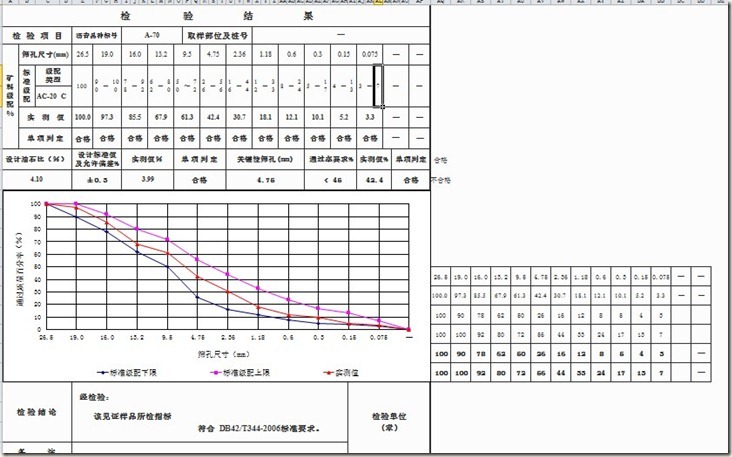
在向这个模板插入新图片时把原来图表的内容给弄不见了,而且把格式搞得一塌糊涂. 之后发现是createDrawingPatriarch()这个方法的问题,在API中是这样解释的:
Creates the top-level drawing patriarch. This will have the effect of removing any existing drawings on this sheet. This may then be used to add graphics or charts
没办法,调用这个方法会把Chart整个Remove掉,换一种方法调用getDrawingPatriarch(),结果发现一样的效果.
测试了一下午,依然没有发现解决的问题,到这个时候我总算体会到了这SeparateSheetFormat是如此的可怕,Apache的良苦用心啊..
最后只有把目光转向XSSF,XSSF是第二代的Excel格式,也是微软公司支持Open Document Format(开放式文档格式)的一个改版.其后缀名是.xlsx,最后那个X的含义貌似是代表XML吧.有同学不懂Open Document Format的请问谷老师.懂的同学把后缀名改为.zip然后解压出来你就豁然开朗了.
不扯那么远了,最终的两个类为:
public class ExcelEditor {

    private XSSFWorkbook book;

    private OPCPackage opc;

    private String excelRealPath;

    private Map<Integer,ExcelSheet> sheets = new HashMap<Integer,ExcelSheet>();

    /**

     * 新版的采用OPCPackage作为文件操作类包括.xlsx和.docx都可以用这个类去读取文件

     * @param excelRealPath

     * @throws IOException

     * @throws InvalidFormatException

     */

    public ExcelEditor(String excelRealPath)throws IOException, InvalidFormatException {

        this.opc = OPCPackage.open(excelRealPath);

        this.book = new XSSFWorkbook(opc);

        this.excelRealPath = excelRealPath;

    }

    public XSSFWorkbook getXSSFWorkbook(){

        return book;

    }

    public ExcelSheet getSheet(int index){

        validateSheetIndex(index);

        ExcelSheet sheet;

        if(sheets.containsKey(index)){

            sheet = sheets.get(index);

        }else{

            sheet = new ExcelSheet(book.getSheetAt(index));

            sheets.put(index, sheet);

        }

        return sheet;

    }

    private void validateSheetIndex(int index) {

        int lastSheetIx = book.getNumberOfSheets() - 1;

        if (index < 0 || index > lastSheetIx) {

            throw new IllegalArgumentException("Sheet index ("+ index +") is out of range (0.." +    lastSheetIx + ")");

        }

    }

    public void writeExcel(String path) throws FileNotFoundException,IOException {

        File excelFile = new File(path);

        if(excelFile.exists()){

            String extension;

            String fileName;

            if(path.lastIndexOf(".")!=-1 && ".xlsx".equalsIgnoreCase(path.substring(path.lastIndexOf(".")))){

                extension = path.substring(path.lastIndexOf("."));

                fileName = path.substring(0,path.lastIndexOf("."));

            }else{

                throw new IOException("Xlsx file output only,check your path!!!");

            }

            File tempFile = new File(fileName+"T"+extension);

            FileOutputStream fos = new FileOutputStream(tempFile);

            book.write(fos);

            fos.close();

            opc.revert();

            excelFile.delete();

            tempFile.renameTo(new File(path));

        }else{

            FileOutputStream fos = new FileOutputStream(excelFile);

            book.write(fos);

            fos.close();

        }

    }

    public void saveExcel() throws IOException{

        this.writeExcel(this.excelRealPath);

    }

}
我在XSSFWorkbook中没有找到保存Excel的方法,之后在发现OPCPackage中发现了revert()和close()方法.revert()个是将打开的Excel还原,不保存任何的修改,close()则是保存已经修改的操作.
close()在第二天运行的时候无法正确保存文件,导致close()之后再打开抛出异常,问了谷老师也不知道是什么原因,最后只有把源文件还原revert()然后保存为新文件之后在删掉.
操作XSSFSheet的类为:
public class ExcelSheet{

    private XSSFSheet sheet;

    public ExcelSheet(XSSFSheet sheet){

        this.sheet = sheet;

    }

    private XSSFCell getCell(int rowNum, int column) {

        XSSFRow row = sheet.getRow(rowNum);

        if (row == null) {

            row = sheet.createRow(rowNum);

        }

        XSSFCell c = row.getCell(column);

        if (c == null) {

            c = row.createCell(column);

        }

        return c;

    }

    public void setGraphicByAnchor(BufferedImage bi,XSSFClientAnchor anchor)throws IOException {

        //    anchor.setAnchorType(XSSFClientAnchor.DONT_MOVE_AND_RESIZE);

            ByteArrayOutputStream baos = new ByteArrayOutputStream();

            ImageIO.write(bi,"jpg", baos);

            XSSFDrawing printer = this.sheet.createDrawingPatriarch();

            XSSFPicture picture = printer.createPicture(anchor, sheet.getWorkbook().addPicture(baos.toByteArray(),XSSFWorkbook.PICTURE_TYPE_JPEG));

            picture.resize();

            baos.close();

        }

        public XSSFCell setString(int rownum, int column, String value) {

            XSSFCell xcell = this.getCell(rownum, column);

            xcell.setCellValue(value);

            return xcell;

        }

        public XSSFCell setInt(int rownum, int column, int value) {

            XSSFCell xcell = this.getCell(rownum, column);

            xcell.setCellValue(value);

            return xcell;

        }

        public XSSFCell setDouble(int rownum, int column, double value) {

            XSSFCell xcell = this.getCell(rownum, column);

            xcell.setCellValue(value);

            return xcell;

        }

        public XSSFCell setBoolean(int rownum, int column, boolean value) {

            XSSFCell xcell = this.getCell(rownum, column);

            xcell.setCellValue(value);

            return xcell;

        }

        public XSSFCell setText(int rownum, int column, RichTextString value) {

            XSSFCell xcell = this.getCell(rownum, column);

            xcell.setCellValue(value);

            return xcell;

        }

        public XSSFCell setDate(int rownum, int column, Date value) {

            XSSFCell xcell = this.getCell(rownum, column);

            xcell.setCellValue(value);

            return xcell;

        }

        public XSSFCell setCalendar(int rownum, int column, Calendar value) {

            XSSFCell xcell = this.getCell(rownum, column);

            xcell.setCellValue(value);

            return xcell;

        }

}

@原文引入:http://www.cnblogs.com/rockcookies/archive/2012/05/15/2502169.html
POI中HSSF和XSSF操作Excel的更多相关文章
- HSSF与XSSF导出excel文档
Apache POI Apache POI 是用Java编写的免费开源的跨平台的 Java API,它可以创建和维护操作各种符合Office Open XML(OOXML)标准和微软的OLE 2复合文 ...
- 工作中常用的QTP操作Excel函数
前言 本文只是对工作中常用的EOM相关函数的整理,并不是要写个大而全的操作手册,如果想对EOM有更多的了解可以参考QTP的帮助文档或查看QTP安装目录\CodeSamplesPlus\UsingExc ...
- Delphi中使用OLE方法操作Excel
首先创建 Excel 对象,使用ComObj: var ExcelApp: Variant; ExcelApp := CreateOleObject( ′Excel.Application′ ); 注 ...
- java使用Apache POI操作excel文件
官方介绍 HSSF is the POI Project's pure Java implementation of the Excel '97(-2007) file format. XSSF is ...
- C# 操作 Excel 文件(.xls 或 .xlsx)
在.net中,常用的操作excel文件的方式,有三种: OLE DB的形式, 第三方框架NPOI, Office组件. 总结: 通过对比,在读取大数据量的excel文件,建议用OLE DB的形式,把e ...
- 关于 HSSF 和 XSSF 功能的开发者入门指南 (Apache POI 操作 Excel)
关于 HSSF 和 XSSF 功能的开发者入门指南 笔者深夜无眠,特此对本文翻译一部分,未完成部分待后续更新 本文源文地址 意欲使用 HSSF 和 XSSF 功能快熟读写电子表格?那本文就是为你而写的 ...
- POI操作Excel详细解释,HSSF和XSSF两种方式
HSSF道路: package com.tools.poi.lesson1; import java.io.FileInputStream; import java.io.FileNotFoundEx ...
- POI操作Excel详解,HSSF和XSSF两种方式
package com.tools.poi.lesson1; import java.io.FileInputStream; import java.io.FileNotFoundException; ...
- poi操作officePOI操作excel中的数据格式(日期类型)
7.3.3 POI中Excel文件Cell的类型 在读取每一个Cell的值的时候,通过getCellType方法获得当前Cell的类型,在Excel中Cell有6种类型,如表7-3所示. 表7-3 C ...
随机推荐
- 使用inline-box代替float
在网页布局中,使用float有不少好处,可以为你带来更加自由的布局,还可以自动根据浏览器改变布局效果.但是使用多了你也可能发现有一个问题,使用了float之后,外层的div不会撑高,导致布局出现坍塌. ...
- [NOIP1998] 提高组 洛谷P1012 拼数
题目描述 设有n个正整数(n≤20),将它们联接成一排,组成一个最大的多位整数. 例如:n=3时,3个整数13,312,343联接成的最大整数为:34331213 又如:n=4时,4个整数7,13,4 ...
- linux 报错:E: Package 'libmemcached' has no installation candidate
linux 报错:E: Package 'libmemcached' has no installation candidate 网上查资料说是软件安装源没有这个软件,需要添加软件源. 1.备份源列表 ...
- ***iOS学习之Table View的简单使用和DEMO示例(共Plain普通+Grouped分组两种)
Table View简单描述: 在iPhone和其他iOS的很多程序中都会看到Table View的出现,除了一般的表格资料展示之外,设置的属性资料往往也用到Table View,Table View ...
- HDU 5665 Lucky
看有没有0和1,都有的时候是YES,否则是NO #include<cstdio> #include<cstring> #include<cmath> #includ ...
- 2017-10-04-afternoon
注意完全平方数统计时的特判 #include <cstdio> inline void read(int &x) { x=; register char ch=getchar(); ...
- webpack体积优化篇一
定位 webpack 大的原因 这里推荐使用 webpack-bundle-analyzer —— Webpack 插件和 CLI 实用程序,她可以将内容束展示为方便交互的直观树状图,让你明白你所 ...
- 【APUE】关于信号的一些常用函数
kill和raise函数 #include <signal.h> int kill(pid_t pid,int signo); int raise(int signo);//两个函数返回值 ...
- HNU 12834 Thread Tree
递归输出即可了 #include<bits/stdc++.h> using namespace std; struct tree{ int dot; string s; } ...
- 限制input的输入类型
1.只能输入和粘贴汉字 <input onkeyup="value=value.replace(/[^\u4E00-\u9FA5]/g,'')" onbeforepaste= ...