
[React] {svg, css module, sass} support in Create React App 2.0
create-react-app version 2.0 added a lot of new features.
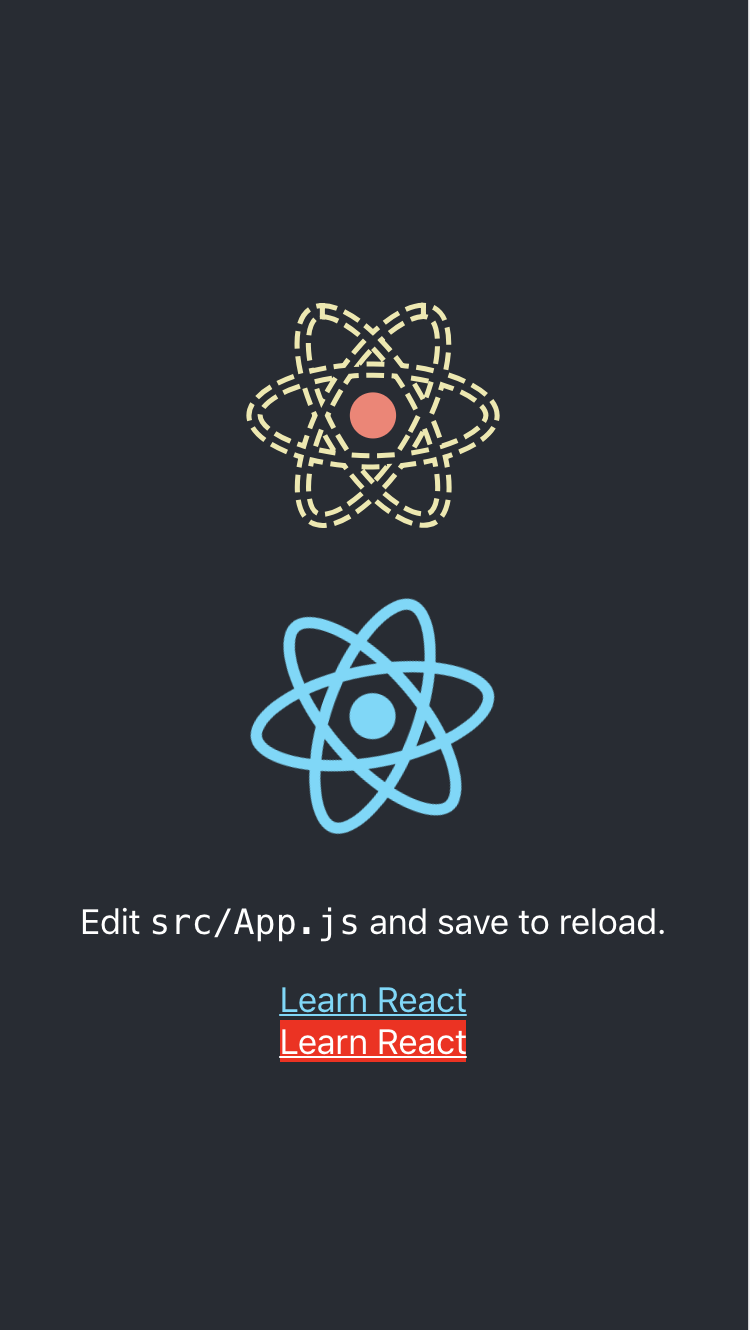
One of the new features is added the svgr webpack loader to wrap SVGs in React components as a named export. This let’s you either grab the filename from the default export or grab a wrapped SVG component depending on your needs.
Second of the new features is support for Sass. If you start to use Sass, create-react-app will give you an error, but will give detailed instructions on how you can add Sass support to your project.
Thrid features is to add CSS Module support. CSS Modules automatically scope class names and animation names local by default to get around the problem of global name clashes. You can learn more by looking at the CSS Modules repository.
import React, {Component} from 'react';

// ReactComponent support svg

import logo, {

    ReactComponent as ReactLogo

} from "./logo.svg";

import './App.scss';

// Supoort

import styles from './styles.module.css';

class App extends Component {

    render() {

        return (

            <div className="App">

                <header className="App-header">

                    <!-- Using svg -->

                    <ReactLogo className="App-logo-svg" alt="logo"/>

                    <img src={logo} className="App-logo" alt="logo"/>

                    <p>

                        Edit <code>src/App.js</code> and save to reload.

                    </p>

                    <a

                        className="App-link"

                        href="https://reactjs.org"

                        target="_blank"

                        rel="noopener noreferrer"

                    >

                        Learn React

                    </a>

                    <!-- Using css module -->

                    <a

                        className={styles['error']}

                        href="https://reactjs.org"

                        target="_blank"

                        rel="noopener noreferrer"

                    >

                        Learn React

                    </a>

                </header>

            </div>

        );

    }

}

export default App;
App.scss:
.App-logo-svg {

  height: 40vmin;

  & g {

    fill: salmon;

  }

  & path {

    stroke: palegoldenrod;

    fill: none;

    stroke-width: 10px;

    stroke-dasharray: 35px 15px;

    animation: orbit 1s infinite linear;

  }

}

@keyframes orbit { to { stroke-dashoffset: 50px; } }
styles.module.css:
.warning {

    color: black;

    background-color: yellow;

}

.error {

    color: white;

    background-color: red;

}
[React] {svg, css module, sass} support in Create React App 2.0的更多相关文章
- [React] Use the Fragment Short Syntax in Create React App 2.0
create-react-app version 2.0 added a lot of new features. One of the new features is upgrading to Ba ...
- React使用css module和className多类名设置
引入样式文件 import styles from './footer.module.css'; 注意: 样式文件名必须要以.module.css结尾 单类名设置 <div className= ...
- parcel bug & not support normal import React & ReactDOM module
bug report not support normal import React & ReactDOM module, why Code Sample OK import * as Rea ...
- React项目中 使用 CSS Module
安装react-app-rewired 由于新的 react-app-rewired@2.x 版本的关系,还需要安装 customize-cra.但是我们这里不需要安装 react-app-rewir ...
- 使用create react app教程
This project was bootstrapped with Create React App. Below you will find some information on how to ...
- 深入 Create React App 核心概念
本文差点难产而死.因为总结的过程中,多次怀疑本文是对官方文档的直接翻译和简单诺列:同时官方文档很全面,全范围的介绍无疑加深了写作的心智负担.但在最终的梳理中,发现走出了一条与众不同的路,于是坚持分享出 ...
- react看这篇就够了(react+webpack+redux+reactRouter+sass)
本帖将对一下内容进行分享: 1.webpack环境搭建: 2.如何使用react-router: 3.引入sass预编译: 4.react 性能优化方案: 5.redux结合react使用: 6.fe ...
- Create React App 安装less 报错
执行npm run eject 暴露模块 安装 npm i less less-loader -D 1.打开 react app 的 webpack.config.js const sassRege ...
- 2019最新create-react-app创建的react中使用sass/scss,以及在react中使用sass/scss公共变量的方法
Sass(英文全称:Syntactically Awesome Stylesheets)是一个最初由Hampton Catlin设计并由Natalie Weizenbaum开发的层叠样式表语言.Sas ...
随机推荐
- vuez init webStorm
<!-- * @description text !--> <template> <div>#[[$END$]]#</div> </templat ...
- CAD交互绘制圆(网页版)
CAD绘制图像的过程中,画圆的情况是非常常见的,用户可以在控件视区点取任意一点做为圆心,再动态点取半径绘制圆. 主要用到函数说明: _DMxDrawX::DrawCircle 绘制一个圆.详细说明如下 ...
- 关于apache access log 统计的那些事儿
统计APACHE ACCESS.LOG IP访问记录 可以根据自己的需要,统计很多,每个IP访问多少个页面等等! cat access.log-20090904 |awk '{print $3}'|s ...
- linux 复制文件夹内所有文件到另一个文件夹
cp -Rf /home/user1/* /root/temp/将 /home/user1目录下的所有东西拷到/root/temp/下而不拷贝user1目录本身.即格式为:cp -Rf 原路径/ 目的 ...
- 路由器wan口ip地址显示0.0.0.0怎么办
http://m.xuexila.com/luyouqi/671049.html 这个网络时代里面我们最常用来连接网络的设备就是路由器了,现在的社会不管是工作还是生活几乎都离不开网络了,同时我们也要学 ...
- 【传智播客】Libevent学习笔记(四):事件event
目录 00. 目录 01. 事件概述 02. 创建事件 03. 事件的标志 04. 事件持久性 05. 超时事件 06. 信号事件 07. 设置不使用堆分配的事件 08. 事件的未决和非未决 09. ...
- 牛客OI赛制测试赛2(0906)
牛客OI赛制测试赛2(0906) A :无序组数 题目描述 给出一个二元组(A,B) 求出无序二元组(a,b) 使得(a|A,b|B)的组数 无序意思就是(a,b)和(b,a) 算一组. 输入描述: ...
- MySQL内外联结
一.内联结(INNER JOIN) MySQL内联结使用INNER JOIN将多个数据表t1,t2隔开,结果是t1里的每一个数据行将与t2里的每一个数据行组合. 逗号连接符.CROSS JOIN和JO ...
- Linux文件和目录的权限笔记
查看文件或者目录的权限命令:ls -al # -a 表示全部文件包含隐藏文件,-l 表示列出每个文件的详细信息 比如执行 ls -al total 115 drwxr--x--- 4 root roo ...
- php添加了环境变更,还是显示 不是内部或外部命令 (注:添加到目录即可,不加 php.exe )
重新配置了PHP环境,要安全PEAR扩展,CMD窗口运行PHP,提示不是内部或者外部命令或者可执行文件,解决方法是把PHP目录加入系统环境变量,不然的话,你只能CD到PHP安装目录下来运行PHP命令.