
[React] {svg, css module, sass} support in Create React App 2.0
create-react-app version 2.0 added a lot of new features.
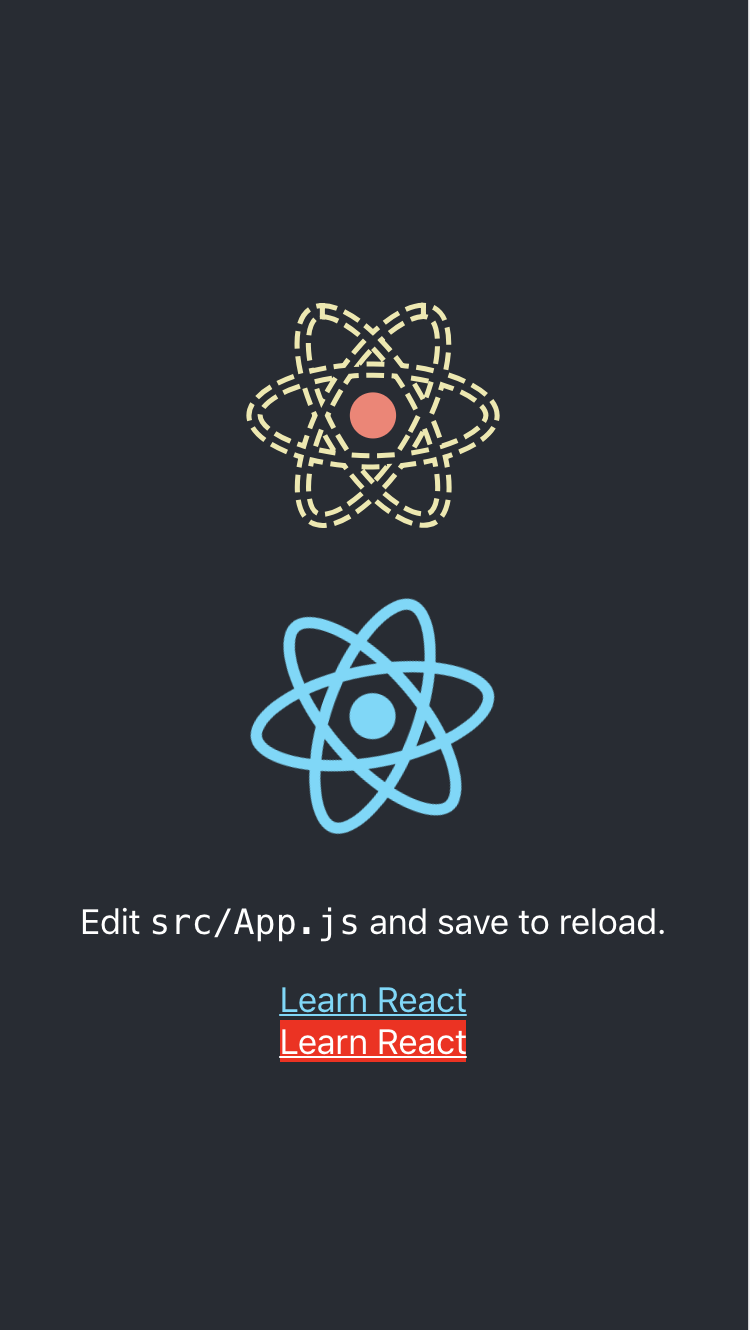
One of the new features is added the svgr webpack loader to wrap SVGs in React components as a named export. This let’s you either grab the filename from the default export or grab a wrapped SVG component depending on your needs.
Second of the new features is support for Sass. If you start to use Sass, create-react-app will give you an error, but will give detailed instructions on how you can add Sass support to your project.
Thrid features is to add CSS Module support. CSS Modules automatically scope class names and animation names local by default to get around the problem of global name clashes. You can learn more by looking at the CSS Modules repository.
import React, {Component} from 'react';

// ReactComponent support svg

import logo, {

    ReactComponent as ReactLogo

} from "./logo.svg";

import './App.scss';

// Supoort

import styles from './styles.module.css';

class App extends Component {

    render() {

        return (

            <div className="App">

                <header className="App-header">

                    <!-- Using svg -->

                    <ReactLogo className="App-logo-svg" alt="logo"/>

                    <img src={logo} className="App-logo" alt="logo"/>

                    <p>

                        Edit <code>src/App.js</code> and save to reload.

                    </p>

                    <a

                        className="App-link"

                        href="https://reactjs.org"

                        target="_blank"

                        rel="noopener noreferrer"

                    >

                        Learn React

                    </a>

                    <!-- Using css module -->

                    <a

                        className={styles['error']}

                        href="https://reactjs.org"

                        target="_blank"

                        rel="noopener noreferrer"

                    >

                        Learn React

                    </a>

                </header>

            </div>

        );

    }

}

export default App;
App.scss:
.App-logo-svg {

  height: 40vmin;

  & g {

    fill: salmon;

  }

  & path {

    stroke: palegoldenrod;

    fill: none;

    stroke-width: 10px;

    stroke-dasharray: 35px 15px;

    animation: orbit 1s infinite linear;

  }

}

@keyframes orbit { to { stroke-dashoffset: 50px; } }
styles.module.css:
.warning {

    color: black;

    background-color: yellow;

}

.error {

    color: white;

    background-color: red;

}
[React] {svg, css module, sass} support in Create React App 2.0的更多相关文章
- [React] Use the Fragment Short Syntax in Create React App 2.0
create-react-app version 2.0 added a lot of new features. One of the new features is upgrading to Ba ...
- React使用css module和className多类名设置
引入样式文件 import styles from './footer.module.css'; 注意: 样式文件名必须要以.module.css结尾 单类名设置 <div className= ...
- parcel bug & not support normal import React & ReactDOM module
bug report not support normal import React & ReactDOM module, why Code Sample OK import * as Rea ...
- React项目中 使用 CSS Module
安装react-app-rewired 由于新的 react-app-rewired@2.x 版本的关系,还需要安装 customize-cra.但是我们这里不需要安装 react-app-rewir ...
- 使用create react app教程
This project was bootstrapped with Create React App. Below you will find some information on how to ...
- 深入 Create React App 核心概念
本文差点难产而死.因为总结的过程中,多次怀疑本文是对官方文档的直接翻译和简单诺列:同时官方文档很全面,全范围的介绍无疑加深了写作的心智负担.但在最终的梳理中,发现走出了一条与众不同的路,于是坚持分享出 ...
- react看这篇就够了(react+webpack+redux+reactRouter+sass)
本帖将对一下内容进行分享: 1.webpack环境搭建: 2.如何使用react-router: 3.引入sass预编译: 4.react 性能优化方案: 5.redux结合react使用: 6.fe ...
- Create React App 安装less 报错
执行npm run eject 暴露模块 安装 npm i less less-loader -D 1.打开 react app 的 webpack.config.js const sassRege ...
- 2019最新create-react-app创建的react中使用sass/scss,以及在react中使用sass/scss公共变量的方法
Sass(英文全称:Syntactically Awesome Stylesheets)是一个最初由Hampton Catlin设计并由Natalie Weizenbaum开发的层叠样式表语言.Sas ...
随机推荐
- 在CNN网络中roi从原图映射到feature map中的计算方法
在使用fast rcnn以及faster rcnn做检测任务的时候,涉及到从图像的roi区域到feature map中roi的映射,然后再进行roi_pooling之类的操作.比如图像的大小是(600 ...
- 【搜索】P1041 传染病控制
题目链接:P1041 传染病控制 题解: 这个题目是看别人的博客做出来的,其实挺不错的一个题目,考察的东西挺多的, 一个dfs可以处理5个东西: 1.找出父亲 2.找出深度 3.每一层的节点,存进Ve ...
- Java以组的数量将字符串分组
package org.jimmy.autosearch2019.test; import java.util.ArrayList; public class Test20190327 { publi ...
- Vickers Vane Pump - Hydraulic Vane Pump Failure: Cavitation, Mechanical Damage
One of our readers recently wrote to me about the following questions: “Recently, we purchased a sec ...
- Hibernate-02 HQL实用技术
学习任务 Query接口的使用 HQL基本用法 动态参数绑定查询 HQL的使用 Hibernate支持三种查询方式:HQL查询.Criateria查询.Native SQL查询. HQL是Hibern ...
- STL源码分析与实现-stl_list容器
1. stl_list 介绍 今天我们来总结一下stl_List, 通过之前介绍单链表的文章,其实对链表的基本操作已经十分熟悉了,那对于stl_list,无非就是链表结构不一样,至于其中的增删改查的细 ...
- CAS机制(多线程)
---- 什么是CAS机制 CAS机制主要是发生于Java中原子操作类(JUC)的底层实现中,其中在CAS机制中包含3个基本参数:内存地址V.旧预期值A.要修改的新值B. 当要更新一个变量的时候,只有 ...
- SANBA服务和FTP服务
1.samba服务 Smb主要作为网络通信协议:Smb是基于cs(client/server)架构(架构还有bs,broswer/server):完成linux与windows之间的共享:linux与 ...
- 条款7:为多太基类声明virtual析构函数
NOTE: 1.polymorphic(多态性质的)base classes 应该声明一个virtual 析构函数.如果class带有任何virtual函数,它就应该拥有一个virtual析构函数. ...
- Django框架基础知识12-中间件及上下文处理器
Django中间件(Middleware) 是一个轻量级.底层的“插件”系统,可以介入Django的请求和响应处理过程,修改Django的输入或输出. django 中的中间件(middleware) ...