
一个简单的QQ隐藏图生成算法 通过jQuery和C#分别实现对.NET Core Web Api的访问以及文件上传
一个简单的QQ隐藏图生成算法
隐藏图不是什么新鲜的东西,具体表现在大部分社交软件中,预览图看到的是一张图,而点开后看到的又是另一张图。虽然很早就看到过这类图片,但是一直没有仔细研究过它的原理,今天思考了一下,发现挺有趣的,所以自己也写了个简单的算法把两张图片合成为一张隐藏图。
比如下面这张图。

当背景颜色为白色时,通常也就是在预览状态下,它是这个样子的
而当背景颜色变黑以后,通常也就是点开图片以后,它是这样子的。。

隐藏图原理
我们知道一张图片中具有透明度的像素会叠加一部分的背景色,因此当背景色为白色时,所有具有透明度的白色像素全部显示为纯白色,而当背景色为黑色时,所有具有透明度的黑色会显示为纯黑色。因此我们只需要把图片一的所有像素根据其灰度值转换成不同透明度的黑色,将图片二的所有像素根据其灰度值转换成不同透明度的白色,并将两图的所有像素按照任意规律交叉排列,即可生成隐藏图。这样当背景色为黑色时,图一的所有像素将会显示为纯黑色,图二的所有像素会因为其透明度不同显现出不同的灰色,此时图一隐藏,图二显现,反之同理。
算法实现
基本的算法思路上面已经提过了,可以说是一个相当简单的算法了。不过具体有几点需要注意:
- 由其原理可知,隐藏图只能是黑白的,不能是彩色的,因此当遇到彩色像素时,需要将其转换成灰度。对于彩色转灰度,心理学中有一个公式:Gray = R*0.299 + G*0.587 + B*0.114,我们需要做的是根据算出来的灰度设定像素透明度。在白色背景下,黑色像素的灰度会随着像透明度增高而降低,在黑色背景下,白色像素的灰度会随着透明度增高而增高。
- 考虑到需要合成的两张图片尺寸不一致,为了保证生成的隐藏图能够完成保留两张图片信息并且不发生变形,我们需要将最终图片的长和宽设定为两张图片尺寸中最大的长和最大的宽。
好的,接下来把我的代码实现贴出来吧

 1 using System;
 2 using System.IO;
 3 using System.Drawing;
 4
 5 class MainClass
 6     {
 7         public static void Main(string[] args)
 8         {
 9             //图片一的文件路径
10             Stream blackImageReader = new FileStream("/Users/shiyidu/Desktop//1.jpg", FileMode.Open);
11             Bitmap blackImage = new Bitmap(blackImageReader);
12
13             //图片二的文件路径
14             Stream whiteImageReader = new FileStream("/Users/shiyidu/Desktop//2.jpg", FileMode.Open);
15             Bitmap whiteImage = new Bitmap(whiteImageReader);
16
17             //生成最终图片
18             Bitmap finalImage = CalculateHiddenImage(blackImage, whiteImage);
19
20             //最终图片保存路径
21             Stream imageCreater = new FileStream("/Users/shiyidu/Desktop//final.png", FileMode.Create);
22             finalImage.Save(imageCreater, System.Drawing.Imaging.ImageFormat.Png);
23         }
24
25         private static Bitmap CalculateHiddenImage(Bitmap blackImage, Bitmap whiteImage)
26         {
27             int b_width = blackImage.Width;
28             int b_height = blackImage.Height;
29             int w_width = whiteImage.Width;
30             int w_height = whiteImage.Height;
31
32             //设定最终图片的尺寸
33             int f_width = Math.Max(b_width, w_width);
34             int f_height = Math.Max(b_height, w_height);
35
36             Bitmap result = new Bitmap(f_width, f_height);
37
38             //黑色图片距离边缘的距离
39             int b_widthOffset = b_width == f_width ? 0 : (f_width - b_width) / 2;
40             int b_heightOffset = b_height == f_height ? 0 : (f_height - b_height) / 2;
41
42             //白色图片离边缘距离
43             int w_widthOffset = w_width == f_width ? 0 : (f_width - w_width) / 2;
44             int w_heightOffset = w_height == f_height ? 0 : (f_height - w_height) / 2;
45
46             for (int x = 0; x < f_width; x++) {
47                 for (int y = 0; y < f_height; y++) {
48                     //上下左右交叉排列黑白像素
49                     bool blackPixel = (x + y) % 2 == 0 ? true : false;
50
51                     int coor_x;
52                     int coor_y;
53                     //决定当前像素位置是否对应图一或图二某像素,如果没有,跳过循环
54                     bool validPixel = true;
55                     if (blackPixel) {
56                         coor_x = x - b_widthOffset;
57                         if (coor_x > b_width - 1) validPixel = false;
58                         coor_y = y - b_heightOffset;
59                         if (coor_y > b_height - 1) validPixel = false;
60                     } else {
61                         coor_x = x - w_widthOffset;
62                         if (coor_x > w_width - 1) validPixel = false;
63                         coor_y = y - w_heightOffset;
64                         if (coor_y > w_height - 1) validPixel = false;
65                     }
66
67                     validPixel = validPixel && coor_x >= 0 && coor_y >= 0;
68                     if (!validPixel) continue;
69
70                     //根据颜色计算像素灰度,设定透明度
71                     if (blackPixel) {
72                         Color origin = blackImage.GetPixel(coor_x, coor_y);
73                         int gray = (origin.R * 19595 + origin.G * 38469 + origin.B * 7472) >> 16;
74                         Color finalColor = Color.FromArgb(255 - gray, Color.Black);
75                         result.SetPixel(x, y, finalColor);
76                     } else {
77                         Color origin = whiteImage.GetPixel(coor_x, coor_y);
78                         int gray = (origin.R * 19595 + origin.G * 38469 + origin.B * 7472) >> 16;
79                         Color finalColor = Color.FromArgb(gray, Color.White);
80                         result.SetPixel(x, y, finalColor);
81                     }
82                 }
83             }
84
85             return result;
86         }
87     }
通过jQuery和C#分别实现对.NET Core Web Api的访问以及文件上传
准备工作:
建立.NET Core Web Api项目
新建一个用于Api请求的UserInfo类
    public class UserInfo
    {
        public string name { get; set; }
        public int age { get; set; }
        public bool sex { get; set; }
    }
2、建立.NET Core Web项目
一、使用jQuery Ajax访问
(一)、表单 [FromForm]
数据类型:Object
ContenyType类型:application/x-www-form-urlencoded
var model = { name: "刘大大", age: 23, sex: true };
前台请求
        var model = { name: "刘大大", age: 23, sex: true };
        $.ajax({
            url: "http://localhost:57954/API/Default/data",
            type: "POST",
            async: true,
            dataType: "json",
            data: model,
            contentType: "application/x-www-form-urlencoded",
            success: function (data) {
                console.log("data:");
                console.log(data);
            }
        });
后台接受
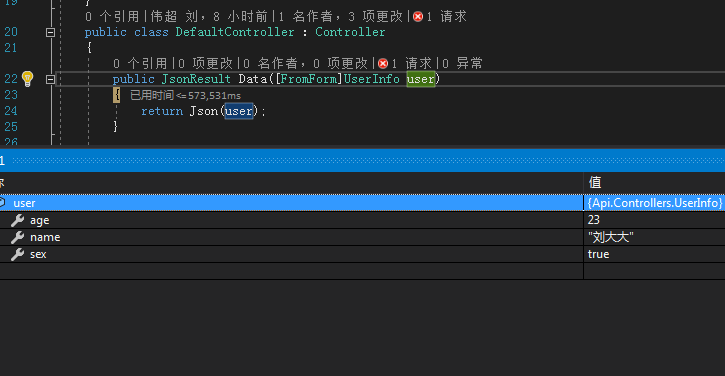
(二)、JSON字符串 [FromBdy]
数据类型:Json
ContenyType类型:application/json
var json={"name":"刘大大","age":23,"sex":true}
也可以使用JSON.stringify(Object)将Object转换为JSON字符串
前端请求
        var model = { name: "刘大大", age: 23, sex: true };
        $.ajax({
            url: "http://localhost:57954/API/Default/data",
            type: "POST",
            async: true,
            dataType: "json",
            data: JSON.stringify(model),
            contentType: "application/json",
            success: function (data) {
                console.log("data:");
                console.log(data);
            }
        });
后台接受
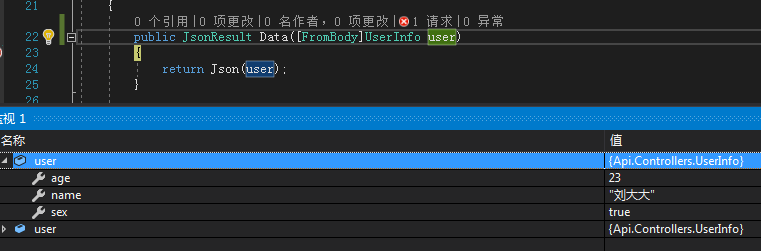
(三)、文件上传
建立FormData对象
数据类型:FromData
ContenyType类型false, //必须false才会避开jQuery对 formdata 的默认处理
processData类型: false, //必须false才会自动加上正确的Content-Type
html
<input type="file" multiple id="file" />
JS获取文件对象
        var file = document.getElementById("file");
        var files = file.files;
        var formData = new FormData();
        for (var i = 0; i < files.length; i++) {
            formData.append(files[i].name, files[i]);
        }     formData.append("name", "刘大大");//可追加参数
AJAX请求
        $.ajax({
            url: "http://localhost:57954/API/Default/data",
            type: "POST",
            async: true,
            dataType: "json",
            data: formData,
            contentType: false,
            processData: false,
            success: function (data) {
                console.log("data:");
                console.log(data);
            }
        });
后台接受
追加的name参数
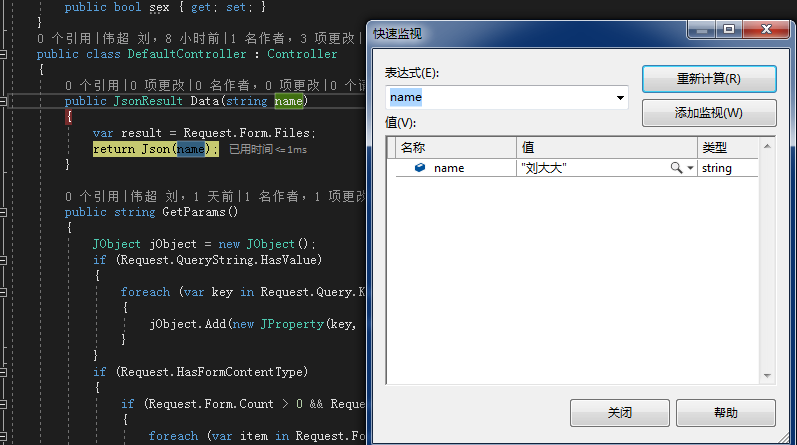
传输的文件
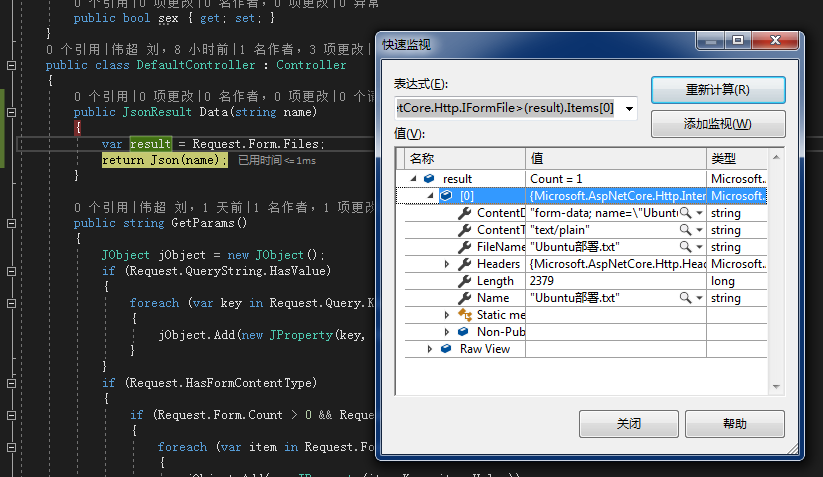
二、使用C#后台访问
(一)、Get访问
var url = "http://localhost:57954/API/Default/values";
using (var client = new HttpClient(new HttpClientHandler() { AutomaticDecompression = DecompressionMethods.Deflate | DecompressionMethods.GZip }))
{
var taskResponse = client.GetAsync(url);
taskResponse.Wait();
if (taskResponse.IsCompletedSuccessfully)
{
var taskStream = taskResponse.Result.Content.ReadAsStreamAsync();
taskStream.Wait();
using (var reader = new StreamReader(taskStream.Result))
{
jsonString = reader.ReadToEnd();
}
}
}
(二)、Post访问
            var data = new {name="刘大大",age=23,sex=true };
            using (var client = new HttpClient(new HttpClientHandler() { AutomaticDecompression = DecompressionMethods.Deflate | DecompressionMethods.GZip }))
            {
                var jsonToSend = JsonConvert.SerializeObject(data, Formatting.None, new IsoDateTimeConverter());
                var body = new StringContent(jsonToSend, Encoding.UTF8, "application/json");
                var taskResponse = client.PostAsync(url, body);
                taskResponse.Wait();
                if (taskResponse.IsCompletedSuccessfully)
                {
                    var taskStream = taskResponse.Result.Content.ReadAsStreamAsync();
                    taskStream.Wait();
                    using (var reader = new StreamReader(taskStream.Result))
                    {
                        jsonString = reader.ReadToEnd();
                    }
                }
            }
(三)、上传文件
        public IActionResult Upload()
        {

            var url = "http://localhost:57954/API/Default/values";

            var data = new MultipartFormDataContent();
            if (Request.HasFormContentType)
            {
                var request = Request.Form.Files;
                foreach (var item in request)
                {
                    data.Add(new StreamContent(item.OpenReadStream()), item.Name, item.FileName);
                }

                foreach (var item in Request.Form)
                {
                    data.Add(new StringContent(item.Value), item.Key);
                }
            }
            string jsonString;
            using (var client = new HttpClient(new HttpClientHandler() { AutomaticDecompression = DecompressionMethods.Deflate | DecompressionMethods.GZip }))
            {
                var taskResponse = client.PostAsync(url, data);
                taskResponse.Wait();
                if (taskResponse.IsCompletedSuccessfully)
                {
                    var taskStream = taskResponse.Result.Content.ReadAsStreamAsync();
                    taskStream.Wait();
                    using (var reader = new StreamReader(taskStream.Result))
                    {
                        jsonString = reader.ReadToEnd();
                    }
                }
            }
            return Json("OK");
        }
WebHelper
这里包含了WebRequest和HttpClient两种请求方式,以及包含了将Object对象序列化为HttpCotnent对象的方法。
/***************************************************************************************************************************************************
 * *文件名:WebHelper.cs
 * *创建人:Jon
 * *日 期 :2018年5月25日
 * *描 述 :实现HTTP协议中的GET、POST请求
 * *MVC使用HttpClient上传文件实例:
        public IActionResult Upload()
        {

            var url = "http://localhost:57954/API/Default/values";
            var data = new MultipartFormDataContent();
            if (Request.HasFormContentType)
            {
                var request = Request.Form.Files;
                foreach (var item in request)
                {
                    data.Add(new StreamContent(item.OpenReadStream()), item.Name, item.FileName);
                }

                foreach (var item in Request.Form)
                {
                    data.Add(new StringContent(item.Value), item.Key);
                }
            }
            WebHelper.PostByHttpClientFromHttpContent(url, data);
            return Json("OK");
        }
*****************************************************************************************************************************************************/
using Newtonsoft.Json;
using Newtonsoft.Json.Converters;
using Newtonsoft.Json.Linq;
using System;
using System.Collections.Generic;
using System.IO;
using System.Net;
using System.Net.Http;
using System.Net.Http.Headers;
using System.Text;

namespace Expansion.Helper
{
    public static class WebHelper
    {
        /// <summary>
        /// 通过WebRequest发起Get请求
        /// </summary>
        /// <param name="url">请求地址</param>
        /// <returns>JSON字符串</returns>
        public static string GetByWebRequest(string url)
        {
            string jsonString = string.Empty;
            var request = (HttpWebRequest)WebRequest.Create(url);
            request.Method = "GET";
            request.ContentType = "application/json";
            request.AutomaticDecompression = DecompressionMethods.Deflate | DecompressionMethods.GZip;
            var response = (HttpWebResponse)request.GetResponse();
            using (var stream = new StreamReader(response.GetResponseStream()))
            {
                jsonString = stream.ReadToEnd();
            }
            return jsonString;
        }

        /// <summary>
        /// 通过WebRequest发起Post请求
        /// </summary>
        /// <param name="url">请求地址</param>
        /// <param name="data">请求参数</param>
        /// <returns>JSON字符串</returns>
        public static string PostByWebRequest(string url, object data)
        {
            string jsonString = string.Empty;
            var request = (HttpWebRequest)WebRequest.Create(url);
            request.ContentType = "application/json";
            request.Method = "POST";
            request.Timeout = Int32.MaxValue;
            request.AutomaticDecompression = DecompressionMethods.Deflate | DecompressionMethods.GZip;
            var jsonToSend = JsonConvert.SerializeObject(data, Formatting.None, new IsoDateTimeConverter());
            byte[] btBodys = Encoding.UTF8.GetBytes(jsonToSend);
            request.ContentLength = btBodys.Length;
            request.GetRequestStream().Write(btBodys, 0, btBodys.Length);
            var response = (HttpWebResponse)request.GetResponse();
            using (var stream = new StreamReader(response.GetResponseStream()))
            {
                jsonString = stream.ReadToEnd();
            }
            return jsonString;
        }

        /// <summary>
        /// 通过HttpClient发起Get请求
        /// </summary>
        /// <param name="url">请求地址</param>
        /// <returns>JSON字符串</returns>
        public static string GetByHttpClient(string url)
        {
            string jsonString = string.Empty;
            using (var client = new HttpClient(new HttpClientHandler() { AutomaticDecompression = DecompressionMethods.Deflate | DecompressionMethods.GZip }))
            {
                var taskResponse = client.GetAsync(url);
                taskResponse.Wait();
                if (taskResponse.IsCompletedSuccessfully)
                {
                    var taskStream = taskResponse.Result.Content.ReadAsStreamAsync();
                    taskStream.Wait();
                    using (var reader = new StreamReader(taskStream.Result))
                    {
                        jsonString = reader.ReadToEnd();
                    }
                }
            }
            return jsonString;
        }

        /// <summary>
        /// 通过HttpClient发起Post请求
        /// </summary>
        /// <param name="url">请求地址</param>
        /// <param name="data">请求参数</param>
        /// <returns>JSON字符串</returns>
        public static string PostByHttpClient(string url, object data)
        {
            string jsonString = string.Empty;
            using (var client = new HttpClient(new HttpClientHandler() { AutomaticDecompression = DecompressionMethods.Deflate | DecompressionMethods.GZip }))
            {
                var jsonToSend = JsonConvert.SerializeObject(data, Formatting.None, new IsoDateTimeConverter());
                var body = new StringContent(jsonToSend, Encoding.UTF8, "application/json");
                var taskResponse = client.PostAsync(url, body);
                taskResponse.Wait();
                if (taskResponse.IsCompletedSuccessfully)
                {
                    var taskStream = taskResponse.Result.Content.ReadAsStreamAsync();
                    taskStream.Wait();
                    using (var reader = new StreamReader(taskStream.Result))
                    {
                        jsonString = reader.ReadToEnd();
                    }
                }
            }
            return jsonString;
        }

        /// <summary>
        /// 通过数据来自HttpContent的HttpClient发起Post请求
        /// </summary>
        /// <param name="url">请求地址</param>
        /// <param name="content">请求参数</param>
        /// <returns>JSON字符串</returns>
        public static string PostByHttpClientFromHttpContent(string url, HttpContent content)
        {
            string jsonString = string.Empty;
            using (var client = new HttpClient(new HttpClientHandler() { AutomaticDecompression = DecompressionMethods.Deflate | DecompressionMethods.GZip }))
            {
                var taskResponse = client.PostAsync(url, content);
                taskResponse.Wait();
                if (taskResponse.IsCompletedSuccessfully)
                {
                    var taskStream = taskResponse.Result.Content.ReadAsStreamAsync();
                    taskStream.Wait();
                    using (var reader = new StreamReader(taskStream.Result))
                    {
                        jsonString = reader.ReadToEnd();
                    }
                }
            }
            return jsonString;
        }

        /// <summary>
        /// Object转换为StreamContent
        /// </summary>
        /// <param name="data">请求参数</param>
        /// <returns>StreamContent</returns>
        public static HttpContent ToStreamContent(this object data)
        {

            var json = JsonConvert.SerializeObject(data, Formatting.None, new IsoDateTimeConverter());
            byte[] bytes = Encoding.UTF8.GetBytes(json);
            MemoryStream ms = new MemoryStream();
            ms.Write(bytes, 0, bytes.Length);
            ms.Position = 0;
            HttpContent streamContent = new StreamContent(ms);
            return streamContent;
        }

        /// <summary>
        /// Object转换为StringContent
        /// </summary>
        /// <param name="data">请求参数</param>
        /// <returns>StringContent</returns>
        public static HttpContent ToStringContent(this object data)
        {
            HttpContent stringContent = new StringContent(JsonConvert.SerializeObject(data));
            return stringContent;
        }

        /// <summary>
        /// Object转换为MultipartFormDataContent
        /// </summary>
        /// <param name="data"></param>
        /// <returns>MultipartFormDataContent</returns>
        public static HttpContent ToMultipartFormDataContent(this object data)
        {
            var json = JsonConvert.SerializeObject(data, Formatting.None, new IsoDateTimeConverter());
            var body = new StringContent(json, Encoding.UTF8, "application/json");
            var multipartFormDataContent = new MultipartFormDataContent();
            multipartFormDataContent.Add(body);
            return multipartFormDataContent;
        }

        /// <summary>
        /// Object转换为FormUrlEncodedContent
        /// </summary>
        /// <param name="data">请求参数</param>
        /// <returns>FormUrlEncodedContent</returns>
        public static HttpContent ToFormUrlEncodedContent(this object data)
        {
            var param = new List<KeyValuePair<string, string>>();
            var values = JObject.FromObject(data);
            foreach (var item in values)
            {
                param.Add(new KeyValuePair<string, string>(item.Key, item.Value.ToString()));
            }
            HttpContent formUrlEncodedContent = new FormUrlEncodedContent(param);
            return formUrlEncodedContent;
        }

        /// <summary>
        /// Object转换为ByteArrayContent
        /// </summary>
        /// <param name="data">请求参数</param>
        /// <returns>FormUrlEncodedContent</returns>
        public static HttpContent ToByteArrayContent(this object data)
        {
            var json = JsonConvert.SerializeObject(data, Formatting.None, new IsoDateTimeConverter());
            byte[] bytes = Encoding.UTF8.GetBytes(json);
            HttpContent byteArrayContent = new ByteArrayContent(bytes);
            return byteArrayContent;
        }

        /// <summary>
        /// Url编码
        /// </summary>
        /// <param name="content">内容</param>
        /// <param name="encode">编码类型</param>
        /// <returns></returns>
        private static string Encode(string content, Encoding encode = null)
        {
            if (encode == null) return content;

            return System.Web.HttpUtility.UrlEncode(content, Encoding.UTF8);

        }

        /// <summary>
        /// Url解码
        /// </summary>
        /// <param name="content">内容</param>
        /// <param name="encode">编码类型</param>
        /// <returns></returns>
        private static string Decode(string content, Encoding encode = null)
        {
            if (encode == null) return content;

            return System.Web.HttpUtility.UrlDecode(content, Encoding.UTF8);

        }

        /// <summary>
        /// 将键值对参数集合拼接为Url字符串
        /// </summary>
        /// <param name="paramArray">键值对集合</param>
        /// <param name="encode">转码类型</param>
        /// <returns></returns>
        private static string BuildParam(List<KeyValuePair<string, string>> paramArray, Encoding encode = null)
        {
            string url = "";

            if (encode == null) encode = Encoding.UTF8;

            if (paramArray != null && paramArray.Count > 0)
            {
                var parms = "";
                foreach (var item in paramArray)
                {
                    parms += string.Format("{0}={1}&", Encode(item.Key, encode), Encode(item.Value, encode));
                }
                if (parms != "")
                {
                    parms = parms.TrimEnd('&');
                }
                url += parms;

            }
            return url;
        }
    }
}
时间仓促,没能说的太详细,有时间再做补充。如本文中的有错误示范,欢迎指正
一个简单的QQ隐藏图生成算法 通过jQuery和C#分别实现对.NET Core Web Api的访问以及文件上传的更多相关文章
- 一个简单的QQ隐藏图生成算法
隐藏图不是什么新鲜的东西,具体表现在大部分社交软件中,预览图看到的是一张图,而点开后看到的又是另一张图.虽然很早就看到过这类图片,但是一直没有仔细研究过它的原理,今天思考了一下,发现挺有趣的,所以自己 ...
- Vue.js 3.0搭配.NET Core写一个牛B的文件上传组件
在开发Web应用程序中,文件上传是经常用到的一个功能. 在Jquery时代,做上传功能,一般找jQuery插件就够了,很少有人去探究上传文件插件到底是怎么做的. 简单列一下我们要做的技术点和功能点 使 ...
- iOS开发UI篇—使用UItableview完成一个简单的QQ好友列表(一)
iOS开发UI篇—使用UItableview完成一个简单的QQ好友列表(一) 一.项目结构和plist文件 二.实现代码 1.说明: 主控制器直接继承UITableViewController // ...
- [Vue]写一个简单的文件上传控件
这篇将介绍如何写一个简单的基于Vue+Element的文件上传控件. 控件将具有 1. 上传队列的列表,显示文件名称,大小等信息,可以显示上传进度实时刷新 2. 取消上传 使用Element的u ...
- ASP.NET Core Web API下事件驱动型架构的实现(一):一个简单的实现
很长一段时间以来,我都在思考如何在ASP.NET Core的框架下,实现一套完整的事件驱动型架构.这个问题看上去有点大,其实主要目标是为了实现一个基于ASP.NET Core的微服务,它能够非常简单地 ...
- Java实现一个简单的文件上传案例
Java实现一个简单的文件上传案例 实现流程: 1.客户端从硬盘读取文件数据到程序中 2.客户端输出流,写出文件到服务端 3.服务端输出流,读取文件数据到服务端中 4.输出流,写出文件数据到服务器硬盘 ...
- 利用Bootstrap简单实现一个文件上传进度条
© 版权声明:本文为博主原创文章,转载请注明出处 说明: 1. 使用commons-fileupload.jar实现文件上传及进度监听 2. 使用bootstrap的进度条进行页面显示 3. 因为进度 ...
- nodejs 实现简单的文件上传功能
首先需要大家看一下目录结构,然后开始一点开始我们的小demo. 文件上传总计分为三种方式: 1.通过flash,activeX等第三方插件实现文件上传功能. 2.通过html的form标签实现文件上传 ...
- 微信录音文件上传到服务器以及amr转化成MP3格式,linux上转换简单方法
微信公众号音频接口开发 根据业务需求,我们可能需要将微信录音保存到服务器,而通过微信上传语音接口上传到微信服务器的语音文件的有效期只有3天,所以需要将文件下载到我们自己的服务器. 上传语音接口 wx. ...
随机推荐
- cifar-10 图片可视化
保存cifar-10 数据集 图片 python3 #用于将cifar10的数据可视化 import pickle as p import numpy as np import matplotlib. ...
- python基础——16(re模块,内存管理)
一.内存管理 1.垃圾回收机制 不能被程序访问到的数据,就称之为垃圾. 1.1.引用计数 引用计数是用来记录值的内存地址被记录的次数的. 每一次对值地址的引用都使该值的引用计数+1:每一次对值地址的释 ...
- js根据银行卡号判断属于哪个银行,并返回银行缩写及银行卡类型
在做绑定银行卡,输入银行卡的时候,产品有这么一个需求,需要用户输入银行卡号的时候,显示对应的银行卡名称及简称.于是苦苦寻觅,终于找到了支付宝的开放API,银行卡校验接口 https://ccdca ...
- H5系列之地理位置(必知必会)
H5之地理位置必知必会 [02]概念 规范地址:http://www.w3.org/TR/geolocation-API/ HTML5 Geolocation(地理定位)用于定位用 ...
- Cocoa-Cocoa对象
2.Cocoa对象 2.1 Objective-C是面向对象的语言 Objective-C和Java C++一样,有封装,继承,多态,重用.但是它不像C++那样有重载操作法.模版和多继承,也没有Jav ...
- IOS 自动布局-UIStackPanel和UIGridPanel(四)
为什么说scrollview的自动化布局是难点? 对scrollview做自动化布局,无非就是想对scrollview里面的subviews来做自动化布局.但是scrollview里面的subview ...
- c语言头文件以及make注意事项
c语言头文件以及make注意事项 头文件说明:自己定义的头文件和项目文件放在一起,注意使用""而不是使用<>,系统的头文件才使用<> 当main函数要调用其 ...
- Android点击两次返回退出程序
代码改变世界 Android点击两次返回退出程序 private long mExitTime; public boolean onKeyDown(int keyCode, KeyEvent even ...
- 【Luogu】P3627抢掠计划(缩点最短路)
题目链接在此 有环当然一定尽量走环,这是搞缩点的人都知道的常识. 建了新图之后搞点权SPFA跑最长路.枚举每个酒吧选择最大值. 发现我的博客写的越来越水了 #include<cstdio> ...
- HDU 1693 Eat the Trees ——插头DP
[题目分析] 吃树. 直接插头DP,算是一道真正的入门题目. 0/1表示有没有插头 [代码] #include <cstdio> #include <cstring> #inc ...