
putty 配置
http://blog.sanctum.geek.nz/putty-configuration/
PuTTY configuration
PuTTY is a terminal emulator with a free software license, including an SSH client. While it has cross-platform ports, it’s used most frequently on Windows systems, because they otherwise lack a built-in terminal emulator that interoperates well with Unix-style TTY systems.
While it’s very popular and useful, PuTTY’s defaults are quite old, and are chosen for compatibility reasons rather than to take advantage of all the features of a more complete terminal emulator. For new users, this is likely an advantage as it can avoid confusion, but more advanced users who need to use a Windows client to connect to a modern Linux system may find the defaults frustrating, particularly when connecting to a more capable and custom-configured server.
Here are a few of the problems with the default configuration:
- It identifies itself as an
xterm(1), whenterminfo(5)definitions are available namedputtyandputty-256color, which more precisely define what the terminal can and cannot do, and their various custom escape sequences. - It only allows 16 colors, where most modern terminals are capable of using 256; this is partly tied into the terminal type definition.
- It doesn’t use UTF-8 by default, which should be used whenever possible for reasons of interoperability and compatibility, and is well-supported by modern
localedefinitions on Linux. - It uses Courier New, a workable but rather harsh monospace font, which should be swapped out for something more modern if available.
- It uses audible terminal bells, which tend to be annoying.
- Its default palette based on
xterm(1)is rather garish and harsh; softer colors are more pleasant to read.
All of these things are fixable.
Terminal type
Usually the most important thing in getting a terminal working smoothly is to make sure it identifies itself correctly to the machine to which it’s connecting, using an appropriate $TERM string. By default, PuTTY identifies itself as an xterm(1) terminal emulator, which most systems will support.
However, there’s a terminfo(5) definition for putty and putty-256color available as part of ncurses, and if you have it available on your system then you should use it, as it slightly more precisely describes the features available to PuTTY as a terminal emulator.
You can check that you have the appropriate terminfo(5) definition installed by looking in /usr/share/terminfo/p:
$ ls -1 /usr/share/terminfo/p/putty*

/usr/share/terminfo/p/putty

/usr/share/terminfo/p/putty-256color

/usr/share/terminfo/p/putty-sco

/usr/share/terminfo/p/putty-vt100
On Debian and Ubuntu systems, these files can be installed with:
# apt-get install ncurses-term
If you can’t install the files via your system’s package manager, you can also keep a private repository of terminfo(5) files in your home directory, in a directory called .terminfo:
$ ls -1 $HOME/.terminfo/p

putty

putty-256color
Once you have this definition installed, you can instruct PuTTY to identify with that $TERM string in the Connection > Data section:
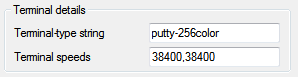
Here, I’ve used putty-256color; if you don’t need or want a 256 color terminal you could just use putty.
Once connected, make sure that your $TERM string matches what you specified, and hasn’t been mangled by any of your shell or terminal configurations:
$ echo $TERM

putty-256color
Color space
Certain command line applications like Vim and Tmux can take advantage of a full 256 colors in the terminal. If you’d like to use this, set PuTTY’s $TERM string to putty-256color as outlined above, and select Allow terminal to use xterm 256-colour mode in Window > Colours:
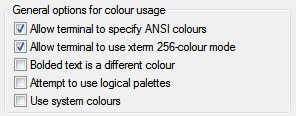
You can test this is working by using a 256 color application, or by trying out the terminal colours directly in your shell using tput:
$ for ((color = 0; color <= 255; color++)); do

> tput setaf "$color"

> printf "test"

> done
If you see the word test in many different colors, then things are probably working. Type reset to fix your terminal after this:
$ reset
Using UTF-8
If you’re connecting to a modern GNU/Linux system, it’s likely that you’re using a UTF-8 locale. You can check which one by typing locale. In my case, I’m using the en_NZ locale with UTF-8 character encoding:
$ locale

LANG=en_NZ.UTF-8

LANGUAGE=en_NZ:en

LC_CTYPE="en_NZ.UTF-8"

LC_NUMERIC="en_NZ.UTF-8"

LC_TIME="en_NZ.UTF-8"

LC_COLLATE="en_NZ.UTF-8"

LC_MONETARY="en_NZ.UTF-8"

LC_MESSAGES="en_NZ.UTF-8"

LC_PAPER="en_NZ.UTF-8"

LC_NAME="en_NZ.UTF-8"

LC_ADDRESS="en_NZ.UTF-8"

LC_TELEPHONE="en_NZ.UTF-8"

LC_MEASUREMENT="en_NZ.UTF-8"

LC_IDENTIFICATION="en_NZ.UTF-8"

LC_ALL=
If the output of locale does show you’re using a UTF-8 character encoding, then you should configure PuTTY to interpret terminal output using that character set; it can’t detect it automatically (which isn’t PuTTY’s fault; it’s a known hard problem). You do this in the Window > Translation section:
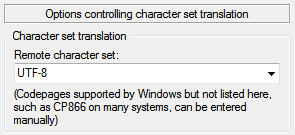
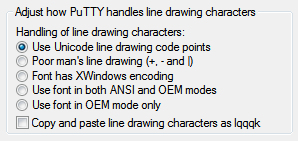
While you’re in this section, it’s best to choose the Use Unicode line drawing code points option as well. Line-drawing characters are most likely to work properly with this setting for UTF-8 locales and modern fonts:
If Unicode and its various encodings is new to you, I highly recommend Joel Spolsky’s classic article about what programmers should know about both.
Fonts
Courier New is a workable monospace font, but modern Windows systems include Consolas, a much nicer terminal font. You can change this in the Window > Appearance section:
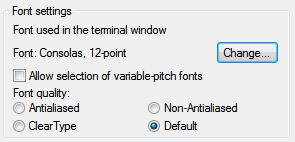
There’s no reason you can’t use another favourite Bitmap or TrueType font instead once it’s installed on your system; DejaVu Sans Mono, Inconsolata, and Terminus are popular alternatives. I personally favor Ubuntu Mono.
Bells
Terminal bells by default in PuTTY emit the system alert sound. Most people find this annoying; some sort of visual bell tends to be much better if you want to use the bell at all. Configure this in Terminal > Bell:
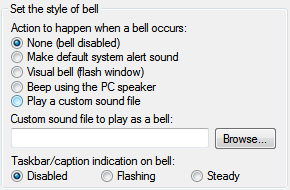
Given the purpose of the alert is to draw attention to the window, I find that using a flashing taskbar icon works well; I use this to draw my attention to my prompt being displayed after a long task completes, or if someone mentions my name or directly messages me in irssi(1).
Another option is using the Visual bell (flash window) option, but I personally find this even worse than the audible bell.
Default palette
The default colours for PuTTY are rather like those used in xterm(1), and hence rather harsh, particularly if you’re used to the slightly more subdued colorscheme of terminal emulators like gnome-terminal(1), or have customized your palette to something like Solarized.
If you have decimal RGB values for the colours you’d prefer to use, you can enter those in the Window > Colours section, making sure that Use system colours and Attempt to use logical palettes are unchecked:
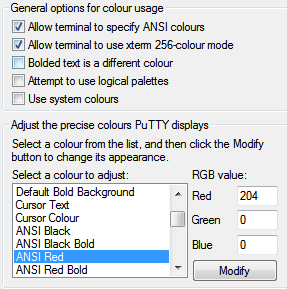
There are a few other default annoyances in PuTTY, but the above are the ones that seem to annoy advanced users most frequently. Dag Wieers has a similar post with a few more defaults to fix.
Solarized 配色:
The Values
L*a*b values are canonical (White D65, Reference D50), other values are matched in sRGB space.
SOLARIZED HEX     16/8 TERMCOL  XTERM/HEX   L*A*B      RGB         HSB

--------- ------- ---- -------  ----------- ---------- ----------- -----------

base03    #002b36  8/4 brblack  234 #1c1c1c 15 -12 -12   0  43  54 193 100  21

base02    #073642  0/4 black    235 #262626 20 -12 -12   7  54  66 192  90  26

base01    #586e75 10/7 brgreen  240 #585858 45 -07 -07  88 110 117 194  25  46

base00    #657b83 11/7 bryellow 241 #626262 50 -07 -07 101 123 131 195  23  51

base0     #839496 12/6 brblue   244 #808080 60 -06 -03 131 148 150 186  13  59

base1     #93a1a1 14/4 brcyan   245 #8a8a8a 65 -05 -02 147 161 161 180   9  63

base2     #eee8d5  7/7 white    254 #e4e4e4 92 -00  10 238 232 213  44  11  93

base3     #fdf6e3 15/7 brwhite  230 #ffffd7 97  00  10 253 246 227  44  10  99

yellow    #b58900  3/3 yellow   136 #af8700 60  10  65 181 137   0  45 100  71

orange    #cb4b16  9/3 brred    166 #d75f00 50  50  55 203  75  22  18  89  80

red       #dc322f  1/1 red      160 #d70000 50  65  45 220  50  47   1  79  86

magenta   #d33682  5/5 magenta  125 #af005f 50  65 -05 211  54 130 331  74  83

violet    #6c71c4 13/5 brmagenta 61 #5f5faf 50  15 -45 108 113 196 237  45  77

blue      #268bd2  4/4 blue      33 #0087ff 55 -10 -45  38 139 210 205  82  82

cyan      #2aa198  6/6 cyan      37 #00afaf 60 -35 -05  42 161 152 175  74  63

green     #859900  2/2 green     64 #5f8700 60 -20  65 133 153   0  68 100  60
putty 配置的更多相关文章
- PuTTY配置
目录 1.作用? 2.中文问题解决 ? 3.GUI支持? 4.使用密钥对实现安全快捷的无密码登陆? 5.操作习惯(Alt+Enter全屏以及字体配置) 6.附录(sshd服务器配置) 1.作用? Pu ...
- 【原】putty配置下载
文章出自:http://www.cnblogs.com/david-zhang-index/p/3205354.html putty配置下载,已经配置好了,颜色非常不错 PUTTY.zip
- TortoiseGit 与 Putty 配置冲突导致 Server refuse our key
tortoisegit是TortoiseSVN的Git版本,tortoisegit用于迁移TortoiseSVN到TortoiseGit,一直以来Git在Windows平台没有好用GUI客户端,现在t ...
- linux零基础之--使用putty配置
PuTTY是一个Telnet.SSH.rlogin.纯TCP以及串行接口连接软件.随着Linux在服务器端应用的普及,Linux系统管理越来越依赖于远程.在各种远程登录工具中,Putty是出色的工具之 ...
- 导出putty配置
原文链接:http://downloadsquad.switched.com/2007/02/01/howto-transfer-your-putty-settings-between-compute ...
- windows10 下访问 virtualbox 虚拟机的linux15.10/16.04 系统 及 用 putty 访问虚拟机的配置
参考: http://www.doc88.com/p-915707596190.html --- 安装samba http://my.oschina.net/u/2260265/blog/405598 ...
- 远程连接Kali Linux使用PuTTY实现SSH远程连接
远程连接Kali Linux使用PuTTY实现SSH远程连接 本书主要以在Android设备上安装的Kali Linux操作系统为主,介绍基于Bash Shell渗透测试.由于在默认情况下,在Andr ...
- L10 PUtty+SSH 访问vncviewer
在Linux下配置一个VNC服务器,并设置2个用户,要求其中一个用户登录时不需要输入密码.然后在客户端使用ssh+vncview的方式访问. 安装tigervnc: 输入的密码是123456 连接服务 ...
- jmeter连接配置带跳板机(SSH)的mysql服务器
jmeter连接配置mysql服务器时,如果数据库服务器没有通过ssh连接,则只需要配置相应的jdbc参数就可以了,即请求域名或ip地址:3306,如果数据库服务器是通过SSH连接的,那需要通过中间远 ...
随机推荐
- Java垃圾回收机制分析
Java的堆是一个运行时数据区,类的实例从中分配空间,堆中存储着正在运行的应用程序所建立的所有对象.垃圾回收是一种动态存储管理技术.它按照特定的垃圾回收算法,自动释放掉不再被引用的对象.堆内存里垃圾的 ...
- linux下自定义pid实现任意数据采集
当你需要采集特殊的数据,而不满足于现有的你所知的数据模版时,自定义oid将是你必须而且非常好的解决方式. oid是snmp服务器为每条系统信息提供的唯一标识符,如果不能很好理解snmp服务的话,可以将 ...
- PMP项目管理学习笔记(3)——过程框架
所有项目,不论大小,都可以分解为过程组: 如果项目规模很大,可以分阶段管理,每个阶段都要经过上面的五个过程组,从启动到收尾. 阶段的类型: 顺序阶段: 一个阶段完成后进入下个阶段. 重叠阶段: 有时需 ...
- java 读取txt,java读取大文件
java 读取txt,java读取大文件 package com.bbcmart.util; import java.io.File;import java.io.RandomAccessFile;i ...
- 微信小程序开发系列教程三:微信小程序的调试方法
微信小程序开发系列教程 微信小程序开发系列一:微信小程序的申请和开发环境的搭建 微信小程序开发系列二:微信小程序的视图设计 这个教程的前两篇文章,介绍了如何用下图所示的微信开发者工具自动生成一个Hel ...
- 在LXC Centos6-moban 编译安装mysql-5.6.36 时候遇见的报错
在LXC安装Centos6-moban 编译安装mysql-5.6.36 cmake . -DCMAKE_INSTALL_PREFIX=/application/mysql-5.6.36 -DMY ...
- Oracle的Central Inventory和Local inventory详解
很多朋友对Oracle的inventory信息不太了解以至遇到相关的问题不知道如何处理,这篇文章我们将详细讲解Oracle的Central Inventory (oraInventory)和Local ...
- Python中Pickle模块的dump()方法和load()方法
Python中的Pickle模块实现了基本的数据序列与反序列化. 经常遇到在Python程序运行中得到了一些字符串.列表.字典等数据,想要长久的保存下来,方便以后使用,而不是简单的放入内存中关机断电就 ...
- this.$emit('on-select-change' emit里面不能写大写字母
this.$emit('on-select-change' emit里面不能写大写字母 刚试了下 也能写大写 但是 两边就都写一样就完了,就都写成带-的就完了
- ES6 export default 和 export 的区别
export default 和 export 区别: 1.export与export default均可用于导出常量.函数.文件.模块等 2.你可以在其它文件或模块中通过import+(常量 | 函 ...