
一个Lucene.Net的Demo
今天突然想来看一下全文检索,于是就了解了一下Lucene.Net,然后把公司目前的产品表拿来练手,写了这么个Demo。
先看一下Demo的代码
    public class ProductRepository

    {

        private Logger logger = new Logger(typeof(ProductRepository));

        /// <summary>

        /// 分页获取商品数据

        /// </summary>

        /// <param name="tableNum"></param>

        /// <param name="pageIndex">从1开始</param>

        /// <param name="pageSize"></param>

        /// <returns></returns>

        public List<Product> QueryList(int tableNum, int pageIndex, int pageSize)

        {

            string sql = string.Format("SELECT top {2} ProductID,ProductCode,ProductName,PreferentialPrice AS Price,ProductImage AS ImageUrl FROM Product WHERE ProductID>{1};", tableNum.ToString(""), pageSize * Math.Max(, pageIndex - ), pageSize);

            return SqlHelper.QueryList<Product>(sql);

        }

    }
internal class LuceneTest

{

        public static void Show(string searchInput)

        {

            FSDirectory dir = FSDirectory.Open(StaticConstant.TestIndexPath);

            IndexSearcher searcher = new IndexSearcher(dir);//查找器

            QueryParser parser = new QueryParser(Lucene.Net.Util.Version.LUCENE_30, "title", new PanGuAnalyzer());//解析器

            {

                string keyword = searchInput;

                {

                    Query query = parser.Parse(keyword);

                    TopDocs docs = searcher.Search(query, null, );//找到的数据

                    int i = ;

                    foreach (ScoreDoc sd in docs.ScoreDocs)

                    {

                        if (i++ < )

                        {

                            Document doc = searcher.Doc(sd.Doc);

                            Console.WriteLine("***************************************");

                            Console.Write(string.Format(" id={0}", doc.Get("id")));

                            Console.Write(string.Format(" title={0}", doc.Get("title")));

                            Console.Write(string.Format(" time={0}", doc.Get("time")));

                            Console.Write(string.Format(" price={0}", doc.Get("price")));

                            Console.WriteLine("***************************************");

                        }

                    }

                    Console.WriteLine($"一共命中了{docs.TotalHits}个");

                }

            }

        }

        /// <summary>

        /// 初始化索引

        /// </summary>

        public static void InitIndex()

        {

            List<Product> productList = GetList();

            FSDirectory directory = FSDirectory.Open(StaticConstant.TestIndexPath);//FSDirectory表示存放在文件中

            using (IndexWriter writer = new IndexWriter(directory, new PanGuAnalyzer(), true, IndexWriter.MaxFieldLength.LIMITED))//索引写入器

            {

                foreach (Product product in productList)

                {

                        Document doc = new Document();//一条数据

                        doc.Add(new Field("id", product.ProductID.ToString(), Field.Store.NO, Field.Index.NOT_ANALYZED));//一个字段  列名  值   是否保存值  是否分词

                        doc.Add(new Field("title", product.ProductName, Field.Store.YES, Field.Index.ANALYZED));

                        doc.Add(new Field("imageurl", product.ImageUrl, Field.Store.NO, Field.Index.NOT_ANALYZED));

                        doc.Add(new Field("content", "this is lucene working,powerful tool ", Field.Store.YES, Field.Index.ANALYZED));

                        doc.Add(new NumericField("price", Field.Store.YES, true).SetDoubleValue((double)(product.Price)));

                        doc.Add(new NumericField("time", Field.Store.YES, true).SetIntValue(int.Parse(DateTime.Now.ToString("yyyyMMdd"))));

                        writer.AddDocument(doc);//写进去

                }

                writer.Optimize();//优化合并

            }

        }

        /// <summary>

        /// 数据库取5000条数据测试

        /// </summary>

        /// <returns></returns>

        private static List<Product> GetList()

        {

            ProductRepository repository = new ProductRepository();

            List<Product> productList = repository.QueryList(, , );

            return productList;

        }

}
class Program

{

    static void Main(string[] args)

    {

        LuceneTest.InitIndex();

        string input;

        while ((input = Console.ReadLine()).ToUpper() != "EXIT")

        {

            if (input == "") continue;

            LuceneTest.Show(input);

        }

    }

}
现在来看一下LuceneTest的InitIndex方法。
FSDirectory directory = FSDirectory.Open(StaticConstant.TestIndexPath); 该语句表示将创建的索引保存到文件中;
IndexWriter writer = new IndexWriter(directory, new PanGuAnalyzer(), true, IndexWriter.MaxFieldLength.LIMITED) 接着我们创建了一个writer,并指定存放索引的目录为刚创建的directory,使用的分析器为PanGuAnalyzer,第三个参数说明如果已经有索引文件在索引目录下,我们将覆盖它们。
我们循环遍历productList,创建Document,然后往Document添加Filed。这里说明一下Document是表示含文档的数据结构,定义了存储文档的数据结构,Field类定义了document一个域。Field有两个属性可选:存储和索引。通过存储属性你可以控制是否对这个Field进行存储;通过索引属性你可以控制是否对该Field进行索引。最后将document加入到IndexWriter里,使用IndexWriter.Optimize()进行优化合并。
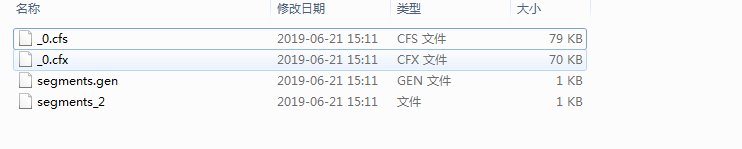
之后我们可以看到在我们制定的目录下生成了下面的文件
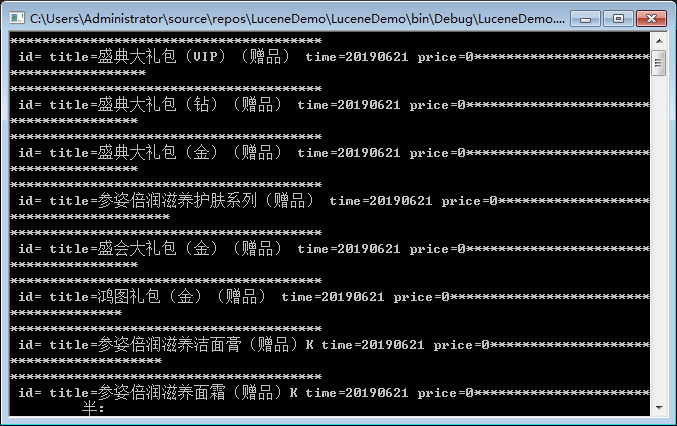
最后我们在Show方法中使用 IndexSearcher 进行检索。
一个Lucene.Net的Demo的更多相关文章
- ios学习-制作一个浏览图片的Demo
一.项目要求:制作一个浏览图片的Demo,要求包含夜间模式,以及改变图片大小,能够显示不同的图片描述 二.开发步骤: 1.在storyboard上添加一个空白的View,然后添加”设置“按钮,添加im ...
- 2.Lucene3.6.2包介绍,第一个Lucene案例介绍,查看索引信息的工具lukeall介绍,Luke查看的索引库内容,索引查找过程
1 Lucen目录介绍 2 lucene-core-3.6.2.jar是lucene开发核心jar包 contrib 目录存放,包含一些扩展jar包 3 案例 建立第一个Lucene项目 ...
- WebRTC系列(1)-手把手教你实现一个浏览器拍照室Demo
1.WebRTC开发背景 由于业务需求,需要在项目中实现实时音视频通话功能,之前基于浏览器开发的Web项目要进行音视频通话,需要安装flash插件才能实现或者使用C/S客户端进行通信.随着互联网技术的 ...
- 一个lucene源码分析的博客
ITpub上的一个lucene源码分析的博客,写的比较全面:http://blog.itpub.net/28624388/cid-93356-list-1/
- C#中缓存的使用 ajax请求基于restFul的WebApi(post、get、delete、put) 让 .NET 更方便的导入导出 Excel .net core api +swagger(一个简单的入门demo 使用codefirst+mysql) C# 位运算详解 c# 交错数组 c# 数组协变 C# 添加Excel表单控件(Form Controls) C#串口通信程序
C#中缓存的使用 缓存的概念及优缺点在这里就不多做介绍,主要介绍一下使用的方法. 1.在ASP.NET中页面缓存的使用方法简单,只需要在aspx页的顶部加上一句声明即可: <%@ Outp ...
- Dubbo入门介绍---搭建一个最简单的Demo框架
Dubbo入门---搭建一个最简单的Demo框架 置顶 2017年04月17日 19:10:44 是Guava不是瓜娃 阅读数:320947 标签: dubbozookeeper 更多 个人分类: D ...
- Lucene3.6.2包介绍,第一个Lucene案例介绍,查看索引信息的工具lukeall介绍,Luke查看的索引库内容,索引查找过程
2.Lucene3.6.2包介绍,第一个Lucene案例介绍,查看索引信息的工具lukeall介绍,Luke查看的索引库内容,索引查找过程 2014-12-07 23:39 2623人阅读 评论(0) ...
- 一个发邮件的demo 用golang
一个比较成熟的第三方包用来发邮件,可以带图片 和附件,项目地址 : github.com/go-gomail/gomail 一个发邮件的demo 用golang 文件目录树: -d:\test\goe ...
- DeWeb进阶 :控件开发 --- 1 完成一个纯html的demo
最近随着DeWeb(以下简称DW)的完善,和群友的应用的深入,已经有网友开始尝试做DeWeb支持控件的开发了! 这太令人兴奋了! 作为DeWeb的开发者,感觉DeWeb的优势之一就是简洁的第三方控件扩 ...
随机推荐
- Linux限制端口
设置防火墙 iptables -a input -p 协议 -s 可以访问ip -dport端口 -j ACCEPT
- Eclipse的maven工程不小心移除了Maven Dependencies,如何添加回来?
转自:https://blog.csdn.net/eininotop/article/details/71124533 选择该工程--> 点击右键--> 选择Properties--> ...
- Lua变量
Lua 变量 变量在使用前,必须在代码中进行声明,即创建该变量. 编译程序执行代码之前编译器需要知道如何给语句变量开辟存储区,用于存储变量的值. Lua 变量有三种类型:全局变量.局部变量.表中的域. ...
- Python2/3共存,pip2/3共存
python2 和 python3设置: 1.安装Python2和3,并添加环境变量: 2.找到python2和python3的安装目录,修改python2中和python3中python.exe和p ...
- Ant Design Vue项目解析-前言
源码系列文章很长时间没有更新,一是在考虑文章用什么方式写质量会更高,用什么方式总结更易于扩展和总结知识点,加上工作.看书.健身占用的时间比较多所以也没时间去整理.最近在网上看到一篇文章感觉这种方式不错 ...
- hdoj1176【DP】
DP基础吧.A掉还是挺爽的.就是考虑在两端只能是从前一秒的内部一米或原来的点来进行,但是在5秒以内可到达点是逐渐外扩的,并不是[0,10],所以就特殊考虑了一下.后面两端是0和10,中间的点可以从上一 ...
- 黑客攻防技术宝典web实战篇:工具web服务器习题
猫宁!!! 参考链接:http://www.ituring.com.cn/book/885 随书答案. 1. 在什么情况下 Web 服务器会显示目录列表? 如果请求某目录的 URL 且满足以下条件,W ...
- 求导四则运算以及三角函数求导 Derivative formulas
对特定函数的求导. 1:sin(x) 对其进行求斜率.带入公式得:[ sin(x+Δx)- sin(x)]/Δx = [ sinx*cosΔx + cosx*sinΔx -sin x ]/ Δx = ...
- Bits Equalizer UVA - 12545
点击打开链接 #include<cstdio> #include<cstring> /* 别看错了:0能变1,1不能变0 能完成的条件是,s与t长度相等且s中0数量和?数量之和 ...
- hibernate Day1
1 Web内容回顾(1) JavaEE三层架构web层(struts2框架)service层(spring框架)dao层(hibernate框架):负责对数据库进行CRUD操作(2) MVC模式(这是 ...