
What is an ISAPI Extension?
https://www.codeproject.com/Articles/1432/What-is-an-ISAPI-Extension
Introduction
Unless you have been a caveman, you have seen a number of web sites that whenever is browsed, the navigation ends up to a DLL file residing in a scripting directory of that dominium! Something like the following pseudo URL:
http://www.mydomain.com/script/example.dll?ID=p05874&Tx=870250AZT6
What does this DLL suppose to do and what does it have to do with today's paper?
These DLLs are created using the Internet Server API, or ISAPI for short. ISAPI is developed to provide a benefit or two, over the shortcomings of Common Gateway Interface, CGI. Although we surprisingly experience new web sites developed exclusively by CGI scripts nowadays, however, ISAPI DLLs have got something to offer that CGI could never bring us this way or that way.
I am going to start off this paper by describing the underlying details that any ISAPI programmer has to know, to be able to develop a better ISAPI extension. From then on, I will go through a development of a useful ISAPI extension step by step. The extension is supposed to validate a given credit card. Yeah! This is also my answer to those people who asked me the algorithm involved validating a credit card over and over again. Gotta go!
What is ISAPI?
Internet Server Application Programming Interface (ISAPI), is an API developed to provide the application developers with a powerful way to extend the functionality of Internet Information Server (IIS). Although ISAPI extensions by no means are limited to IIS, they are extensively used in conjunction with MS-IIS.
CGI vs. ISAPI
Developing a CGI program involves creating an EXE with C, C++, and/or Perl programming languages. This EXE file will be executed and terminated for every request received, causing an excessive memory usage, whenever users hit the same page over and over again!
This excessive memory usage that could bring the server completely down, has been solved under ISAPI extensions. An ISAPI extension is a regular DLL file that exposes 3 special functions that is called by the calling process (i.e., IIS) and therefore, will be loaded to memory once, no matter how many clients are going to use it at the same time. (It would be a good idea if you could take a look at a reference, to see how memory management is done under Windows 2000. The Visual C++ 6.0 Bible, Chapter 18, The Memory Management, describes it well!)
ISAPI fundamentals
Since the ISAPI extension and the calling process (IIS) live at the same address space, they could contact each other, directly. This means a great potential to bring the whole IIS down, and in some cases, the entire web server! Take a look at the following figure:
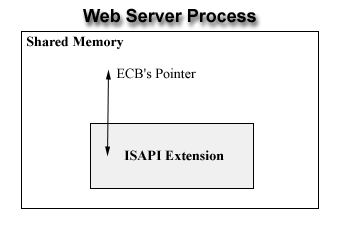
You see whatever problem your extension encounters, it could affect the entire web server process, if it's not handled properly. As illustrated above, communicating between the extension and IIS is done via a pointer to a structure of type ECB, or Extension Control Block that is declared as follows:
Whatever information either the calling process or the extension wants to pass to the other, is done through this control block. We will shortly have a look at this ECB structure. For now, let's see how IIS works in conjunction with your extension, to serve the visitor of your web site.
Whenever an extension is accessed (e.g., http://www.mydomain.com/script/example.dll?ID=p05874 & Tx=870250AZT6), IIS checks to see whether the example.dll is loaded into memory. If it is not, then it initiates the loading process. Once the DLL is loaded into memory, a worker thread starts running to manage our extension, and thereafter the entry point (DLLMain function) is called. When the DLLMain finishes, the server makes a call to GetExtensionVersion function to perform two tasks:
- Exchange version information
- Get a short text description of the extension
The server then calls the HttpExtensionProc function passing a copy of the ECB's pointer to start the actual ISAPI extension. This is the function that makes writing data back to the client, possible! We will examine this, shortly.
The third and the last entry point in an ISAPI extension DLL is the TerminateExtension function that is called whenever the extension is going to be unloaded from the memory. All the cleanup code can be done in this function.
In brief, an ISAPI extension is a regular DLL that exposes 3 functions to interact with the server:
GetExtensionVersionHttpExtensionProcTerminateExtension(optional)
Having this information in hand, let's start with the DLLMain, the entry point of any DLL!
DLLMain, the entry point
As indicated by Microsoft, "the DllMain function is an optional entry point into a dynamic-link library (DLL). If the function is used, it is called by the system when processes and threads are initialized and terminated, or upon calls to the LoadLibrary and FreeLibrary functions", that is prototyped as follows:
BOOL APIENTRY DllMain(HANDLE hModule, DWORD dwCallReason,

                                            LPVOID lpReserved);
If you provide your extension with this function, it will be called upon the initialization and the termination process of your extension. The state is indicated by the dwCallReason parameter that could be one the following predefined values:
DLL_PROCESS_ATTACHEDDLL_THREAD_ATTACHDLL_THREAD_DETACHDLL_PROCESS_DETACH
Describing each of these parameters in detail is beyond the scope of this paper, so I simply refer you to Microsoft's Developer Network to read more about this function.
Anyhow, we could save the hModule parameter for later use in our extension (if this suites us) and simply return TRUE from this function. We usually do not have anything to do in this function, while developing an extension!
GetExtensionVersion, the actual entry point
This function is actually the first entry point that is called by IIS to determine the information about the extension. To understand this better, let's have a look at it's prototype:
BOOL WINAPI GetExtensionVersion(HSE_VERSION_INFO *pVer);
Upon the activation of this function, we are supposed to fill out the extension information within the pVer parameter passed to the function. This pointer is of type HSE_VERSION_INFO that is declared as follows:
typedef struct _HSE_VERSION_INFO

{

   DWORD dwExtensionVersion;

   CHAR lpszExtensionDesc[HSE_MAX_EXT_DLL_NAME_LEN];

}HSE_VERSION_INFO, *LPHSE_VERSION_INFO;
where dwExtensionVersion is the extension version and lpszExtensionDescription is the description of the extension. If we return TRUE from this function, we notify IIS that our extension is ready to be used. Otherwise, IIS will not use the extension.
HttpExtensionProc, the main entry point
The amazing part of any ISAPI extension starts when the extension procedure (HttpExtensionProc) is called. As far as you could remember, this is the procedure that makes writing data back to the client possible! To see how this happens, lets start by having a look at the prototype of HttpExtensionProc:
DWORD WINAPI HttpExtensionProc(EXTENSION_CONTROL_BLOCK *pECB);
where pECB is a pointer to an extension control block, that makes the intercommunication between the server and the extension possible. You decide what the web page should contain and how to present it to the user in this entry point. But how?
Do you recall the members of the ECB's structure? ECB contains a method, prototyped as follows:
BOOL WriteClient(HCONN ConnID, LPVOID Buffer, LPDWORD lpdwBytes,

                                                        DWORD dwSync);
Using this member function, you can send the data present in the given Buffer to the client that is identified by its ConnID, the one that made the request. For example, to send A BIG RED ROSE to a client, you could simply make the following calls:
char szBigRedRos[] =

  "<font color='#FF0000' size='3'><b>A BIG RED ROSE</b></font>";

DWORD dwSize = strlen(szBigRedRos);

pECB->WriteClient(pECB->ConnID, szBigRedRose, dwSize, 0);
Neat, huh? I think you already have got the minimum underlying knowledge to develop your first ISAPI extension. So, let's start...
The final word
This is what ISAPI extensions are supposed to do. They extend the functionality of IIS. Through this article, I repeated the word extension over and over again. It's now time to say that ISAPI programs are divided into two categories: ISAPI extensions and ISAPI filters.
ISAPI filters, unlike the ISAPI extensions would be called for any hit made to the web server! In other words, they magnificently slow down the process, since they are called over and over again. However, they could be absolutely useful when creating a logging service, or doing some specific jobs. Since describing ISAPI filters in detail deserves another paper, let me leave it here to you to understand the subtle nuances of how they work.
Anyhow, this was the simplest ISAPI extension that we developed today, just to show you what the heck an extension is and how it works. It was a synchronous, single-threaded DLL that is the most easiest DLL to develop! Real-world applications are not this easy to implement though, since you have to face the multi-threaded issues, as well as connection pools and other advanced topics. It's all up to you to learn how to play them magnificently, though, and this paper is just a starting point! That's all, folks. Aloha!
What is an ISAPI Extension?的更多相关文章
- ISAPI在IIS7上的配置
主要介绍ISAPI的作用.ISAPI在IIS7上的配置.开发ISAPI的基本内容及使用VS 2008配置ISAPI DLL开发项目. 一.ISAPI介绍 缩写词=Internet Server App ...
- WEB服务器5--IIS中ISAPI扩展、ISAPI筛选器
在IIS的文档中经常会提到两个术语:ISAPI扩展和ISAPI筛选器. ISAPI扩展 “ISAPI扩展(ISAPI Extension)”是一种可以添加到IIS中以增强Web服务器功能的程序,其载体 ...
- Windows Python Extension Packages
备注: 1.先要安装wheel库:pip install wheel 2.下载wheel,切换至下载路径,然后安装:pip install wheel库名.whl Windows Python Ext ...
- IIS 和 ASP.NET ISAPI
前几天有一个朋友在MSN上问我“ASP.NET 从最初的接收到Http request到最终生成Response的整个流程到底是怎样的?”我觉得这个问题涉及到IIS和ASP.NETASP.NET Ru ...
- ASP.NET在IIS 5/6上的运行模型(ISAPI)
IIS 5.X中的ASP.NET 实现了Web Server和ASP.NET App的分离. IIS作为Web Server运行在InetInfo.exe进程上.该进程是非托管的本地进程. ASP.N ...
- [转载]IIS7报500.23错误的解决方法
原文出处: 原文作者:pizibaidu 原文链接:http://pizibaidu.blog.51cto.com/1361909/1794446 背景:今天公司终端上有一个功能打开异常,报500错误 ...
- [转]ASP.NET应用程序生命周期趣谈(四) HttpHandler和页面生命周期
在之前的三篇文章中,我们还算简明扼要的学习了asp.net的整个生命周期,我们知道了一个Request进来以后先去ISAPI Filter,发现是asp.net程序后又ASPNET_ISAPI.dll ...
- 【配置】检测到在集成的托管管道模式下不适用的ASP.NET设置的解决方法(非简单设置为【经典】模式)。
× 检测到在集成的托管管道模式下不适用的ASP.NET设置的解决方法(非简单设置为[经典]模式). 我们将ASP.NET程序从IIS6移植到IIS7,可能运行提示以下错误: HTTP 错误 5 ...
- Microsoft Azure Web Sites应用与实践【2】—— 通过本地IIS 远程管理Microsoft Azure Web Site
Microsoft Azure Web Sites应用与实践 系列: [1]—— 打造你的第一个Microsoft Azure Website [2]—— 通过本地IIS 远程管理Microsoft ...
随机推荐
- Jmeter之关联——常用提取器
Jmeter关联 所谓关联,从业务角度讲,即:某些操作步骤与其相邻步骤存在一定的依赖关系,导致某个步骤的输入数据来源于上一步的返回数据,这时就需要“关联”来建立步骤之间的联系. 简单来说,就是:将上一 ...
- IOS 11,UIWebView内容随状态栏高度下移,导致状态栏不透明
解决方案: 方法1:在html中设置 <meta name="viewport" content="viewport-fit=cover,maximum-scale ...
- Java基础(二)--this关键字及初始化
构造器: 构造器的名称必须和类名完全相同,所以一般方法的"首字母小写"命名规则并不适合构造器 默认构造器: 也叫无参构造器,作用就是创建一个默认对象,如果你不是手写出来,编译器默认 ...
- 第二节:Css重写样式
一丶 进入浏览器---->F12----->找到要修改的区域的Style 进行重写Css样式 二丶打开新页面 window.open("/Persitent/OtherIndex ...
- JAVA基础——集合浅析
Java 集合 数组是一种很常见的数据结构,开始接触编程的时候多数程序都和数组相关.刚开始接触Java时也是一直使用数组写一些程序,后来越来越觉得数组这东西没法满足需求了,这时一位“前辈” ...
- 在Java中调用带参数的存储过程
JDBC调用存储过程: CallableStatement 在Java里面调用存储过程,写法那是相当的固定: Class.forName(.... Connection conn = DriverMa ...
- Oracle的shutdown命令
oracle的shutdown命令用来关闭当前实例,有4个可选参数:normal.transactional.immediate和abort.不带参数时默认是normal.这几个参数的差异体现在以下几 ...
- APUE 文件IO
文件 IO 记录书中的重要知识和思考实践部分 Unix 每个文件都对应一个文件描述符(file descriptor),为一个非负整数,一个文件可以有多个fd, 后面所有与文件(设备,套接字等)有关操 ...
- VM 安装ubuntu16.04简易方法
在已经安装好VM10虚拟机后 首先文件—>新建虚拟机—>典型(标准) 选择稍后安装操作系统,后续要使用的是已经下载好的ubuntu16.04镜像 选择操作系统是linux ,版本是ub ...
- Sublime text如何设置快捷键让编写的HTML文件在浏览器预览?
STEP 1 Tools->Build System->New Build System STEP 2<img src="https://pic3.zhimg.com/ ...