
提高比特率 有损 无损 Video-and-Audio-file-format-conversion 视频声音转码
3 Ways to Change Bitrate on MP3 Files https://www.online-tech-tips.com/software-reviews/change-bitrate-on-mp3-files-tutorial/
3 Ways to Change Bitrate on MP3 Files
Want to change the bitrate on your MP3 files? This can be useful if you need to reduce the size of your MP3 files, for example. A MP3 file at 320 kbps, the highest bitrate allowed for MP3 files, could be reduced to 192 kbps in order to significantly reduce the size of the MP3 file.
There would be a loss of quality, but the difference would be negligible to most listeners using standard speakers or headphones. If you’re an audiophile, then in addition to having expensive audio equipment, you’re probably never going to use the MP3 format anyway.
Most likely you’ll be using a compressed or uncompressed lossless format like PCM Audio, WAV, AIFF, FLAC, ALAC, or APE. An uncompressed PCM audio file is about 10 times bigger than a CD quality MP3 file.
The MP3 format is a lossy format, which means audio quality is sacrificed in order to keep the relatively small size of the files. Pretty much every site will tell you that you should never convert a lossless format audio file to MP3 format unless you are OK with losing some audio quality.

This is true almost all of the time. The only time it might make sense is if you have a lower bitrate audio file in a high quality format like WAV. For example, it might make sense to convert a 96 kbps WAV file to MP3, but only if you choose a bitrate of 192 kbps or higher. The higher bitrate on the MP3 file will allow it to maintain the same quality as the WAV file, even though it is a lower bitrate.
The second thing you’ll read is that you should never convert a lower bitrate stream to a higher bitrate stream and hope that it sounds better. You cannot gain quality by increasing the bitrate. This is exactly correct. You will actually reduce the quality of your MP3 file if you try to convert up the bitrate.
If you want a higher bitrate MP3 than you currently have, you need to go back to the source (CD, etc) and extract that audio at full quality. Then you can convert that file into a higher bitrate MP3 file.
The last thing you should know is that it is not advisable to convert between lossy formats as you will continue to loss quality. It is OK, however, to convert between lossless formats as the quality is retained.
So now that you understand a few of the basics of the best ways to convert audio files to different bitrates, let’s talk about the programs that can help us. Note that I checked all of these programs on VirusTotal to make sure they are 100% clean.
ffmpeg:编解码过程,基本用法 - zxqstrong - 博客园 https://www.cnblogs.com/zxqstrong/p/4555517.html
# ffmpeg -i film.avi -b 1.5M film.mp4

#You can encode to several formats at the same time and define a mapping from input stream to output streams:

#ffmpeg Documentation http://ffmpeg.org/ffmpeg.html#Video-and-Audio-file-format-conversion

'''

You can encode to several formats at the same time and define a mapping from input stream to output streams:

ffmpeg -i /tmp/a.wav -map 0:a -b:a 64k /tmp/a.mp2 -map 0:a -b:a 128k /tmp/b.mp2

Converts a.wav to a.mp2 at 64 kbits and to b.mp2 at 128 kbits. ’-map file:index’ specifies which input stream is used for each output stream, in the order of the definition of output streams.

'''

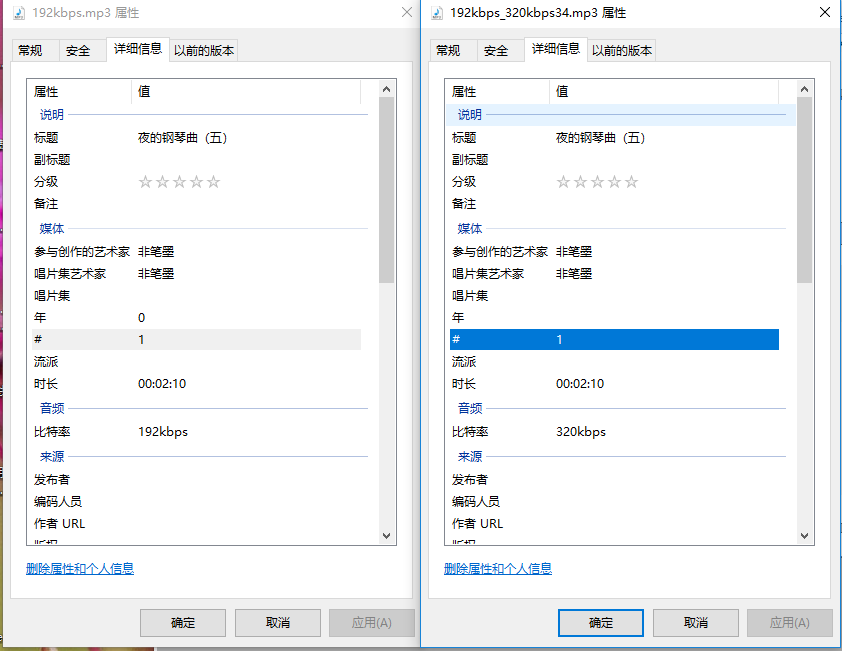
bm_mp3='192kbps.mp3'

bm_mp3_320 = bm_mp3.replace('.mp3', '_320kbps34.mp3')

d = '{} -i {} -map 0:a -b:a 320K {}'.format(ffmpeg_f_dir, bm_mp3, bm_mp3_320)

os.system(d)

print(d)
C:\Users\sas\AppData\Roaming\Python\Python36\site-packages\requests\__init__.py:80: RequestsDependencyWarning: urllib3 (1.16) or chardet (3.0.4) doesn't match a supported version!

  RequestsDependencyWarning)

ffmpeg version N-90553-gbe502ec6cd Copyright (c) 2000-2018 the FFmpeg developers

  built with gcc 7.3.0 (GCC)

  configuration: --enable-gpl --enable-version3 --enable-sdl2 --enable-bzlib --enable-fontconfig --enable-gnutls --enable-iconv --enable-libass --enable-libbluray --enable-libfreetype --enable-libmp3lame --enable-libopencore-amrnb --enable-libopencore-amrwb --enable-libopenjpeg --enable-libopus --enable-libshine --enable-libsnappy --enable-libsoxr --enable-libtheora --enable-libtwolame --enable-libvpx --enable-libwavpack --enable-libwebp --enable-libx264 --enable-libx265 --enable-libxml2 --enable-libzimg --enable-lzma --enable-zlib --enable-gmp --enable-libvidstab --enable-libvorbis --enable-libvo-amrwbenc --enable-libmysofa --enable-libspeex --enable-libxvid --enable-libaom --enable-libmfx --enable-amf --enable-ffnvcodec --enable-cuvid --enable-d3d11va --enable-nvenc --enable-nvdec --enable-dxva2 --enable-avisynth

  libavutil      56. 12.100 / 56. 12.100

  libavcodec     58. 16.100 / 58. 16.100

  libavformat    58. 10.100 / 58. 10.100

  libavdevice    58.  2.100 / 58.  2.100

  libavfilter     7. 13.100 /  7. 13.100

  libswscale      5.  0.102 /  5.  0.102

  libswresample   3.  0.101 /  3.  0.101

  libpostproc    55.  0.100 / 55.  0.100

Input #0, mp3, from '192kbps.mp3':

  Metadata:

    title           : 夜的钢琴曲(五)

    artist          : 非笔墨

    album_artist    : 非笔墨

    TYER            : NaN

    track           : 1

    disc            : 1/2

    lyrics-eng      : 1801835885

  Duration: 00:02:10.85, start: 0.025056, bitrate: 233 kb/s

    Stream #0:0: Audio: mp3, 44100 Hz, stereo, s16p, 192 kb/s

    Metadata:

      encoder         : LAME3.99r

    Side data:

      replaygain: track gain - -4.500000, track peak - unknown, album gain - unknown, album peak - unknown,

    Stream #0:1: Video: mjpeg, yuvj420p(pc, bt470bg/unknown/unknown), 1920x1080 [SAR 72:72 DAR 16:9], 90k tbr, 90k tbn, 90k tbc

    Metadata:

      comment         : Cover (front)

Stream mapping:

  Stream #0:0 -> #0:0 (mp3 (native) -> mp3 (libmp3lame))

Press [q] to stop, [?] for help

Output #0, mp3, to '192kbps_320kbps34.mp3':

  Metadata:

    TIT2            : 夜的钢琴曲(五)

    TPE1            : 非笔墨

    TPE2            : 非笔墨

    TYER            : NaN

    TRCK            : 1

    TPOS            : 1/2

    lyrics-eng      : 1801835885

    TSSE            : Lavf58.10.100

    Stream #0:0: Audio: mp3 (libmp3lame), 44100 Hz, stereo, s16p, 320 kb/s

    Metadata:

      encoder         : Lavc58.16.100 libmp3lame

    Side data:

      replaygain: track gain - -4.500000, track peak - unknown, album gain - unknown, album peak - unknown,

size=    5112kB time=00:02:10.82 bitrate= 320.1kbits/s speed=16.4x

video:0kB audio:5111kB subtitle:0kB other streams:0kB global headers:0kB muxing overhead: 0.023845%

ffmpeg-20180331-be502ec-win64-static_ffmpeg.exe -i 192kbps.mp3 -map 0:a -b:a 320K 192kbps_320kbps34.mp3

Process finished with exit code 232
提高比特率 有损 无损 Video-and-Audio-file-format-conversion 视频声音转码的更多相关文章
- <video>和<audio>标签,对视频和音频的支持
H5新增了<video>和<audio>标签,提供对视频和音频的支持 <audio>的属性与<video>属性相同 <video> vide ...
- html5新媒体播放器标签video、audio 与embed、object
html5里的一些新的标签,看到里面object.embed.video.audio都可以添加视频或音频文件 embed是针对非IE的浏览器的媒体播放器 video是html5出的一种新标准,但并不是 ...
- Combining an audio file with video file in python
Combining an audio file with video file in python - Stack Overflow https://stackoverflow.com/questio ...
- video 与 audio
Play方法:使用play方法来播放媒体,自动将元素的paused属性的值变为false.Pause方法:使用pause方法来暂停播放,自动将元素的paused属性的值变为true.Load方法:使用 ...
- HTML5中Video和Audio
相关属性 src属性 该属性指定媒体数据的URL地址. autoplay属性 在该属性中指定是否在页面加载后自动播放,使用方法: <video src="test.mov" ...
- 范仁义html+css课程---9、video、audio、canvas和svg元素略讲
范仁义html+css课程---9.video.audio.canvas和svg元素略讲 一.总结 一句话总结: video:HTML5视频标签. audio:html5音频标签. canvas:绘制 ...
- Sound (audio file) player in java - working source code example
转载自:http://ganeshtiwaridotcomdotnp.blogspot.com/2011/12/sound-audio-file-player-in-java-working.html ...
- video和audio
1.video 使用: <video width="320" height="240" src="http://www.jb51.net/mov ...
- Xilinx低比特率高品质 ABR 视频实时转码(HPE 参考架构)
Xilinx低比特率高品质 ABR 视频实时转码(HPE 参考架构) 介绍 对实时视频流的需求给视频服务提供商带来了严峻挑战,必须在管理基础设施和互联网带宽运营成本,还要为客户提供高质量体验.鉴于视频 ...
随机推荐
- POJ 1287 Networking (最小生成树模板题)
Description You are assigned to design network connections between certain points in a wide area. Yo ...
- luogu1494 [国家集训队]小Z的袜子
#include <algorithm> #include <iostream> #include <cstdio> #include <cmath> ...
- FTS5与DIY
此文已由作者王荣涛授权网易云社区发布. 欢迎访问网易云社区,了解更多网易技术产品运营经验. FTS5简介 前文已经介绍了FTS3/FTS4,本文着重介绍它们的继任者FTS5. FTS5是在SQLite ...
- CI 安装时目录的安全处理
如果你想通过隐藏 CodeIgniter 的文件位置来增加安全性,你可以将 system 和 application 目录修改为其他的名字,然后打开主目录下的 index.php 文件将 $syste ...
- hihocoder 1425What a Beautiful Lake(实验专用)
Problem D. What a Beautiful Lake Description Weiming Lake, also named "Un-named Lake", is ...
- 【Ural1297】Palindrome(后缀数组)
题意:求一个字符串的最长回文子串 n<=1000 思路:这是一道论文题 需要注意的细节: 1.奇偶分类 2.中间的分割符与最后的附加字母都是最小值,但两者不能相同,否则height可能会出现问题 ...
- 【SPOJ694&705】Distinct Substrings(后缀数组)
题意:求一个字符串的不相同的子串个数 n<=1000 思路:这是一道论文题 ..]of longint; n,i,m,ans,v,cas:longint; ch:ansistring; proc ...
- WordPress升级错误:class-wp-filesystem-direct.php on line 122
错误描述:WordPress在后台进行版本升级时,出错,之后进入前台或者后台,都无法访问进入,错误信息如下:Warning: copy(/home/xxx/public_html/wordpress/ ...
- Python基础之 一 文件操作
文件操作 流程: 1:打开文件,得到文件句柄并赋值给一个变量 2:通过句柄对文件进行操作 3:关闭文件 模式解释 r(读) , w(写) ,a(附加)r+(读写的读), w+(读写的写),a+(读附加 ...
- HDU 6311 最少路径覆盖边集 欧拉路径
Cover Time Limit: 6000/3000 MS (Java/Others) Memory Limit: 32768/32768 K (Java/Others)Total Submi ...