
iOS之tabbar图片去除渲染以及字体颜色统一配置
selectedAtts[NSFontAttributeName]=[UIFont systemFontOfSize:12];
selectedAtts[NSForegroundColorAttributeName]=[UIColor greenColor];
atts[NSFontAttributeName]=[UIFont systemFontOfSize:12];
atts[NSForegroundColorAttributeName]=[UIColor grayColor];
NSMutableDictionary *selectedAtts=[NSMutableDictionary dictionary];
selectedAtts[NSFontAttributeName]=atts[NSFontAttributeName];
[item setTitleTextAttributes:atts forState:UIControlStateNormal];
[item setTitleTextAttributes:selectedAtts forState:UIControlStateSelected];
// 添加子控制器
UIViewController *vc01=[[UIViewController alloc]init];
vc01.view.backgroundColor=[UIColor redColor];
vc01.tabBarItem.title=@"精华";
vc01.tabBarItem.image=[UIImage imageNamed:@"tabBar_essence_icon"];
UIImage *image=[UIImage imageNamed:@"tabBar_friendTrends_click_icon"];
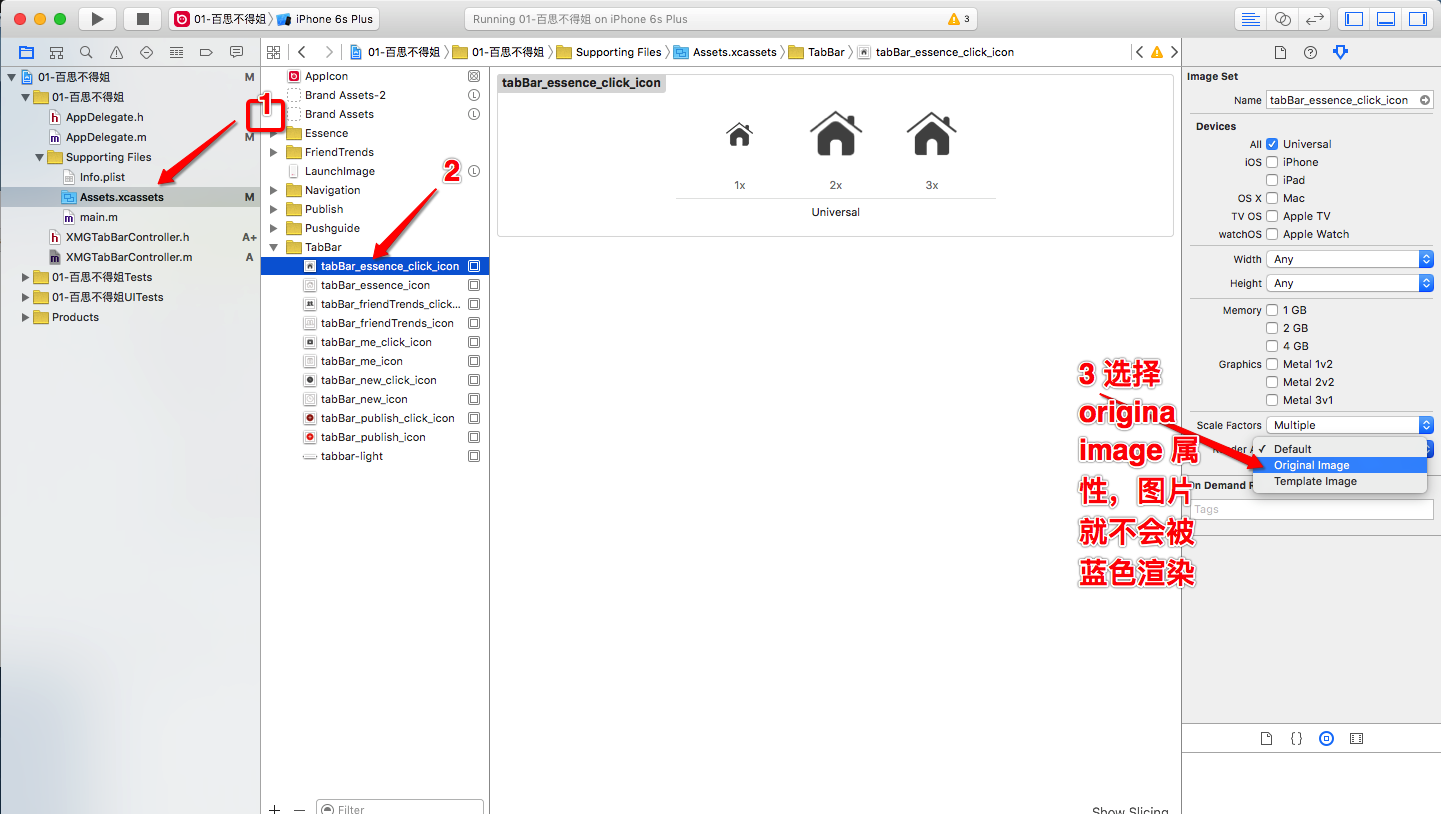
// 不让tabbar底部有渲染的关键代码
UIViewController *vc02=[[UIViewController alloc]init];
vc02.tabBarItem.title=@"新帖";
vc02.tabBarItem.image=[UIImage imageNamed:@"tabBar_new_click_icon"];
vc02.tabBarItem.selectedImage=[UIImage imageNamed:@"tabBar_new_click_icon"];
vc02.view.backgroundColor=[UIColor cyanColor];
[self addChildViewController:vc02];
UIViewController *vc03=[[UIViewController alloc]init];
vc03.view.backgroundColor=[UIColor blueColor];
vc03.tabBarItem.title=@"关注";
vc03.tabBarItem.image=[UIImage imageNamed:@"tabBar_friendTrends_icon"];
vc03.tabBarItem.selectedImage=[UIImage imageNamed:@"tabBar_friendTrends_click_icon"];
[self addChildViewController:vc03];
UIViewController *vc04=[[UIViewController alloc]init];
vc04.tabBarItem.title=@"我";
vc04.tabBarItem.image=[UIImage imageNamed:@"tabBar_me_icon"];
vc04.tabBarItem.selectedImage=[UIImage imageNamed:@"tabBar_me_click_icon"];
vc04.view.backgroundColor=[UIColor yellowColor];
iOS之tabbar图片去除渲染以及字体颜色统一配置的更多相关文章
- IOS 修改UIAlertController的按钮标题的字体颜色,字号,内容
IOS 修改UIAlertController的按钮标题的字体颜色,字号,内容 UIAlertController *alertVC = [UIAlertController alertControl ...
- 【转】iOS中设置导航栏标题的字体颜色和大小
原文网址:http://www.360doc.com/content/15/0417/11/20919452_463847404.shtml iOS中设置导航栏标题的字体颜色和大小,有需要的朋友可以参 ...
- iOS中设置导航栏标题的字体颜色和大小
iOS中设置导航栏标题的字体颜色和大小,有需要的朋友可以参考下. 在平时开发项目的时候,难免会遇到修改导航栏字体大小和颜色的需求,一般使用自定义视图的方法,其实还存在一种方法. 方法一:(自定义视图的 ...
- iOS更改tabbar图片渲染 —不让tabbat有蓝色的渲染 并修改文字
方式一 代码实现 这种要写很多代码 ,每个控制器都要写 UIImage *image=[UIImage imageNamed:@"tabBar_friendTrends_click_i ...
- python设置图片背景和设置字体颜色大小
# -*- coding: utf-8 -*- """ Created on Wed Dec 11 22:37:30 2019 @author: Dell "& ...
- iOS 8 TabBar 图片显示真实颜色
“展信颜开” 我怎么想到这个词了呢……因为这个足以表达我现在的心情,有解决了一个问题,有了一个收获. 早上小伙伴问我“用自带的tab改图的颜色他会不显示?改tabitem.”我记得是可以显示的,但是他 ...
- iOS 修改UITextField的placeholder属性的字体颜色(修改UITextField占位符字体的颜色)
只要把原来的placeholder属性改为attributedPlaceholder属性即可 具体代码如下图:
- iOS如何把所有页面状态栏的字体颜色都设置为白色
第一步:在info.plist中添加一个字段:view controller -base status bar 设置为NO 第二步:在一个所有界面都继承的父类里添加: if (IOS7_OR_LATE ...
- iOS设置图片名称、启动图片、防止TabBar图片和文字渲染
设置App的名称 设置App的启动图片 需要注意点是,App要杀掉重启才能显示出启动图片 2种方法防止图片被渲染 1. vc02.tabBarItem.image = [UIImage imageNa ...
随机推荐
- ACE_Message_Block消息数据类
ACE_Message_Block ACE_Message_Block用于构建"固定"和"可变"长度的消息.ACE_Message_Block可以将多条消息连接 ...
- 欧几里得算法求最大公约数(gcd)
关于欧几里得算法求最大公约数算法, 代码如下: int gcd( int a , int b ) { if( b == 0 ) return a ; else gcd( b , a % b ) ; } ...
- ZOJ 2158 POJ 1789 Truck History
最小生成树,主要是题目比较难懂. #include <cstdio> #include <cstring> #include <cmath> #include &l ...
- python2.7学习记录
一.两个学习网址(2.7已经过时,建议直接学习3) http://blog.csdn.net/longxibendi/article/details/41949215 http://www.liaox ...
- 《Windows驱动开发技术详解》之派遣函数
驱动程序的主要功能是负责处理I/O请求,其中大部分I/O请求是在派遣函数中处理的.用户模式下所有对驱动程序的I/O请求,全部由操作系统转化为一个叫做IRP的数据结构,不同的IRP数据会被“派遣”到不同 ...
- 《C++ Primer》之面向对象编程(一)
面向对象编程基于三个基本概念:数据抽象.继承和动态绑定.//动态绑定使编译器能够在运行时决定是使用基类中定义的函数还是派生类中定义的函数. 面向对象编程的关键思想是多态性(polymorphism). ...
- cPanel 安装方法
. 如何安装cPanel/WHM? 答:安装过程较长,建议使用screen或nohupscreen: yum -y install screen perl screen -S cpanel cd /h ...
- Entity Framework技巧系列之十一 - Tip 42 - 45
提示42. 怎样使用Code-Only创建一个动态模型 背景: 当我们给出使用Code-Only的例子,总是由创建一个继承自ObjectContext的强类型的Context开始.这个类用于引导模型. ...
- WisKey的眼神
WisKey的眼神 Time Limit : 1000/1000ms (Java/Other) Memory Limit : 32768/32768K (Java/Other) Total Sub ...
- configure PUTTY to not time out
To modify an existing session with "keep alives" to maintain your connection follow the st ...