
Learning Cocos2d-x for WP8(9)——Sprite到哪,我做主
原文:Learning Cocos2d-x for WP8(9)——Sprite到哪,我做主
工程文件TouchesTest.h和TouchesTest.cpp
相关素材文件

事件驱动同样适用于cocos2d-x引擎,cocos2d-x的触屏事件可分为单点和多点触屏。
一般用到情况有:
Layer统一接受触屏消息,然后由程序根据需要分发给不同位置的sprite;
自定义可接收触屏事件的sprite。
Layer层实现触屏事件
1.开启触屏事件
在Layer层初始化的时候设置
setIsTouchEnabled( true );
2.重写(覆盖)父类CCLayer的方法
以下为CCLayer类的CCCtouch相关虚方法
    // default implements are used to call script callback if exist

    virtual bool ccTouchBegan(CCTouch *pTouch, CCEvent *pEvent);

    virtual void ccTouchMoved(CCTouch *pTouch, CCEvent *pEvent);

    virtual void ccTouchEnded(CCTouch *pTouch, CCEvent *pEvent);

    virtual void ccTouchCancelled(CCTouch *pTouch, CCEvent *pEvent);

    // default implements are used to call script callback if exist

    virtual void ccTouchesBegan(CCSet *pTouches, CCEvent *pEvent);

    virtual void ccTouchesMoved(CCSet *pTouches, CCEvent *pEvent);

    virtual void ccTouchesEnded(CCSet *pTouches, CCEvent *pEvent);

    virtual void ccTouchesCancelled(CCSet *pTouches, CCEvent *pEvent);
Begin:触屏事件开始
Ended:触屏事件结束
Moved:触屏拖动
根据具体情况,改写自己需要的触屏事件方法。
选择其中的ccTouchesEnded方法,目的实现Sprite射击开火。
 void TouchesLayer::ccTouchesEnded(CCSet *pTouches, CCEvent *pEvent)

 {

     CCSetIterator it;

     CCTouch* touch;

     for( it = pTouches->begin(); it != pTouches->end(); it++)

     {

         touch = (CCTouch*)(*it);

         if(!touch)

             break;

         CCPoint location = touch->locationInView();

         location = CCDirector::sharedDirector()->convertToGL(location);

         //SGQSpriteBatchRepeatAnimation(role2,"Role2Run%d.png",10,0.2f,1);

         //CCMoveTo* role2Move=CCMoveTo::actionWithDuration(2,location);

         //role2->runAction(role2Move);

         CCSprite* Role2FireArrow=CCSprite::spriteWithSpriteFrameName("FireArrow0.png");

         Role2FireArrow->setPosition(role2->getPosition());

         Role2FireArrowBatch= CCSpriteBatchNode::batchNodeWithFile("Sprite/Role2/Role2FireArrow.png");//与CCSpriteFrameCache同一纹理

         Role2FireArrowBatch->addChild(Role2FireArrow);

         this->addChild(Role2FireArrowBatch,);

         Role2Fire(Role2FireArrow,location);

     }

 }
其中包含方法Role2Fire,实现动画效果
 void TouchesLayer::Role2Fire(CCSprite* pSprite,CCPoint touchLocation)

 {

     //创建逐帧数组

     CCMutableArray<CCSpriteFrame*>* animFrames1=new CCMutableArray<CCSpriteFrame*>();

     char str1[]={};

     for(int i=;i<;i++)

     {

         sprintf(str1,"FireArrow%d.png",i);

         CCSpriteFrame* pFrame=cache->spriteFrameByName( str1 );

         animFrames1->addObject(pFrame);

     }

     CCMutableArray<CCSpriteFrame*>* animFrames2=new CCMutableArray<CCSpriteFrame*>();

     for(int i=;i<;i++)

     {

         sprintf(str1,"FireArrowExplode%d.png",i);

         CCSpriteFrame* pFrame=cache->spriteFrameByName( str1 );

         animFrames2->addObject(pFrame);

     }

     CCAnimation* animation1=CCAnimation::animationWithFrames(animFrames1,0.25f);

     CCAnimation* animation2=CCAnimation::animationWithFrames(animFrames2,0.1f);

     CCMoveTo* Role2FireArrowMoveTo=CCMoveTo::actionWithDuration(,touchLocation);

     CCCallFuncN* role3FunN=CCCallFuncN::actionWithTarget(this,callfuncN_selector(TouchesLayer::removeSprite));

     //float offY=touchLocation.y-this->getPosition().y;

     //float offX=touchLocation.x-this->getPosition().x;

     //float angleRadians=atan2f(offY,offX);

     //float angleDegrees=CC_RADIANS_TO_DEGREES(angleRadians);

     //float cocosAngle=-1*angleDegrees;

     //pSprite->setRotation(cocosAngle);

     pSprite->runAction(CCAnimate::actionWithAnimation(animation1,false));

     pSprite->runAction(CCSequence::actions(Role2FireArrowMoveTo,CCAnimate::actionWithAnimation(animation2,false),role3FunN,NULL));

     animFrames1->release();

 }
注意
坐标系转换,设备中是以左上角为坐标系原点,cococs2d-x以左下角为坐标系原点,所以,在获取坐标点后,需要转换坐标系。
        CCPoint location = touch->locationInView();

        location = CCDirector::sharedDirector()->convertToGL(location);
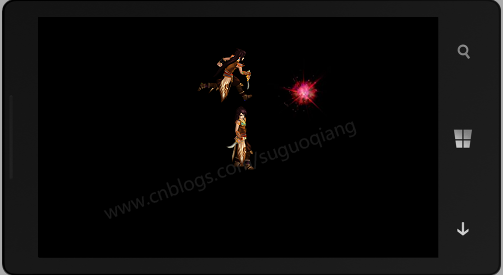
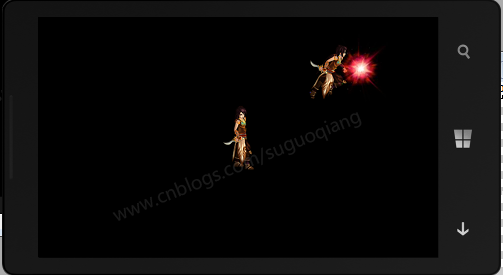
运行后,触摸屏幕后,Sprite会向着该触点发射开火。
Sprite自定义触屏事件
同样,在CCLayer上实现Touch的效果,使用Sprite自定义触屏事件也可。
1. 创建一个类继承CCSprite和Touch相关接口
要使sprite实现自定义touch必须继承相关的touch接口。
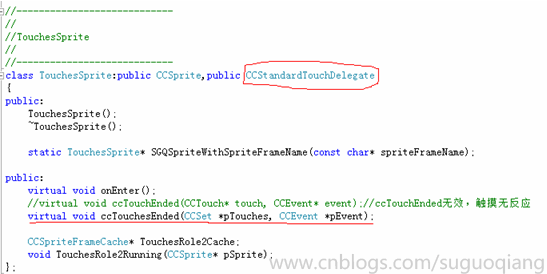
CCTouchDelegate下包含CCTargetedTouchDelegate和CCStandardTouchDelegate委托
2.CCTouch方法中处理事件函数
 void TouchesSprite::ccTouchesEnded(CCSet *pTouches, CCEvent *pEvent)

 {

     CCSetIterator it;

     CCTouch* touch;

     for( it = pTouches->begin(); it != pTouches->end(); it++)

     {

         touch = (CCTouch*)(*it);

         if(!touch)

             break;

         CCPoint location = touch->locationInView();

         location = CCDirector::sharedDirector()->convertToGL(location);

         TouchesRole2Running(this);

         CCMoveTo* moveTo=CCMoveTo::actionWithDuration(,location);

         runAction(moveTo);

     }

 }
其中,TouchesRole2Running实现动画,触摸屏幕后,Sprite会跑动到触点位置。
 void TouchesSprite::TouchesRole2Running(CCSprite* pSprite)

 {

     //创建逐帧数组

     CCMutableArray<CCSpriteFrame*>* animFrames1=new CCMutableArray<CCSpriteFrame*>();

     char str1[]={};

     for(int i=;i<;i++)

     {

         sprintf(str1,"Role2Run%d.png",i);

         CCSpriteFrame* pFrame=TouchesRole2Cache->spriteFrameByName( str1 );

         animFrames1->addObject(pFrame);

     }

     CCAnimation* animation1=CCAnimation::animationWithFrames(animFrames1,0.2f);

     pSprite->runAction(CCAnimate::actionWithAnimation(animation1,false));

     animFrames1->release();

 }
运行后,触摸屏幕后,Sprite会跑动到触点位置。
Lyaer层和Sprite层实现触摸屏事件,各有各的优点,都可实现触摸效果。
完整代码
 #ifndef _TOUCHES_TEST_

 #define _TOUCHES_TEST_

 #include "cocos2d.h"

 using namespace cocos2d;

 //-------------------------------

 //

 //TouchesScene

 //

 //-------------------------------

 class TouchesScene:public CCScene

 {

 public:

     TouchesScene();

     ~TouchesScene();

     virtual void onEnter();

 };

 //----------------------------

 //

 //TouchesSprite

 //

 //----------------------------

 class TouchesSprite:public CCSprite,public CCStandardTouchDelegate

 {

 public:

     TouchesSprite();

     ~TouchesSprite();

     static TouchesSprite* SGQSpriteWithSpriteFrameName(const char* spriteFrameName);

 public:

     virtual void onEnter();

     //virtual void ccTouchEnded(CCTouch* touch, CCEvent* event);//ccTouchEnded无效,触摸无反应

     virtual void ccTouchesEnded(CCSet *pTouches, CCEvent *pEvent);

     CCSpriteFrameCache* TouchesRole2Cache;

     void TouchesRole2Running(CCSprite* pSprite);

 };

 //------------------------------

 //

 //TouchesLayer

 //

 //------------------------------

 class TouchesLayer:public CCLayer

 {

 public:

     TouchesLayer();

     ~TouchesLayer();

     //ccTouchEnded出现BUG,触摸无反应

     //virtual void ccTouchEnded(CCTouch *pTouch, CCEvent *pEvent);

     virtual void ccTouchesEnded(CCSet *pTouches, CCEvent *pEvent);

     void Role2Standing(CCSprite* pSprite);

     void Role2Fire(CCSprite* pSprite,CCPoint touchLocation);

     void TouchesRole2Standing(CCSprite* pSprite);

     void removeSprite(CCNode* pSender);

 private:

     CCSprite* role2;

     TouchesSprite* touchesRole2;

     CCSpriteFrameCache* cache;

     CCSpriteBatchNode* Role2FireArrowBatch;

 };

 #endif
 #include "pch.h"

 #include "Classes\TouchesTest.h"

 //------------------------------------

 //

 //TouchesLayer

 //

 //------------------------------------

 TouchesLayer::TouchesLayer()

 {

     setIsTouchEnabled( true );//开启触屏事件

     CCSize s=CCDirector::sharedDirector()->getWinSize();

     //Layer层Touches

     cache=CCSpriteFrameCache::sharedSpriteFrameCache();

     cache->addSpriteFramesWithFile("Sprite/Role2/Role2.plist","Sprite/Role2/Role2.png");

     cache->addSpriteFramesWithFile("Sprite/Role2/Role2FireArrow.plist","Sprite/Role2/Role2FireArrow.png");

     role2=CCSprite::spriteWithSpriteFrameName("Role2Stand0.png");

     role2->setPosition(CCPointMake(s.width/,s.height/));

     CCSpriteBatchNode* spritebatch1 = CCSpriteBatchNode::batchNodeWithFile("Sprite/Role2/Role2.png");//与CCSpriteFrameCache同一纹理

     spritebatch1->addChild(role2);

     this->addChild(spritebatch1,);

     Role2Standing(role2);

     //Sprite层Touches

     touchesRole2=TouchesSprite::SGQSpriteWithSpriteFrameName("Role2Stand0.png");

     touchesRole2->setPosition(CCPointMake(,s.height-));

     CCSpriteBatchNode* spritebatch2 = CCSpriteBatchNode::batchNodeWithFile("Sprite/Role2/Role2.png");//与CCSpriteFrameCache同一纹理

     spritebatch2->addChild(touchesRole2);

     this->addChild(spritebatch2,);

     TouchesRole2Standing(touchesRole2);

 }

 TouchesLayer::~TouchesLayer()

 {}

 void TouchesLayer::Role2Standing(CCSprite* pSprite)

 {

         //创建逐帧数组

     CCMutableArray<CCSpriteFrame*>* animFrames1=new CCMutableArray<CCSpriteFrame*>();

     char str1[]={};

     for(int i=;i<;i++)

     {

         sprintf(str1,"Role2Stand%d.png",i);

         CCSpriteFrame* pFrame=cache->spriteFrameByName( str1 );

         animFrames1->addObject(pFrame);

     }

     CCAnimation* animation1=CCAnimation::animationWithFrames(animFrames1,0.2f);

     pSprite->runAction(CCRepeatForever::actionWithAction(CCAnimate::actionWithAnimation(animation1,false)));

     animFrames1->release();

 }

 void TouchesLayer::TouchesRole2Standing(CCSprite* pSprite)

 {

     //创建逐帧数组

     CCMutableArray<CCSpriteFrame*>* animFrames1=new CCMutableArray<CCSpriteFrame*>();

     char str1[]={};

     for(int i=;i<;i++)

     {

         sprintf(str1,"Role2Stand%d.png",i);

         CCSpriteFrame* pFrame=cache->spriteFrameByName( str1 );

         animFrames1->addObject(pFrame);

     }

     CCAnimation* animation1=CCAnimation::animationWithFrames(animFrames1,0.2f);

     pSprite->runAction(CCRepeatForever::actionWithAction(CCAnimate::actionWithAnimation(animation1,false)));

     animFrames1->release();

 }

 /*

 ccTouchEnded出现BUG,触摸无反应

 */

 //void TouchesLayer::ccTouchEnded(CCTouch *pTouch, CCEvent *pEvent)

 //{

 //    CCPoint location=pTouch->locationInView();

 //    location=CCDirector::sharedDirector()->convertToGL(location);

 //

 //    CCMoveTo* moveTo=CCMoveTo::actionWithDuration(3,location);

 //    role->runAction(moveTo);

 //}

 void TouchesLayer::ccTouchesEnded(CCSet *pTouches, CCEvent *pEvent)

 {

     CCSetIterator it;

     CCTouch* touch;

     for( it = pTouches->begin(); it != pTouches->end(); it++)

     {

         touch = (CCTouch*)(*it);

         if(!touch)

             break;

         CCPoint location = touch->locationInView();

         location = CCDirector::sharedDirector()->convertToGL(location);

         //SGQSpriteBatchRepeatAnimation(role2,"Role2Run%d.png",10,0.2f,1);

         //CCMoveTo* role2Move=CCMoveTo::actionWithDuration(2,location);

         //role2->runAction(role2Move);

         CCSprite* Role2FireArrow=CCSprite::spriteWithSpriteFrameName("FireArrow0.png");

         Role2FireArrow->setPosition(role2->getPosition());

         Role2FireArrowBatch= CCSpriteBatchNode::batchNodeWithFile("Sprite/Role2/Role2FireArrow.png");//与CCSpriteFrameCache同一纹理

         Role2FireArrowBatch->addChild(Role2FireArrow);

         this->addChild(Role2FireArrowBatch,);

         Role2Fire(Role2FireArrow,location);

     }

 }

 void TouchesLayer::Role2Fire(CCSprite* pSprite,CCPoint touchLocation)

 {

     //创建逐帧数组

     CCMutableArray<CCSpriteFrame*>* animFrames1=new CCMutableArray<CCSpriteFrame*>();

     char str1[]={};

     for(int i=;i<;i++)

     {

         sprintf(str1,"FireArrow%d.png",i);

         CCSpriteFrame* pFrame=cache->spriteFrameByName( str1 );

         animFrames1->addObject(pFrame);

     }

     CCMutableArray<CCSpriteFrame*>* animFrames2=new CCMutableArray<CCSpriteFrame*>();

     for(int i=;i<;i++)

     {

         sprintf(str1,"FireArrowExplode%d.png",i);

         CCSpriteFrame* pFrame=cache->spriteFrameByName( str1 );

         animFrames2->addObject(pFrame);

     }

     CCAnimation* animation1=CCAnimation::animationWithFrames(animFrames1,0.25f);

     CCAnimation* animation2=CCAnimation::animationWithFrames(animFrames2,0.1f);

     CCMoveTo* Role2FireArrowMoveTo=CCMoveTo::actionWithDuration(,touchLocation);

     CCCallFuncN* role3FunN=CCCallFuncN::actionWithTarget(this,callfuncN_selector(TouchesLayer::removeSprite));

     //float offY=touchLocation.y-this->getPosition().y;

     //float offX=touchLocation.x-this->getPosition().x;

     //float angleRadians=atan2f(offY,offX);

     //float angleDegrees=CC_RADIANS_TO_DEGREES(angleRadians);

     //float cocosAngle=-1*angleDegrees;

     //pSprite->setRotation(cocosAngle);

     pSprite->runAction(CCAnimate::actionWithAnimation(animation1,false));

     pSprite->runAction(CCSequence::actions(Role2FireArrowMoveTo,CCAnimate::actionWithAnimation(animation2,false),role3FunN,NULL));

     animFrames1->release();

 }

 void TouchesLayer::removeSprite(CCNode* pSender)

 {

     this->removeChild(Role2FireArrowBatch,true);

 }

 //------------------------------------

 //

 //TouchesSprite

 //

 //------------------------------------

 TouchesSprite::TouchesSprite()

 {

     TouchesRole2Cache=CCSpriteFrameCache::sharedSpriteFrameCache();

     TouchesRole2Cache->addSpriteFramesWithFile("Sprite/Role2/Role2.plist","Sprite/Role2/Role2.png");

 }

 TouchesSprite::~TouchesSprite()

 {}

 TouchesSprite* TouchesSprite::SGQSpriteWithSpriteFrameName(const char* spriteFrameName)

 {

     TouchesSprite* pSprite=new TouchesSprite();

     pSprite->initWithSpriteFrameName(spriteFrameName);

     return pSprite;

 }

 void TouchesSprite::onEnter()

 {

     //CCTouchDispatcher::sharedDispatcher()->addTargetedDelegate(this, 0, true);//ccTouchEnded无效

     CCTouchDispatcher::sharedDispatcher()->addStandardDelegate(this,);

     CCSprite::onEnter();

 }

 //ccTouchEnded无效

 //void TouchesSprite::ccTouchEnded(CCTouch* touch, CCEvent* event)

 //{

 //    CCPoint location=touch->locationInView();

 //    location=CCDirector::sharedDirector()->convertToGL(location);

 //

 //    CCMoveTo* moveTo=CCMoveTo::actionWithDuration(3,location);

 //    runAction(moveTo);

 //}

 void TouchesSprite::ccTouchesEnded(CCSet *pTouches, CCEvent *pEvent)

 {

     CCSetIterator it;

     CCTouch* touch;

     for( it = pTouches->begin(); it != pTouches->end(); it++)

     {

         touch = (CCTouch*)(*it);

         if(!touch)

             break;

         CCPoint location = touch->locationInView();

         location = CCDirector::sharedDirector()->convertToGL(location);

         TouchesRole2Running(this);

         CCMoveTo* moveTo=CCMoveTo::actionWithDuration(,location);

         runAction(moveTo);

     }

 }

 void TouchesSprite::TouchesRole2Running(CCSprite* pSprite)

 {

     //创建逐帧数组

     CCMutableArray<CCSpriteFrame*>* animFrames1=new CCMutableArray<CCSpriteFrame*>();

     char str1[]={};

     for(int i=;i<;i++)

     {

         sprintf(str1,"Role2Run%d.png",i);

         CCSpriteFrame* pFrame=TouchesRole2Cache->spriteFrameByName( str1 );

         animFrames1->addObject(pFrame);

     }

     CCAnimation* animation1=CCAnimation::animationWithFrames(animFrames1,0.2f);

     pSprite->runAction(CCAnimate::actionWithAnimation(animation1,false));

     animFrames1->release();

 }

 //------------------------------------

 //

 //TouchesScene

 //

 //------------------------------------

 TouchesScene::TouchesScene()

 {}

 TouchesScene::~TouchesScene()

 {}

 void TouchesScene::onEnter()

 {

     CCScene::onEnter();

     CCLayer* touchesLayer=new TouchesLayer();

     addChild(touchesLayer);

     touchesLayer->release();

 }
著作权声明:本文由http://www.cnblogs.com/suguoqiang 原创,欢迎转载分享。请尊重作者劳动,转载时保留该声明和作者博客链接,谢谢!
Learning Cocos2d-x for WP8(9)——Sprite到哪,我做主的更多相关文章
- Cocos2d 3.0继承自Sprite的类在addChild后出现故障
当继承自Sprite的类被addChild到其它的Node里后出现例如以下图问题,说明没有调用父类Sprite::init()的方法.由于父类Sprite里的_textureAtlas须要初始化为nu ...
- Cocos2d-iphone 为sprite添加双击的事件响应
这篇文章介绍两种方式处理cocos2d中的双击事件响应. 在iOS中使用UITapGestureRecognizer ,很容易就可以添加双击事件处理,但是在cocos2d中无法直接向sprite添加U ...
- Cocos2d-x游戏移植到WP8之路 -- c++和c#交互
Cocos2d-x是眼下最流行的手机游戏引擎之中的一个,开源.轻量.多平台等的诸多特性使得它被非常多国内外手游开发人员所喜爱. 利用Cocos2d-x来开发Windows Phone 8的游戏相同也是 ...
- (转) [it-ebooks]电子书列表
[it-ebooks]电子书列表 [2014]: Learning Objective-C by Developing iPhone Games || Leverage Xcode and Obj ...
- 25 个增强iOS应用程序性能的提示和技巧 应用程序性能的提示和技巧
初级 在开发过程中,下面这些初级技巧需要时刻注意: 1.使用ARC进行内存管理2.在适当的情况下使用reuseIdentifier3.尽可能将View设置为不透明(Opaque)4.避免臃肿的XIBs ...
- 增强iOS应用程序性能的提示和技巧(25个)
转自 http://www.cocoachina.com/newbie/basic/2013/0522/6259.html 在开发iOS应用程序时,让程序具有良好的性能是非常关键的.这也是用户所期望的 ...
- 非常优秀的iphone学习文章总结!
This site contains a ton of fun tutorials – so many that they were becoming hard to find! So I put t ...
- iPhone Tutorials
http://www.raywenderlich.com/tutorials This site contains a ton of fun written tutorials – so many t ...
- 25个增强iOS应用程序性能的提示和技巧(中级篇)(2)
25个增强iOS应用程序性能的提示和技巧(中级篇)(2) 2013-04-16 14:42 破船之家 beyondvincent 字号:T | T 本文收集了25个关于可以提升程序性能的提示和技巧,分 ...
- 25个增强iOS应用程序性能的提示和技巧--中级篇
25个增强iOS应用程序性能的提示和技巧--中级篇 标签: ios性能优化内存管理 2013-12-13 10:55 738人阅读 评论(0) 收藏 举报 分类: IPhone开发高级系列(34) ...
随机推荐
- 将 Shiro 作为一个许可为基础的应用程序 五:password加密/解密Spring应用
考虑系统password的安全,眼下大多数系统都不会把password以明文的形式存放到数据库中. 一把会採取下面几种方式对password进行处理 password的存储 "编码" ...
- BootStrap - FileUpload美化样式
效果: 代码: <div class="panel panel-default" style="border: 1px solid #ffd800;"&g ...
- Win7+vs2010下安装boost_1_46_1库
一.boost库分类: (1)不需要编译库:any.array.asio.conversion.crc.bind/mem_fn.enable_if.function.lambda.mpl.smart_ ...
- 我在知乎上关于Laser200/310电脑的文章。
我是30年前从Laser-310起步的,我来回答这个问题. 主要硬件规格: CPU:Z-80A/4.7MHz主频 16K RAM + 2K Video RAM 16K ROM 磁带输出:波特率300 ...
- Swift - 时间控制器NSTimer(每隔一定时间执行某个函数)
时间控制器NSTimer可以实现定时器功能,即每隔一定时间执行具体函数,可以重复也可以只执行一次. 1 2 3 4 5 6 7 8 9 10 11 12 13 14 15 16 17 18 19 cl ...
- Delphi中获取某类的祖先类及其所在单元名称(使用GetTypeData(PClass.ClassInfo)函数,并且该类是从TPersistent类的派生类才可以这么使用)
前几天在CSDN社区看到一篇<如何得到自身单元名称>的帖子,其中一位名为sdzeng网友给出了答案.受此启发,自己写了一个函数,用来获取指定类的所有祖先类的名称及其所在的单元名称. //参 ...
- Emotion英语学习
英语学习断断续续也快两年了,以前也蜻蜓点水地写过几篇总结,但是因为思考的少,只能得到一些表面的收获.从今年三月初到现在,口语阶段已经有三个月,感触较多,所以写这篇博客对这段时间英语学习的一个整体总结. ...
- 原型链(__proto__)
前面详细的解释了new的几个步骤,其中随意带过了一下原型链的概念,如果细读那篇文章,基本对原型也能有所理解. 原型有两个关键属性,一个是 __proto__ 一个是 prototype ,了解了这两个 ...
- Delphi引用C对象文件
C语言应用非常广泛,并在世界各地拥有大量的代码库.这些代码库与Delphi的可比性较小,因此如果我们无需转换为Delphi代码而可以直接使用这些库的部分代码就完美了.幸运的是,Delphi允许连接到C ...
- Delphi中获取Unix时间戳及注意事项(c语言中time()是按格林威治时间计算的,比北京时间多了8小时)
uses DateUtils;DateTimeToUnix(Now) 可以转换到unix时间,但是注意的是,它得到的时间比c语言中time()得到的时间大了8*60*60这是因为Now是当前时区的时间 ...