
Web监听器导图详解(转)
阅读目录
监听器是JAVA Web开发中很重要的内容,其中涉及到的知识,可以参考下面导图:
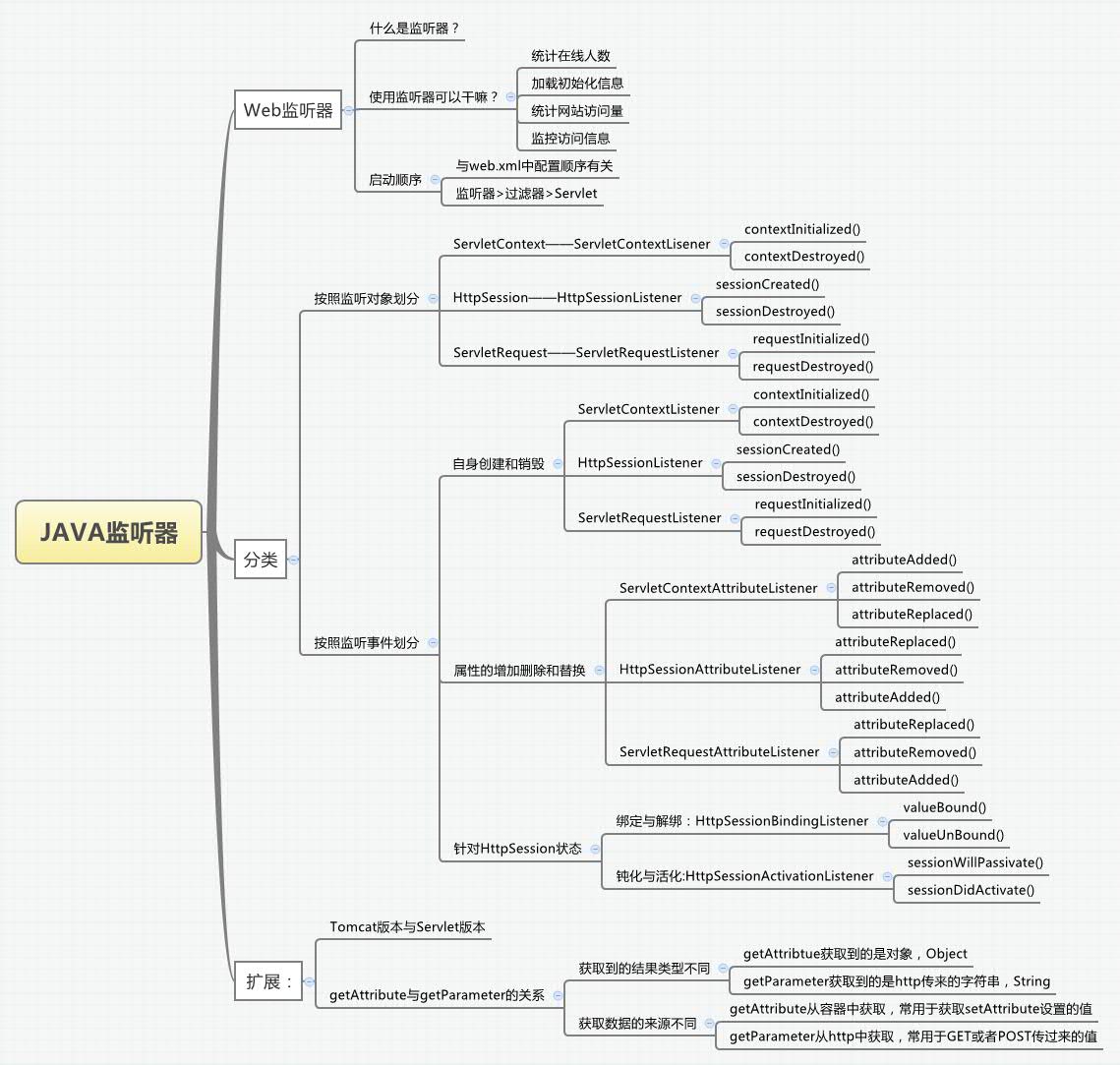
Web监听器
1 什么是web监听器?
web监听器是一种Servlet中的特殊的类,它们能帮助开发者监听web中的特定事件,比如ServletContext,HttpSession,ServletRequest的创建和销毁;变量的创建、销毁和修改等。可以在某些动作前后增加处理,实现监控。
2 监听器常用的用途
通常使用Web监听器做以下的内容:
统计在线人数,利用HttpSessionLisener
加载初始化信息:利用ServletContextListener
统计网站访问量
实现访问监控
3 接下里看看一个监听器的创建以及执行过程
首先需要创建一个监听器,实现某种接口,例如我想实现一个对在线人数的监控,可以创建如下的监听器:

public class MyListener implements HttpSessionListener{

    private int userNumber = 0;

    public void sessionCreated(HttpSessionEvent arg0) {

        userNumber++;

        arg0.getSession().setAttribute("userNumber", userNumber);

    }

    public void sessionDestroyed(HttpSessionEvent arg0) {

        userNumber--;

        arg0.getSession().setAttribute("userNumber", userNumber);

    }

}
然后在web.xml中配置该监听器,在web-app中添加:
  <listener>

      <listener-class>com.test.MyListener</listener-class>

  </listener>
在JSP中添加访问人数:
<body>

    在线人数:<%=session.getAttribute("userNumber") %><br/>

</body>
当我使用我的浏览器访问时,执行结果如下:
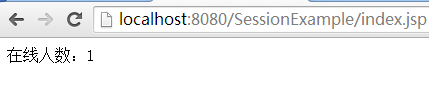
当打开另一个浏览器访问时:
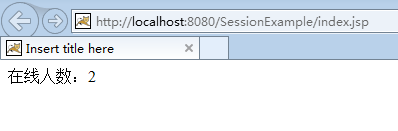
由于打开另一个浏览器访问,相当于另一个会话,因此在线人数会增加。
对于3.0版本的Servlet来说,还支持使用注解的方式进行配置。
那么接下来看看都有哪些监听器以及方法吧!
监听器的分类
1 按照监听的对象划分:
按照监听对象的不同可以划分为三种:
ServletContext监控:对应监控application内置对象的创建和销毁。
当web容器开启时,执行contextInitialized方法;当容器关闭或重启时,执行contextDestroyed方法。
实现方式:直接实现ServletContextListener接口:
public class MyServletContextListener implements ServletContextListener{

    public void contextDestroyed(ServletContextEvent sce) {

    }

    public void contextInitialized(ServletContextEvent sce) {

    }

}
HttpSession监控:对应监控session内置对象的创建和销毁。
当打开一个新的页面时,开启一个session会话,执行sessionCreated方法;当页面关闭session过期时,或者容器关闭销毁时,执行sessionDestroyed方法。
实现方式:直接实现HttpSessionListener接口:
public class MyHttpSessionListener implements HttpSessionListener{

    public void sessionCreated(HttpSessionEvent arg0) {

    }

    public void sessionDestroyed(HttpSessionEvent arg0) {

    }

}
ServletRequest监控:对应监控request内置对象的创建和销毁。
当访问某个页面时,出发一个request请求,执行requestInitialized方法;当页面关闭时,执行requestDestroyed方法。
实现方式,直接实现ServletRequestListener接口:
public class MyServletRequestListener implements ServletRequestListener{

    public void requestDestroyed(ServletRequestEvent arg0) {

    }

    public void requestInitialized(ServletRequestEvent arg0) {

    }

}
2 按照监听事件划分:
2.1 监听事件自身的创建和销毁:同上面的按对象划分。
2.2 监听属性的新增、删除和修改:
监听属性的新增、删除和修改也是划分成三种,分别针对于ServletContext、HttpSession、ServletRequest对象:
ServletContext,实现ServletContextAttributeListener接口:
通过调用ServletContextAttribtueEvent的getName方法可以得到属性的名称。
public class MyServletContextAttrListener implements ServletContextAttributeListener{

    public void attributeAdded(ServletContextAttributeEvent hsbe) {

        System.out.println("In servletContext added :name = "+hsbe.getName());

    }

    public void attributeRemoved(ServletContextAttributeEvent hsbe) {

        System.out.println("In servletContext removed :name = "+hsbe.getName());

    }

    public void attributeReplaced(ServletContextAttributeEvent hsbe) {

        System.out.println("In servletContext replaced :name = "+hsbe.getName());

    }

}
HttpSession,实现HttpSessionAttributeListener接口:
public class MyHttpSessionAttrListener implements HttpSessionAttributeListener{

    public void attributeAdded(HttpSessionBindingEvent hsbe) {

        System.out.println("In httpsession added:name = "+hsbe.getName());

    }

    public void attributeRemoved(HttpSessionBindingEvent hsbe) {

        System.out.println("In httpsession removed:name = "+hsbe.getName());

    }

    public void attributeReplaced(HttpSessionBindingEvent hsbe) {

        System.out.println("In httpsession replaced:name = "+hsbe.getName());

    }

}
ServletRequest,实现ServletRequestAttributeListener接口:
public class MyServletRequestAttrListener implements ServletRequestAttributeListener{

    public void attributeAdded(ServletRequestAttributeEvent hsbe) {

        System.out.println("In servletrequest added :name = "+hsbe.getName());

    }

    public void attributeRemoved(ServletRequestAttributeEvent hsbe) {

        System.out.println("In servletrequest removed :name = "+hsbe.getName());

    }

    public void attributeReplaced(ServletRequestAttributeEvent hsbe) {

        System.out.println("In servletrequest replaced :name = "+hsbe.getName());

    }

}
2.3 监听对象的状态:
针对某些POJO类,可以通过实现HttpSessionBindingListener接口,监听POJO类对象的事件。例如:
public class User implements HttpSessionBindingListener,Serializable{

    private String username;

    private String password;

    public String getUsername() {

        return username;

    }

    public void setUsername(String username) {

        this.username = username;

    }

    public String getPassword() {

        return password;

    }

    public void setPassword(String password) {

        this.password = password;

    }

    public void valueBound(HttpSessionBindingEvent hsbe) {

        System.out.println("valueBound name: "+hsbe.getName());

    }

    public void valueUnbound(HttpSessionBindingEvent hsbe) {

        System.out.println("valueUnbound name: "+hsbe.getName());

    }

}
Session数据的钝化与活化:
由于session中保存大量访问网站相关的重要信息,因此过多的session数据就会服务器性能的下降,占用过多的内存。因此类似数据库对象的持久化,web容器也会把不常使用的session数据持久化到本地文件或者数据中。这些都是有web容器自己完成,不需要用户设定。
不用的session数据序列化到本地文件中的过程,就是钝化;
当再次访问需要到该session的内容时,就会读取本地文件,再次放入内存中,这个过程就是活化。
类似的,只要实现HttpSeesionActivationListener接口就是实现钝化与活化事件的监听:
public class User implements HttpSessionBindingListener,

HttpSessionActivationListener,Serializable{

    private String username;

    private String password;

    public String getUsername() {

        return username;

    }

    public void setUsername(String username) {

        this.username = username;

    }

    public String getPassword() {

        return password;

    }

    public void setPassword(String password) {

        this.password = password;

    }

    public void valueBound(HttpSessionBindingEvent hsbe) {

        System.out.println("valueBound name: "+hsbe.getName());

    }

    public void valueUnbound(HttpSessionBindingEvent hsbe) {

        System.out.println("valueUnbound name: "+hsbe.getName());

    }

    public void sessionDidActivate(HttpSessionEvent hsbe) {

        System.out.println("sessionDidActivate name: "+hsbe.getSource());

    }

    public void sessionWillPassivate(HttpSessionEvent hsbe) {

        System.out.println("sessionWillPassivate name: "+hsbe.getSource());

    }

}
Servlet版本与Tomcat版本
首先看一下Tomcat官网给出的匹配:
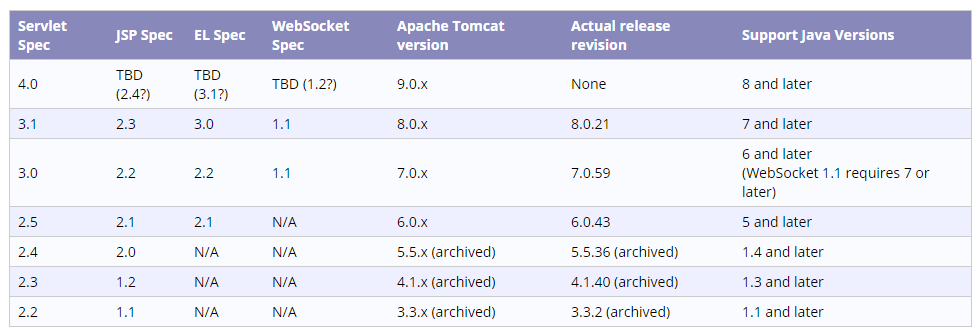
如果版本不匹配,那么tomcat是不能发布该工程的,首先看一下版本不匹配时,会发生什么!
我试图创建一个web工程,并且选取了Servlet3.0版本:

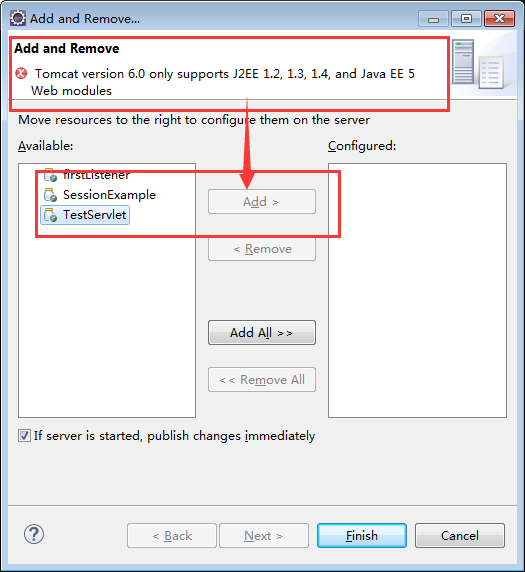
然后我想要在tomcat6中发布,可以看到报错了!
JDK版本不对....这是在平时开发如果对Servlet不熟悉的web新手,常犯的错误。
解决方法:
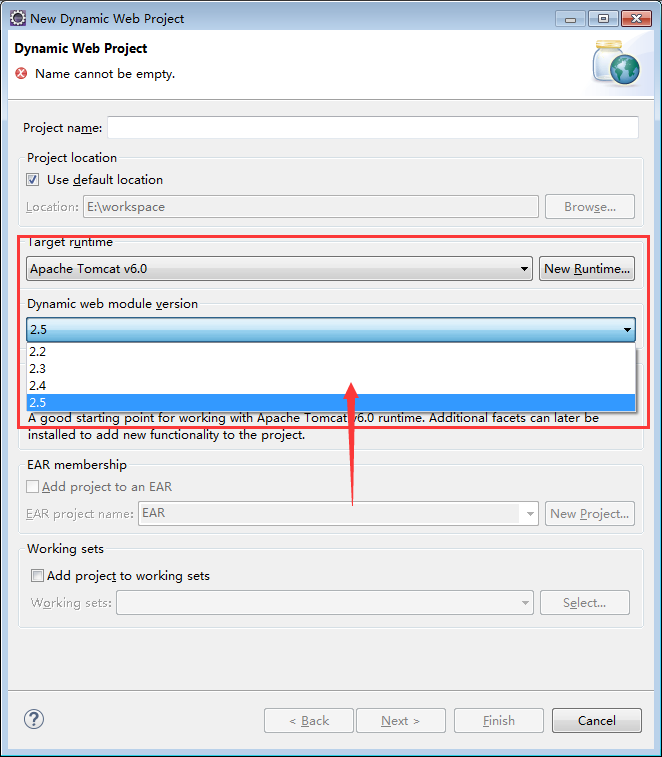
1 在创建时,直接发布到Tomcat容器中,此时Servlet仅仅会列出Tomcat支持的版本:
2 修改工程Servlet版本配置信息,文件为:工作目录\SessionExample\.settings\org.eclipse.wst.common.project.facet.core.xml
<?xml version="1.0" encoding="UTF-8"?>

<faceted-project>

  <runtime name="Apache Tomcat v6.0"/>

  <fixed facet="java"/>

  <fixed facet="wst.jsdt.web"/>

  <fixed facet="jst.web"/>

  <installed facet="java" version="1.7"/>

  <installed facet="jst.web" version="2.5"/>

  <installed facet="wst.jsdt.web" version="1.0"/>

</faceted-project>
getAttribute与getParameter的区别
这部分是对JSP的扩展,经常在JSP或者Servlet中获取数据,那么getAttribute与getParameter有什么区别呢?
1 从获取到数据的来源来说:
getAttribtue获取到的是web容器中的值,比如:
我们在Servlet中通过setAttribute设定某个值,这个值存在于容器中,就可以通过getAttribute方法获取;
getParameter获取到的是通过http传来的值,比如这样一个http请求:
http:localhost:8080/test/test.html?username=xingoo
还有其他的GET和POST方式,都可以通过getParameter来获取。
2 从获取到的数据类型来说:
getAttribute返回的是一个对象,Object。
getParameter返回的是,前面页面中某个表单或者http后面参数传递的值,是个字符串。
参考
【1】慕课网,监听器:http://www.imooc.com/learn/271
【2】jsp中getAttribute与getParameter的区别:http://wenku.baidu.com/link?url=4URJWerrusLTFRviR1sAlTH4BKc7QswiRYsso3xaYs_nZMiTMV-TwCnIIgu31K1N9HbrUhfgO2-jXjpYe1hGZn9RBo3b8HHzY2Dn2-Fcbs7
http://www.cnblogs.com/xing901022/p/4378727.html
Web监听器导图详解(转)的更多相关文章
- java Web监听器导图详解
监听器是JAVA Web开发中很重要的内容,其中涉及到的知识,可以参考下面导图: Web监听器 1 什么是web监听器? web监听器是一种Servlet中的特殊的类,它们能帮助开发者监听web中的特 ...
- Web监听器导图详解
监听器是JAVA Web开发中很重要的内容,其中涉及到的知识,可以参考下面导图: Web监听器 1 什么是web监听器? web监听器是一种Servlet中的特殊的类,它们能帮助开发者监听web中的特 ...
- Vue基础开发入门之简单语法知识梳理(思维导图详解)
基于个人写的以下关于Vue框架基础学习的三篇随笔,在此基础上,做一个阶段性的知识总结,以此来检验自己对Vue这一段时间学习的成果,内容不多,但很值得一看.(思维导图详解)
- (转)CAS (4) —— CAS浏览器SSO访问顺序图详解(CAS Web Flow Diagram by Example)
CAS (4) —— CAS浏览器SSO访问顺序图详解(CAS Web Flow Diagram by Example) tomcat版本: tomcat-8.0.29 jdk版本: jdk1.8.0 ...
- CAS (4) —— CAS浏览器SSO访问顺序图详解(CAS Web Flow Diagram by Example)
CAS (4) -- CAS浏览器SSO访问顺序图详解(CAS Web Flow Diagram by Example) tomcat版本: tomcat-8.0.29 jdk版本: jdk1.8.0 ...
- CAS (6) —— Nginx代理模式下浏览器访问CAS服务器网络顺序图详解
CAS (6) -- Nginx代理模式下浏览器访问CAS服务器网络顺序图详解 tomcat版本: tomcat-8.0.29 jdk版本: jdk1.8.0_65 nginx版本: nginx-1. ...
- web.xml常用配置详解
web.xml常用配置详解 context-param 指定 ServletContext(上下文) 配置文件路径,基本配置一般是Spring配置文件,或者是spring-security的配置文件. ...
- SPI总线协议及SPI时序图详解
SPI,是英语Serial Peripheral Interface的缩写,顾名思义就是串行外围设备接口.SPI,是一种高速的,全双工,同步的通信总线,并且在芯片的管脚上只占用四根线,节约了芯片的管脚 ...
- SPI总线协议及SPI时序图详解【转】
转自:https://www.cnblogs.com/adylee/p/5399742.html SPI,是英语Serial Peripheral Interface的缩写,顾名思义就是串行外围设备接 ...
随机推荐
- 关于iOS7以后版本号企业公布问题
大家都知道,苹果在公布7.1以后,不打个招呼就把企业公布方式给换掉了(谴责一下~) 曾经普通server+web页面+ipa+plist就能够搞定,如今已经不行了. 关于如今企业公布教程网上贴出来了非 ...
- 第十六周oj刷题——Problem J: 填空题:静态成员---计算学生个数
Description 学生类声明已经给出.在主程序中依据输入信息输出实际建立的学生对象个数,以及全部学生对象的成绩总和. Input 学生个数 相应学生个数的学生信息(姓名 年龄 成绩) ...
- FastDFS概要
本篇文章是我上级老大所写. 留在这里为了不弄丢. FastDFS是一款开源的轻量级分布式文件系统 纯C实现,支持Linux, FreeBSD等UNIX系统 类google FS, 不是通用的文件系统, ...
- BUG: scheduling while atomic: events/0/4/总结
对于Linux内核来说,Oops就意外着内核出了异常,此时会将产生异常时CPU的状态,出错的指令地址.数据地址及其他寄存器,函数调用的顺序甚至是栈里面的内容都打印出来,然后根据异常的严重程度来决定下一 ...
- 积累的VC编程小技巧之工具提示
1.用鼠标移动基于对话框的无标题栏程序的简单方法 void CVCTestDlg::OnLButtonDown(UINT nFlags, CPoint point) { //一句话解决问题 ...
- 理解 Thread.Sleep 函数
我们可能经常会用到 Thread.Sleep 函数来使线程挂起一段时间.那么你有没有正确的理解这个函数的用法呢?思考下面这两个问题: 假设现在是 2008-4-7 12:00:00.000,如果我调用 ...
- Swift - UIColor使用自定义的RGB配色
1,比如rgb 色值为55. 186 .89 那么给UIColor设置里面要除以255 1 UIColor(red: 55/255, green: 186/255, blue: 89/255, alp ...
- Swift - 文本标签(UILabel)的用法
1,标签的创建 1 2 3 4 5 6 7 8 9 10 import UIKit class ViewController: UIViewController { override func ...
- 显示形状回归算法(ESR)代码介绍
源地址:http://www.thinkface.cn/thread-3704-1-6.html 人脸对齐包括两个部分,分别为训练部分和测试部分.所有的代码基于opencv2.0.(一)训练阶段Ste ...
- Windows系统版本号判定那些事儿
v\:* {behavior:url(#default#VML);} o\:* {behavior:url(#default#VML);} w\:* {behavior:url(#default#VM ...