
Spring MVC Hello World Example(转)
In Spring MVC web application, it consist of 3 standard MVC (Model, Views, Controllers) components :
- Models – Domain objects that are processed by service layer (business logic) or persistent layer (database operation).
- Views – Usually JSP page written with Java Standard Tag Library (JSTL).
- Controllers – Interact with service layer for business processing and return a Model.
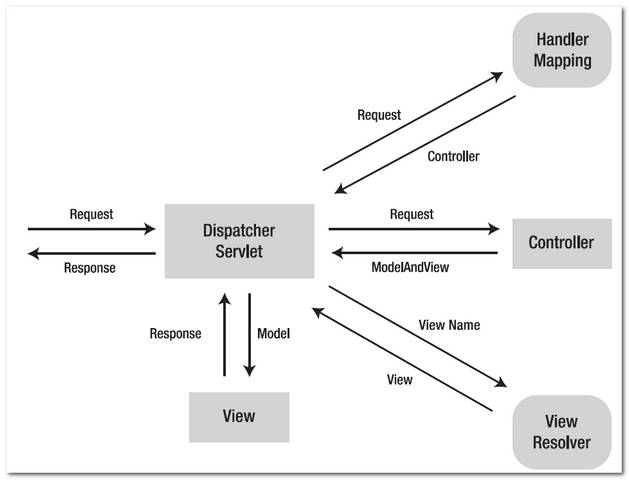
See following figures 1.1, 1.2 to demonstrate how Spring MVC web application handle a web request.
Figure 1.1 – Image copied from Spring MVC reference with slightly modification.
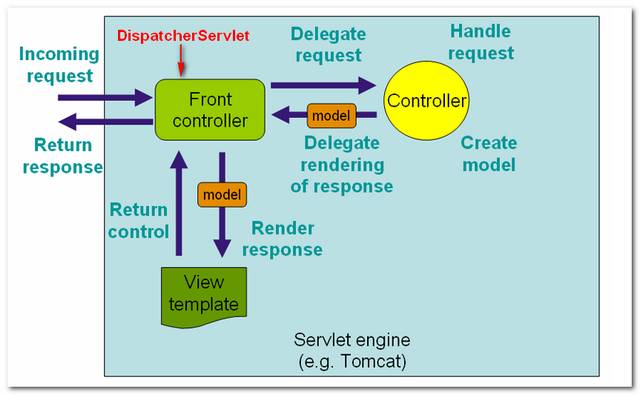
Figure 1.2 – P.S Image copied from book : Spring Recipes
Spring MVC Tutorial
In this tutorial, you will create a simple Spring MVC hello world web application in order to understand the basic concepts and configurations of this framework.
Technologies used in this tutorial.
- Spring 2.5.6
- JDK 1.6
- Eclipse 3.6
- Maven 3
1. Directory Structure
Final directory structure of this tutorial.

2. Dependency library
Spring MVC required two core dependency libraries, spring-version.jar and spring-mvc-version.jar. If you are using JSP page with jstl, include the jstl.jar and standard.jar as well.
File : pom.xml
       <!-- Spring framework -->

	<dependency>

		<groupId>org.springframework</groupId>

		<artifactId>spring</artifactId>

		<version>2.5.6</version>

	</dependency>


        <!-- Spring MVC framework -->

	<dependency>

		<groupId>org.springframework</groupId>

		<artifactId>spring-webmvc</artifactId>

		<version>2.5.6</version>

	</dependency>


	<!-- JSTL -->

	<dependency>

		<groupId>javax.servlet</groupId>

		<artifactId>jstl</artifactId>

		<version>1.1.2</version>

	</dependency>


	<dependency>

		<groupId>taglibs</groupId>

		<artifactId>standard</artifactId>

		<version>1.1.2</version>

	</dependency>


	<!-- for compile only, your container should have this -->

	<dependency>

		<groupId>javax.servlet</groupId>

		<artifactId>servlet-api</artifactId>

		<version>2.5</version>

		<scope>provided</scope>

	</dependency>
3. Spring Controller
Spring comes with many Controllers, normally, you just need to extend the AbstractController, if you do not have other special requirement, and override the handleRequestInternal() method and return a ModelAndView object.
File : HelloWorldController.java
package com.mkyong.common.controller;


import javax.servlet.http.HttpServletRequest;

import javax.servlet.http.HttpServletResponse;


import org.springframework.web.servlet.ModelAndView;

import org.springframework.web.servlet.mvc.AbstractController;


public class HelloWorldController extends AbstractController{


	@Override

	protected ModelAndView handleRequestInternal(HttpServletRequest request,

		HttpServletResponse response) throws Exception {


		ModelAndView model = new ModelAndView("HelloWorldPage");

		model.addObject("msg", "hello world");


		return model;

	}

}
- ModelAndView(“HelloWorldPage”) – The “HelloWorldPage” will pass to Spring’s viewResolver later, to indentify which view should return back to the user. (see step 6)
- model.addObject(“msg”, “hello world”) – Add a “hello world” string into a model named “msg”, later you can use JSP EL ${msg} to display the “hello world” string.
4. View (JSP page)
In this case, “view” is a jSP page, you can display the value “hello world” that is store in the model “msg” via expression language (EL) ${msg}.
File : HelloWorldPage.jsp
<%@ taglib prefix="c" uri="http://java.sun.com/jsp/jstl/core"%>

<html>

<body>

	<h1>Spring MVC Hello World Example</h1>


	<h2>${msg}</h2>


</body>

</html>
5. Spring Configuration
In web.xml, declared a DispatcherServlet servlet, named “mvc-dispatcher“, and act as the front-controller to handle all the entire web request which end with “htm” extension.
File : web.xml
<web-app id="WebApp_ID" version="2.4"

	xmlns="http://java.sun.com/xml/ns/j2ee"

	xmlns:xsi="http://www.w3.org/2001/XMLSchema-instance"

	xsi:schemaLocation="http://java.sun.com/xml/ns/j2ee

	http://java.sun.com/xml/ns/j2ee/web-app_2_4.xsd">


  <display-name>Spring Web MVC Application</display-name>


  <servlet>

  	<servlet-name>mvc-dispatcher</servlet-name>

        <servlet-class>

                  org.springframework.web.servlet.DispatcherServlet

        </servlet-class>

        <load-on-startup>1</load-on-startup>

  </servlet>


  <servlet-mapping>

 	<servlet-name>mvc-dispatcher</servlet-name>

        <url-pattern>*.htm</url-pattern>

  </servlet-mapping>


</web-app>
Alternatively, you can explicitly specify the Spring configuration file in the “contextConfigLocation” servlet parameter, to ask Spring to load your configurations besides the default “mvc-dispatcher-servlet.xml“.
File : web.xml
<web-app id="WebApp_ID" version="2.4"

	xmlns="http://java.sun.com/xml/ns/j2ee"

	xmlns:xsi="http://www.w3.org/2001/XMLSchema-instance"

	xsi:schemaLocation="http://java.sun.com/xml/ns/j2ee

	http://java.sun.com/xml/ns/j2ee/web-app_2_4.xsd">


  <display-name>Spring Web MVC Application</display-name>


  <servlet>

  	<servlet-name>mvc-dispatcher</servlet-name>

        <servlet-class>

               org.springframework.web.servlet.DispatcherServlet

        </servlet-class>

        <load-on-startup>1</load-on-startup>

  </servlet>


  <servlet-mapping>

 	<servlet-name>mvc-dispatcher</servlet-name>

        <url-pattern>*.htm</url-pattern>

  </servlet-mapping>


  <context-param>

	<param-name>contextConfigLocation</param-name>

	<param-value>/WEB-INF/SpringMVCBeans.xml</param-value>

  </context-param>


  <listener>

        <listener-class>

		org.springframework.web.context.ContextLoaderListener

        </listener-class>

  </listener>


</web-app>
6. Spring Beans Configuration
Declared the Spring Controller and viewResolver.
File : mvc-dispatcher-servlet.xml
<beans xmlns="http://www.springframework.org/schema/beans"

	xmlns:xsi="http://www.w3.org/2001/XMLSchema-instance"

	xsi:schemaLocation="http://www.springframework.org/schema/beans

	http://www.springframework.org/schema/beans/spring-beans-2.5.xsd">


    <bean name="/welcome.htm"

	class="com.mkyong.common.controller.HelloWorldController" />


    <bean id="viewResolver"

    	class="org.springframework.web.servlet.view.InternalResourceViewResolver" >

        <property name="prefix">

            <value>/WEB-INF/pages/</value>

        </property>

        <property name="suffix">

            <value>.jsp</value>

        </property>

    </bean>


</beans>
- Controller – Declared a bean name “/welcome.htm” and map it to HelloWorldController class. It means, if an URL with “/welcome.htm” pattern is requested, it will send to the HelloWorldController controller to handle the request.
- viewResolver – Define how Spring will looking for the view template. In this case, the controller “HelloWorldController” will return a ModelAndView object named “HelloWorldPage”, and the viewResolver will find the file with following mechanism : “prefix + ModelAndView name + suffix“, which is “/WEB-INF/pages/HelloWorldPage.jsp“.
7. Demo
Run it and access via URL : http://localhost:8080/SpringMVC/welcome.htm , the “SpringMVC” is your project context name.

How it works?
- http://localhost:8080/SpringMVC/welcome.htm is requested.
- URL is end with “.htm” extension, so it will redirect to “DispatcherServlet” and send request to the default BeanNameUrlHandlerMapping.
- BeanNameUrlHandlerMapping return HelloWorldController to the DispatcherServlet.
- DispatcherServlet forward request to the HelloWorldController.
- HelloWorldController process it and return a ModelAndView object named “HelloWorldPage”.
- DispatcherServlet received the ModelAndView and call the viewResolver to process it.
- viewResolver return the “/WEB-INF/pages/HelloWorldPage.jsp” back to the DispatcherServlet.
- DispatcherServlet return the “HelloWorldPage.jsp” back to user.
Download Source Code
Spring MVC Hello World Example(转)的更多相关文章
- 如何用Java类配置Spring MVC(不通过web.xml和XML方式)
DispatcherServlet是Spring MVC的核心,按照传统方式, 需要把它配置到web.xml中. 我个人比较不喜欢XML配置方式, XML看起来太累, 冗长繁琐. 还好借助于Servl ...
- Spring MVC重定向和转发以及异常处理
SpringMVC核心技术---转发和重定向 当处理器对请求处理完毕后,向其他资源进行跳转时,有两种跳转方式:请求转发与重定向.而根据要跳转的资源类型,又可分为两类:跳转到页面与跳转到其他处理器.对于 ...
- Spring MVC入门
1.什么是SpringMvc Spring MVC属于SpringFrameWork的后续产品,已经融合在Spring Web Flow里面.Spring 框架提供了构建 Web 应用程序的全功能 M ...
- Spring7:基于注解的Spring MVC(下篇)
Model 上一篇文章<Spring6:基于注解的Spring MVC(上篇)>,讲了Spring MVC环境搭建.@RequestMapping以及参数绑定,这是Spring MVC中最 ...
- Spring6:基于注解的Spring MVC(上篇)
什么是Spring MVC Spring MVC框架是一个MVC框架,通过实现Model-View-Controller模式来很好地将数据.业务与展现进行分离.从这样一个角度来说,Spring MVC ...
- 高性能的关键:Spring MVC的异步模式
我承认有些标题党了,不过话说这样其实也没错,关于“异步”处理的文章已经不少,代码例子也能找到很多,但我还是打算发表这篇我写了好长一段时间,却一直没发表的文章,以一个更简单的视角,把异步模式讲清楚. 什 ...
- Java Spring mvc 操作 Redis 及 Redis 集群
本文原创,转载请注明:http://www.cnblogs.com/fengzheng/p/5941953.html 关于 Redis 集群搭建可以参考我的另一篇文章 Redis集群搭建与简单使用 R ...
- 深入分析Spring 与 Spring MVC容器
1 Spring MVC WEB配置 Spring Framework本身没有Web功能,Spring MVC使用WebApplicationContext类扩展ApplicationContext, ...
- spring mvc DispatcherServlet详解之前传---FrameworkServlet
做项目时碰到Controller不能使用aop进行拦截,从网上搜索得知:使用spring mvc 启动了两个context:applicationContext 和WebapplicationCont ...
- 我是如何进行Spring MVC文档翻译项目的环境搭建、项目管理及自动化构建工作的
感兴趣的同学可以关注这个翻译项目 . 我的博客原文 和 我的Github 前段时间翻译的Spring MVC官方文档完成了第一稿,相关的文章和仓库可以点击以下链接.这篇文章,主要是总结一下这个翻译项目 ...
随机推荐
- C# - MemoryStream
代码: using System; using System.Collections.Generic; using System.ComponentModel; using System.Data; ...
- BZOJ 1112: [POI2008]砖块Klo1112( BST )
枚举每个长度为k的区间, 然后用平衡树找中位数进行判断, 时间复杂度O(nlogn). 早上起来精神状态不太好...连平衡树都不太会写了...果断去看了会儿番然后就A了哈哈哈 ------------ ...
- HTTP 错误 500.19 – Internal Server Error web.config 文件的 system.webServer/httpErrors 节中不允许绝对物理路径“C:\inetpub\custerr”[转]
给ASP或者ASP.NET等需要配置IIS服务器的过程中,很可能会遇到以下两种错误.尤其是用Win7系统的,配置IIS7.0版本比用XP系统配置IIS5.1版本而言要复杂复杂一些.当同时需要配置ASP ...
- Windows Phone 8初学者开发—第23部分:测试并向应用商店提交
第23部分: 测试并向应用商店提交 原文地址:http://channel9.msdn.com/Series/Windows-Phone-8-Development-for-Absolute-Begi ...
- java--socket实现一个client像还有一个client发送信息
首先建立接收方socket服务端 package com.haier.socket.server; import java.io.BufferedReader; import java.io.Inpu ...
- S3C3440看门狗驱动程序
S3C3440看门狗驱动程序 http://www.cnblogs.com/lfsblack/archive/2012/09/13/2684079.html 看门狗是当CPU进入错误状态后,无法恢复的 ...
- sqlserver bak还原
一.查看: restore filelistonly from disk='F:\Db\A_backup.bak' 二.还原:RESTORE DATABASE AFROM DISK = 'F:\Db\ ...
- EasyUI - Slider组件
效果: html代码: <input id="box" /> JS代码: $(function () { $('#box').slider({ width: ,//设置 ...
- uvc摄像头代码解析7
13.uvc视频初始化 13.1 uvc数据流控制 struct uvc_streaming_control { __u16 bmHint; __u8 bFormatIndex; //视频格式索引 _ ...
- 【LeetCode从零单排】No 3 Longest Substring Without Repeating Characters
题目 Given a string, find the length of the longest substring without repeating characters. For exampl ...