
Spring Security 学习+实践
Spring Security是Spring为解决应用安全所提供的一个全面的安全性解决方案。基于Spring AOP和Servlet过滤器,启动时在Spring上下文中注入了一组安全应用的Bean,并在应用开发中提供了声明式的安全访问控制功能,使开发者可以在请求级和方法级上处理用户身份认证与鉴权,大大减少了应用开发安全处理时编写代码的工作量。
接下来通过代码来实践一番,首先在pom中添加security的依赖:
<dependency>

    <groupId>org.springframework.boot</groupId>

    <artifactId>spring-boot-starter-security</artifactId>

</dependency>
添加依赖后启动服务,可以看到控制台打印如下信息:
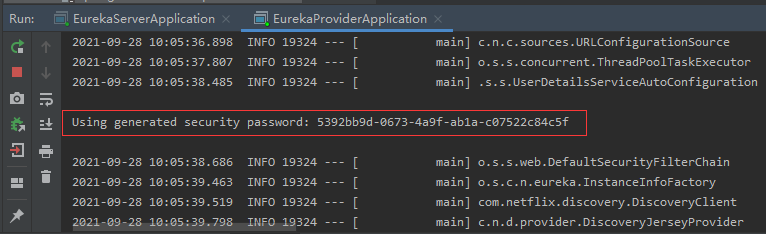
当Spring Security启动时,如果没有指定用户服务则会创建一个默认的用户,登录名称为user,5392bb9d-0673-4a9f-ab1a-c07522c84c5f是登录口令。
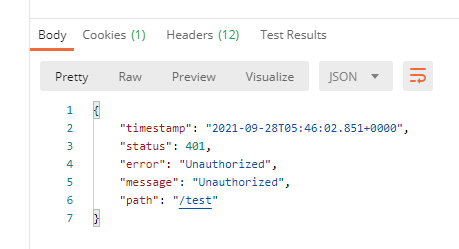
这时如果我们通过postman去请求,会返回如下结果:
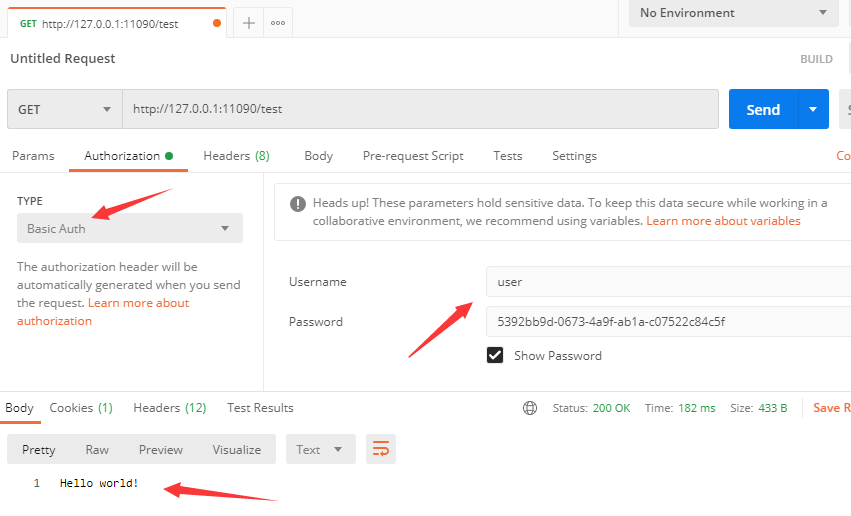
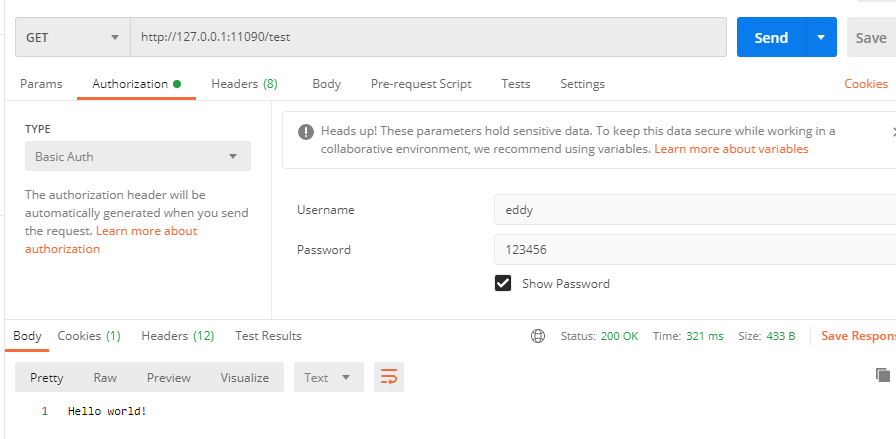
按照默认的认证方式传递用户名和密码即可成功请求获取返回值,如下图所示:
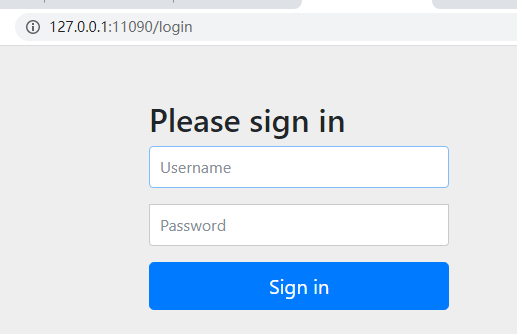
如果通过浏览器访问,则会自动跳转到默认的登录页面:
通过上述测试,我们对Spring Security能实现的效果有了一个直观的感受。但是在实际应用场景中,认证的方式是需要开发人员自己来实现的,那么如何让Spring Security使用我们所定义的用户名和登录口令呢?
@Configuration

public class SecurityConfig extends WebSecurityConfigurerAdapter {

    @Bean

    @Override

    public UserDetailsService userDetailsServiceBean() throws Exception {

        return super.userDetailsServiceBean();

    }

    @Bean

    @Override

    public AuthenticationManager authenticationManagerBean() throws Exception {

        return super.authenticationManagerBean();

    }

    @Override

    protected void configure(AuthenticationManagerBuilder authManagerBuilder) throws Exception {

        authManagerBuilder.inMemoryAuthentication().withUser("eddy").password("123456").roles("user");

    }

}
在上面的代码实现中继承了WebSecurityConfigurerAdapter并使用其所提供的默认配置,通过覆写configure()方法,以内存的方式增加应用用户信息的定义。在增加的用户中我们设置了用户的登录名、登录口令及相应的用户权限(角色)。
这时我们重新启动服务,由于已经指定了认证规则,在控制台也不会打印随机生成的口令了。这时我们通过postman再去请求,发现服务端抛出了如下异常:
java.lang.IllegalArgumentException: There is no PasswordEncoder mapped for the id "null"

	at org.springframework.security.crypto.password.DelegatingPasswordEncoder$UnmappedIdPasswordEncoder.matches(DelegatingPasswordEncoder.java:244) ~[spring-security-core-5.1.13.RELEASE.jar:5.1.13.RELEASE]

	at org.springframework.security.crypto.password.DelegatingPasswordEncoder.matches(DelegatingPasswordEncoder.java:198) ~[spring-security-core-5.1.13.RELEASE.jar:5.1.13.RELEASE]

	at org.springframework.security.config.annotation.web.configuration.WebSecurityConfigurerAdapter$LazyPasswordEncoder.matches(WebSecurityConfigurerAdapter.java:605) ~[spring-security-config-5.1.13.RELEASE.jar:5.1.13.RELEASE]

	at org.springframework.security.authentication.dao.DaoAuthenticationProvider.additionalAuthenticationChecks(DaoAuthenticationProvider.java:90) ~[spring-security-core-5.1.13.RELEASE.jar:5.1.13.RELEASE]

	at org.springframework.security.authentication.dao.AbstractUserDetailsAuthenticationProvider.authenticate(AbstractUserDetailsAuthenticationProvider.java:166) ~[spring-security-core-5.1.13.RELEASE.jar:5.1.13.RELEASE]

	at org.springframework.security.authentication.ProviderManager.authenticate(ProviderManager.java:175) ~[spring-security-core-5.1.13.RELEASE.jar:5.1.13.RELEASE]

	at org.springframework.security.authentication.ProviderManager.authenticate(ProviderManager.java:200) ~[spring-security-core-5.1.13.RELEASE.jar:5.1.13.RELEASE]

	at org.springframework.security.web.authentication.www.BasicAuthenticationFilter.doFilterInternal(BasicAuthenticationFilter.java:180) ~[spring-security-web-5.1.13.RELEASE.jar:5.1.13.RELEASE]
经过查阅资料,了解到Spring security 5.0中新增了多种加密方式,使得当进行验证时Spring Security将传输的数据看作是进行了加密后的数据,在匹配之后发现找不到正确识别序列,就认为id是null,因此要将前端传过来的密码进行某种方式加密。
@Override

protected void configure(AuthenticationManagerBuilder authManagerBuilder) throws Exception {

    authManagerBuilder.inMemoryAuthentication()

            .passwordEncoder(new BCryptPasswordEncoder())

            .withUser("eddy")

            .password(new BCryptPasswordEncoder().encode("123456"))

            .roles("user");

}
再次测试,成功返回!
Spring Security 学习+实践的更多相关文章
- [转]Spring Security学习总结一
[总结-含源码]Spring Security学习总结一(补命名空间配置) Posted on 2008-08-20 10:25 tangtb 阅读(43111) 评论(27) 编辑 收藏 所属分 ...
- Spring security 学习 (自助者,天助之!)
自己努力,何必要强颜欢笑的求助别人呢? 手心向下不求人! Spring security学习有进展哦: 哈哈! 1.页面都是动态生产的吧! 2.设置权限: a:pom.xml配置jar包 b:cr ...
- SpringBoot + Spring Security 学习笔记(五)实现短信验证码+登录功能
在 Spring Security 中基于表单的认证模式,默认就是密码帐号登录认证,那么对于短信验证码+登录的方式,Spring Security 没有现成的接口可以使用,所以需要自己的封装一个类似的 ...
- SpringBoot + Spring Security 学习笔记(三)实现图片验证码认证
整体实现逻辑 前端在登录页面时,自动从后台获取最新的验证码图片 服务器接收获取生成验证码请求,生成验证码和对应的图片,图片响应回前端,验证码保存一份到服务器的 session 中 前端用户登录时携带当 ...
- [转]Spring Security学习总结二
原文链接: http://www.blogjava.net/redhatlinux/archive/2008/08/20/223148.html http://www.blogjava.net/red ...
- spring security 学习资料
spring security 学习资料 网址 Spring Security 文档参考手册中文版 https://springcloud.cc/spring-security.html
- Spring Security学习笔记
Spring Web Security是Java web开发领域的一个认证(Authentication)/授权(Authorisation)框架,基于Servlet技术,更确切的说是基于Servle ...
- Spring Security简明实践及相关国际化处理
别人的都是最佳实践,因为我目前的设置没有按照参考文档推荐,还是采用DelegatingFilterProxy,所以我只能说简明实践.先贴我的applicationContext-security.xm ...
- SpringBoot + Spring Security 学习笔记(二)安全认证流程源码详解
用户认证流程 UsernamePasswordAuthenticationFilter 我们直接来看UsernamePasswordAuthenticationFilter类, public clas ...
随机推荐
- 骨架屏css样式
.chiaroscuro { background: #f2f2f2; animation-duration: 1.5s; animation-name: blink; animation-itera ...
- CentOS7 yum方式安装MySQL5.7 + 远程连接
1 下载并安装MySQL官方的 Yum Repository [root@localhost ~]# wget -i -c http://dev.mysql.com/get/mysql57-commu ...
- Node.js & Kubernetes Graceful Shutdown
k8s-graceful-shutdown:该库提供了使用 Kubernetes 实现 Graceful Shutdown(优雅退出) Node.js App 的资源. 问题描述 在 kubernet ...
- mybatis动态sql以及分页
1.mybatis动态sql 2.模糊查询 3.查询返回结果集的处理 4.分页查询 5.特殊字符处理 1.mybatis动态sql If.trim.foreach If 标签判断某一字段是否为空 &l ...
- Python - typing 模块 —— Union
前言 typing 是在 python 3.5 才有的模块 前置学习 Python 类型提示:https://www.cnblogs.com/poloyy/p/15145380.html 常用类型提示 ...
- Stream流方法引用
一.对象存在,方法也存在,双冒号引用 1.方法引用的概念: 使用实例: 1.1先定义i一个函数式接口: 1.2定义一个入参参数列表有函数式接口的方法: 1.3调用这个入参有函数式接口的方法: lamb ...
- Operator 示例:使用 Redis 部署 PHP 留言板应用程序
「Kubernetes 官方示例:使用 Redis 部署 PHP 留言板应用程序」Operator 化. 源码仓库:https://github.com/jxlwqq/guestbook-operat ...
- 铺路、建路、指路:联想ISG给出一份全新的智能化“路书”
新基建,新服务,新智能:联想给出的"高质量"方案 昨天,第七届联想创新科技大会(Lenovo Tech World 2021)正式召开.每年通过这个大会,各行各业不仅可以了解联想最 ...
- python库--pandas--Series.str--字符串处理
原数据 import pandas as pd a = pd.Series(['aSd', 'asd', 'dfd fsAsf sfs']) b = pd.Series([None, 'asd', ' ...
- Java反序列化漏洞Apache CommonsCollections分析
Java反序列化漏洞Apache CommonsCollections分析 cc链,既为Commons-Collections利用链.此篇文章为cc链的第一条链CC1.而CC1目前用的比较多的有两条链 ...