
SQLlite实现增删查改
activity_main.xml文件:
<LinearLayout xmlns:android="http://schemas.android.com/apk/res/android"

    xmlns:tools="http://schemas.android.com/tools"

    android:id="@+id/LinearLayout1"

    android:layout_width="match_parent"

    android:layout_height="match_parent"

    android:gravity="center_horizontal"

    android:orientation="vertical"

    tools:context=".MainActivity" >

    <LinearLayout

        android:layout_width="290dp"

        android:layout_height="wrap_content"

        android:padding="10dp">

        <TextView

            android:layout_width="wrap_content"

            android:layout_height="wrap_content"

            android:text="手机号:"

            android:textSize="18sp" />

        <EditText

            android:id="@+id/ID"

            android:layout_width="match_parent"

            android:layout_height="wrap_content" />

    </LinearLayout>

    <LinearLayout

        android:layout_width="290dp"

        android:layout_height="wrap_content"

        android:padding="10dp">

        <TextView

            android:layout_width="wrap_content"

            android:layout_height="wrap_content"

            android:text="姓名:"

            android:textSize="18dp" />

        <EditText

            android:id="@+id/Name"

            android:layout_width="match_parent"

            android:layout_height="wrap_content" />

    </LinearLayout>

    <LinearLayout

        android:layout_width="wrap_content"

        android:layout_height="wrap_content" >

    </LinearLayout>

    <TextView

        android:id="@+id/StudentList"

        android:layout_width="290dp"

        android:layout_height="wrap_content"

        android:gravity="center"

        android:text="显示数据"

        android:padding="10dp"/>

</LinearLayout>
main.xml:
<menu xmlns:android="http://schemas.android.com/apk/res/android" >

    <item

        android:id="@+id/CreateDataBase"

        android:title="创建数据库">

    </item>

    <item

        android:id="@+id/CreateTable"

        android:title="创建表">

    </item>

    <item

        android:id="@+id/DropTable"

        android:title="删除表">

    </item>

    <item

        android:id="@+id/InsertData"

        android:title="插入数据">

    </item>

    <item

        android:id="@+id/ReadData"

        android:title="读取数据">

    </item>

</menu>
MainActivity.java
package com.zrdm.sqlitecrud;

import java.lang.reflect.Field;

import java.util.ArrayList;

import java.util.List;

import android.app.Activity;

import android.database.Cursor;

import android.database.sqlite.SQLiteDatabase;

import android.os.Bundle;

import android.view.Menu;

import android.view.MenuItem;

import android.view.View;

import android.view.ViewConfiguration;

import android.widget.EditText;

import android.widget.TextView;

import android.widget.Toast;

public class MainActivity extends Activity {

    // 变量***********************************/

    private MyDataBase myDataBase = null;

    private String strSql = null;

    private EditText ID = null;

    private EditText Name = null;

    private TextView studentList = null;

    // 函数***********************************/

    // 创建

    @Override

    protected void onCreate(Bundle savedInstanceState) {

        super.onCreate(savedInstanceState);

        setContentView(R.layout.activity_main);

        makeActionOverflowMenuShown();

        ID = (EditText) findViewById(R.id.ID);

        Name = (EditText) findViewById(R.id.Name);

        studentList = (TextView) findViewById(R.id.StudentList);

    }

    // 创建菜单

    @Override

    public boolean onCreateOptionsMenu(Menu menu) {

        // Inflate the menu; this adds items to the action bar if it is present.

        getMenuInflater().inflate(R.menu.main, menu);

        return true;

    }

/*

    // 创建表

    public void CreateTable(View v) {

        strSql = "Create table student(" + "ID nvarchar(20) not null,"

                + "Name nvarchar(40) not null," + "primary key(ID)" + " )";

        if (myDataBase == null) {

            myDataBase = new MyDataBase(this);

        }

        if (myDataBase.ExecSql(strSql)) {

            Toast.makeText(getApplicationContext(), "创建表成功!", Toast.LENGTH_SHORT).show();

        } else {

            Toast.makeText(getApplicationContext(), "创建表失败!", Toast.LENGTH_SHORT).show();

        }

    }

    // 删除表

    public void DropTable(View v) {

        strSql = "Drop table student";

        if (myDataBase == null) {

            myDataBase = new MyDataBase(this);

        }

        if (myDataBase.ExecSql(strSql)) {

            Toast.makeText(getApplicationContext(), "删除表成功!", Toast.LENGTH_SHORT).show();

        } else {

            Toast.makeText(getApplicationContext(), "删除表失败!", Toast.LENGTH_SHORT).show();

        }

    }

    // 插入数据

    public void InsertData(View v) {

        String strId = ID.getText().toString();

        String strName = Name.getText().toString();

        if (strId.equals("") || strName.equals("")) {

            Toast.makeText(getApplicationContext(), "学号或姓名不能为空!", Toast.LENGTH_SHORT).show();

        } else {

            strSql = "insert into student values (" + "'" + strId + "'," + "'"

                    + strName + "')";

            if (myDataBase == null) {

                myDataBase = new MyDataBase(this);

            }

            if (myDataBase.ExecSql(strSql)) {

                Toast.makeText(getApplicationContext(), "插入数据成功!", Toast.LENGTH_SHORT).show();

            } else {

                Toast.makeText(getApplicationContext(), "插入数据失败!", Toast.LENGTH_SHORT).show();

            }

        }

    }

    // 读取数据

    public void ReadData(View v) {

        if (myDataBase == null) {

            Toast.makeText(getApplicationContext(), "数据库不存在!", Toast.LENGTH_SHORT).show();

        } else {

            SQLiteDatabase db = myDataBase.getReadableDatabase();

            strSql = "select * from student";

            Cursor cursor = db.rawQuery(strSql, null);

            StringBuffer sb = new StringBuffer();

            while (cursor.moveToNext()) {

                Student s = new Student(cursor.getString(0),

                        cursor.getString(1));

                sb.append("学号:" + s.getID() + "     姓名:" + s.getName() + "\n");

            }

            studentList.setText(sb);

        }

    }(注释区的代码是供按钮使用的因为我把按钮都删掉了所以这一段被我注释掉了,如果想添加按钮的话只需要在布局文件里添加按钮然后在这里吧注释符号去掉去壳)*/

    // 菜单被选中

    @Override

    public boolean onOptionsItemSelected(MenuItem item) {

        // TODO Auto-generated method stub

        int id = item.getItemId();

        if (id == R.id.CreateDataBase) {

            // 创建数据库

            if (myDataBase == null) {

                myDataBase = new MyDataBase(this);

                Toast.makeText(getApplicationContext(), "创建数据库成功!", Toast.LENGTH_SHORT).show();

            } else {

                Toast.makeText(getApplicationContext(), "数据库已存在!", Toast.LENGTH_SHORT).show();

            }

        } else if (id == R.id.CreateTable) {

            // 创建表

            strSql = "Create table student(" + "ID nvarchar(20) not null,"

                    + "Name nvarchar(40) not null," + "primary key(ID)" + " )";

            if (myDataBase == null) {

                myDataBase = new MyDataBase(this);

            }

            if (myDataBase.ExecSql(strSql)) {

                Toast.makeText(getApplicationContext(), "创建表成功!",Toast.LENGTH_SHORT).show();

            } else {

                Toast.makeText(getApplicationContext(), "创建表失败!", Toast.LENGTH_SHORT).show();

            }

        } else if (id == R.id.DropTable) {

            // 删除表

            strSql = "Drop table student";

            if (myDataBase == null) {

                myDataBase = new MyDataBase(this);

            }

            if (myDataBase.ExecSql(strSql)) {

                Toast.makeText(getApplicationContext(), "删除表成功!", Toast.LENGTH_SHORT).show();

            } else {

                Toast.makeText(getApplicationContext(), "删除表失败!", Toast.LENGTH_SHORT).show();

            }

        } else if (id == R.id.InsertData) {

            // 插入数据

            String strId = ID.getText().toString();

            String strName = Name.getText().toString();

            if (strId.equals("") || strName.equals("")) {

                Toast.makeText(getApplicationContext(), "学号或姓名不能为空!", Toast.LENGTH_SHORT).show();

            } else {

                strSql = "insert into student values (" + "'" + strId + "',"

                        + "'" + strName + "')";

                if (myDataBase == null) {

                    myDataBase = new MyDataBase(this);

                }

                if (myDataBase.ExecSql(strSql)) {

                    Toast.makeText(getApplicationContext(), "插入数据成功!", Toast.LENGTH_SHORT)

                            .show();

                } else {

                    Toast.makeText(getApplicationContext(), "插入数据失败!", Toast.LENGTH_SHORT)

                            .show();

                }

            }

        } else if (id == R.id.ReadData) {

            // 读取数据

            if (myDataBase == null) {

                Toast.makeText(getApplicationContext(), "数据库不存在!", Toast.LENGTH_SHORT).show();

            } else {

                SQLiteDatabase db = myDataBase.getReadableDatabase();

                strSql = "select * from student";

                Cursor cursor = db.rawQuery(strSql, null);

                StringBuffer sb = new StringBuffer();

                while (cursor.moveToNext()) {

                    Student s = new Student(cursor.getString(0),

                            cursor.getString(1));

                    sb.append( " 姓名:" + s.getName() + "手机号:" + s.getID() +"\n");

                }

                studentList.setText(sb);

            }

        }

        return super.onOptionsItemSelected(item);

    }

    // 显示右上角三个点菜单

    private void makeActionOverflowMenuShown() {

        try {

            ViewConfiguration config = ViewConfiguration.get(this);

            Field menuKeyField = ViewConfiguration.class

                    .getDeclaredField("sHasPermanentMenuKey");

            if (menuKeyField != null) {

                menuKeyField.setAccessible(true);

                menuKeyField.setBoolean(config, false);

            }

        } catch (Exception e) {

            // TODO: handle exception

        }

    }

}
MyDataBase.java
package com.zrdm.sqlitecrud;

import java.util.concurrent.ExecutionException;

import android.content.Context;

import android.database.DatabaseErrorHandler;

import android.database.sqlite.SQLiteDatabase;

import android.database.sqlite.SQLiteDatabase.CursorFactory;

import android.database.sqlite.SQLiteOpenHelper;

public class MyDataBase extends SQLiteOpenHelper{

    //变量*********************************************/

    private static String strDataBaseName = "Student.db";

    private static int intVersion = 1;

    private SQLiteDatabase db = null;

    //函数********************************************/

    public MyDataBase(Context context){

        super(context, strDataBaseName, null, intVersion);

        db = getWritableDatabase();

    }

    //构造

    public MyDataBase(Context context, String name, CursorFactory factory,

            int version, DatabaseErrorHandler errorHandler) {

        super(context, name, factory, version, errorHandler);

        // TODO Auto-generated constructor stub

    }

    //构造

    public MyDataBase(Context context, String name, CursorFactory factory,

            int version) {

        super(context, name, factory, version);

        // TODO Auto-generated constructor stub

    }

    //执行SQL语句,建议语句类型 create 、delete 、 update 、insert

    public boolean ExecSql(String strSql){

        try{

            db.execSQL(strSql);

            return true;

        }catch(Exception e){

            return false;

        }

    }

    //创建

    @Override

    public void onCreate(SQLiteDatabase arg0) {

        // TODO Auto-generated method stub

    }

    //版本升级

    @Override

    public void onUpgrade(SQLiteDatabase arg0, int arg1, int arg2) {

        // TODO Auto-generated method stub

    }

}
Student.java
package com.zrdm.sqlitecrud;

import java.util.concurrent.ExecutionException;

import android.content.Context;

import android.database.DatabaseErrorHandler;

import android.database.sqlite.SQLiteDatabase;

import android.database.sqlite.SQLiteDatabase.CursorFactory;

import android.database.sqlite.SQLiteOpenHelper;

public class MyDataBase extends SQLiteOpenHelper{

    //变量*********************************************/

    private static String strDataBaseName = "Student.db";

    private static int intVersion = 1;

    private SQLiteDatabase db = null;

    //函数********************************************/

    public MyDataBase(Context context){

        super(context, strDataBaseName, null, intVersion);

        db = getWritableDatabase();

    }

    //构造

    public MyDataBase(Context context, String name, CursorFactory factory,

            int version, DatabaseErrorHandler errorHandler) {

        super(context, name, factory, version, errorHandler);

        // TODO Auto-generated constructor stub

    }

    //构造

    public MyDataBase(Context context, String name, CursorFactory factory,

            int version) {

        super(context, name, factory, version);

        // TODO Auto-generated constructor stub

    }

    //执行SQL语句,建议语句类型 create 、delete 、 update 、insert

    public boolean ExecSql(String strSql){

        try{

            db.execSQL(strSql);

            return true;

        }catch(Exception e){

            return false;

        }

    }

    //创建

    @Override

    public void onCreate(SQLiteDatabase arg0) {

        // TODO Auto-generated method stub

    }

    //版本升级

    @Override

    public void onUpgrade(SQLiteDatabase arg0, int arg1, int arg2) {

        // TODO Auto-generated method stub

    }

}
点击创建数据库->创建表->插入数据。如果创建表的时候失败就点击删除表然后点击创建表就可以.

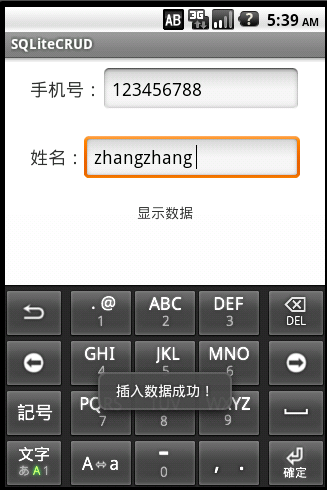
插入数据成功:
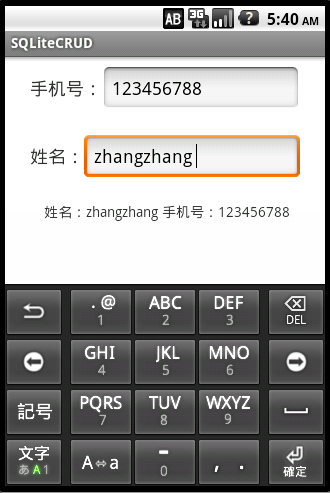
读取数据成功:
SQLlite实现增删查改的更多相关文章
- [置顶] cocos2dx sqllite 增删查改等操作
首先导入文件shell.c sqllite3.c sqlite3.h sqlite3etx.h文件(注意在生成安卓项目是 不要将shell.c写进android.mk文件中,写进去在cywin中生成会 ...
- 6.在MVC中使用泛型仓储模式和依赖注入实现增删查改
原文链接:http://www.c-sharpcorner.com/UploadFile/3d39b4/crud-operations-using-the-generic-repository-pat ...
- 3.EF 6.0 Code-First实现增删查改
原文链接:http://www.c-sharpcorner.com/UploadFile/3d39b4/crud-operations-using-entity-framework-5-0-code- ...
- 4.在MVC中使用仓储模式进行增删查改
原文链接:http://www.c-sharpcorner.com/UploadFile/3d39b4/crud-using-the-repository-pattern-in-mvc/ 系列目录: ...
- 5.在MVC中使用泛型仓储模式和工作单元来进行增删查改
原文链接:http://www.c-sharpcorner.com/UploadFile/3d39b4/crud-operations-using-the-generic-repository-pat ...
- jdbc的实例应用:增删查改实现
//在jdbc中进行增删查改 //查看所有 public static void findAll() { String url = "jdbc:mysql://localhost:3306/ ...
- 用javascript实现html元素的增删查改[xyytit]
<!DOCTYPE html PUBLIC "-//W3C//DTD XHTML 1.0 Transitional//EN" "http://www.w3.org/ ...
- hibernate基础增删查改简单实例
hibernate 基础理论知识网上很多,可以百度和google.这里不做多的介绍,以一个User表来开展例子 建一个web-project 我这里用了junit单元测试环境来进行增删查改的测试,别的 ...
- Entity FrameWork 增删查改的本质
之前的文章里面已经说了,EF的增删查改.那时候的修改,删除,只能是先查询出来要修改的数据,再修改,删除...现在来一个改进版的,增删查改. 1.Add static void Add() { //1. ...
随机推荐
- 应该如何看待VAST的未来价格与价值?
提起数字货币的价格,很多币圈人士都是滔滔不绝,随口一举例,便是百倍千倍的数字货币.可是提起数字货币的价值,就很少有币圈人士能举出几个有力的例子,常常顾左右而言他,场面十分尴尬.之所以会这样,是因为很多 ...
- Jupyter notebook操作技巧
学习笔记:Jupyter notebook操作技巧 一.jupyter notebook简介.用途.优势和缺点 二. 单元Cell: 三.操作技巧 - 给Jupyter换主题 - 笔记本扩展(nbex ...
- plsql连接oracle出现问题总结
https://blog.csdn.net/yali1990515/article/details/46874511
- sql where 1=1 的详细解释
原文来自:https://blog.csdn.net/zc474235918/article/details/50544484 看一下这两个句子: select * from user select ...
- Redis与Spring Data Redis
1.Redis概述 1.1介绍 官网:https://redis.io/ Redis是一个开源的使用ANSIC语言编写.支持网络.可基于内存 亦可持久化的日志型.Key-Value型的高性能数据库. ...
- Java基本概念:面向对象
一.简介 面向过程的思维模式是简单的线性思维,思考问题首先陷入第一步做什么.第二步做什么的细节中. 面向对象的思维模式说白了就是分类思维模式.思考问题首先会解决问题需要哪些分类,然后对这些分类进行单独 ...
- 分分钟钟学会Python - 第四章 文件操作
4.1 文件基本操作 obj = open('路径',mode='模式',encoding='编码') obj.write() # 写入 obj.read() # 读取 obj.close() #关闭 ...
- Codeforces Global Round 13
比赛地址 A(水题) 题目链接 题目: 给出一个\(01\)序列,有2种操作:1.将某个位置取反:2.询问\(01\)序列中第\(k\)大的数 解析: 显然维护1的数目即可 #include<b ...
- for、while的循环套用和函数的递归
一.集成开发工具Eclipse 1.1 下载 官网下载 https://www.eclipse.org/downloads/download.php?file=/technology/epp/down ...
- spring boot自定义类配置绑定在配置文件中自动提示
在spring boot的日常使用中,我们可能需要使用配置绑定的方式动态配置自定义类的成员变量. 这个时候,我们在配置文件中配置spring默认已有的配置时,只需要输入部分关键字即可自动提示,如下图: ...