
Spring的配置文件 (SSM maven项目)
<?xml version="1.0" encoding="UTF-8"?>

<beans xmlns="http://www.springframework.org/schema/beans"

       xmlns:xsi="http://www.w3.org/2001/XMLSchema-instance"

       xmlns:context="http://www.springframework.org/schema/context"

       xmlns:aop="http://www.springframework.org/schema/aop" xmlns:tx="http://www.springframework.org/schema/tx"

       xsi:schemaLocation="http://www.springframework.org/schema/beans http://www.springframework.org/schema/beans/spring-beans.xsd http://www.springframework.org/schema/context http://www.springframework.org/schema/context/spring-context.xsd http://www.springframework.org/schema/aop http://www.springframework.org/schema/aop/spring-aop.xsd http://www.springframework.org/schema/cache http://www.springframework.org/schema/cache/spring-cache.xsd">

    <!--Spring的配置文件  这里主要是配置和业务逻辑有关的-->

    <context:component-scan base-package="xyz.sun">

        <context:exclude-filter type="annotation" expression="org.springframework.stereotype.Controller"></context:exclude-filter>

    </context:component-scan>

    <!-- 数据源  事务控制器  xxx...-->

    <context:property-placeholder location="classpath:dbconfig.properties" />

    <bean id="pooledDataSource" class="com.mchange.v2.c3p0.ComboPooledDataSource">

        <property name="jdbcUrl" value="${jdbc.jdbcUrl}"></property>

        <property name="driverClass" value="${jdbc.driverClass}"></property>

        <property name="user" value="${jdbc.user}"></property>

        <property name="password" value="${jdbc.password}"></property>

    </bean>

    <!--==============================配置和mybatis整合====================================== -->

    <bean id="SqlSessionFactoryBean" class="org.mybatis.spring.SqlSessionFactoryBean">

        <!--指定mybatis 全局配置文件的位置-->

        <property name="configLocation" value="classpath:mybatis-config.xml"></property>

        <property name="dataSource" ref="pooledDataSource"></property>

        <!--指定mybatis  mapper文件 的位置-->

        <property name="mapperLocations" value="classpath:mapper/*.xml"></property>

    </bean>

    <!--配置扫描器  将mybatis 接口的实现 加入到 ioc容器中-->

    <bean class="org.mybatis.spring.mapper.MapperScannerConfigurer">

        <!--扫描所有dao接口的实现, 加入到ioc容器中-->

        <property name="basePackage" value="xyz.sun.crud.dao"></property>

    </bean>

    <!--=====================事务控制的配置======================-->

    <bean id="transactionManager" class="org.springframework.jdbc.datasource.DataSourceTransactionManager">

        <!--控制住数据源-->

        <property name="dataSource" ref="pooledDataSource"></property>

    </bean>

    <!--开启基于注解的事务,  也可以使用xml配置形式事务(必要主要的都是使用配置)-->

    <aop:config>

        <!-- 切入点表达式-->

        <aop:pointcut  expression="execution(* xyz.sun.crud.service..*(..))" id="txPoint" />

        <!--配置事务增强 -->

        <aop:advisor advice-ref="txAdvice" pointcut-ref="txPoint" />

    </aop:config>

    <!--配置事务增强 事务如何切入 -->

     <!-- 配置事务属性 -->

    <tx:advice id="txAdvice" transaction-manager="transactionManager">

        <tx:attributes>

            <!--代表素偶有方法都是事务方法-->

            <tx:method name="*" />

            <!--以get 开始的所有方法-->

            <tx:method name="get*" read-only="true" />

        </tx:attributes>

    </tx:advice>

    <!--Spring 配置文件的核心点 (数据源、与mybatis的整合 事务控制)-->

</beans>
jdbc.jdbcUrl=jdbc:mysql://localhost:3306/ssm_crud?useUnicode=true&characterEncoding=utf8&useSSL=true

jdbc.driverClass=com.mysql.jdbc.Driver

jdbc.user=root

jdbc.password=123456
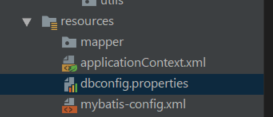
截图:
Spring的配置文件 (SSM maven项目)的更多相关文章
- eclipse中SSM(maven)项目搭建全过程+实现用户登录功能
项目创建之前确保eclipse中已经配置好了jdk,tomcat,maven如果没有配置下面有配置教程的链接 eclipse中配置jdk的教程url:http://www.cnblogs.com/ ...
- STS(Spring Tool Suite)创建maven项目
右键菜单选择新建->maven项目 自己创建存放配置文件需要使用的maven文件夹
- Spring日记_01 之 Maven项目的创建和更新
创建Maven项目: Maven是一个第三方工具用来 下载包的,将阿里云maven中的对应包的dependency 复制到maven项目的pom.xml文件中.就可以自动下载包(比如Spring-we ...
- 搭建springboot的ssm(spring + springmvc + mybatis)的maven项目
最终项目目录结构 创建过程 1.创建开关SpringBootApplication 为了创建快速.我们使用idea自带的创建springboot来创建结构,当然创建普通的web项目也是可以的.(使用e ...
- spring tool suite处理 maven项目名称红色感叹号的问题
今天构建一个springboot项目时,发现项目有个红色感叹号,但是pom.xml跟Build Path 都没问题. 解决方案: 选择 Windows --> show view --> ...
- ssm maven项目启动 报SYSTEM_PROPERTIES_MODE_ENVIRONMENT
1.jar包冲突,查看项目中的jar和pom.xml中配置的jar包 版本,把没用的jar包删掉
- MyBatis Generator(SSM Maven项目)
mbg.xml 放在项目目录里 <?xml version="1.0" encoding="UTF-8"?> <!DOCTYPE genera ...
- dispatcherServlet-servlet.xml(SSM maven 项目)
<?xml version="1.0" encoding="UTF-8"?> <beans xmlns="http://www.sp ...
- web.xml 基本配置(SSM maven项目)
<web-app> <display-name>Archetype Created Web Application</display-name> <!--we ...
随机推荐
- js 判断 是否在当前页面
1.使用visibilitychange 浏览器标签页被隐藏或显示的时候会触发visibilitychange事件. document.addEventListener("visibilit ...
- 【H264】视频编码发展简史
一.常见视频编码格式 编码格式有很多,如下图: 目前比较常用的编码有: H26x系列:由ITU(国际电传视讯联盟)主导,侧重网络传输 MPEG系列:由ISO(国际标准组织机构)下属的MPEG(运动图象 ...
- Java中的Set集合
Set接口简介 Set接口和List接口一样,同样继承自Collection接口,它与Collection接口中的方法基本一致,并没有对Collection接口进行功能上的扩充,它是比Collecti ...
- 练习使用Unicorn、Capstone
Unicorn是一个轻量级的多平台,多体系结构的CPU仿真器框架.官网:http://www.unicorn-engine.org/ Capstone是一个轻量级的多平台,多体系结构的反汇编框架.官网 ...
- c/c++ switch case内括号
如果在case语句中有定义变量,则必须要加{},否则会报错.
- redis雪崩,穿透,击穿
缓存雪崩:同一时间大量key到过期时间失效,可在设置失效时间时加随机数,如果直接修改数据库,那么一定会有不一致,通过失效时间去反复刷新缩短不一致的时间, 为了避免数据一直存在,一定要设置过期时间如果通 ...
- maven-plugin-shade 详解
一.介绍 [1] This plugin provides the capability to package the artifact in an uber-jar, including its d ...
- 互联网开发工具之idea项目打jar包
一.idea打jar包 步骤一:创建一个简单的java项目:如下图所示 `public class Main { public static void main(String[] args) { Sy ...
- DAOS 分布式异步对象存储|存储模型
概述 DAOS Pool 是分布在 Target 集合上的存储资源预留.分配给每个 Target 上的 Pool 的实际空间称为 Pool Shard. 分配给 Pool 的总空间在创建时确定,后期可 ...
- [深搜]A. 【例题1】拔河比赛
A . [ 例 题 1 ] 拔 河 比 赛 A. [例题1]拔河比赛 A.[例题1]拔河比赛 解析 模板题,选与不选 Code #include <bits/stdc++.h> #defi ...