
Lucene8.5.x全文检索工具
本文的资源展示:
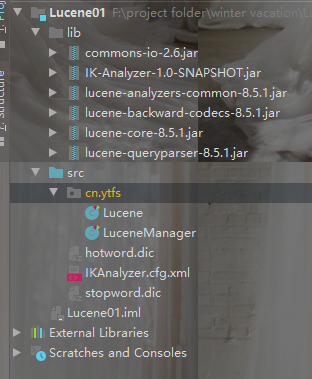
hotword:是热词的文本,比如不是词语的中文,但是是什么人名或者公司名称的词语,需要分词成一个词语的将需要的加入hotword.dic
stopword:无意义的词放入的词典,或者禁用词,敏感词汇,进行创建索引的时候该词会被忽略不进行分词,不储存
全文检索简介
全文检索技术被广泛的应用于搜索引擎,查询检索等领域。我们在网络上的大部分搜索服务都用到了全文检索技术。
对于数据量大、数据结构不固定的数据可采用全文检索方式搜索,比如百度、Google等搜索引擎、论坛站内搜索、电商网站站内搜索等。
简介地址:https://zh.wikipedia.org/wiki/Lucene

1.1 数据分类
我们生活中的数据总体分为两种:结构化数据和非结构化数据。
结构化数据:指具有固定格式或有限长度的数据,如数据库,元数据等。
非结构化数据:指不定长或无固定格式的数据,如邮件,word文档等磁盘上的文件
1.2 结构化数据搜索
常见的结构化数据也就是数据库中的数据。在数据库中搜索很容易实现,通常都是使用sql语句进行查询,而且能很快的得到查询结果。
为什么数据库搜索很容易?
因为数据库中的数据存储是有规律的,有行有列而且数据格式、数据长度都是固定的。
1.3 非结构化数据查询方法
(1)顺序扫描法(Serial Scanning)
所谓顺序扫描,比如要找内容包含某一个字符串的文件,就是一个文档一个文档的看,对于每一个文档,从头看到尾,如果此文档包含此字符串,则此文档为我们要找的文件,接着看下一个文件,直到扫描完所有的文件。如利用windows的搜索也可以搜索文件内容,只是相当的慢。
(2)全文检索(Full-text Search)
将非结构化数据中的一部分信息提取出来,重新组织,使其变得有一定结构,然后对此有一定结构的数据进行搜索,从而达到搜索相对较快的目的。这部分从非结构化数据中提取出的然后重新组织的信息,我们称之索引。
例如:字典。字典的拼音表和部首检字表就相当于字典的索引,对每一个字的解释是非结构化的,如果字典没有音节表和部首检字表,在茫茫辞海中找一个字只能顺序扫描。然而字的某些信息可以提取出来进行结构化处理,比如读音,就比较结构化,分声母和韵母,分别只有几种可以一一列举,于是将读音拿出来按一定的顺序排列,每一项读音都指向此字的详细解释的页数。我们搜索时按结构化的拼音搜到读音,然后按其指向的页数,便可找到我们的非结构化数据——也即对字的解释。
这种先建立索引,再对索引进行搜索的过程就叫全文检索(Full-text Search)。
虽然创建索引的过程也是非常耗时的,但是索引一旦创建就可以多次使用,全文检索主要处理的是查询,所以耗时间创建索引是值得的。
1.4 如何实现全文检索
可以使用Lucene实现全文检索。Lucene是apache下的一个开放源代码的全文检索引擎工具包。提供了完整的查询引擎和索引引擎,部分文本分析引擎。Lucene的目的是为软件开发人员提供一个简单易用的工具包,以方便的在目标系统中实现全文检索的功能。
1.5 全文检索的应用场景
对于数据量大、数据结构不固定的数据可采用全文检索方式搜索,比如百度、Google等搜索引擎、论坛站内搜索、电商网站站内搜索等。
使用Lucene进行全文检索
1.创建对应的索引
/**

     * 创建索引

     * @Created by 雨听风说

     * @throws IOException

     */

    @Test

    public void createIndex() throws IOException {

        //1.创建文档对象,指定索引库的放置位置

        Document document = new Document();

        //创建索引放在磁盘

        FSDirectory directory = FSDirectory.open(new File("F:\\project folder\\winter vacation\\Lucene\\temp").toPath());

        //2.基于Directory对象创建IndexWrite对象

        IndexWriter indexWriter = new IndexWriter(directory, new IndexWriterConfig());

        //3.读取本地文件

        File dir = new File("L:\\JAVA\\searchsource");

        File[] files = dir.listFiles();

        for (File file : files) {

            //获取文件的名称

            String name = file.getName();

            //获取文件的路径

            String path = file.getPath();

            //获取文件的内容

            String content = FileUtils.readFileToString(file, "utf-8");

            //获取文件的大小

            long size = FileUtils.sizeOf(file);

            //4.像文件中添加对象

            //参数1:域的名称,2:域里面的值,3:是否储存在磁盘上

            Field fieldName = new TextField("name", name, Field.Store.YES);

            Field fieldContent = new TextField("content", content, Field.Store.YES);

            Field fieldSize = new TextField("size", size + "", Field.Store.YES);

            Field fieldPath = new TextField("path", path, Field.Store.YES);

            //5.像文档对象中添加域

            document.add(fieldName);

            document.add(fieldContent);

            document.add(fieldSize);

            document.add(fieldPath);

            //6.将document写入磁盘

            indexWriter.addDocument(document);

        }

        //7.关闭IndexWrite

        indexWriter.close();

    }
2.查询索引内容
 /**

     * 查询索引内容

     *

     * @throws IOException

     * @Created by 雨听风说

     */

    @Test

    public void searchIndex() throws IOException {

        //1.指定文档的位置

        FSDirectory directory = FSDirectory.open(new File("F:\\project folder\\winter vacation\\Lucene\\temp").toPath());

        //2.创建IndexReader对象

        DirectoryReader reader = DirectoryReader.open(directory);

        //3.创建IndexSearch,搜索索引

        IndexSearcher searcher = new IndexSearcher(reader);

        //4.创建查询:参数含义1:域的名字    2:要查询的字段

        Query query = new TermQuery(new Term("name", "更新"));

        //5.执行查询:参数含义;1:查询的方式,,2查询的条数,此处,不管总数多少只显示10条

        TopDocs topDocs = searcher.search(query, 10);

        //获取查询的文档

        ScoreDoc[] scoreDocs = topDocs.scoreDocs;

        System.out.println("总条数 = " + topDocs.totalHits);

        //打印文档内容

        for (ScoreDoc doc : scoreDocs) {

            //取文档id

            int doc1 = doc.doc;

            Document document = searcher.doc(doc1);

            System.out.println(document.get("name"));

            System.out.println(document.get("path"));

            System.out.println(document.get("size"));

        }

        //关闭读取流

        reader.close();

    }
3.使用IKAnalyzer分词器创建索引
/**

     * 使用IKAnalyzer分词器创建索引

     *

     * @throws IOException

     * @Created by 雨听风说

     */

    @Test

    public void createIndexByIKAnalyzer() throws IOException {

        //创建文档对象

        Document document = new Document();

        //至此那个索引存储的位置

        Directory directory = FSDirectory.open(new File("F:\\project folder\\winter vacation\\Lucene\\temp").toPath());

        //使用IKAnalyzer分词器

        IndexWriterConfig indexWriterConfig = new IndexWriterConfig(new IKAnalyzer());

        //创建索引写流

        IndexWriter indexWriter = new IndexWriter(directory, indexWriterConfig);

        //读取写需要创建索引的文件

        File file = new File("L:\\JAVA\\searchsource");

        File[] files = file.listFiles();

        for (File file1 : files) {

            //获取文件的内容

            String content = FileUtils.readFileToString(file1, "UTF-8");

            //获取文件的路径

            String path = file1.getPath();

            //获取文件的大小

            long sizeOf = FileUtils.sizeOf(file1);

            //获取文件的名字

            String name = file1.getName();

            //设置域

            Field name1 = new TextField("name", name, Field.Store.YES);

            Field path1 = new TextField("path", path, Field.Store.YES);

            Field content1 = new TextField("content", content, Field.Store.YES);

            Field size = new TextField("size", sizeOf + "", Field.Store.YES);

            //向文档中添加域

            document.add(name1);

            document.add(path1);

            document.add(content1);

            document.add(size);

            //写入索引

            indexWriter.addDocument(document);

        }

        //关闭写的流

        indexWriter.close();

    }
4.创建索引通过IKAnalyze分词器,并用不同的域
 /**

     * 创建索引通过IKAnalyze分词器,并用不同的域

     *

     * @throws Exception

     * @Created by 雨听风说

     */

    @Test

    public void createIndexByIKAnalyzerAndKindField() throws Exception {

        //1、创建一个Director对象,指定索引库保存的位置。

        //把索引库保存在内存中

        //Directory directory = new RAMDirectory();

        //把索引库保存在磁盘

        Directory directory = FSDirectory.open(new File("F:\\project folder\\winter vacation\\Lucene\\temp").toPath());

        //2、基于Directory对象创建一个IndexWriter对象

        IndexWriterConfig config = new IndexWriterConfig(new IKAnalyzer());

        IndexWriter indexWriter = new IndexWriter(directory, config);

        //3、读取磁盘上的文件,对应每个文件创建一个文档对象。

        File dir = new File("L:\\JAVA\\searchsource");

        File[] files = dir.listFiles();

        for (File f :

                files) {

            //取文件名

            String fileName = f.getName();

            //文件的路径

            String filePath = f.getPath();

            //文件的内容

            String fileContent = FileUtils.readFileToString(f, "utf-8");

            //文件的大小

            long fileSize = FileUtils.sizeOf(f);

            //创建Field

            //参数1:域的名称,参数2:域的内容,参数3:是否存储

            Field fieldName = new TextField("name", fileName, Field.Store.YES);

            //Field fieldPath = new TextField("path", filePath, Field.Store.YES);

            Field fieldPath = new StoredField("path", filePath);

            Field fieldContent = new TextField("content", fileContent, Field.Store.YES);

            //Field fieldSize = new TextField("size", fileSize + "", Field.Store.YES);

            Field fieldSizeValue = new LongPoint("size", fileSize);

            Field fieldSizeStore = new StoredField("size", fileSize);

            //创建文档对象

            Document document = new Document();

            //向文档对象中添加域

            document.add(fieldName);

            document.add(fieldPath);

            document.add(fieldContent);

            //document.add(fieldSize);

            document.add(fieldSizeValue);

            document.add(fieldSizeStore);

            //5、把文档对象写入索引库

            indexWriter.addDocument(document);

        }

        //6、关闭indexwriter对象

        indexWriter.close();

    }
5.不同的域的解释 Field域的属性
是否分析:是否对域的内容进行分词处理。前提是我们要对域的内容进行查询。
是否索引:将Field分析后的词或整个Field值进行索引,只有索引方可搜索到。
比如:商品名称、商品简介分析后进行索引,订单号、身份证号不用分析但也要索引,这些将来都要作为查询条件。
是否存储:将Field值存储在文档中,存储在文档中的Field才可以从Document中获取
比如:商品名称、订单号,凡是将来要从Document中获取的Field都要存储。
是否存储的标准:是否要将内容展示给用户
|
Field类 |
数据类型 |
Analyzed 是否分析 |
Indexed 是否索引 |
Stored 是否存储 |
说明 |
|
StringField(FieldName, FieldValue,Store.YES)) |
字符串 |
N |
Y |
Y或N |
这个Field用来构建一个字符串Field,但是不会进行分析,会将整个串存储在索引中,比如(订单号,姓名等) 是否存储在文档中用Store.YES或Store.NO决定 |
|
LongPoint(String name, long... point) |
Long型 |
Y |
Y |
N |
可以使用LongPoint、IntPoint等类型存储数值类型的数据。让数值类型可以进行索引。但是不能存储数据,如果想存储数据还需要使用StoredField。 |
|
StoredField(FieldName, FieldValue) |
重载方法,支持多种类型 |
N |
N |
Y |
这个Field用来构建不同类型Field 不分析,不索引,但要Field存储在文档中 |
|
TextField(FieldName, FieldValue, Store.NO) 或 TextField(FieldName, reader) |
字符串 或 流 |
Y |
Y |
Y或N |
如果是一个Reader, lucene猜测内容比较多,会采用Unstored的策略. |
对索引的增删改查操作
package cn.ytfs;

import org.apache.lucene.document.Document;

import org.apache.lucene.document.Field;

import org.apache.lucene.document.LongPoint;

import org.apache.lucene.document.TextField;

import org.apache.lucene.index.*;

import org.apache.lucene.queryparser.classic.ParseException;

import org.apache.lucene.queryparser.classic.QueryParser;

import org.apache.lucene.search.*;

import org.apache.lucene.store.Directory;

import org.apache.lucene.store.FSDirectory;

import org.junit.Before;

import org.junit.Test;

import org.wltea.analyzer.lucene.IKAnalyzer;

import java.io.File;

import java.io.IOException;

/**

 * @classname : LuceneManager

 * @description : Lucne的管理类

 * @date : 2020/4/24 13:43

 * @created by : 雨听风说

 */

public class LuceneManager {

    private IndexWriter indexWriter;

    private Directory directory;

    /**

     * 初始化IndexWrite

     * 初始化directory

     */

    @Before

    public void init() throws IOException {

        directory = FSDirectory.open(new File("F:\\project folder\\winter vacation\\Lucene\\temp").toPath());

        indexWriter = new IndexWriter(directory, new IndexWriterConfig(new IKAnalyzer()));

    }

    /**

     * 删除全部索引

     *

     * @throws IOException

     */

    @Test

    public void deleteAllIndex() throws IOException {

        try {

            indexWriter.deleteAll();

        } catch (IOException e) {

            e.printStackTrace();

        }

        indexWriter.close();

    }

    /**

     * 删除查询到的

     */

    @Test

    public void deleteIndexBySearch() {

        //查询条件

        Query query = new TermQuery(new Term("content", "spring"));

        //查询

        try {

            indexWriter.deleteDocuments(query);

            indexWriter.close();

        } catch (IOException e) {

            System.out.println("删除查询的失败");

        }

    }

    /**

     * 更新索引

     */

    @Test

    public void updateDocument() throws IOException {

        //创建文档

        Document doc = new Document();

        //向文档中添加不同的域

        doc.add(new TextField("content", "需要更新的文档context", Field.Store.YES));

        doc.add(new TextField("name", "需要更新的文档name", Field.Store.YES));

        //执行更新操作

        indexWriter.updateDocument(new Term("name", "apache"), doc);

        //关闭IndexWrite

        indexWriter.close();

    }

    /**

     * TermQuery查询

     *

     * @throws IOException

     */

    @Test

    public void searchByTermQuery() throws IOException {

        //创建TermQuery查询

        Query query = new TermQuery(new Term("content", "apache"));

        printResult(query);

    }

    /**

     * 结果的打印方法

     * @param query

     * @throws IOException

     */

    private void printResult(Query query) throws IOException {

        //打开索引库

        Directory directory = FSDirectory.open(new File("F:\\project folder\\winter vacation\\Lucene\\temp").toPath());

        //读取索引库

        IndexReader indexReader = DirectoryReader.open(directory);

        //创建查询,并指定对应的索引库

        IndexSearcher indexSearcher = new IndexSearcher(indexReader);

        //执行查询

        TopDocs topDocs = indexSearcher.search(query, 10);

        System.out.println("总条数 = " + topDocs.totalHits);

        //获取与文档的详情

        ScoreDoc[] docs = topDocs.scoreDocs;

        for (ScoreDoc doc : docs) {

            //获取文档的id

            int doc1 = doc.doc;

            Document document = indexSearcher.doc(doc1);

            System.out.println("document.get(\"name\") = " + document.get("name"));

//            System.out.println("document.get(\"content\") = " + document.get("content"));

            System.out.println("document.get(\"path\") = " + document.get("path"));

            System.out.println("document.get(\"size\") = " + document.get("size"));

        }

        //关闭读取的流

        indexReader.close();

    }

    /**

     * 根据范围查询

     * @throws IOException

     */

    @Test

    public void searchByRange() throws IOException {

        //创建范围查询(RangeQuery)

        Query query = LongPoint.newRangeQuery("size", 0, 1000);

        //打印结果

        printResult(query);

    }

    /**

     * QueryParser查询

     * @throws ParseException

     * @throws IOException

     */

    @Test

    public void searchByQueryParser() throws ParseException, IOException {

        //创建QueryParser对象

        QueryParser  queryParser = new QueryParser("content", new IKAnalyzer());

        Query query = queryParser.parse("Luene是一个Java开发搜索的工具包");

        printResult(query);

    }

}
Lucene8.5.x全文检索工具的更多相关文章
- 全文检索工具推荐FileLocator
全文检索工具推荐FileLocator https://www.baidu.com/link?url=_vaDZaJ_OePrAX-BTUD5hjTymnvN7_1oIAnWyS25hqxAg0nUH ...
- lucene 全文检索工具的介绍
Lucene:全文检索工具:这是一种思想,使用的是C语言写出来的 1.Lucene就是apache下的一个全文检索工具,一堆的jar包,我们可以使用lucene做一个谷歌和百度一样的搜索引擎系统 2. ...
- Elasticsearch全文检索工具入门
Elasticsearch全文检索工具入门: 1.下载对应系统版本的文件 elasticsearch-2.4.0.zip 1.1运行elasticsearch-2.4.0\elasticsearch- ...
- python 开源全文检索工具 Whoosh
About Whoosh Whoosh is a fast, featureful full-text indexing and searching library implemented in pu ...
- 全文检索工具elasticsearch和kibana安装
一.安装elasticsearch 1.拷贝elasticsearch-5.6.4.rpm到/opt目录下「cenos7」 systemctl list-unit-files|grep elastic ...
- 全文检索引擎及工具 Lucene Solr
全文检索引擎及工具 lucence lucence是一个全文检索引擎. lucence代码级别的使用步骤大致如下: 创建文档(org.apache.lucene.document.Document), ...
- Lucene:信息检索与全文检索
目录 信息检索的概念 信息检索技术的分类 全文检索与数据库查询对比 全文检索工具一般由三部分构成 全文检索中建立索引和进行检索的流程 索引里面究竟存什么 如何创建索引 如何对索引进行检索 Lucene ...
- solr全文检索实现原理
本文转自:https://blog.csdn.net/u014209975/article/details/53263642 https://blog.csdn.net/lihang_1994/ ...
- I-team 博客全文检索 Elasticsearch 实战
一直觉得博客缺点东西,最近还是发现了,当博客慢慢多起来的时候想要找一篇之前写的博客很是麻烦,于是作为后端开发的楼主觉得自己动手丰衣足食,也就有了这次博客全文检索功能Elasticsearch实战,这里 ...
随机推荐
- 【死磕Java并发】—–深入分析volatile的实现原理
通过前面一章我们了解了synchronized是一个重量级的锁,虽然JVM对它做了很多优化,而下面介绍的volatile则是轻量级的synchronized.如果一个变量使用volatile,则它比使 ...
- [BUUCTF]REVERSE——Youngter-drive
Youngter-drive 附件 步骤: 例行查壳儿,32位程序,upx壳儿 利用网上找的upx脱壳儿工具脱完壳扔进ida,首先检索程序里的字符串,发现了有关flag的字样,跟进,当source=T ...
- CF248A Cupboards 题解
Content 在一个走廊上有 \(2n\) 扇门,排成两列分居左右.有个人很无聊,随意地开关了一些门,使得这些门看起来十分乱.现在请开关一些门,使得这些门恢复原来整齐的状态(要么都开.要么都关.要么 ...
- C++之去重
note 今天刷题,忘了去重复库函数,于是手写了一个. 前提: 必须保证数组是有序的. 源码 template <typename T> void unique_arr(T arr[], ...
- MFC屏蔽按键ESC、ENTER、Alt+F4
1.重写 重写下面的函数 virtual BOOL PreTranslateMessage(MSG* pMsg); 2.函数体 BOOL Cfile_trans_codeDlg::PreTransla ...
- 七、Uniapp+vue+腾讯IM+腾讯音视频开发仿微信的IM聊天APP,支持各类消息收发,音视频通话,附vue实现源码(已开源)-聊天消息项的实现
会话好友列表的实现 1.项目引言 2.腾讯云后台配置TXIM 3.配置项目并实现IM登录 4.会话好友列表的实现 5.聊天输入框的实现 6.聊天界面容器的实现 7.聊天消息项的实现 8.聊天输入框扩展 ...
- Spring Boot + MyBatis + MySQL 实现读写分离
读写分离要做的事情就是对于一条SQL该选择哪个数据库去执行,至于谁来做选择数据库这件事儿,无非两个,要么中间件帮我们做,要么程序自己做. 读写分离有两种实现方式: 第一种是依靠中间件(比如:MyCat ...
- 【Leetcode】718. 最长重复子数组
最长重复子数组有一下性质 A: [1,2,3,2,1] B: [3,2,1,4,7]设横是A竖是B,有规律:若横元和竖元相等,则为1,不等为0 1 2 3 2 13 0 0 1 0 12 0 1 0 ...
- 第48篇-native方法调用解释执行的Java方法
举一个native方法调用解释执行的Java方法的实例,如下: public class TestJNI { static { System.load("/media/mazhi/sourc ...
- Kernel Methods for Deep Learning
目录 引 主要内容 与深度学习的联系 实验 Cho Y, Saul L K. Kernel Methods for Deep Learning[C]. neural information proce ...