
mybatis 使用经验小结
一、多数据源问题
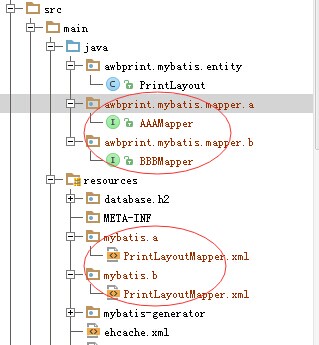
主要思路是把dataSource、sqlSesstionFactory、MapperScannerConfigurer在配置中区分开,各Mapper对应的包名、类名区分开
 <?xml version="1.0" encoding="UTF-8"?>

 <beans xmlns="http://www.springframework.org/schema/beans"

        xmlns:xsi="http://www.w3.org/2001/XMLSchema-instance" xmlns:aop="http://www.springframework.org/schema/aop"

        xmlns:tx="http://www.springframework.org/schema/tx" xmlns:jdbc="http://www.springframework.org/schema/jdbc"

        xmlns:context="http://www.springframework.org/schema/context"

        xsi:schemaLocation="

      http://www.springframework.org/schema/context http://www.springframework.org/schema/context/spring-context-3.0.xsd

      http://www.springframework.org/schema/beans http://www.springframework.org/schema/beans/spring-beans-3.0.xsd

      http://www.springframework.org/schema/jdbc http://www.springframework.org/schema/jdbc/spring-jdbc-3.0.xsd

      http://www.springframework.org/schema/tx http://www.springframework.org/schema/tx/spring-tx-3.0.xsd

      http://www.springframework.org/schema/aop http://www.springframework.org/schema/aop/spring-aop-3.0.xsd"

        default-autowire="byName">

     <bean id="dataSource1" class="org.h2.jdbcx.JdbcConnectionPool"

           destroy-method="dispose">

         <constructor-arg>

             <bean class="org.h2.jdbcx.JdbcDataSource">

                 <property name="URL" value="jdbc:h2:r:/h2db/awbprint/a"/>

                 <property name="user" value="sa"/>

                 <property name="password" value="sa"/>

             </bean>

         </constructor-arg>

     </bean>

     <bean id="dataSource2" class="org.h2.jdbcx.JdbcConnectionPool"

           destroy-method="dispose">

         <constructor-arg>

             <bean class="org.h2.jdbcx.JdbcDataSource">

                 <property name="URL" value="jdbc:h2:r:/h2db/awbprint/b"/>

                 <property name="user" value="sa"/>

                 <property name="password" value="sa"/>

             </bean>

         </constructor-arg>

     </bean>

     <bean id="sqlSessionFactory1" class="org.mybatis.spring.SqlSessionFactoryBean">

         <property name="dataSource" ref="dataSource1"/>

         <property name="configLocation" value="classpath:mybatis-config.xml"></property>

         <property name="typeAliasesPackage" value="awbprint.mybatis.entity"></property>

         <property name="mapperLocations" value="classpath:mybatis/a/**/*.xml"></property>

     </bean>

     <bean id="sqlSessionFactory2" class="org.mybatis.spring.SqlSessionFactoryBean">

         <property name="dataSource" ref="dataSource2"/>

         <property name="configLocation" value="classpath:mybatis-config.xml"></property>

         <property name="typeAliasesPackage" value="awbprint.mybatis.entity"></property>

         <property name="mapperLocations" value="classpath:mybatis/b/**/*.xml"></property>

     </bean>

     <bean class="org.mybatis.spring.mapper.MapperScannerConfigurer">

         <property name="sqlSessionFactoryBeanName" value="sqlSessionFactory1"></property>

         <property name="basePackage" value="awbprint.mybatis.mapper.a"/>

     </bean>

     <bean class="org.mybatis.spring.mapper.MapperScannerConfigurer">

         <property name="sqlSessionFactoryBeanName" value="sqlSessionFactory2"></property>

         <property name="basePackage" value="awbprint.mybatis.mapper.b"/>

     </bean>

 </beans>
上面的配置,一个连h2的a数据库,一个连h2的b数据库,至于事务管理器,大家可参考这个思路,建二个,各管各的。
项目中mapper接口及映射文件均用包名区分开,如下图:
二、如何使用Map做为参数及动态条件生成
     <resultMap id="BaseResultMap" type="awbprint.mybatis.entity.PrintLayout">

         <id column="D_RECID" property="recid" jdbcType="DECIMAL"/>

         <result column="D_USER_NAME" property="userName" jdbcType="VARCHAR"/>

         <result column="D_NAME" property="name" jdbcType="VARCHAR"/>

         <result column="D_TYPE" property="type" jdbcType="VARCHAR"/>

         ...

     </resultMap>

    <sql id="Base_Column_List">

         D_RECID, D_USER_NAME, D_NAME, D_TYPE, ...

     </sql>

     <select id="select" resultMap="BaseResultMap"

             parameterType="java.util.Map">

         select

         <include refid="Base_Column_List"/>

         from T_PRINT_LAYOUT

         where D_USER_NAME = #{userName,jdbcType=VARCHAR} and D_TYPE = #{awbType,jdbcType=VARCHAR}

         <if test="recId != null">

             and D_RECID = #{recId,jdbcType=DECIMAL}

         </if>

         <if test="ids != null">

             or D_RECID in

             <foreach item="item" index="index" collection="ids"

                      open="(" separator="," close=")">

                 #{item}

             </foreach>

         </if>

     </select>
14-31演示了如何使用Map做为参数,动态传入查询条件,及List参数生成in(...)条件
java端代码示例:
         PrintLayoutMapper mapper = context.getBean(PrintLayoutMapper.class);

         Map<String, Object> map = new HashMap<String, Object>();

         map.put("userName", "ADMIN");

         map.put("awbType", "CARGOLABEL_MU");

         map.put("recId", 1);

         List<Integer> ids = new ArrayList<Integer>();

         ids.add(0, 1);

         ids.add(0, 2);

         ids.add(0, 3);

         map.put("ids", ids);

         List<?> list = mapper.select(map);
其实PrintLayoutMapper接口的定义为:
 public interface PrintLayoutMapper {

     ...

     List<PrintLayout> select(Map<String, Object> map);

 }
最终生成的SQL语句为:
select D_RECID, D_USER_NAME, D_NAME, D_TYPE, ... from T_PRINT_LAYOUT where D_USER_NAME = ? and D_TYPE = ? and D_RECID = ? or D_RECID in ( ? , ? , ? )
三、兼容不同的数据库
 <insert id="insert">

  <selectKey keyProperty="id" resultType="int" order="BEFORE">

  <if test="_databaseId == 'oracle'">

  select seq_users.nextval from dual

  </if>

  <if test="_databaseId == 'db2'">

  select nextval for seq_users from sysibm.sysdummy1"

  </if>

  </selectKey>

  insert into users values (#{id}, #{name})

 </insert>
这是官方文档上的示例,演示了如何兼容oracle与db2这二种不同的数据库,来获取序列的下一个值
四、加强版的分支、选择判断
 <select id="findActiveBlogLike"

  resultType="Blog">

  SELECT * FROM BLOG WHERE state = ‘ACTIVE’

  <choose>

  <when test="title != null">

  AND title like #{title}

  </when>

  <when test="author != null and author.name != null">

  AND author_name like #{author.name}

  </when>

  <otherwise>

  AND featured = 1

  </otherwise>

  </choose>

 </select>
这也是官方文档上的示例,因为<if>...</if>并没对应的<else>标签,所以要达到<if>...<else>...</else> </if>的效果,得借助<choose>、<when>、<otherwise>组合使用。
五、避免Where 空条件的尴尬
 <select id="findActiveBlogLike" resultType="Blog">

  SELECT * FROM BLOG

  WHERE

  <if test="state != null">

  state = #{state}

  </if>

 </select>
如果state参数为空时,最终生成SQL语句为
  SELECT * FROM BLOG

  WHERE
执行会出错,当然,你可以在where 后加一个1=1,改成
 <select id="findActiveBlogLike" resultType="Blog">

  SELECT * FROM BLOG

  WHERE 1=1

  <if test="state != null">

  and state = #{state}

  </if>

 </select>
但是这个做法不太“环保”(毕竟引入了一个垃圾条件),其实只要改成<where>...</where>即可
 <select id="findActiveBlogLike" resultType="Blog">

  SELECT * FROM BLOG

  <where>

      <if test="state != null">

          and state = #{state}

      </if>

  </where>

 </select>
六、$与#的区别
select * from T_PRINT_LAYOUT where D_RECID = ${recId}
最后生成的SQL为:
select * from T_PRINT_LAYOUT where D_RECID = 1
即:直接将参数值替换到了原来${recId}的位置,相当于硬拼SQL
select * from T_PRINT_LAYOUT where D_RECID = #{recid,jdbcType=DECIMAL}
最后生成的SQL为:
select * from T_PRINT_LAYOUT where D_RECID = ?
即:#{...}被识别为一个SQL参数
七、大量数据的批量insert
大量数据(条数>10000)做insert时,如果按常规方式,每条insert into table(...) values(...);来提交,速度巨慢。改善性能的思路是多条insert批量提交。
oracle环境中,有一种批量insert的小技巧,原理是 insert into ... select from ...,套在mybatis上,变形为:
 INSERT INTO T_TEST

   (ID, COL_A, COL_B)

   SELECT SEQ_TEST.NEXTVAL, A.*

     FROM (

               SELECT 'A1', 'B1' FROM DUAL

     UNION ALL SELECT 'A2', 'B2' FROM DUAL

     UNION ALL SELECT 'A3', 'B3' FROM DUAL

     UNION ALL SELECT 'A4', 'B4' FROM DUAL

     UNION ALL SELECT 'A5', 'B5' FROM DUAL

     UNION ALL SELECT 'A6', 'B6' FROM DUAL

     ) A
中间的部分非常有规律,可以用foreach标签生成,参考下面的片段:
 <insert id="insertBatch2" parameterType="ctas.entity.SharkFlt">

     <selectKey keyProperty="recId" order="BEFORE" resultType="Long">

       select SEQ_CTAS_SHARK_FLT.nextval as recId from dual

     </selectKey>

     insert into CTAS_SHARK_FLT (<include refid="Base_Column_List"/>) SELECT SEQ_TEST.NEXTVAL, A.*

     FROM (

     <foreach collection="list" item="item" index="index" open="" close="" separator="union all">

       select #{item.awbType,jdbcType=VARCHAR}, #{item.awbPre,jdbcType=VARCHAR},... from dual

     </foreach>

     ) A

   </insert>
即使这样,也不能直接run,oracle中一次执行的sql语句长度是有限制的,如果最后拼出来的sql字符串过长,会导致执行失败,所以java端还要做一个分段处理,参考下面的处理:
         List<SharkFlt> data = new ArrayList<SharkFlt>();

         for (TSharkFlt f : sharkFlts) {

             data.add(getSharkFlt(f));

         }

         System.out.println(data.size());

         long beginTime = System.currentTimeMillis();

         System.out.println("开始插入...");

         SqlSessionFactory sqlSessionFactory = ctx.getBean(SqlSessionFactory.class);

         SqlSession session = null;

         try {

             session = sqlSessionFactory.openSession(ExecutorType.BATCH, false);

             int a = 2000;//每次提交2000条

             int loop = (int) Math.ceil(data.size() / (double) a);

             List<SharkFlt> tempList = new ArrayList<SharkFlt>(a);

             int start, stop;

             for (int i = 0; i < loop; i++) {

                 tempList.clear();

                 start = i * a;

                 stop = Math.min(i * a + a - 1, data.size() - 1);

                 System.out.println("range:" + start + " - " + stop);

                 for (int j = start; j <= stop; j++) {

                     tempList.add(data.get(j));

                 }

                 session.insert("ctas.importer.writer.mybatis.mappper.SharkFltMapper.insertBatch2", tempList);

                 session.commit();

                 session.clearCache();

                 System.out.println("已经插入" + (stop + 1) + " 条");

             }

         } catch (Exception e) {

             e.printStackTrace();

             session.rollback();

         } finally {

             if (session != null) {

                 session.close();

             }

         }

         long endTime = System.currentTimeMillis();

         System.out.println("插入完成,耗时 " + (endTime - beginTime) + " 毫秒!");
13,27-29这几行是关键,这一段逻辑会经常使用,为了重用,可以封装一下:
     /**

      * 批量提交数据

      * @param sqlSessionFactory

      * @param mybatisSQLId SQL语句在Mapper XML文件中的ID

      * @param commitCountEveryTime 每次提交的记录数

      * @param list 要提交的数据列表

      * @param logger 日志记录器

      */

     private <T> void batchCommit(SqlSessionFactory sqlSessionFactory, String mybatisSQLId, int commitCountEveryTime, List<T> list, Logger logger) {

         SqlSession session = null;

         try {

             session = sqlSessionFactory.openSession(ExecutorType.BATCH, false);

             int commitCount = (int) Math.ceil(list.size() / (double) commitCountEveryTime);

             List<T> tempList = new ArrayList<T>(commitCountEveryTime);

             int start, stop;

             Long startTime = System.currentTimeMillis();

             for (int i = 0; i < commitCount; i++) {

                 tempList.clear();

                 start = i * commitCountEveryTime;

                 stop = Math.min(i * commitCountEveryTime + commitCountEveryTime - 1, list.size() - 1);

                 for (int j = start; j <= stop; j++) {

                     tempList.add(list.get(j));

                 }

                 session.insert(mybatisSQLId, tempList);

                 session.commit();

                 session.clearCache();

             }

             Long endTime = System.currentTimeMillis();

             logger.debug("batchCommit耗时:" + (endTime - startTime) + "毫秒");

         } catch (Exception e) {

             logger.error("batchCommit error!", e);

             e.printStackTrace();

             session.rollback();

         } finally {

             if (session != null) {

                 session.close();

             }

         }

     }
对应的,如果是批量update,也是类似的思路,只不过要注意一点:oracle环境中,多条语句提交的sql语句为
begin
update xxx set xxx =xxx ;
update xxx set xxx =xxx;
end;
用mytais拼的时候,参考下面的写法:
   <update id="updateBatch" parameterType="java.util.List">

     <foreach collection="list" item="item" index="index" open="begin" close="end;" >

       update xxx set x=#{item.x,jdbcType=VARCHAR} where x =#{item.x,jdbcType=VARCHAR};

     </foreach>

   </update>
关于批量提交的性能,Oracle环境下,我大概测试了一下:
insert into ... select xxx
union all select yyy
union all select zzz;
最快,其次是
begin
insert into ... values ...;
insert into ... values ...;
end;
当然最慢是逐条insert提交,最后谈下Spring与mybatis集成后,AOP事务管理 对 批量提交的影响 ,通常情况下,我们会这样配置AOP事务管理:
     <tx:advice id="txAdvice" transaction-manager="transactionManager">

         <tx:attributes>

             <tx:method name="do*" read-only="false" rollback-for="java.lang.Exception"/>

             <tx:method name="*" propagation="SUPPORTS" read-only="true"/>

         </tx:attributes>

     </tx:advice>

     <aop:config>

         <aop:pointcut id="pc" expression="execution(* ctas.service.*.*(..))"/>

         <aop:advisor pointcut-ref="pc" advice-ref="txAdvice"/>

     </aop:config>
这样,ctas.service(及子包)下的所有方法都被拦截,而且只有do开头的方法,具有可写的事务(即:能insert/update/delete记录),而其它方法是只读事务(即:只能select数据),但是我们前面谈到的批量提交操作,都是写代码手动提交的,不需要spring管理,所以配置中需要将某些方法排除,可以约定self开头的方法,由开发者自己管理事务,不需要spring代为管理,上面的配置要改成:
     <aop:config>

         <aop:pointcut id="pc" expression="execution(* ctas.service.*.*(..)) and !execution(* ctas.service.*.self*(..)))"/>

         <aop:advisor pointcut-ref="pc" advice-ref="txAdvice"/>

     </aop:config>
通过 and !execution(...) 将self开头的方法排除就可以了,前面的批量操作代码写到selfXXX方法中。
关于批量提交,还有一种情况:父子表的批量插入。思路还是一样的,但是SQL的写法有点区别,原理参考下面的语句(Oracle环境)
 DECLARE

   BASE_ID   INTEGER;

   DETAIL_ID INTEGER;

 BEGIN

   --第1组记录

   SELECT SEQ_T_BASE.NEXTVAL INTO BASE_ID FROM DUAL;

   INSERT INTO T_BASE (ID, FEE) VALUES (BASE_ID, ?);

   SELECT SEQ_T_DETAIL.NEXTVAL INTO DETAIL_ID FROM DUAL;

   INSERT INTO T_DETAIL (ID, BASE_ID, FEE) VALUES (DETAIL_ID, BASE_ID, ?);

   SELECT SEQ_T_DETAIL.NEXTVAL INTO DETAIL_ID FROM DUAL;

   INSERT INTO T_DETAIL (ID, BASE_ID, FEE) VALUES (DETAIL_ID, BASE_ID, ?);

   --第2组记录

   SELECT SEQ_T_BASE.NEXTVAL INTO BASE_ID FROM DUAL;

   INSERT INTO T_BASE (ID, FEE) VALUES (BASE_ID, ?);

   SELECT SEQ_T_DETAIL.NEXTVAL INTO DETAIL_ID FROM DUAL;

   INSERT INTO T_DETAIL (ID, BASE_ID, FEE) VALUES (DETAIL_ID, BASE_ID, ?);

   SELECT SEQ_T_DETAIL.NEXTVAL INTO DETAIL_ID FROM DUAL;

   INSERT INTO T_DETAIL (ID, BASE_ID, FEE) VALUES (DETAIL_ID, BASE_ID, ?);

   --...

 END;
xml映射文件中的写法:
     <insert id="insertBatch" parameterType="java.util.List">

         DECLARE

         base_id INTEGER ;

         detail_id INTEGER ;

         <foreach collection="list" item="item" index="index" open="begin" close="end;">

             select seq_t_base.nextval into base_id from dual;

             insert into t_base(id, fee) values(base_id, #{item.baseEntity.fee,jdbcType=DECIMAL});

             <foreach collection="item.details" item="detail" index="index">

                 select seq_t_detail.nextval into detail_id from dual;

                 insert into t_detail(id, base_id, fee) values(detail_id,base_id,#{detail.fee,jdbcType=DECIMAL});

             </foreach>

         </foreach>

     </insert>
List中的Dto定义
 public class BaseDetailDto {

     private TBase baseEntity;

     private List<TDetail> details;

     public TBase getBaseEntity() {

         return baseEntity;

     }

     public void setBaseEntity(TBase baseEntity) {

         this.baseEntity = baseEntity;

     }

     public List<TDetail> getDetails() {

         return details;

     }

     public void setDetails(List<TDetail> details) {

         this.details = details;

     }

 }
mybatis 使用经验小结的更多相关文章
- mybatis 使用经验小结 good
一.多数据源问题 主要思路是把dataSource.sqlSesstionFactory(用来产生sqlSession).MapperScannerConfigurer在配置中区分开,各Mapper对 ...
- mybatis入门小结(六)
入门小结---查询 1.1.1.1.1 #{}和${} #{}表示一个占位符号,通过#{}可以实现preparedStatement向占位符中设置值,自动进行java类型和jdbc类型转换,#{}可以 ...
- 【心得】Lattice后端使用经验小结(ECP5UM,DDR3,Diamond3.10,Reveal逻辑分析)
[博客导航] [导航]FPGA相关 背景 下边的内容,适合初次使用Lattice的.具备FPGA开发经验的同学. 1.初次使用,还真遇到不少的坑,Lattice的工具也有不少优缺点,通过总结,希望能缩 ...
- MyBatis学习小结
一款轻量级的ORM框架 全局配置文件 SqlMapConfig.xml <?xml version="1.0" encoding="UTF-8" ?> ...
- Git使用经验小结
2012春,开始正式使用SVN,2014年9月加入一起好后,开始使用Git. 有了一些使用经验,也看了下网上关于"Git全胜SVN"的言论. 结合自己的实际情况,简要写几句: 1 ...
- mybatis基础小结
1.JDBC是怎么访问数据库的?答:JDBC编程有6步,分别是1.加载sql驱动,2.使用DriverManager获取数据库连接,3.使用Connecttion来创建一个Statement对象 St ...
- Mybatis用法小结
select 1.基本用法 <select id="selectTableOne" resultType="com.test.entity.tableOne&quo ...
- jmeter linux使用经验小结
1. 确认务必安装了JDK,并且把路径配置OK.否则执行会报错. 2. 当做负载机时,在hosts 配置上 你的ip 你的hostname 或者使用./bin/jmeter-server ...
- Struts2 interceptor使用经验小结
1. interceptor 调用Spring容器中的bean 在interceptor中常有需要调用Spring Bean的需要,其实很简单和Struts2的Action一样配置即可. Spring ...
随机推荐
- GJM : C#语言学习笔记
--------------------------------------C#--------------------------------------if (tom == null) tom = ...
- js 模块化的一些理解和es6模块化学习
模块化 1 IIFE 2 commonjs 3 浏览器中js的模块化 4 简单理解模块加载器的原理 5 es6 之前在参加百度前端技术学院做的小题目的时候,自己写模块的时候 都是写成立即调用表达式( ...
- 【webapp的优化整理】要做移动前端优化的朋友进来看看吧
单页or多页 本文仅代表个人观点,不足请见谅,欢迎赐教. webapp 小钗从事单页相关的开发一年有余,期间无比的推崇webapp的网站模式,也整理了很多移动开发的知识点,但是现在回过头来看,weba ...
- jsonp 演示实例 —— 基于node
序 同源策略是浏览器处于安全考虑,为通信设置了"相同的域.相同的端口.相同的协议"这一限制.这让我们的ajax请求存在跨域无权限访问的问题. 同时我们发现script标签引入脚本的 ...
- AE创建一个空白的Shapefile
1.IField和IFieldEdit区别: IFieldEdit是继承IField的,因为IField的属性大部分是只读的(read-only),所以IFieldEdit就在IField的基础上多了 ...
- 屌丝giser成长记-研一篇(上)
2011年本科毕业之后,我选择了保研GIS研究生,继续了我的GIS研究生涯,读研的童鞋们注意了,读研选择什么样的导师很重要,因为不同的导师有不同的人脉,从浅一点的来说,导师手头的开发项目多的话,你自己 ...
- 免费薪资总额管控系统-JXHR2016
•工资总额是指按照国家统计局规定的统计口径或企业规定,在一定时期内支付给各类用工的劳动报酬总额 •工资总额,即基本工资,包括岗位工资.各项津补贴 •JXHR2016以薪酬管控为核心,结合人力资源规划. ...
- Objective-C 快速入门--基础(四)
1.什么是Block? ① 块语法,本质上是匿名函数(没有名称的函数): ② Block是OC中的一种数据类型,在iOS开发中被广泛使用: ③ ^是Block的特有标记: ④ Block的实现代码包含 ...
- Java Serializable系列化与反系列化
[引言] 将 Java 对象序列化为二进制文件的 Java 序列化技术是 Java 系列技术中一个较为重要的技术点,在大部分情况下,开发人员只需要了解被序列化的类需要实现 Serializable 接 ...
- iPhone被盗后续更新二:被换机!已取机!没扣住新机!怎么找新机呢?事发半年后跟进...
先说下情况 MEID/IMEI:3544 2706 9380 456 我的序列号:F17NL088G5MY 新的IMEI:3569 7606 5956 097 新的序列号:DNPNV69ZG5MY 我 ...