
WPF---数据绑定之ValidationRule数据校验(六)
一、概述
我们知道,Binding好比架设在Source和Target之间的桥梁,数据可以借助这个桥梁进行流通。在数据流通的过程中,我们可以在Binding这座桥梁上设置关卡,对数据的有效性进行验证。
二、验证方法
我们利用Binding的ValidationRules(类型为Collection<ValidationRule)对数据进行验证。从它的名称和类型可以得知,我们可以为每个Binding设置多个数据校验条件,每个条件是一个
ValidationRule对象,ValidationRule类是个抽象类,使用的时候,我们需要创建它的派生类并实现它的Validate方法。
Validate方法返回值是ValidationResult类型对象,如果校验通过,需要把ValidationResult对象的IsValid属性设置为true,反之,设置false并为其ErrorContent属性设置一个合适的消息内容,一般情况下是一个字符串。
三、例子
Demo1
假设UI上有一个Slider和一个TextBox,我们以Slider为源,TextBox为Target,Slider的取值范围为0~100,也就是说我们要需要校验TextBox中输入的值是不是在1~100这个范围内。
 1 using System.Globalization;

 2 using System.Windows;

 3 using System.Windows.Controls;

 4

 5 namespace BindingDemo4ValidationRule

 6 {

 7     /// <summary>

 8     /// Interaction logic for MainWindow.xaml

 9     /// </summary>

10     public partial class MainWindow : Window

11     {

12         public MainWindow()

13         {

14             InitializeComponent();

15         }

16     }

17     public class RangeValidationRule:ValidationRule

18     {

19         public override ValidationResult Validate(object value, CultureInfo cultureInfo)

20         {

21             double myValue = 0;

22             if(double.TryParse(value.ToString(),out myValue))

23             {

24                 if (myValue >= 0 && myValue <= 100)

25                 {

26                     return new ValidationResult(true, null);

27                 }

28             }

29             return new ValidationResult(false, "Input should between 0 and 100");

30         }

31     }

32 }
 1 <Window x:Class="BindingDemo4ValidationRule.MainWindow"

 2         xmlns="http://schemas.microsoft.com/winfx/2006/xaml/presentation"

 3         xmlns:x="http://schemas.microsoft.com/winfx/2006/xaml"

 4         xmlns:d="http://schemas.microsoft.com/expression/blend/2008"

 5         xmlns:mc="http://schemas.openxmlformats.org/markup-compatibility/2006"

 6         xmlns:local="clr-namespace:BindingDemo4ValidationRule"

 7         mc:Ignorable="d"

 8         Title="MainWindow" Height="350" Width="525">

 9     <Grid>

10         <Slider Margin="10,120,-10,-120" Minimum="0" Maximum="100" Name="slider" Value="10"></Slider>

11         <TextBox Height="50" Margin="5,30,5,240" >

12             <TextBox.Text>

13                 <Binding ElementName="slider" Path="Value" UpdateSourceTrigger="PropertyChanged">

14                     <Binding.ValidationRules>

15                         <local:RangeValidationRule/>

16                     </Binding.ValidationRules>

17                 </Binding>

18             </TextBox.Text>

19         </TextBox>

20

21     </Grid>

22 </Window>
运行结果如下: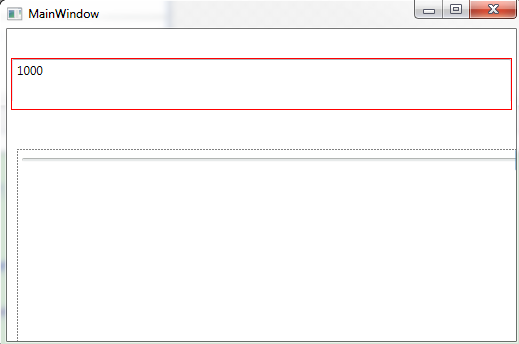
从结果中可以看出,当我们在TextBox中输入的值不在0~100的范围内的时候,TextBox会显示红色边框,提示值是错误的。
Demo2
默认情况下,Binding校验默认来自Source的数据总是正确的,只有来自Target的数据(Target多为UI控件,等价于用户的输入)才有可能出现问题,为了不让有问题的数据污染Source,所以需要校验。换句话说,Binding只在Target被外部更新时候进行校验,而来自Binding的Source数据更新Target时是不会进行校验的。
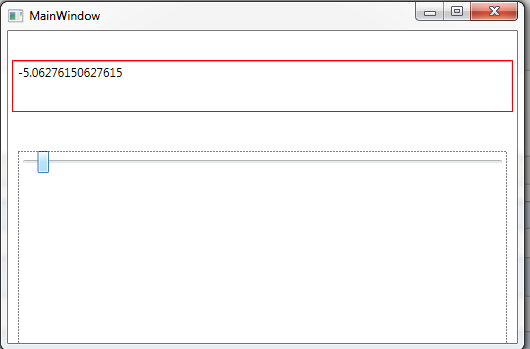
当来自Source的数据也有可能出现问题的时候,我们需要将校验条件的ValidatesOnTargetUpdated属性设置为true。
我们把Xaml代码改为以下的时候,会发现当移动滑动条在0以下或者100以上的时候,TextBox边框也会变成红色。
 1 <Window x:Class="BindingDemo4ValidationRule.MainWindow"

 2         xmlns="http://schemas.microsoft.com/winfx/2006/xaml/presentation"

 3         xmlns:x="http://schemas.microsoft.com/winfx/2006/xaml"

 4         xmlns:d="http://schemas.microsoft.com/expression/blend/2008"

 5         xmlns:mc="http://schemas.openxmlformats.org/markup-compatibility/2006"

 6         xmlns:local="clr-namespace:BindingDemo4ValidationRule"

 7         mc:Ignorable="d"

 8         Title="MainWindow" Height="350" Width="525">

 9     <Grid>

10         <Slider Margin="10,120,10,-120" Minimum="-10" Maximum="110" Name="slider" Value="10"></Slider>

11         <TextBox Height="50" Margin="5,30,5,240" >

12             <TextBox.Text>

13                 <Binding ElementName="slider" Path="Value" UpdateSourceTrigger="PropertyChanged">

14                     <Binding.ValidationRules>

15                         <local:RangeValidationRule ValidatesOnTargetUpdated="True"/>

16                     </Binding.ValidationRules>

17                 </Binding>

18             </TextBox.Text>

19         </TextBox>

20

21     </Grid>

22 </Window>
Demo3
当校验发生错误的时候,Validate方法返回的ValidationResult对象会携带一条错误消息,下面我们就要显示这个错误消息。
为了达到这个目的,我们需要把Binding的NotifyOnValidationError属性设置为true,这样当数据校验失败的时候,Binding会像报警一样发出一个信号,这个信号会以Binding对象的Target为起点在UI树上传播,如果某个节点上设置了对这种信号的侦听器,那么这个侦听器就会触发来处理这个信号。详细参加以下代码:
 1 using System.Globalization;

 2 using System.Windows;

 3 using System.Windows.Controls;

 4

 5 namespace BindingDemo4ValidationRule

 6 {

 7     /// <summary>

 8     /// Interaction logic for MainWindow.xaml

 9     /// </summary>

10     public partial class MainWindow : Window

11     {

12         public string TipMessage

13         {

14             get { return (string)GetValue(TipMessageProperty); }

15             set { SetValue(TipMessageProperty, value); }

16         }

17

18         // Using a DependencyProperty as the backing store for TipMessage.  This enables animation, styling, binding, etc...

19         public static readonly DependencyProperty TipMessageProperty =

20             DependencyProperty.Register("TipMessage", typeof(string), typeof(MainWindow), new PropertyMetadata("Tip"));

21

22         public MainWindow()

23         {

24             InitializeComponent();

25             this.DataContext = this;

26         }

27

28         private void tbx1_Error(object sender, ValidationErrorEventArgs e)

29         {

30             if (Validation.GetErrors(tbx1).Count > 0)

31             {

32                 TipMessage = Validation.GetErrors(tbx1)[0].ErrorContent.ToString();

33             }

34             else

35             {

36                 TipMessage = "";

37             }

38         }

39     }

40     public class RangeValidationRule : ValidationRule

41     {

42         public override ValidationResult Validate(object value, CultureInfo cultureInfo)

43         {

44             double myValue = 0;

45             if (double.TryParse(value.ToString(), out myValue))

46             {

47                 if (myValue >= 0 && myValue <= 100)

48                 {

49                     return new ValidationResult(true, null);

50                 }

51             }

52

53             return new ValidationResult(false, "Input should between 0 and 100");

54         }

55     }

56 }
 1 <Window x:Class="BindingDemo4ValidationRule.MainWindow"

 2         xmlns="http://schemas.microsoft.com/winfx/2006/xaml/presentation"

 3         xmlns:x="http://schemas.microsoft.com/winfx/2006/xaml"

 4         xmlns:d="http://schemas.microsoft.com/expression/blend/2008"

 5         xmlns:mc="http://schemas.openxmlformats.org/markup-compatibility/2006"

 6         xmlns:local="clr-namespace:BindingDemo4ValidationRule"

 7         mc:Ignorable="d"

 8         Title="MainWindow" Height="350" Width="525">

 9     <Grid>

10         <Slider Margin="10,120,10,-120" Minimum="-10" Maximum="110" Name="slider" Value="10"></Slider>

11         <TextBox Height="50" Margin="5,30,5,240" Name="tbx1" Validation.Error="tbx1_Error">

12             <TextBox.Text>

13                 <Binding ElementName="slider" Path="Value" UpdateSourceTrigger="PropertyChanged" NotifyOnValidationError="True">

14                     <Binding.ValidationRules>

15                         <local:RangeValidationRule ValidatesOnTargetUpdated="True"/>

16                     </Binding.ValidationRules>

17                 </Binding>

18             </TextBox.Text>

19         </TextBox>

20         <Label Height="50" Margin="5,154,-5,116" Content="{Binding TipMessage}" Foreground="Red">

21

22         </Label>

23

24     </Grid>

25 </Window>
运行结果以下: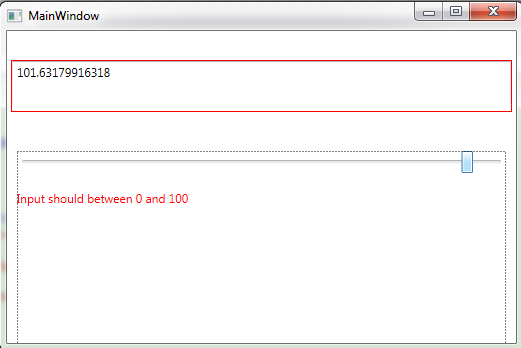
WPF---数据绑定之ValidationRule数据校验(六)的更多相关文章
- wpf企业应用之数据校验
wpf中使用IDataErrorInfo实现数据校验,绑定实体需要实现了此接口,并在UI绑定表达式中添加ValidatesOnDataErrors=True,这样数据校验发生时,wpf会调用该接口中的 ...
- WPF使用IDataErrorInfo进行数据校验
这篇博客将介绍如何使用IDataErrorInfo进行数据校验.下面直接看例子.一个Customer类,两个属性(FirstName, Age) class Customer { public str ...
- WPF---数据绑定之ValidationRule数据校验综合Demo(七)
一.概述 我们利用ValidationRule以及ErrorTemplate来制作一个简单的表单验证. 二.Demo 核心思想:我们在ValidationRule中的Validate函数中进行验证, ...
- SpringMVC 数据转换 & 数据格式化 & 数据校验
数据绑定流程 1. Spring MVC 主框架将 ServletRequest 对象及目标方法的入参实例传递给 WebDataBinderFactory 实例,以创建 DataBinder 实例对象 ...
- JSR教程2——Spring MVC数据校验与国际化
SpringMVC数据校验采用JSR-303校验. • Spring4.0拥有自己独立的数据校验框架,同时支持JSR303标准的校验框架. • Spring在进行数据绑定时,可同时调用校验框架完成数据 ...
- SpringMVC中的 JSR 303 数据校验框架说明
JSR 303 是java为Bean数据合法性校验提供的标准框架,它已经包含在JavaEE 6.0中. JSR 303 通过在Bean属性上标注类似于@NotNull.@Max等标准的注解指定校验规则 ...
- SpringMVC的数据转换&&数据格式化&&数据校验
1 SpringMVC的数据绑定流程 SpringMVC将ServletRequest对象及目标方法的入参实例传递给WebDataBinderFactory实例,以创建DataBinder实例对象. ...
- springMVC使用JSR303数据校验
JSR303注解 hibernate validate是jsr 303的一个参考实现,除支持所有的标准校验注解外,他还支持扩展注解 spring4.0拥有自己独立的数据校验框架,同时支持jsr 303 ...
- SpringMVC数据校验并通过国际化显示错误信息
目录 SpringMVC数据校验并通过国际化显示错误信息 SpringMVC数据校验 在页面中显示错误信息 通过国际化显示错误信息 SpringMVC数据校验并通过国际化显示错误信息 SpringMV ...
随机推荐
- 建立属于自己的scrapy crawl模板
本人安装PYTHON3.7安装位置:D:\Python\Python37模板位置:D:\Python\Python37\Lib\site-packages\scrapy\templates\spide ...
- WSL2:Windows 亲生的 Linux 子系统
作 者:道哥,10+年的嵌入式开发老兵. 公众号:[IOT物联网小镇],专注于:C/C++.Linux操作系统.应用程序设计.物联网.单片机和嵌入式开发等领域. 公众号回复[书籍],获取 Linux. ...
- mysqli_fetch_row()函数返回结果的理解
在PHP处理对数据库查询返回的结果集,即mysqli_query()函数返回的结果集,我们可以把它处理为数组形式以便于处理. 我们一般会用下面四个函数: 1.array mysqli_fetch_ar ...
- JDK 和 CGLib 实现动态代理和区别
JDK 和 CGLib 实现动态代理和区别 在日常的开发中,Spring AOP 是一个非常常用的功能.谈到 AOP,自然离不开动态代理. 那么,基于 JDK 和 CGLib 如何实现动态代理,他们之 ...
- 插入排序(insertion_sort)——Python实现
# 插入排序 # 作用:对给出的n个顺序不定的数进行排序 # 输入:任意数组A # 输出:按顺序排列的数组A # 时间复杂度 n(n-1) 至 (n(n-1))/2 # 插入排序过程 # 第一 ...
- <textarea></textarea>标签的placeholder属性不生效问题
<textarea></textarea>标签的placeholder属性不生效问题 1.在用到<textarea></textarea>标签时,设 ...
- 云平台制作(1)-OPC Client取数模块的制作
近来由于工程需要,基于OPC DA 2.0搭建通用的取数模块,与远程webscoket服务端连接,并传输数据.在网上找了些资料,修改相应网友公开的源代码,基本达到要求,特供大家参考. 1.实体类 us ...
- ETL数仓测试
前言 datalake架构 离线数据 ODS -> DW -> DM https://www.jianshu.com/p/72e395d8cb33 https://www.cnblogs. ...
- 一键设置WPS_Office_2019专业版的定时自动备份的批处理文件
一键设置WPS_Office_2019专业版的定时自动备份的批处理文件 rem ================================================ rem 一键设置WPS ...
- Linux的磁盘管理和进程管理(入门)
查看磁盘使用情况 df :列出文件系统整体的磁盘使用量 增加-h参数可以使得显示的容量更人性化 du:检查磁盘空间使用量---需要进入文件中查看 挂载本地磁盘或文件 mount mount /dev/ ...