
uwp 中的音频开发
xml code
---------------------------------------------------
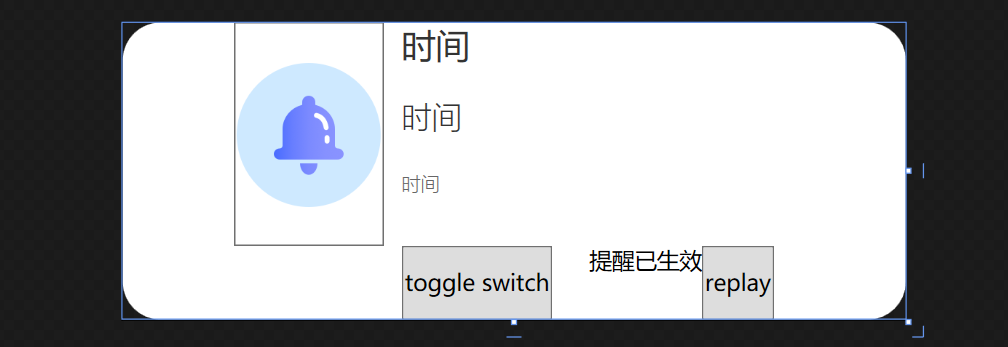
<UserControl x:Class="WinTest.HPControl.ReminderTimer"
xmlns="http://schemas.microsoft.com/winfx/2006/xaml/presentation"
xmlns:x="http://schemas.microsoft.com/winfx/2006/xaml"
xmlns:mc="http://schemas.openxmlformats.org/markup-compatibility/2006"
xmlns:d="http://schemas.microsoft.com/expression/blend/2008"
xmlns:local="clr-namespace:WinTest.HPControl"
mc:Ignorable="d" Height="158.036" Width="417.35">
<Grid>
<Border BorderBrush="White" Background="White" CornerRadius="20" >
<Grid Background="Transparent" Width="300">
<Grid.RowDefinitions>
<RowDefinition></RowDefinition>
<RowDefinition></RowDefinition>
<RowDefinition></RowDefinition>
<RowDefinition></RowDefinition>
</Grid.RowDefinitions>
<Grid.ColumnDefinitions>
<ColumnDefinition Width="80"></ColumnDefinition>
<ColumnDefinition Width="10"></ColumnDefinition>
<ColumnDefinition Width="*"></ColumnDefinition>
</Grid.ColumnDefinitions>
<Button Background="Transparent" Grid.Row="0" Grid.RowSpan="3" Click="Button_Click" >
<Image Source="/images/Alarm.png" ></Image>
</Button>
<TextBlock FontFamily="{StaticResource RegularFont}" Foreground="#333333" FontSize="18" Grid.Column="2" Grid.Row="0">时间</TextBlock>
<TextBlock FontFamily="{StaticResource LightFont}" FontWeight="Light" Foreground="#333333" FontSize="16" Grid.Column="2" Grid.Row="1">时间</TextBlock>
<TextBlock FontFamily="{StaticResource LightFont}" FontWeight="Light" Foreground="#666666" FontSize="10" Grid.Column="2" Grid.Row="2">时间</TextBlock>
<StackPanel Grid.Column="2" Grid.Row="3" Orientation="Horizontal">
<ToggleButton>toggle switch</ToggleButton>
<TextBlock Margin="20,0,0,0">提醒已生效</TextBlock>
<Button Click="ReminderTimer_replay">replay</Button>
</StackPanel>
</Grid>
</Border>
</Grid>
</UserControl>
C# code 后台
------------------------------------------------------------------
public partial class ReminderTimer : UserControl
{
private SoundPlayer player = null;
private MediaPlayer currentPlayer = null;
public ReminderTimer()
{
InitializeComponent();
this.Loaded += ReminderTimer_Loaded;
player = new SoundPlayer();
this.Unloaded += ReminderTimer_Unloaded;
}
private void ReminderTimer_Unloaded(object sender, RoutedEventArgs e)
{
currentPlayer.Stop();
currentPlayer.Close();
}
private void ReminderTimer_Loaded(object sender, RoutedEventArgs e)
{
initalplayer();
}
private void inital()
{
string str = System.IO.Directory.GetCurrentDirectory();
string path = Environment.CurrentDirectory;
string p = new Uri("ms-appx:///sound/AlarmSound.wma").ToString();
// string m= Application.StartupPath;
// player.SoundLocation = "/sound/美国往事.wav";//(将播放音乐放在应用程序Debug目录下)
// player.SoundLocation = "美国往事.wav";
int index = str.LastIndexOf(@"\bin");
if (index > 0)
{
str = str.Substring(0, index) + @"\sound\AlarmSound.wma";
}
player.SoundLocation = str;
player.Load();
//音乐播放
player.Play();
}
//ToastAudio Audio;
private void initalplayer()
{
currentPlayer = new MediaPlayer();
//Audio = new ToastAudio()
//{
// Loop = true,
// Src = new Uri("ms-appx:///HPControls/Assets/AlarmSound.wma")
//}
//"C:\Users\bruce\Desktop\UWP\WinTest\sound\AlarmSound.wma"
// Src = new Uri("ms-appx:///HPControls/Assets/AlarmSound.wma")
var path = @"C:\Users\bruce\Desktop\UWP\WinTest\sound\AlarmSound.wma";
//Uri audioUri = new Uri("ms-appx:///WinTest/sound/AlarmSound.wma");
Uri audioUri = new Uri(path);
currentPlayer.Open(audioUri);
currentPlayer.MediaEnded += CurrentPlayer_MediaEnded;
currentPlayer.Play();
}
private void CurrentPlayer_MediaEnded(object sender, EventArgs e)
{
var path = @"C:\Users\bruce\Desktop\UWP\WinTest\sound\AlarmSound.wma";
//Uri audioUri = new Uri("ms-appx:///WinTest/sound/AlarmSound.wma");
Uri audioUri = new Uri(path);
currentPlayer.Open(audioUri);
currentPlayer.Play();
}
private void Button_Click(object sender, RoutedEventArgs e)
{
currentPlayer.Stop();
}
private void ReminderTimer_replay(object sender, RoutedEventArgs e)
{
currentPlayer.Play();
}
}
public partial class ReminderTimer : UserControl { private SoundPlayer player = null; private MediaPlayer currentPlayer = null; public ReminderTimer() { InitializeComponent(); this.Loaded += ReminderTimer_Loaded; player = new SoundPlayer(); this.Unloaded += ReminderTimer_Unloaded; }
private void ReminderTimer_Unloaded(object sender, RoutedEventArgs e) { currentPlayer.Stop(); currentPlayer.Close();
}
private void ReminderTimer_Loaded(object sender, RoutedEventArgs e) { initalplayer(); } private void inital() { string str = System.IO.Directory.GetCurrentDirectory(); string path = Environment.CurrentDirectory; string p = new Uri("ms-appx:///sound/AlarmSound.wma").ToString(); // string m= Application.StartupPath; // player.SoundLocation = "/sound/美国往事.wav";//(将播放音乐放在应用程序Debug目录下) // player.SoundLocation = "美国往事.wav"; int index = str.LastIndexOf(@"\bin"); if (index > 0) { str = str.Substring(0, index) + @"\sound\AlarmSound.wma"; } player.SoundLocation = str; player.Load(); //音乐播放 player.Play(); } //ToastAudio Audio; private void initalplayer() { currentPlayer = new MediaPlayer();
//Audio = new ToastAudio() //{ // Loop = true, // Src = new Uri("ms-appx:///HPControls/Assets/AlarmSound.wma") //}
//"C:\Users\bruce\Desktop\UWP\WinTest\sound\AlarmSound.wma" // Src = new Uri("ms-appx:///HPControls/Assets/AlarmSound.wma") var path = @"C:\Users\bruce\Desktop\UWP\WinTest\sound\AlarmSound.wma"; //Uri audioUri = new Uri("ms-appx:///WinTest/sound/AlarmSound.wma"); Uri audioUri = new Uri(path); currentPlayer.Open(audioUri); currentPlayer.MediaEnded += CurrentPlayer_MediaEnded; currentPlayer.Play(); }
private void CurrentPlayer_MediaEnded(object sender, EventArgs e) { var path = @"C:\Users\bruce\Desktop\UWP\WinTest\sound\AlarmSound.wma"; //Uri audioUri = new Uri("ms-appx:///WinTest/sound/AlarmSound.wma"); Uri audioUri = new Uri(path);
currentPlayer.Open(audioUri); currentPlayer.Play(); }
private void Button_Click(object sender, RoutedEventArgs e) {
currentPlayer.Stop();
}
private void ReminderTimer_replay(object sender, RoutedEventArgs e) { currentPlayer.Play(); } }
uwp 中的音频开发的更多相关文章
- 小强的HTML5移动开发之路(15)——HTML5中的音频
浏览器虽然发展很快,但是浏览器中的标准还是不完善,在HTML4+CSS2+JS的前段开发中让很多程序员头疼的就是浏览器的兼容性问题,音频播放也一样,直到现在,仍然不存在一项网页上播放视频和音频的标准. ...
- UWP开发-在UWP中使用sqlite
原文:UWP开发-在UWP中使用sqlite sqlite是一种轻量级的数据库,对于一些资源紧张又需要数据库的开发非常好用. SQLite 是一个开源的无服务器嵌入式数据库. 这些年来,它已作为面向存 ...
- UWP中实现自定义标题栏
UWP中实现自定义标题栏 0x00 起因 在UWP开发中,有时候我们希望实现自定义标题栏,例如在标题栏中加入搜索框.按钮之类的控件.搜了下资料居然在一个日文网站找到了一篇介绍这个主题的文章: http ...
- 淘宝UWP中的100个为什么
从淘宝UWP第一版发布到现在,已经有十个月了,期间收到了用户各种各样的反馈,感谢这些用户的反馈,指导我们不断的修正.完善应用.但是也有一部分需求或建议,由于资源或技术的限制,目前确实无法做到,只能对广 ...
- 揭秘Windows10 UWP中的httpclient接口[2]
阅读目录: 概述 如何选择 System.Net.Http Windows.Web.Http HTTP的常用功能 修改http头部 设置超时 使用身份验证凭据 使用客户端证书 cookie处理 概述 ...
- UWP中重用C/C++代码时踩过的一些坑
标题中提到的UWP,主要是指用C#来写UWP的主工程,开发过程中可能需要调用C/C++实现的库. 为什么需要调用C/C++的库呢,举个例子,开源库OpenSSL实现了许多加密算法,稳定快速,我们想在应 ...
- Android音频开发之——如何播放一帧音频
本文重点关注如何在Android平台上播放一帧音频数据.阅读本文之前,建议先读一下<Android音频开发(1):基础知识>,因为音频开发过程中,经常要涉及到这些基础知识,掌握了这些重要的 ...
- UWP中使用Composition API实现吸顶(1)
前几天需要在UWP中实现吸顶,就在网上找了一些文章: 吸顶大法 -- UWP中的工具栏吸顶的实现方式之一 在UWP中页面滑动导航栏置顶 发现前人的实现方式大多是控制ListViewBase的Heade ...
- UWP: 在 UWP 中使用 Entity Framework Core 操作 SQLite 数据库
在应用中使用 SQLite 数据库来存储数据是相当常见的.在 UWP 平台中要使用 SQLite,一般会使用 SQLite for Universal Windows Platform 和 SQLit ...
随机推荐
- python根据窗口标题找句柄,将窗口前置活动
import time, threading, copy import win32api, win32con import win32gui import win32gui def zhaojb(aa ...
- C语言中函数的返回值
规则 除局部变量的内存地址不能作为函数的返回值外,其他类型的局部变量都能作为函数的返回值. 我总结出下面这些规则: int.char等数据类型的局部变量可以作为函数返回值. 在函数中声明的指针可以作为 ...
- 前端性能优化实践-gzip
一名优秀的前端工程师必备技能之一就是要会性能监控,并且能相应的进行性能优化.最近,有需求将项目做一些优化,提升用户的体验.看了一下项目并没有开启gzip,于是着手实现gzip压缩,下面就是具体的实践过 ...
- Cesium局部区域精细瓦片数据下载技巧
当Cesium加载局部的目标地区(如中国某个市)的0-18层或更高层数据时,当缩小到zoom较小时可能地球有部分区域(如南半球或左半球)无瓦片覆盖. 为使得整个地球有瓦片覆盖,可利用以下技巧下载瓦片: ...
- GE ifix 5.5中关于历史报警表的制作
在关于污水处理厂项目实施过程中,按照业主要求,需要用到报警历史的查询功能,遂搜资料,整理在ifix5.5下如何实现报警历史的查询,经过一天的研究,以及多天的入坑,出坑,总算完成.现整理如下,供后来人参 ...
- Go通关03:控制结构,if、for、switch逻辑语句
if 条件语句 func main() { i:=6 if i >10 { fmt.Println("i>10") } else if i>5 && ...
- dio框架访问云函数参数传递问题(以腾讯云中的云函数为例子)第一部
dd云函数其实比较普及,这里以腾讯云的云函数为例,传递参数完成简单的账号注册. 一.第一步先注册腾讯云账号,这里不过多阐述,接着点击 控制台 进入开发者界面.(注意提前进行实名认证) 二.开发者界面如 ...
- python实现常用五种排序算法
一.冒泡排序 原理: 比较相邻的元素.如果第一个比第二个大就交换他们两个 每一对相邻元素做同样的工作,直到结尾最后一对 每个元素都重复以上步骤,除了最后一个 第一步: 将乱序中的最大值找出,逐一移到序 ...
- Spring Cloud 专题之六:bus
书接上回: SpringCloud专题之一:Eureka Spring Cloud专题之二:OpenFeign Spring Cloud专题之三:Hystrix Spring Cloud 专题之四:Z ...
- .user.ini和.htaccess
.user.ini .user.ini的使用条件 (1)nginx/apache/IIS,只要是以fastcgi运行的php都可以用这个方法 php配置访问级别 不同的php配置项根据其访问级别具有不 ...