
uwp 中的音频开发
xml code
---------------------------------------------------
<UserControl x:Class="WinTest.HPControl.ReminderTimer"
xmlns="http://schemas.microsoft.com/winfx/2006/xaml/presentation"
xmlns:x="http://schemas.microsoft.com/winfx/2006/xaml"
xmlns:mc="http://schemas.openxmlformats.org/markup-compatibility/2006"
xmlns:d="http://schemas.microsoft.com/expression/blend/2008"
xmlns:local="clr-namespace:WinTest.HPControl"
mc:Ignorable="d" Height="158.036" Width="417.35">
<Grid>
<Border BorderBrush="White" Background="White" CornerRadius="20" >
<Grid Background="Transparent" Width="300">
<Grid.RowDefinitions>
<RowDefinition></RowDefinition>
<RowDefinition></RowDefinition>
<RowDefinition></RowDefinition>
<RowDefinition></RowDefinition>
</Grid.RowDefinitions>
<Grid.ColumnDefinitions>
<ColumnDefinition Width="80"></ColumnDefinition>
<ColumnDefinition Width="10"></ColumnDefinition>
<ColumnDefinition Width="*"></ColumnDefinition>
</Grid.ColumnDefinitions>
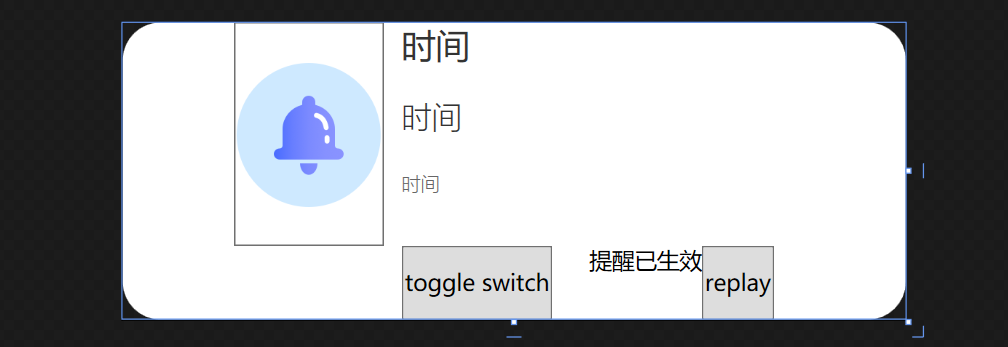
<Button Background="Transparent" Grid.Row="0" Grid.RowSpan="3" Click="Button_Click" >
<Image Source="/images/Alarm.png" ></Image>
</Button>
<TextBlock FontFamily="{StaticResource RegularFont}" Foreground="#333333" FontSize="18" Grid.Column="2" Grid.Row="0">时间</TextBlock>
<TextBlock FontFamily="{StaticResource LightFont}" FontWeight="Light" Foreground="#333333" FontSize="16" Grid.Column="2" Grid.Row="1">时间</TextBlock>
<TextBlock FontFamily="{StaticResource LightFont}" FontWeight="Light" Foreground="#666666" FontSize="10" Grid.Column="2" Grid.Row="2">时间</TextBlock>
<StackPanel Grid.Column="2" Grid.Row="3" Orientation="Horizontal">
<ToggleButton>toggle switch</ToggleButton>
<TextBlock Margin="20,0,0,0">提醒已生效</TextBlock>
<Button Click="ReminderTimer_replay">replay</Button>
</StackPanel>
</Grid>
</Border>
</Grid>
</UserControl>
C# code 后台
------------------------------------------------------------------
public partial class ReminderTimer : UserControl
{
private SoundPlayer player = null;
private MediaPlayer currentPlayer = null;
public ReminderTimer()
{
InitializeComponent();
this.Loaded += ReminderTimer_Loaded;
player = new SoundPlayer();
this.Unloaded += ReminderTimer_Unloaded;
}
private void ReminderTimer_Unloaded(object sender, RoutedEventArgs e)
{
currentPlayer.Stop();
currentPlayer.Close();
}
private void ReminderTimer_Loaded(object sender, RoutedEventArgs e)
{
initalplayer();
}
private void inital()
{
string str = System.IO.Directory.GetCurrentDirectory();
string path = Environment.CurrentDirectory;
string p = new Uri("ms-appx:///sound/AlarmSound.wma").ToString();
// string m= Application.StartupPath;
// player.SoundLocation = "/sound/美国往事.wav";//(将播放音乐放在应用程序Debug目录下)
// player.SoundLocation = "美国往事.wav";
int index = str.LastIndexOf(@"\bin");
if (index > 0)
{
str = str.Substring(0, index) + @"\sound\AlarmSound.wma";
}
player.SoundLocation = str;
player.Load();
//音乐播放
player.Play();
}
//ToastAudio Audio;
private void initalplayer()
{
currentPlayer = new MediaPlayer();
//Audio = new ToastAudio()
//{
// Loop = true,
// Src = new Uri("ms-appx:///HPControls/Assets/AlarmSound.wma")
//}
//"C:\Users\bruce\Desktop\UWP\WinTest\sound\AlarmSound.wma"
// Src = new Uri("ms-appx:///HPControls/Assets/AlarmSound.wma")
var path = @"C:\Users\bruce\Desktop\UWP\WinTest\sound\AlarmSound.wma";
//Uri audioUri = new Uri("ms-appx:///WinTest/sound/AlarmSound.wma");
Uri audioUri = new Uri(path);
currentPlayer.Open(audioUri);
currentPlayer.MediaEnded += CurrentPlayer_MediaEnded;
currentPlayer.Play();
}
private void CurrentPlayer_MediaEnded(object sender, EventArgs e)
{
var path = @"C:\Users\bruce\Desktop\UWP\WinTest\sound\AlarmSound.wma";
//Uri audioUri = new Uri("ms-appx:///WinTest/sound/AlarmSound.wma");
Uri audioUri = new Uri(path);
currentPlayer.Open(audioUri);
currentPlayer.Play();
}
private void Button_Click(object sender, RoutedEventArgs e)
{
currentPlayer.Stop();
}
private void ReminderTimer_replay(object sender, RoutedEventArgs e)
{
currentPlayer.Play();
}
}
public partial class ReminderTimer : UserControl { private SoundPlayer player = null; private MediaPlayer currentPlayer = null; public ReminderTimer() { InitializeComponent(); this.Loaded += ReminderTimer_Loaded; player = new SoundPlayer(); this.Unloaded += ReminderTimer_Unloaded; }
private void ReminderTimer_Unloaded(object sender, RoutedEventArgs e) { currentPlayer.Stop(); currentPlayer.Close();
}
private void ReminderTimer_Loaded(object sender, RoutedEventArgs e) { initalplayer(); } private void inital() { string str = System.IO.Directory.GetCurrentDirectory(); string path = Environment.CurrentDirectory; string p = new Uri("ms-appx:///sound/AlarmSound.wma").ToString(); // string m= Application.StartupPath; // player.SoundLocation = "/sound/美国往事.wav";//(将播放音乐放在应用程序Debug目录下) // player.SoundLocation = "美国往事.wav"; int index = str.LastIndexOf(@"\bin"); if (index > 0) { str = str.Substring(0, index) + @"\sound\AlarmSound.wma"; } player.SoundLocation = str; player.Load(); //音乐播放 player.Play(); } //ToastAudio Audio; private void initalplayer() { currentPlayer = new MediaPlayer();
//Audio = new ToastAudio() //{ // Loop = true, // Src = new Uri("ms-appx:///HPControls/Assets/AlarmSound.wma") //}
//"C:\Users\bruce\Desktop\UWP\WinTest\sound\AlarmSound.wma" // Src = new Uri("ms-appx:///HPControls/Assets/AlarmSound.wma") var path = @"C:\Users\bruce\Desktop\UWP\WinTest\sound\AlarmSound.wma"; //Uri audioUri = new Uri("ms-appx:///WinTest/sound/AlarmSound.wma"); Uri audioUri = new Uri(path); currentPlayer.Open(audioUri); currentPlayer.MediaEnded += CurrentPlayer_MediaEnded; currentPlayer.Play(); }
private void CurrentPlayer_MediaEnded(object sender, EventArgs e) { var path = @"C:\Users\bruce\Desktop\UWP\WinTest\sound\AlarmSound.wma"; //Uri audioUri = new Uri("ms-appx:///WinTest/sound/AlarmSound.wma"); Uri audioUri = new Uri(path);
currentPlayer.Open(audioUri); currentPlayer.Play(); }
private void Button_Click(object sender, RoutedEventArgs e) {
currentPlayer.Stop();
}
private void ReminderTimer_replay(object sender, RoutedEventArgs e) { currentPlayer.Play(); } }
uwp 中的音频开发的更多相关文章
- 小强的HTML5移动开发之路(15)——HTML5中的音频
浏览器虽然发展很快,但是浏览器中的标准还是不完善,在HTML4+CSS2+JS的前段开发中让很多程序员头疼的就是浏览器的兼容性问题,音频播放也一样,直到现在,仍然不存在一项网页上播放视频和音频的标准. ...
- UWP开发-在UWP中使用sqlite
原文:UWP开发-在UWP中使用sqlite sqlite是一种轻量级的数据库,对于一些资源紧张又需要数据库的开发非常好用. SQLite 是一个开源的无服务器嵌入式数据库. 这些年来,它已作为面向存 ...
- UWP中实现自定义标题栏
UWP中实现自定义标题栏 0x00 起因 在UWP开发中,有时候我们希望实现自定义标题栏,例如在标题栏中加入搜索框.按钮之类的控件.搜了下资料居然在一个日文网站找到了一篇介绍这个主题的文章: http ...
- 淘宝UWP中的100个为什么
从淘宝UWP第一版发布到现在,已经有十个月了,期间收到了用户各种各样的反馈,感谢这些用户的反馈,指导我们不断的修正.完善应用.但是也有一部分需求或建议,由于资源或技术的限制,目前确实无法做到,只能对广 ...
- 揭秘Windows10 UWP中的httpclient接口[2]
阅读目录: 概述 如何选择 System.Net.Http Windows.Web.Http HTTP的常用功能 修改http头部 设置超时 使用身份验证凭据 使用客户端证书 cookie处理 概述 ...
- UWP中重用C/C++代码时踩过的一些坑
标题中提到的UWP,主要是指用C#来写UWP的主工程,开发过程中可能需要调用C/C++实现的库. 为什么需要调用C/C++的库呢,举个例子,开源库OpenSSL实现了许多加密算法,稳定快速,我们想在应 ...
- Android音频开发之——如何播放一帧音频
本文重点关注如何在Android平台上播放一帧音频数据.阅读本文之前,建议先读一下<Android音频开发(1):基础知识>,因为音频开发过程中,经常要涉及到这些基础知识,掌握了这些重要的 ...
- UWP中使用Composition API实现吸顶(1)
前几天需要在UWP中实现吸顶,就在网上找了一些文章: 吸顶大法 -- UWP中的工具栏吸顶的实现方式之一 在UWP中页面滑动导航栏置顶 发现前人的实现方式大多是控制ListViewBase的Heade ...
- UWP: 在 UWP 中使用 Entity Framework Core 操作 SQLite 数据库
在应用中使用 SQLite 数据库来存储数据是相当常见的.在 UWP 平台中要使用 SQLite,一般会使用 SQLite for Universal Windows Platform 和 SQLit ...
随机推荐
- C语言:输出各位整数的数字
#include <stdio.h> main() { int i,a,b,c,d,e; printf("请输入四位整数:\n"); scanf("%d&qu ...
- 【011】JavaSE面试题(十一):多线程(1)
第一期:Java面试 - 100题,梳理各大网站优秀面试题.大家可以跟着我一起来刷刷Java理论知识 [011] - JavaSE面试题(十一):多线程(1) 第1问:线程和进程的区别? 进程:具有一 ...
- 前端开发入门到进阶第一集【使用sublime快速编写Html和Css】
1,安装sublime编辑器,下载地址:http://www.sublimetext.com/3 2,要使用sublime的插件机制必须安装package control:https://packag ...
- Cannot read property 'data' of undefined —— 小程序开发
由于疫情原因目前处于半下岗状态,在家的时候就研究起了小程序开发.由于是新手,所以总会遇到各种问题,顺便记录一下. wx.showModal({ title: '提示', content: '这是一个模 ...
- like %和-的区别与使用
通配符的分类: %百分号通配符:表示任何字符出现任意次数(可以是0次). 下划线通配符:表示只能匹配单个字符,不能多也不能少,就是一个字符. like操作符: LIKE作用是指示mysql后面的搜索模 ...
- [考试总结]noip模拟9
因为某些原因,咕掉了一段时间 所以现在才更新 T1 斐波那契 一看就是规律 然而我选择了暴力 其实完全可以打表去找规律. 然后就可以发现父亲的顺序也是斐波那契. 就这 #include<bits ...
- Python - 可变和不可变对象
前置知识 在 Python 中,一切皆为对象 Python 中不存在值传递,一切传递的都是对象的引用,也可以认为是传址 有哪些可变对象,哪些不可变对象? 不可变对象:字符串.元组.数字(int.flo ...
- SpringData JPA 使用原生 SQL
在实现个人博客系统的归档功能的时候,遇上这样的需求: 先把数据库中所有条目的时间按照年月分组,并查询出年月(String)的列表 根据年月字符串查询符合条件的博客,并返回博客列表 由于数据访问层使用的 ...
- vue源码阅读笔记
1.yarn test [文件名] -t [name-of-spec(describe or test )] 直接运行yarn test,会测试所有测试文件:yarn test 后面只跟文件名的话会 ...
- 面试问题记录 三 (JavaWeb、JavaEE)
前言 这块还是比较关键的,考察你对整个业务流程的熟练度吧,虽然企业级的项目没有接触过,但像最基本的内容必须得融会贯通,这一点我感觉自己还是处于浅层,没有深入的去思考以及练习过,其实就像那句话,&quo ...