
sublime text build system automatic ctrl/cmd+B自动选择 python2 或 python3
背景
我同时安装了 python2 和 python3 时,python 指向 python2,python3 才是 python3
默认情况下,在 Sublime 内 Ctrl/Cmd + B 运行 python 文件时,调用的是环境变量 PATH 中的 python
所以当我想用 python3 执行文件时,传统方法是先 new 一个 build system 专门运行 python3,每次还都得手动指定。极其繁琐!
需求
我希望 Sublime 可以根据 py 文件开头第一行注释 #!/usr/bin/env python3 来确定是执行 python2 还是 python3
解决方案
需要一个脚本,在 Sublime 调进 build system 时调用这个脚本
写一个新的 Python.sublime-build 文件,在这个文件中调用前面的脚本
用自己写的 Python.sublime-build 覆盖默认的 Python.sublime-build
具体步骤
- 找到 Python.sublime-package 文件,Mac 系统下在
/Applications/Sublime\ Text.app/Contents/MacOS/Packages/Python.sublime-package - 把它复制一份到
~/Library/Application\ Support/Sublime\ Text\ 3/Packages/User/下面,并把后缀改成 .zip - 解压得到一个 Python 目录,进到这个目录,找到
Python.sublime-build文件,装盘备用,一会下锅。 - 新建一个文件随便给个名字,保存在
~/Library/Application\ Support/Sublime\ Text\ 3/Packages/User/下面,文件内容如下:
import sublime

import sublime_plugin

import subprocess

import threading

import os

class MyPyBuildCommand(sublime_plugin.WindowCommand):

    encoding = 'utf-8'

    killed = False

    proc = None

    panel = None

    panel_lock = threading.Lock()

    def is_enabled(self, kill=False):

        # The Cancel build option should only be available

        # when the process is still running

        if kill:

            return self.proc is not None and self.proc.poll() is None

        return True

    def detect_version(self):

        fname = self.window.active_view ().file_name()

        with open(fname, 'r', encoding='utf-8') as f:

            line = f.readline()

        m = re.search(r'(python[0-9\.]*)', line)

        if m and line.startswith("#"):

            return m.group(1)

        return "python"

    def run(self, kill=False):

        if kill:

            if self.proc is not None and self.proc.poll() is None:

                self.killed = True

                self.proc.terminate()

                self.proc = None

            return

        vars = self.window.extract_variables()

        working_dir = vars['file_path']

        # A lock is used to ensure only one thread is

        # touching the output panel at a time

        with self.panel_lock:

            # Creating the panel implicitly clears any previous contents

            self.panel = self.window.create_output_panel('exec')

            # Enable result navigation. The result_file_regex does

            # the primary matching, but result_line_regex is used

            # when build output includes some entries that only

            # contain line/column info beneath a previous line

            # listing the file info. The result_base_dir sets the

            # path to resolve relative file names against.

            settings = self.panel.settings()

            settings.set(

                'result_file_regex',

                r'^File "([^"]+)" line (\d+) col (\d+)'

            )

            settings.set(

                'result_line_regex',

                r'^\s+line (\d+) col (\d+)'

            )

            settings.set('result_base_dir', working_dir)

            self.window.run_command('show_panel', {'panel': 'output.exec'})

        if self.proc is not None and self.proc.poll() is None:

            self.proc.terminate()

            self.proc = None

        args = [ self.detect_version() ]

        # sublime.message_dialog(vars['file_name'])

        args.append(vars['file_name'])

        env = os.environ.copy()

        env["PYTHONUNBUFFERED"] = "1" # 及时 print

        self.proc = subprocess.Popen(

            args,

            stdin=subprocess.PIPE,

            stdout=subprocess.PIPE,

            stderr=subprocess.STDOUT,

            cwd=working_dir,

            env=env,

        )

        self.killed = False

        threading.Thread(

            target=self.read_handle,

            args=(self.proc.stdout,)

        ).start()

    def read_handle(self, handle):

        # for line in iter(handle.readline, b''):

            # self.queue_write(line.decode(self.encoding))

            # handle.close()

        # return

        chunk_size = 2 ** 13

        out = b''

        while True:

            try:

                data = os.read(handle.fileno(), chunk_size)

                # If exactly the requested number of bytes was

                # read, there may be more data, and the current

                # data may contain part of a multibyte char

                out += data

                if len(data) == chunk_size:

                    continue

                if data == b'' and out == b'':

                    raise IOError('EOF')

                # We pass out to a function to ensure the

                # timeout gets the value of out right now,

                # rather than a future (mutated) version

                self.queue_write(out.decode(self.encoding))

                if data == b'':

                    raise IOError('EOF')

                out = b''

            except (UnicodeDecodeError) as e:

                msg = 'Error decoding output using %s - %s'

                self.queue_write(msg  % (self.encoding, str(e)))

                break

            except (IOError):

                if self.killed:

                    msg = 'Cancelled'

                else:

                    msg = 'Finished'

                self.queue_write('\n[%s]' % msg)

                break

    def queue_write(self, text):

        sublime.set_timeout(lambda: self.do_write(text), 1)

    def do_write(self, text):

        with self.panel_lock:

            self.panel.run_command('append', {'characters': text})
- 修改第 3 步的那个 Python.sublime-build 文件:
{

	"target": "my_py_build",

	"selector": "source.python",

	"cancel": {"kill": true}

}
随便测试一下
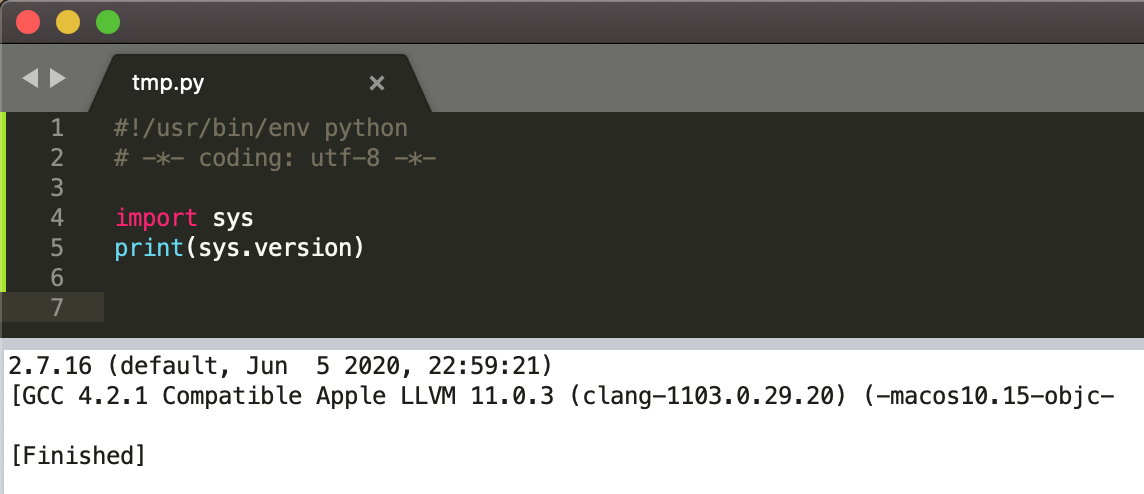
and
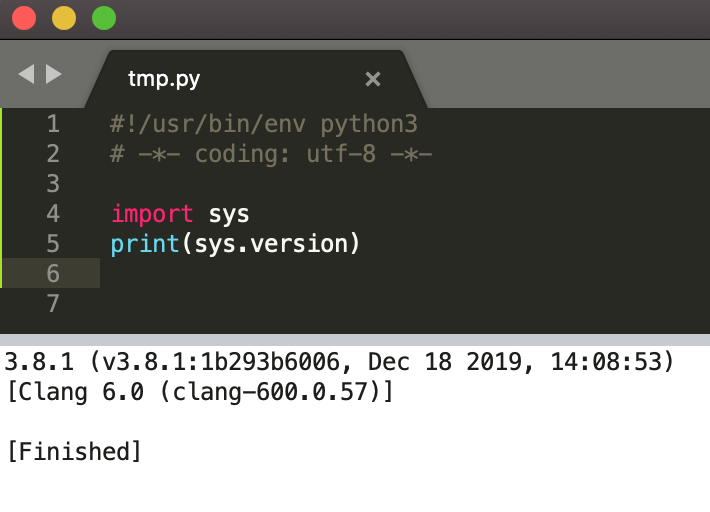
done!
有问题请留言
参考链接:
- https://stackoverflow.com/questions/51744019/how-to-open-sublime-package-file
- https://stackoverflow.com/questions/41768673/let-sublime-choose-among-two-similar-build-systems
- https://www.sublimetext.com/docs/3/build_systems.html
- 关于 PYTHONUNBUFFERED
sublime text build system automatic ctrl/cmd+B自动选择 python2 或 python3的更多相关文章
- Sublime Text Build System——编译运行Java
今天Google如何在ST中编译运行Java的时候,无意中发现了一个更好的方法. 其实,在ST中是可以编译Java的,但是运行不了,因为没有配置运行命令.那么一般的配置方法都是如下的: http:// ...
- Custom Sublime Text Build Systems For Popular Tools And Languages
Sublime Text is currently the text editor of choice for a number of developers in the open-source co ...
- Sublime Text Build 3065 License key
Sublime Text Build 3065 License key 复制如下三个任意一个正版注册码即可 —– BEGIN LICENSE —– Andrew Weber Single User ...
- sublime C++ build system配置体验
近期准备实习,于是终于步入了sublime的阵营,sublime确实性感. 在配置win7下C++编译运行集成环境的时候遇到点问题,于是接触了一下JSON格式,最后终于自己搞定了.. 参考文档:htt ...
- 最新版Sublime Text Build 3156 x64 的下载 + 注册码 + Install Package Control + 汉化教程
一.Sublime Text 下载 神器 Sublime Text 最近开始更新到开发版本 Build 3156,本身英语不是太6,汉化党自然各种百度汉化教程,网上不是一堆绿色汉化包,就是让你下载汉 ...
- Sublime Text 3结合Chrome实现网页的自动刷新
我们在编写前端代码时,写好一部分代码时想要看一看代码的实现效果,每次都要手动刷新会非常麻烦,神器来了,LiveReload插件实现网页的实时刷新,操作方法如下: 1. 官网下载Sublime Text ...
- Sublime Text Build 3207 x64 无法安装Package Control和插件
两个问题的解决方法: 以下都是问题的解决,在本人电脑成功解决,还有就是在虚拟机上也成功解决,可以自行尝试下 . 测试电脑为win7-64位 问题1 : 安装Package Control失败 解决问题 ...
- sublime text 3 ,React,html元素自动补全方法(用Emmet写法写jsx中的html)
1. 安装emmet: Preferences -> Package Control -> Install Package -> emmet 2. 配置emmet: Preferen ...
- Sublime Text 编译运行Kotlin
Sublime Text 编译运行Kotlin 转 https://blog.csdn.net/pirate7777777/article/details/72655293 kotlin最近是火了,所 ...
随机推荐
- Redis内部阻塞式操作有哪些?
Redis实例在运行的时候,要和许多对象进行交互,这些不同的交互对象会有不同的操作.下面我们来看看,这些不同的交互对象以及相应的主要操作有哪些. 客户端:键值对的增删改查操作. 磁盘:生成RDB快照. ...
- 使用JavaScript输出带有边框的乘法表
在学习JavaScript(以下简称为js)过程中,会遇到输出9*9乘法表的问题,我们都知道利用双重for循环可以很简单的在网页中打印出来,可是你在做的过程中有没有想着给这个乘法表加一点花样呢? 下面 ...
- 配置 Nvidia GPU 主机的运行环境
在 Linux 主机上配置了很多次 Cuda/CuDNN 的运行环境,在此记录下用到的脚本命令以复用. 特别提醒,先了解清楚 GPU 卡的型号,查清与主机 Linux 内核兼容的驱动程序.Cuda 和 ...
- 记录21.07.21 —— ES6基础
学习目录 课件地址: ES6核心技术课件 1.let关键字 1.1 let与var的区别 ①let不能重复定义 ②块作用域的区别 ③变量声明之前let不能使用,var可以 ④ 课件代码 <htm ...
- 【PTA|Python】浙大版《Python 程序设计》题目集:第二章
前言 Hello!小伙伴! 非常感谢您阅读海轰的文章,倘若文中有错误的地方,欢迎您指出- 自我介绍 ଘ(੭ˊᵕˋ)੭ 昵称:海轰 标签:程序猿|C++选手|学生 简介:因C语言结识编程,随后转入计 ...
- MSF使用OpenSSL流量加密
MSF使用OpenSSL流量加密 前言 之前在博客里使用了Openssl对流量进行加密,这次我们来复现暗月师傅红队指南中的一篇文章,尝试用OpenSSL对Metasploit的流量进行加密,以此来躲避 ...
- 关于c++ STL map 和 unordered_map 的效率的对比测试
本文采用在随机读取和插入的情况下测试map和unordered_map的效率 笔者的电脑是台渣机,现给出配置信息 处理器 : Intel Pentium(R) CPU G850 @ 2.90GHz × ...
- 深入理解jvm-2Edition-Java内存区域
1.运行时数据区域 Java虚拟机会将内存区域划分为几个区域,每个区域储存不同类型的数据或承担不同的功能. PC,堆-Java堆,栈-虚拟机栈.本地方法栈,方法区.直接内存. 当类被实例化或stati ...
- 答应我,安装chromedriver,按照版本号,v70就安装v2.42,
下载chromedriver,链接:http://chromedriver.storage.googleapis.com/index.html ----------ChromeDriver v2.42 ...
- STM32—串口通讯详解
串口通讯目录 物理层 协议层 USART简介 开发板与上位机的连接 代码讲解: 一.初始化结构体 二.NVIC配置中断优先级 三.USART配置函数讲解 四.传输数据的函数: 1.发送一个字节 2.发 ...