
用svg+css 或者js制作打钩的动画
之前老板让做一个登陆后 可以显示一个打钩的效果 百度死活搜不到 今天在B站看到的一个视频居然有 根据需求改进了一下废话不多说先看效果!
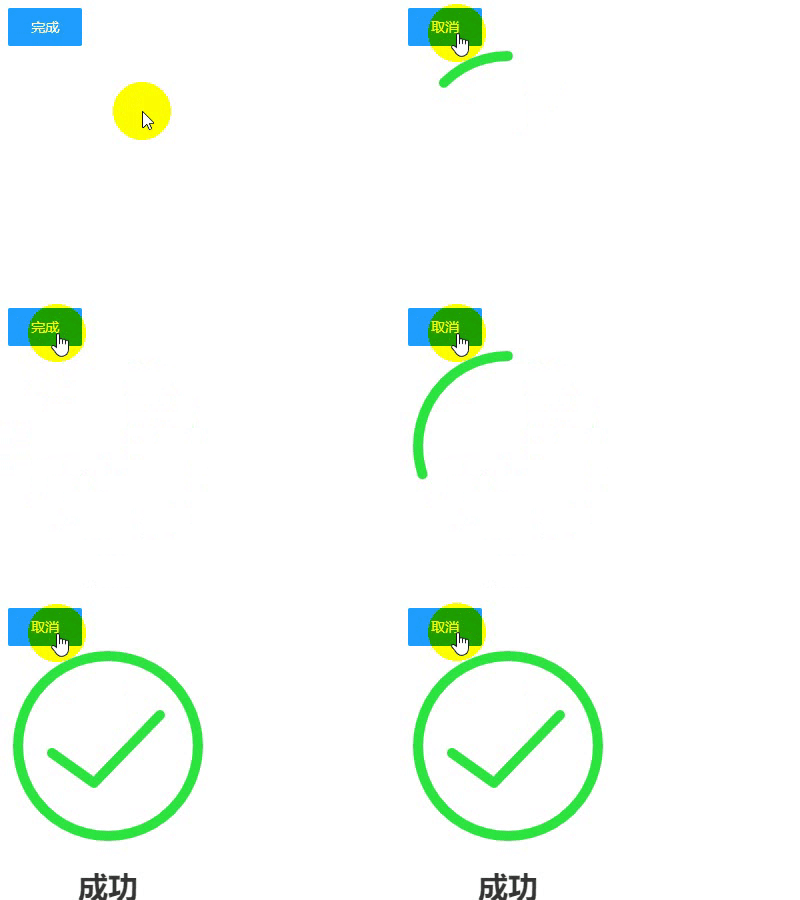
html代码
 <!DOCTYPE html>

 <html lang="en">

 <head>

     <meta charset="UTF-8">

     <title>打钩动画</title>

 </head>

 <body>

 <div id="d1">

     <input type="checkbox" style="display: none" id="love1" />

     <label for="love1" id="btn1" >完成</label>

 <svg width="200px" height="200px">

     <circle r="90" class="circle" fill="none" stroke="#2de540" stroke-width="10" cx="100" cy="100" stroke-linecap="round" transform="rotate(-90 100 100) " ></circle>

     <polyline  fill="none" stroke="#2de540" stroke-width="10" points="44,107 86,137 152,69" stroke-linecap="round" stroke-linejoin="round" class="tick" ></polyline>

 </svg>

 <h2 style="text-align: center;width: 200px">成功</h2>

 </div>

 </body>

 <!--这里引入你本地的jq-->

 <script src="http://libs.baidu.com/jquery/2.0.0/jquery.min.js"></script>

 </html>
css代码
h2 {

        font-family: Helvetica;

        font-size: 30px;

        margin-top: 20px;

        color: #333;

        opacity:;

    }

    input[type="checkbox"]:checked+ label ~ h2 {

        animation: .6s title ease-in-out;

        animation-delay: 1.2s;

        animation-fill-mode: forwards;

    }

    .circle {

        stroke-dasharray:;

        stroke-dashoffset:;

    }

    input[type="checkbox"]:checked + label + svg .circle {

        animation: circle 1s ease-in-out;

        animation-fill-mode: forwards;

    }

    .tick {

        stroke-dasharray:;

        stroke-dashoffset:;

    }

    input[type="checkbox"]:checked + label+ svg .tick {

        animation: tick .8s ease-out;

        animation-fill-mode: forwards;

        animation-delay: .95s;

    }

    @keyframes circle {

        from {

            stroke-dashoffset:;

        }

        to {

            stroke-dashoffset:;

        }

    }

    @keyframes tick {

        from {

            stroke-dashoffset:;

        }

        to {

            stroke-dashoffset:;

        }

    }

    @keyframes title {

        from {

            opacity:;

        }

        to {

            opacity:;

        }

    }

    label {

        display: inline-block;

        height: 38px;

        width: 38px;

        line-height: 38px;

        padding: 0 18px;

        background-color: #1E9FFF;

        color: #fff;

        white-space: nowrap;

        text-align: center;

        font-size: 14px;

        border: none;

        border-radius: 2px;

        cursor: pointer;

    }

    #d1 {

        display: flex;

        justify-content: center;

        min-height: 100px;

        flex-direction: column;

    }
写到这里本来应该就结束了 但是我们在真正实现功能的时候 不太可能用 checkbox切换动画效果的显示 一般还是需要按钮操作动画效果 下面是jq操作的代码 其实用jq的.animate()更好一些但是我是小白所以就偷了个懒 (ps:好吧其实是不会)直接用.css()
JavaScript代码
   $("#btn1").on("click",function () {

       if($(this).text()==="完成"){

           $(".circle").css({'animation':'circle 1s ease-in-out','animation-fill-mode':'forwards'});

           $(".tick").css({'animation':'tick .8s ease-out','animation-fill-mode':'forwards','animation-delay':'.95s'});

           $("h2").css({'animation':'.6s title ease-in-out','animation-fill-mode':'forwards','animation-delay':'1.2s'})

           $(this).text("取消")

       }else{

           $(".circle").css({'animation':'none','animation-fill-mode':'none'});

           $(".tick").css({'animation':'none','animation-fill-mode':'none'});

           $("h2").css({'animation':'none','animation-fill-mode':'none'})

           $(this).text("完成")

       }

   });
哦 对了还有一件事记得给人家UP主一键三连 (BV1ME411F7BG)
用svg+css 或者js制作打钩的动画的更多相关文章
- 利用css+原生js制作简易钟表
利用css+原生js制作简单的钟表.效果如下所示 实现该效果,分三大块:html.javascript.css html部分html部分比较简单,定义一个clock的div,内部有原点.时分秒针.日期 ...
- 用HTML、CSS、JS制作圆形进度条(无动画效果)
逻辑 1.首先有一个圆:蓝色的纯净的圆,效果: 2.再来两个半圆,左边一个,右边一个将此蓝色的圆盖住,效果: 此时将右半圆旋转60°,就会漏出底圆,效果: 然后我们再用一个比底圆小的圆去覆盖这个大 ...
- d3.js制作蜂巢图表带动画效果
以上是效果图,本图表使用d3.js v4制作.图表主要功能是在六边形格子中显示数据,点击底部图标可以切换指定格子高亮显示,图表可以随浏览器任意缩放. 1.图表的主体结构是由正六边形组成,使用d3生成六 ...
- animate.css+wow.js页面滚动即时显示动画
1.地址引入 <link href="css/animate.min.css" rel="stylesheet" type="text/css& ...
- #3使用html+css+js制作网页 番外篇 使用python flask 框架 (II)
#3使用html+css+js制作网页 番外篇 使用python flask 框架 II第二部 0. 本系列教程 1. 登录功能准备 a.python中操控mysql b. 安装数据库 c.安装mys ...
- #3使用html+css+js制作网页 番外篇 使用python flask 框架 (I)
#3使用html+css+js制作网页 番外篇 使用python flask 框架(I 第一部) 0. 本系列教程 1. 准备 a.python b. flask c. flask 环境安装 d. f ...
- #3使用html+css+js制作网页 番外篇 制作接收php
使用html+css+js制作网页 番外篇 制作接收php 本系列链接 基础 php语法 例子 本系列链接 #1使用html+css+js制作网站教程 准备 #2使用html+css+js制作网站教程 ...
- #3使用html+css+js制作网页 制作登录网页
#3使用html+css+js制作网页 制作登录网页 本系列链接 2制作登录网页 2.1 准备 2.1.1 创建文件夹 2.1.2 创建主文件 2.2 html部分 2.2.1 网站信息 2.2.2 ...
- #2使用html+css+js制作网站教程 测试
#2使用html+css+js制作网站教程 测试 本系列链接 1 测试 1.1 运行 1.2 审查 1.3 审查技巧 1.4 其他 引言: 编写完代码后就要上机测试代码,获得用户体验,筛选bug 笔者 ...
随机推荐
- MDEV入门
------------- MDEV入门------------- 对于我们这些人知道如何使用的mdev ,底漆可能似乎跛.为其他人的mdev是一个神秘的黑匣子,他们听到的是真棒,但不能似乎得到他们的 ...
- Java版飞机订票系统
关注微信公众号:Worldhello 回复 飞机订票系统 可获得系统源代码并可加群讨论交流 数据结构课程设计题目: [飞机订票系统] 通过此系统可以实现如下功能 ...
- C++走向远洋——60(十四周阅读程序、STL中的简单容器和迭代器)
*/ * Copyright (c) 2016,烟台大学计算机与控制工程学院 * All rights reserved. * 文件名:text.cpp * 作者:常轩 * 微信公众号:Worldhe ...
- Neural Turing Machine - 神经图灵机
Neural Turing Machine - 神经图灵机 论文原文地址: http://arxiv.org/pdf/1410.5401.pdf 一般的神经网络不具有记忆功能,输出的结果只基于当前的输 ...
- 从0开发3D引擎(十一):使用领域驱动设计,从最小3D程序中提炼引擎(第二部分)
目录 上一篇博文 本文流程 回顾上文 解释基本的操作 开始实现 准备 建立代码的文件夹结构,约定模块文件的命名规则 模块文件的命名原则 一级和二级文件夹 api_layer的文件夹 applicati ...
- iOS内存区域分布
概览 1,RAM ROM 2,内存的几大区域 3,案例解释 RAM ROM RAM:运行内存,不能掉电存储. ROM:存储性内存,可以掉电存储,例如内存卡.Flash. 内存的几大区域 为了合理的分配 ...
- Swift --闭包表达式与闭包(汇编分析)
在Swift中,可以通过func定义一个函数,也可以通过闭包表达式定义一个函数! 一.闭包表达式 概念 闭包表达式与定义函数的语法相对比,有区别如下: 去除了func 去除函数名 返回值类型添加了关键 ...
- 【JavaScript】DOM之表单操作
DOM 表单操作 1.获取表单 获取表单元素 以Document对象中forms属性来获取当前HTML页面所有表单集合以Document对象中表单的name属性值来获取表单元元素 <body&g ...
- html5调用摄像头功能
前言 前些天,线上笔试的时候,发现需要浏览器同意开启摄像头,感觉像是 js 调用的,由于当时笔试,也就没想到这么多
- webapck之多页面打包(常见)
webpack多入口打包 let path = require('path'); elt HtmlWebpackPlugin = require('html-webpack-plugin'); mod ...