
unittest(22)- p2p项目实战(8)-test_class_auto_incre
# 8.test_class_auto_incre

# 使用ddt
import requests
import unittest
from p2p_project_7.tools.http_request import HttpRequest
from p2p_project_7.tools.get_data import GetData
from p2p_project_7.tools.do_excel_auto_incre_by_fanshe_2 import DoExcel
from p2p_project_7.tools import project_path
from p2p_project_7.tools.do_mysql_class import DoMysql
from p2p_project_7.tools.write_log_class import MyLog
from ddt import ddt, data

test_data = DoExcel().get_data(project_path.test_case_path)
my_logger = MyLog()

@ddt
class TestLogin(unittest.TestCase):
    def setUp(self):
        print("start testing...")

    def tearDown(self):
        print("case end.")

    @data(*test_data)
    def test_api(self, item):
        # print("self.method: {}, type:{}".format(self.method, type(self.method)))
        # print("self.data: {}".format(self.data))
        # print("cookie是:", GetCookie.Cookie)

        # 替换loan_id
        my_logger.info("开始执行用例{0}:{1}".format(item["case_id"], item["tittle"]))
        if item["data"]["id"].find("${loan_id}") != -1:
            # 在数据库中根据借款人账号找到标id,使用max是因为如果测试账号,可能有多个人同时使用用来加标
            query_sql = "select max(Id) from loan where MemberID={0}".format(getattr(GetData, "loan_member_id"))
            loan_id = DoMysql().do_mysql(query_sql)[0][0]
            item["data"] = item["data"].replace("${loan_id}", str(loan_id))
            # 把标id的值存到反射,也可以不存,不使用反射,每次都直接在数据库中取值;
            # 使用反射的原因是多个人用同一个账号进行加标,不能保证每次取到的都是自己加的那个标,所以用反射把自己加的标id存起来
            setattr(GetData, "LoanId", loan_id)
            my_logger.info("标id是:{0}".format(loan_id))
        else:
            # loan_id有值的话就直接使用反射进行替换
            my_logger.info("标id是:{0}".format(getattr(GetData, "LoanId")))
            item["data"] = item["data"].replace("${loan_id}", str(getattr(GetData, "LoanId")))
        my_logger.info("获取到的请求数据是:{0}".format(item["data"]))
        my_logger.info("----------------开始接口请求-----------------")

        if item["sheet_name"] in getattr(GetData, "check_list"):
            # 充值请求之前查询余额
            # 查询数据库
            query_sql = "select LeaveAmount from member where  mobile={0}".format(item["data"]["mobile"])
            BeforeAmount = DoMysql().do_mysql(query_sql, 1)[0]
            res = HttpRequest().http_request(item["url"], item["method"], item["data"], cookie=GetData.Cookie)
            # 充值请求之后校验余额
            query_sql = "select LeaveAmount from member where  mobile={0}".format(item["data"]["mobile"])
            AfterAmount = DoMysql().do_mysql(query_sql, 1)[0]
            # 61-64 行代码:不是所有的用例都这么检查,因为有的用例不涉及充值,优化做法是在excel中定义好哪些用例需要查余额
            if abs(BeforeAmount - AfterAmount) == eval(item["data"])["amount"]:
                check_res = "金额正确"
            else:
                check_res = "金额不对"

        # print("哪出错了")
        # print(res.text)
        r = res.json()["errorCode"]

        # 如果GetCookie.Cookie没有值,就把响应的cookie值赋给GetCookie.Cookie,以便下次请求使用
        if GetData.Cookie is None:
            setattr(GetData, "Cookie", res.cookies)
        #  如果GetCookie.Cookie不为空,就把新获得的res.cookies添加到原有的cookie中
        else:
            GetData.Cookie.update(res.cookies)
        try:
            self.assertEqual(r, item["expected"])
            test_result = "PASS"  # 用例成功
        except AssertionError as e:
            test_result = "FAILED"  # 用例失败
            print("there is an error: {}".format(e))
            raise e
        # 无论是否异常,finally后面都要执行。这里是写入响应结果和测试结论
        finally:
            DoExcel().write_back(project_path.test_case_path, item["sheet_name"], item["case_id"] + 1, str(res.json()), test_result)
            print(res.json())
配置文件:

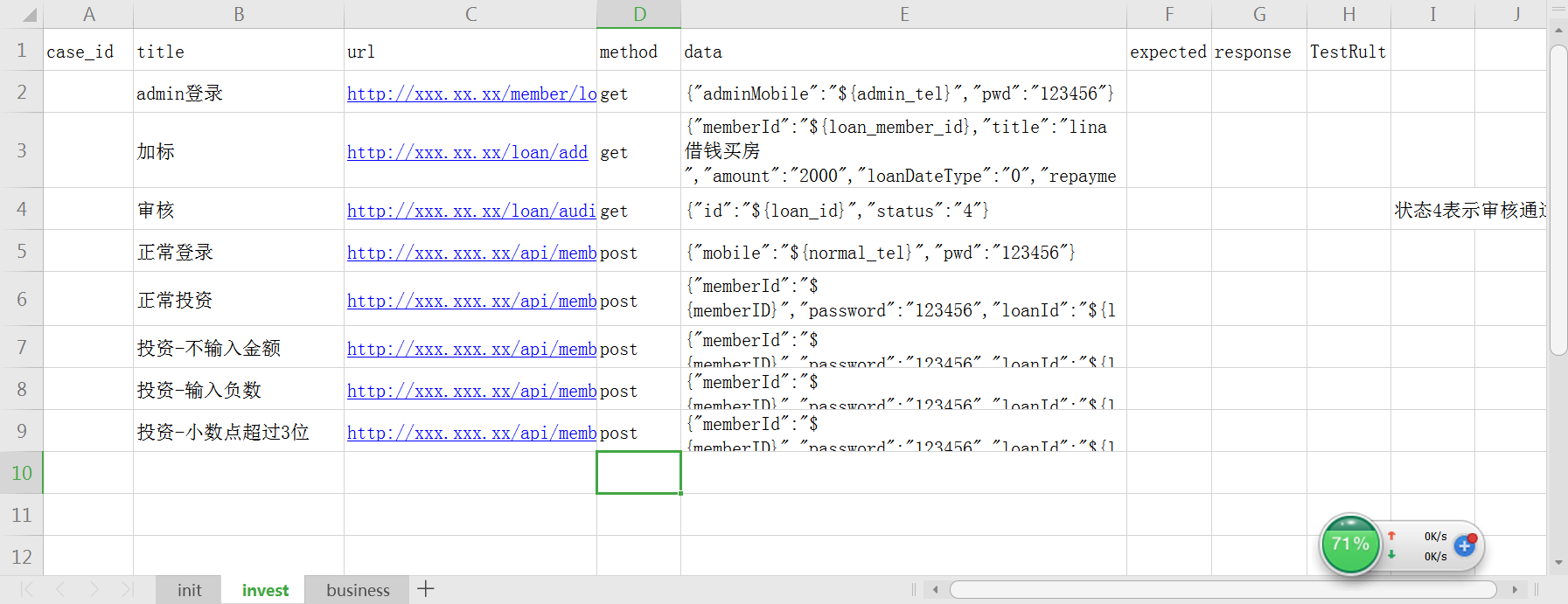
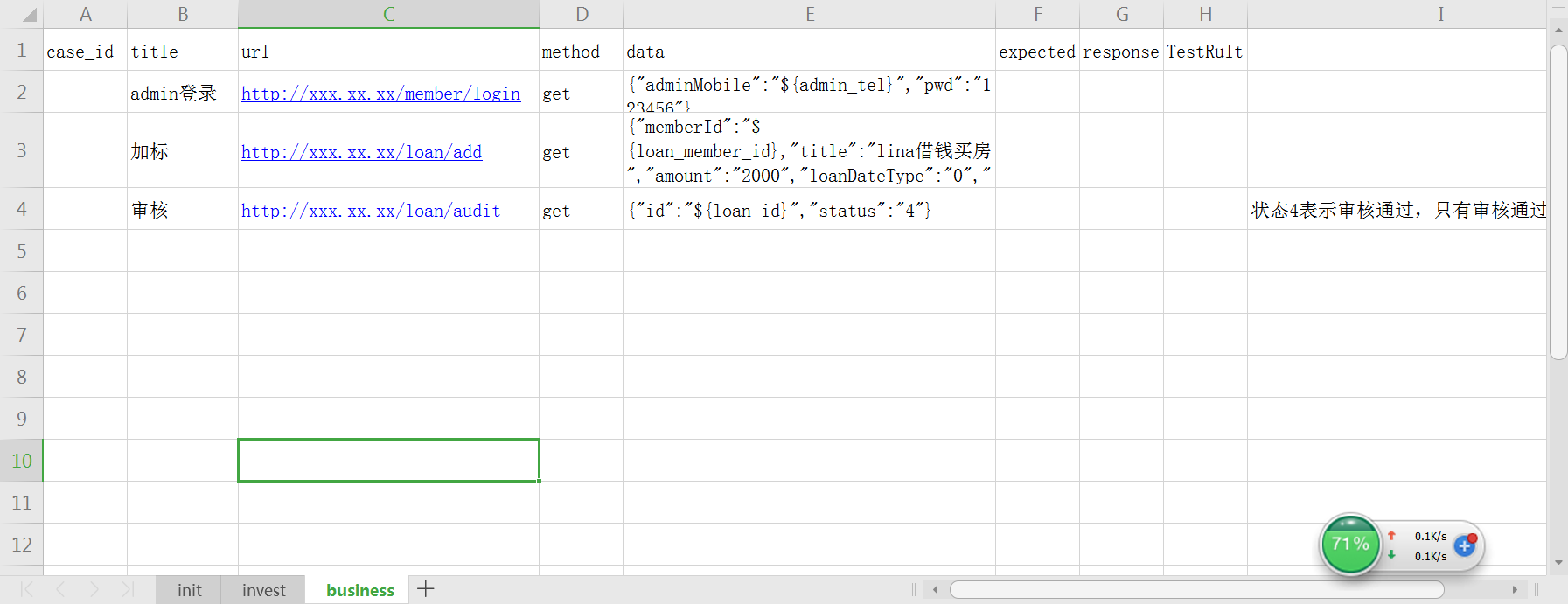
测试数据:
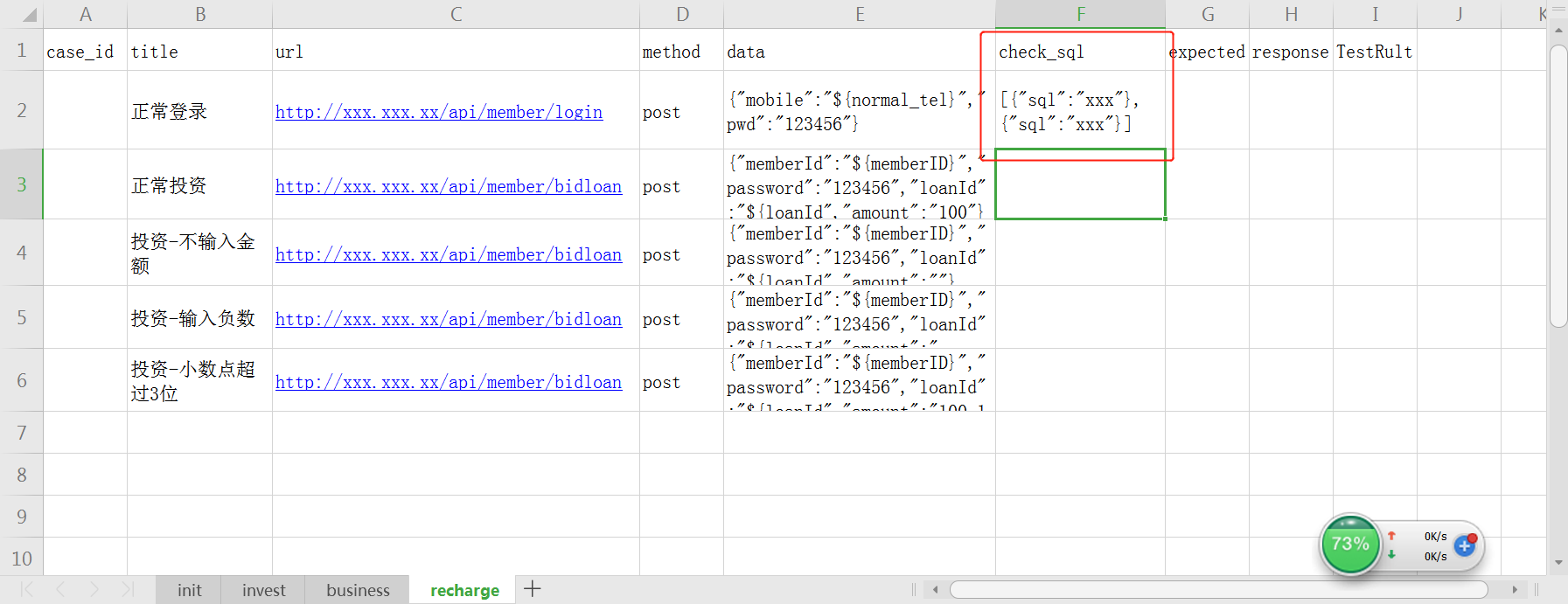
对需要检查余额的用例写入SQL语句:
unittest(22)- p2p项目实战(8)-test_class_auto_incre的更多相关文章
- unittest(22)- p2p项目实战(7)-do_mysql
# 7. do_msql.py import mysql.connector from p2p_project_2020_1_21.tools import project_path from p2p ...
- unittest(22)- p2p项目实战(4)-read_config
# 4. read_config.py import configparser class ReadConfig: @staticmethod def get_config(file_path, se ...
- unittest(22)- p2p项目实战(3)-project_path
# 3. project_path.py # 用来读取文件的路径 import os # os.path.split(path)使用: # 1.path如果是具体到文件名,则返回最后层级的文件,和文件 ...
- unittest(22)- p2p项目实战(2)-http_request
# 2. http_request.py import requests from learn_logging_5.write_log_class import MyLog my_logger = M ...
- selenium3 web自动化测试框架 四:Unittest介绍及项目实战中的运用
unittest介绍及运用,可以参考之前写的文章,除了未结合web自动化演示,基础知识都有了 https://www.cnblogs.com/wuzhiming/p/8858305.html unit ...
- 移动端自动化测试Appium 从入门到项目实战Python版☝☝☝
移动端自动化测试Appium 从入门到项目实战Python版 (一个人学习或许会很枯燥,但是寻找更多志同道合的朋友一起,学习将会变得更加有意义✌✌) 说到APP自动化测试,Appium可是说是非常流 ...
- angularJs项目实战!02:前端的页面分解与组装
自从上一篇文章到现在已经有将近一个月的时间,我将精力放在了前端页面分解与组装,和angularjs如何与jquery.bootstrap.D3等一系列其他类库结合使用的经验总结上.由于公司新招了一些员 ...
- angularJs项目实战!01:模块划分和目录组织
近日来我有幸主导了一个典型的web app开发.该项目从产品层次来说是个典型的CRUD应用,故而我毫不犹豫地采用了grunt + boilerplate + angularjs + bootstrap ...
- Spark大型项目实战:电商用户行为分析大数据平台
本项目主要讲解了一套应用于互联网电商企业中,使用Java.Spark等技术开发的大数据统计分析平台,对电商网站的各种用户行为(访问行为.页面跳转行为.购物行为.广告点击行为等)进行复杂的分析.用统计分 ...
随机推荐
- Properties in Algebra
附录-Properties in Algebra 部分证明转载自标注,仅作个人整理查阅用. 范数 (norm) \(^{[1]}\) 要更好的理解范数,就要从函数.几何与矩阵的角度去理解,我尽量讲的通 ...
- zookeeper注册中心和客户端
1.zookeeper和eureka区别 zookeeper向client进行ping操作,如果不通,就删除client节点 eureka自我保护机制是client向注册中心发送心跳包,如果一定时间内 ...
- POJ 2796 Feel Good 【单调栈】
传送门:http://poj.org/problem?id=2796 题意:给你一串数字,需要你求出(某个子区间乘以这段区间中的最小值)所得到的最大值 例子: 6 3 1 6 4 5 2 当L=3,R ...
- httpsqs 源码修改(内部自动复制多队列)
/* HTTP Simple Queue Service - httpsqs v1.7 Author: Zhang Yan (http://blog.s135.com), E-mail: net@s1 ...
- mnist数据集下载
http://yann.lecun.com/exdb/mnist/ THE MNIST DATABASE of handwritten digitsYann LeCun, Courant Instit ...
- redhat7.0安装postgresql
安装命令 sudo yum install postgresql-server 查看安装的包 sudo yum list postgres* postgresql.x86_64 postgresql- ...
- Underscore _.template 方法使用详解
为什么用「void 0」代替「undefined」 undefined 并不是保留词(reserved word),它只是全局对象的一个属性,在低版本 IE 中能被重写. 事实上,undefined ...
- saltstack的salt-api介绍
一.salt-api安装 yum install salt-api pyOpenSSL -y #pyOpenSSL 生成自签证书时使用 二.生成自签名证书(ssl使用) [root@master ce ...
- eclipse安装tfs插件
Eclipse安装TFS插件 1.打开Eclipse.点击菜单栏上的 “Help”——>选择“Install New Software”. 2.在弹出框中输入点击“Add”. 3.在弹出框中 ...
- mysql 数据库保存\n 微信分享时不能换行
主要因为保存的是\n 但是查询出来是\\n 所以需要把\\n替换为\n即可(不转换的话不会换行并且显示\n)