
h5-钟表动画案例
1.html代码
 <div class="clock">

         <div class="line line1">

             <div class="line-1"></div>

         </div>

         <div class="line line2">

             <div class="line-1"></div>

         </div>

         <div class="line line3">

             <div class="line-1"></div>

         </div>

         <div class="line line4">

             <div class="line-1"></div>

         </div>

         <div class="line line5">

             <div class="line-1"></div>

         </div>

         <div class="line line6">

             <div class="line-1"></div>

         </div>

         <div class="cover"></div>

         <div class="hour"></div>

         <div class="minute"></div>

         <div class="second"></div>

         <div class="center">

             <div class="center1"></div>

         </div>

 </div>
2.css代码
     <style>

         *{

             margin:;

             padding:;

         }

         /*钟表的外圈*/

         .clock{

             width: 300px;

             height: 300px;

             border: 10px solid #00ccbb;

             border-radius: 50%;

             margin: 100px auto;

             position: relative;

         }

         .cover,.hour,.minute,.second,.center,.center1{

             position: absolute;

             left: 50%;

             top: 50%;

         }

         .line,.line-1{

             position: absolute;

             left: 50%;

             top:;

             transform: translate(-50%,0%);

         }

         .cover,.center,.center1{

             border-radius: 50%;

             transform: translate(-50%,-50%);

         }

         .hour,.minute,.second{

             transform: translate(-50%,-100%);

             /*设置旋转中心*/

             transform-origin: center bottom;

         }

         /*钟表的刻度基本样式*/

         .line{

             width: 8px;

             height: 300px;

             background-color: #ccc;

         }

         /*钟表刻度  1和4需要加粗*/

         .line1,.line4{

             width: 12px;

         }

         /*钟表样式的一一定位*/

         .line2{

             transform: translate(-50%,0%) rotate(30deg);

         }

         .line3{

             transform: translate(-50%,0%) rotate(60deg);

         }

         .line4{

             transform: translate(-50%,0%) rotate(90deg);

         }

         .line5{

             transform: translate(-50%,0%) rotate(120deg);

         }

         .line6{

             transform: translate(-50%,0%) rotate(150deg);

         }

         /*钟表刻度的装饰*/

         .line-1{

             width: 2px;

             height: 300px;

             background-color: #00ccbb;

         }

         /*覆盖物*/

         .cover{

             width: 270px;

             height: 270px;

             background-color: #fff;

         }

         /*时针*/

         .hour{

             width: 6px;

             height: 80px;

             background-color: red;

             /*添加动画*/

             animation: clockAnimation  43200s linear infinite;

         }

         /*分针*/

         .minute{

             width: 4px;

             height: 100px;

             background-color: #2000ff;

             /*添加动画*/

             animation: clockAnimation  3600s linear infinite;

         }

         /*秒针*/

         .second{

             width: 2px;

             height: 120px;

             background-color: #22ff00;

             /*添加动画*/

             animation: clockAnimation  60s steps(60) infinite;

         }

         /*中心点*/

         .center{

             width: 20px;

             height: 20px;

             background-color: #c1cbcc;

         }

         .center1{

             width: 5px;

             height: 5px;

             background-color: #fff;

         }

         /*创建动画*/

         @keyframes clockAnimation {

             from{

                 transform: translate(-50%,-100%) rotate(0deg);

             }

             to{

                 transform: translate(-50%,-100%) rotate(360deg);

             }

         }

     </style>
3.效果图
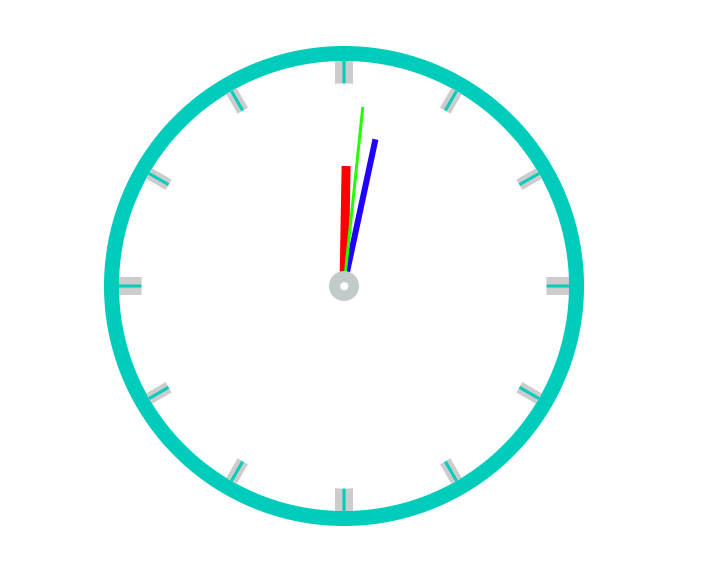
h5-钟表动画案例的更多相关文章
- js实现一个简单钟表动画(javascript+html5 canvas)
第一次在博客园注册发博.有一次去人家单位开标,看到开标网站上有个钟表动画,一时兴起,就写了个简单的钟表动画. 用js和html5 canvas对象实现一个简单钟表程序 主要用到的就是h5的canvas ...
- h5交互动画如何制作
最近几年随着h5的兴起,复杂的h5动画,甚至是交互动画类型的产品不断涌现,尤其在课件产品方面,很多公司都有相关需求,最近很多h5开发工程师想了解相关方面的技术. 针对h5,如果是简单的动画效果,可以考 ...
- 写多个物件css3循环动画案例原理
div { background-color: #67CF22; height: 100%; width: 6px; display: inline-block; -webkit-animation: ...
- H5 适配 动画animation js touch
图片预加载jquery插件 jquery.imgpreload var load_img = [];load_img.push('http://m.pubuzhixing.com/Images/vot ...
- 用原生JS写移动动画案例及实际应用
js很强大 相信很多人都知道,那么它有哪些强大之处呢?有兴趣的人可以去查查,这里就不赘述了,因为不在本片文章讨论的范围. 我们要讲的是怎么用原生JS写移动动画?我们先举一个最简单的动画例子,很多网站的 ...
- 20个专业H5(HTML5)动画工具推荐
AnimateMate 可能是最好的 Sketch 动画插件.Sketch 目前被广泛应用于 HTML5 的原型界面设计,或者被应用于数据可视化的,动画部分则一般经由软件 Principle 等实现. ...
- react-motion 动画案例介绍
第一个案例:Motion组件 import React,{Component} from 'react'; import {Motion,spring,presets} from 'react-mot ...
- iOS动画案例(1)
受人所托,做一个类似于qq账号信息里的一个动画,感觉挺有意思,也没感觉有多难,就开始做了,结果才发现学的数学知识都还给体育老师了,研究了大半天才做出来. 先看一下动画效果: 用到的知识 ...
- iOS动画案例(2) 仿网易新闻标题动画
由于产品的需要,做了一个和网易新闻标题类似的动画效果,现在新闻类的APP都是采用这样的动画效果,来显示更多的内容.先看一下动画效果: 由于这个动画效果在很多场合都有应用,所以我专门封装了一个控 ...
随机推荐
- Springboot跨域 ajax jsonp请求
SpringBoot配置: <dependency> <groupId>org.springframework.boot</groupId> <artifac ...
- python 第一节 脚本 import from reload exec
环境Ubuntu 14.04, 不写交互式命令行了,直接脚本开始. # first Python script import sys print(sys.platform) print(2**4) x ...
- flink笔记(三) flink架构及运行方式
架构图 Job Managers, Task Managers, Clients JobManager(Master) 用于协调分布式执行.它们用来调度task,协调检查点,协调失败时恢复等. Fli ...
- .NET via C#笔记5——基元类型,引用类型和值类型
5 基元类型,引用类型和值类型 5.3 值类型的装箱和拆箱 将值类型转化为引用类型需要进行装箱(boxing) 赋值,传参等操作,如果从值类型转为引用类型,都会进行装箱 装箱的代价比较大 申请一块堆内 ...
- RobotFramwork中实现oracle数据库的连接(终于解决cx_oracle问题)
RobotFramework连接数据库有java实现,也有python实现的,现在研究的python实现的,java还没尝试.有兴趣的参考后面的转载文章. 步骤(也转载了别人的文章,因为写的比 ...
- Ubuntu Vi指令
Ubuntu在不更新源的情况下是没办法使用Vim指令的只能使用Vi指令 所有我也就记录了下来 vi / vim命令: 插入内容: i: 插入光标前一个字符 I: 插入行首 a: 插入光标后一个字符 A ...
- UVA - 11925 Generating Permutations(生成排列)(构造)
题意:将序列1,2,3,……,n,用不超过2n^2次操作,通过下列操作变成给定序列.(1<=n<=300) 1.交换前两个元素 2.将第一个元素移到最后 分析:因为将序列变成升序更容易操作 ...
- 每天一点点之vue框架开发 - vue-router路由进阶(路由别名、跳转、默认路由、二级路由、路由守卫)
路由别名 在main.js中的路由中添加name来创建别名 const routes = [ {path:'/footer',name:footerLink,component:Footer} ] ...
- OpenCV3 Ref SVM : cv::ml::SVM Class Reference
OpenCV3 Ref SVM : cv::ml::SVM Class Reference OpenCV2: #include <opencv2/core/core.hpp>#inclu ...
- AD中内电层设置
用于走线与普铜 内电层分割