
.NET Core+QQ第三方授权登录
安装包
dotnet add package AspNet.Security.OAuth.QQ
申请过程不介绍了,申请者资料,个人也是可以申请成功的。
这时候有二个参数就是clientid clientsecret
APP ID:xxxx

APP Key:xxxxxx
其中平台信息,这个申请审核通过后,不要修改,千万不要随便修改,一修改就要重新审核。
网站回调域:可以随便修改,并且可以写多个,中间用英文逗号分隔即可。
比如,网站地址填的:https://api.igeekfan.cn,下面如果是localhost,是可以的,但如果是域名,便只能是https://api.igeekfan.cn这个域名下的路径。
网站回调域配置,后台是运行在https://localhost:5001端口上。
https://api.igeekfan.cn/signin-qq;https://localhost:5001/signin-qq
接口介绍
server-side模式,是OAuth2.0认证的一种模式,又称Web Server Flow;
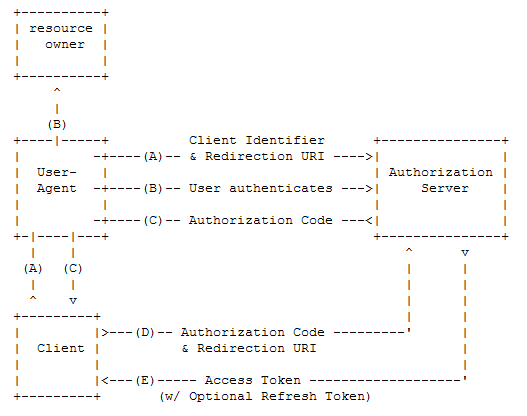
获取Authorization Code
https://graph.qq.com/oauth2.0/authorize
通过Authorization Code获取Access Token
https://graph.qq.com/oauth2.0/token
获取用户OpenID_OAuth2.0
https://graph.qq.com/oauth2.0/me
获取用户个人信息
https://graph.qq.com/user/get_user_info
使用Authorization_Code获取Access_Token
接入流程如下:
- 先获取Authorization Code;
- 通过Authorization Code获取Access Token
1.Step1:获取Authorization Code
GET
具体参数可查看官网。
state由用户自己创建一个随机数,以防止CSRF攻击。
如果用户成功登录并授权,则会跳转到指定的回调地址,并在redirect_uri地址后带上Authorization Code和原始的state值。如:
https://localhost:5001/signin-qq?code=B6D497755EACE4635115FC82BE24F280&state=123abc
后台先根据state验证是自己发出的请求,判断是否相同,不相同,则代表非本项目发出的授权登录请求。
- 根据code获取access_token
GET
这时候你会得到
access_token=1B6E45FA99BA3D6B347713440C9BCEFE&expires_in=7776000&refresh_token=8DB1D48D95C85D3EF593936B8ACE5EE0
获取用户OpenID_OAuth2.0
GET
https://graph.qq.com/oauth2.0/me?access_token=1B6E45FA99BA3D6B347713440C9BCEFE
openid是此网站上唯一对应用户身份的标识
callback( {"client_id":"101867513","openid":"951560F5C7A5AA9E5E599CF9B4ECFFB2"} );
获取用户的其他信息
用户信息
{

"ret": 0,

"msg": "",

"is_lost":0,

"nickname": "、天上有木月OvO",

"gender": "xxx",

"gender_type": 1,

"province": "xxx",

"city": "xxx",

"year": "2019",

"constellation": "",

"figureurl": "http:\/\/qzapp.qlogo.cn\/qzapp\/101867513\/951560F5C7A5AA9E5E599CF9B4ECFFB2\/30",

"figureurl_1": "http:\/\/qzapp.qlogo.cn\/qzapp\/101867513\/951560F5C7A5AA9E5E599CF9B4ECFFB2\/50",

"figureurl_2": "http:\/\/qzapp.qlogo.cn\/qzapp\/101867513\/951560F5C7A5AA9E5E599CF9B4ECFFB2\/100",

"figureurl_qq_1": "http://thirdqq.qlogo.cn/g?b=oidb&k=bjXoWmdlu8fk1m80MCkibMg&s=40&t=1559108425",

"figureurl_qq_2": "http://thirdqq.qlogo.cn/g?b=oidb&k=bjXoWmdlu8fk1m80MCkibMg&s=100&t=1559108425", "figureurl_qq": "http://thirdqq.qlogo.cn/g?b=oidb&k=bjXoWmdlu8fk1m80MCkibMg&s=640&t=1559108425"

}
代码
services.AddAuthentication(xxx)

.AddGitHub(xxx)

加上AddQQ的配置项

.AddQQ(options =>

{

   options.ClientId = Configuration["Authentication:QQ:ClientId"];

   options.ClientSecret = Configuration["Authentication:QQ:ClientSecret"];

})
appsettings.json中配置项
  "Authentication": {

   //下面为新增项

   "QQ": {

     "ClientId": "xx",

     "ClientSecret": "xxx"

   }

 }
对,没错,QQ登录,已经结束了。接下来就是把这些用户的信息保存到数据库,生成token的过程。
这里
[HttpGet("signin-callback")]

public async Task<IActionResult> Home(string provider, string redirectUrl = "")

{

   AuthenticateResult authenticateResult = await _contextAccessor.HttpContext.AuthenticateAsync(provider);

   if (!authenticateResult.Succeeded) return Redirect(redirectUrl);

   var openIdClaim = authenticateResult.Principal.FindFirst(ClaimTypes.NameIdentifier);

   if (openIdClaim == null || string.IsNullOrWhiteSpace(openIdClaim.Value))

       return Redirect(redirectUrl);

   ClaimsPrincipal principal=authenticateResult.Principal;

   //根据provider,处理用户的基础信息,

   long id =SaveQQAsync(principal, openIdClaim.Value)

   //xxx

}
openIdClaimopenIdClaim是唯一值
lin_user表
| 字段 | 类型 | 备注 |
|---|---|---|
| Id | long | 主键 |
| Username | varchar(50) | 用户名 |
| Avatar | varchar(50) | 头像 |
lin_user_identity表
用户授权信息表,用于存储不同登录类型的用户信息,如手机号、邮件、用户名、第三方应用(微信、QQ、GitHub)的登录
| 字段 | 类型 | 备注 |
|---|---|---|
| Id | long | 主键 |
| IdentityType | varchar(50) | 认证类型,如 Password,GitHub、QQ、WeiXin等 |
| Identifier | varchar(24) | 认证者,例如 用户名(PassWord认证类型),授权得到的昵称(QQ),授权得到的用户名(唯一,GitHub) |
| Credential | varchar(50) | 凭证,例如 密码,存OpenId、Id,同一IdentityType的OpenId的值是唯一的 |
| CreateUserId | long | 绑定的用户Id |
根据openId,判断lin_user_identity表中是否存在这一第三方授权信息,如果存在,则返回当前用户lin_user表中的id,如果不存在,则创建一个新的用户信息,插入lin_user、lin_user_identity表中。
public async Task<long> SaveQQAsync(ClaimsPrincipal principal, string openId)

{

   string nickname = principal.FindFirst(ClaimTypes.Name)?.Value;

   string gender = principal.FindFirst(ClaimTypes.Gender)?.Value;

   string picture = principal.FindFirst(QQAuthenticationConstants.Claims.PictureUrl)?.Value;

   string picture_medium = principal.FindFirst(QQAuthenticationConstants.Claims.PictureMediumUrl)?.Value;

   string picture_full = principal.FindFirst(QQAuthenticationConstants.Claims.PictureFullUrl)?.Value;

   string avatar = principal.FindFirst(QQAuthenticationConstants.Claims.AvatarUrl)?.Value;

   string avatar_full = principal.FindFirst(QQAuthenticationConstants.Claims.AvatarFullUrl)?.Value;

    Expression<Func<LinUserIdentity, bool>> expression = r =>

               r.IdentityType == LinUserIdentity.QQ&& r.Credential == openId;

   LinUserIdentity linUserIdentity =await _userIdentityRepository.Where(expression).FirstAsync();

   long userId = 0;

   if (linUserIdentity == null)

   {

       LinUser user = new LinUser

       {

           Avatar = avatar_full,

           Nickname = nickname,

           Username = "",

           LinUserIdentitys = new List<LinUserIdentity>()

           {

               new LinUserIdentity

               {

                   CreateTime = DateTime.Now,

                   Credential = openId,

                   IdentityType = LinUserIdentity.GitHub,

                   Identifier = nickname,

               }

           }

       };

       await _userRepository.InsertAsync(user);

       userId = user.Id;

   }

   else

   {

       userId = linUserIdentity.CreateUserId;

   }

   return userId;

}
上文中的CreateToken,直接将 authenticateResult.Principal.Claims.ToList(),生成token值,会缺少一些系统需要的值,比如键为ClaimTypes.NameIdentifier,应为用户的id,用户的其他信息,如角色/分组,昵称。不同平台的授权登录,键有所不同,所以这里需要二次处理。
[HttpGet("signin-callback")]

public async Task<IActionResult> Home(string provider, string redirectUrl = "")

{

    //xxx

    ClaimsPrincipal principal=authenticateResult.Principal;

    List<Claim> authClaims = principal.Claims.ToList();

    long id =SaveQQAsync(principal, openIdClaim.Value)

    LinUser user =await _userRepository.Select.IncludeMany(r => r.LinGroups)

        .WhereCascade(r => r.IsDeleted == false).Where(r => r.Id == id).FirstAsync();

    List<Claim> claims = new List<Claim>()

    {

        new Claim(ClaimTypes.NameIdentifier,user.Id.ToString()),

        new Claim(ClaimTypes.GivenName,user.Nickname??""),

        new Claim(ClaimTypes.Name,user.Username??""),

    };

    user.LinGroups?.ForEach(r =>

    {

        claims.Add(new Claim(LinCmsClaimTypes.Groups, r.Id.ToString()));

    });

    claims.AddRange(authClaims);

    string token = this.CreateToken(claims);

    return Redirect($"{redirectUrl}?token={token}#login-result");

 }
前台login-result路由,解析到token值,并保存起来,与用户密码登录后的流程相同。
项目源码
.NET Core+QQ第三方授权登录的更多相关文章
- QQ第三方授权登录OAuth2.0实现(Java)
准备材料 1.已经备案好的域名 2.服务器(域名和服务器为统一主体或域名已接入服务器) 3.QQ号 4.开发流程:https://wiki.connect.qq.com/%E5%87%86%E5%A4 ...
- C# winform C/S WebBrowser qq第三方授权登录
qq的授权登录,跟微信相似,不同的地方是: 1 申请appid与appkey的时候,注意填写回调地址. 2 这里可以在WebBrowser的是Navigated事件中直接得到Access Token, ...
- SpringBoot基于JustAuth实现第三方授权登录
1. 简介 随着科技时代日渐繁荣,越来越多的应用融入我们的生活.不同的应用系统不同的用户密码,造成了极差的用户体验.要是能使用常见的应用账号实现全应用的认证登录,将会更加促进应用产品的推广,为生活 ...
- 【转】【Android应用开发详解】第01期:第三方授权认证(一)实现第三方授权登录、分享以及获取用户资料
转载请注明出处:http://blog.csdn.net/yangyu20121224/article/details/9057257 由于公司项目的需要,要实现在项目中使用第三方授权登录以及分享文字 ...
- 【Android应用开发详解】实现第三方授权登录、分享以及获取用户资料
由于公司项目的需要,要实现在项目中使用第三方授权登录以及分享文字和图片等这样的效果,几经波折,查阅了一番资料,做了一个Demo.实现起来的效果还是不错的,不敢独享,决定写一个总结的教程,供大家互相 ...
- 使用ShareSDK实现第三方授权登录、分享以及获取用户资料效果,项目中包含:源码+效果图+项目结构图
[Android应用开发详解]第01期:第三方授权认证(一)实现第三方授权登录.分享以及获取用户资料 由于公司项目的需要,要实现在项目中使用第三方授权登录以及分享文字和图片等这样的效果,几经波折, ...
- github 授权登录教程与如何设计第三方授权登录的用户表
需求:在网站上想评论一篇文章,而评论文章是要用户注册与登录的,那么怎么免去这麻烦的步骤呢?答案是通过第三方授权登录.本文讲解的就是 github 授权登录的教程. 效果体验地址:http://biao ...
- SPA+.NET Core3.1 GitHub第三方授权登录 使用AspNet.Security.OAuth.GitHub
GitHub第三方授权登录 使用SPA+.NET Core3.1实现 GitHub第三方授权登录 类似使用AspNet.Security.OAuth.GitHub,前端使用如下:VUE+Vue-Rou ...
- Github 第三方授权登录教程
Github 第三方授权登录教程 ####大致流程图 ####1.首先注册一个github帐号,Applications>Developer applications>Register a ...
随机推荐
- Some Modern Softwares' drawbacks: User experience 12/29/2015
In the nowadays, there are many APP in the PC or smart Phone. Some of them can't meet the customers' ...
- Product Owner交流记录1
Abstract 最终我们选择了UWP版必应词典功能开发. 项目:“单词挑战”功能 然后我们今天中午我们和Product owner聊了聊. Content Product owner是Travis ...
- H - Hamiltonian Hypercube Gym - 101170H
规律题 首先我们要知道他的顺序是怎么来的,首先当n等于1时,是0,1 当n=2时,先按照与按顺序在他们前面分别加0,即00,01,在逆序加1,即11,10 构成的顺序为00,01,11,10:往后同理 ...
- v&n赛 ML 第一步(python解决)
题目链接 给了70组x,y,根据提示,是求拟合曲线,再通过x求y 知道MATLAB应该录入就能解决吧,但是没下这软件,试试用python解决 #coding:utf- from pwn import ...
- pytorch 孪生神经网络DNN
代码内容请见: https://github.com/LiuXinyu12378/DNN-network
- pytorch seq2seq闲聊机器人
cut_sentence.py """ 实现句子的分词 注意点: 1. 实现单个字分词 2. 实现按照词语分词 2.1 加载词典 3. 使用停用词 "" ...
- 即时通信WebSocket 和Socket.IO
WebSocket HTML5定义了WebSocket协议,能更好的节省服务器资源和带宽,并且能够更实时地进行通讯. 在2008年诞生,2011年成为国际标准. 现在基本所有浏览器都已经支持了. We ...
- 数据结构(C语言版)---查找
1.查找表:同一类型的数据元素构成的集合. 2.对查找表进行的操作:查询某特定元素.检索满足条件的元素的属性.插入元素.删除元素. 1)若对查找表进行的操作只涉及前两种,则为静态查找表:需要进行插入和 ...
- 一个老牌程序员推荐的JavaScript的书籍,看了真的不后悔!
很多人问我怎么学前端?我的回答是:读书吧!相对于在网上学习,在项目中学习和跟着有经验的同事学习,书中有着相对完整的知识体系,每读一本好书都会带来一次全面的提高.而如果深一脚浅一脚的学习,写出代码的质量 ...
- c++四舍五入函数round()
其实c++自身是没有四舍五入函数round()的,若果你要用到的话,可以自己写一个round(),不过要用到floor()和ceil这两个函数如下: #include<iostream> ...