
vue.js 实现点击展开收起动画
最近公司项目加了个页面,其中要求是这样的,点击对应列表,展开和收起,
其实就是显示和隐藏内容部分;说来惭愧,我花了半天时间才搞出来(自黑一下~),
,,接下来分享给大家,先上效果图:
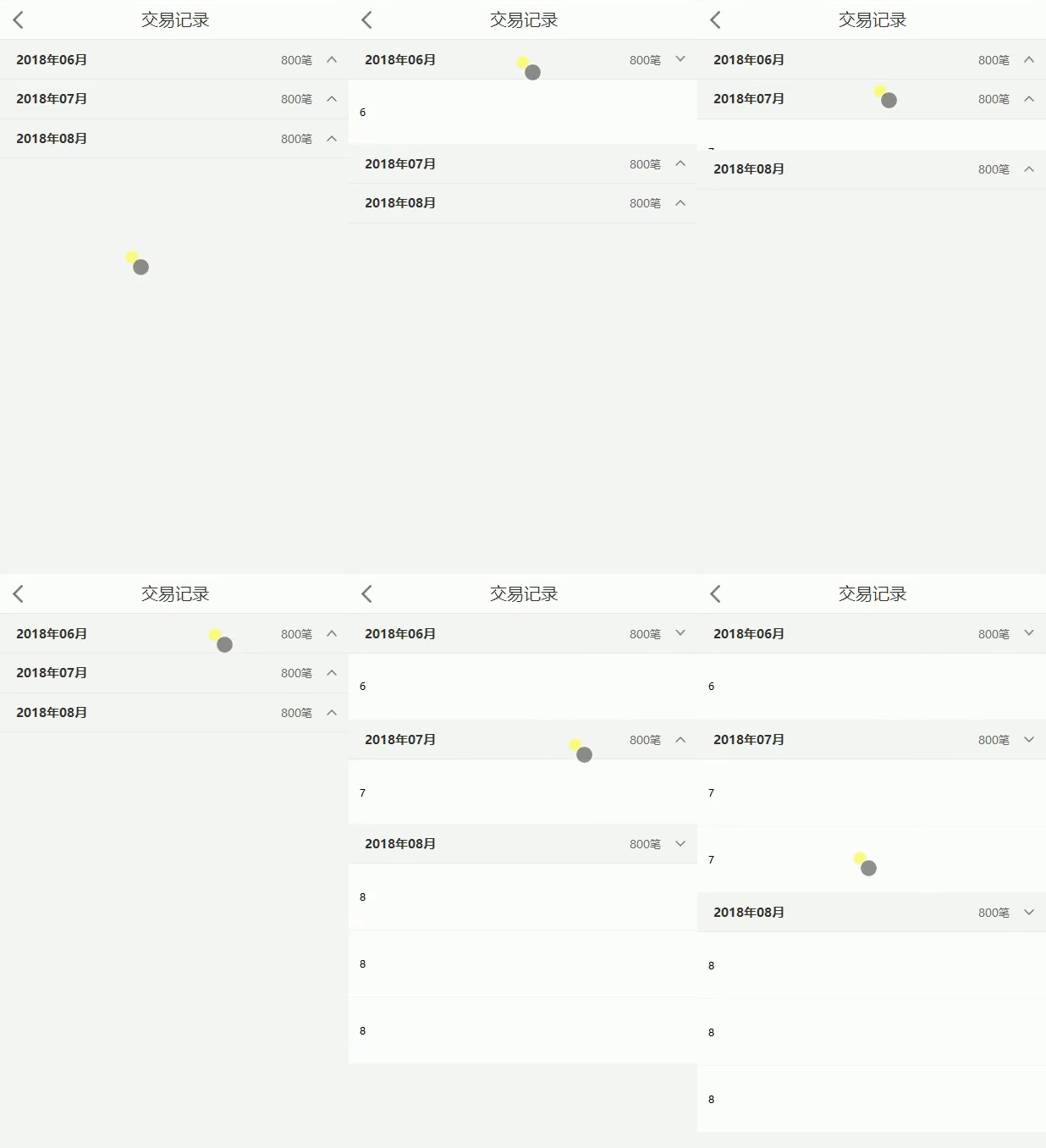
.vue页面:
<template>

	<div class="dealRecord-wrap">

		<div class="title-contant" v-for="(item,index) in items " >

			<div class="title" @click="showHide(index)">

				<h3>2018年0{{index+6}}月</h3>

				<div class="number">800笔<i></i></div>

			</div>

			<div class="contant">

				<ul>

					<li v-for="i in item.allNumber">

						{{index+6}}

					</li>

				</ul>

			</div>

		</div>

	</div>

</template>

<script>

export default{

	data(){

		return{

			items:[

				{v:'qqq',allNumber:1},

				{v:'aaa',allNumber:2},

				{v:'qqq',allNumber:3},

			],

		}

	},

	created(){

		document.body.style.backgroundColor = '#f6f6f6';

	},

	mounted(){

		for(var i=0;i<3;i++){	//这里取值自后台返回的长度,设置页面渲染完成后是否展开,此处不展开

		    document.getElementsByClassName('contant')[i].style.height = '0px';

		}

	},

	components:{

	},

	methods:{

		showHide(index){    //点击展开收起

		    let contant = document.getElementsByClassName('contant')[index];    //这里我们通过参数index来让浏览器判断你点击的是哪一个列表

		    let height = contant.getBoundingClientRect().height;	//获取页面元素的当前高度

		    document.getElementsByTagName('i')[index].style.transform = !!height?'rotateX(0deg)':'rotateX(180deg)';

		    if (!!height) {

			contant.style.height = height + 'px';

			let f = document.body.offsetHeight;	//强制相应dom重绘,使最新的样式得到应用

			contant.style.height = '0px';

		    } else {

			contant.style.height = 'auto';

			height = contant.getBoundingClientRect().height;

			contant.style.height = '0';

			let f = document.body.offsetHeight;

			contant.style.height = height + 'px';

		    }

		}

	},

	beforeDestroy(){

		document.body.style.backgroundColor = '#fff';

	}

}

</script>

<style type="text/scss" lang="scss" scoped>

.dealRecord-wrap{margin-bottom: 100px;

	.title-contant{overflow: hidden;	/* 这个是重点 */

		.title{height: 84px;padding: 0 24px;border-bottom: 1px solid #eaeaea;/*px*/

			h3{height: 84px;font-size: 28px;color: #333;display: flex;align-items: center;float: left;;margin-left: 10px;}

			.number{height: 84px;font-size: 24px;color: #666;display: flex;align-items: center;float: right;}

			.number i{display: inline-block;width: 23px;height: 13px;background: url('../../assets/images/icon_dropup@2x.png');background-repeat: no-repeat;background-size: 23px 13px;background-position: right 6px center;padding-right: 35px;display: flex;align-items: center; float: right;transform:rotateX(0deg);}

		}

		.contant{background: #fff;transition: height 1s;	/* 这个也是重点 */

			ul li{padding: 0 24px;height: 142px;display: flex;align-items: center;}

			ul li:not(:last-child){border-bottom: 1px solid #f6f6f6;/*px*/}

		}

	}

}

</style>
版权声明:本文为博主原创文章,转载需注明出处。https://www.cnblogs.com/silent007/p/9188486.html
*************************************** END ***************************************
vue.js 实现点击展开收起动画的更多相关文章
- js按钮点击展开收起
$('.tab').click(function(){ var index = $('.tab').index(this), //缓存第一次点击的li的索引值 ele = $(this).find(' ...
- Vue 实现点击展开收起
Vue 展开收起功能实现 之前写项目的时候提到了一个需求 展开/收起 所有内容的需求 .因之前一值是重构,自己写功能还是比较少的,于是网上搜了一下,发现很多东西其实是jq的功能 虽然可以拿过来用,但是 ...
- vue.js click点击事件获取当前元素对象
Vue.js可以传递$event对象 <body id="app"> <ul> <li v-on:click="say('hello!', ...
- 原生态js单个点击展开收缩
<!DOCTYPE html> <html lang="en"> <head> <meta charset="UTF-8&quo ...
- VUE.js入门学习(4)-动画特效
1.VUE中CSS动画原理(more是 v-enter 具体的根据 name的来决定) 动画是通过在某一时间段来添加样式决定的. 要通过 transition进行包裹. 2.在VUE中使用 anim ...
- css3实现手机菜单展开收起动画
<!DOCTYPE html> <html> <head> <meta charset="utf-8"> <meta http ...
- Vue.js @click点击无效?
原因, 那个点击的元素, 没有在 <div id="app"></div>里面
- JS 实现点击展开菜单
1: 获取事件源的两种方式 2: overflow 控制展现 <%@ page language="java" import="java.util.*" ...
- vue.js 防暴力点击方案
import lodash from 'lodash' <input v-on:onclick ="doStuff">methods: { doStuff:loadsh ...
随机推荐
- Sprint1规划暨first stand up meeting
实际上,我们关于工程分配和接口实现的讨论已经好几周了,队(shen)长(xian)大人三令五申,先把接口确定下来,数据格式很重要云云~顺便accent一下,utf-8[虽然我并不太明白为什么要这么干但 ...
- JavaScript思维导图很全(W3C上的!!!!很重要快来看!)
- vue2.x学习笔记(四)
接着前面的内容:https://www.cnblogs.com/yanggb/p/12563162.html. 模板语法 vue使用了基于html的模板语法,允许开发者声明式地将dom绑定到底层vue ...
- Ubuntu中设置共享文件夹
1,设备--->共享文件夹--->共享文件夹 2,小加号---->添加路径(自己设置主机上任意的路径)--->设置名称(我的是gx)---->选中自动挂载和固定分配--- ...
- Unity 游戏框架搭建 2019 (三十六~三十八) partial与public
在上一篇,我们把菜单的顺序从头到尾整理了一遍.在整理菜单顺序的过程中,记录了一个要做的事情. 要做的事情: (完成) 备份:导出文件,并取一个合理的名字. 整理完菜单顺序后,学习新的知识,解决随着示例 ...
- How to use QueryPerformanceCounter? (c++,不使用 .Net)
出处:https://stackoverflow.com/questions/1739259/how-to-use-queryperformancecounter 参考:https://docs.mi ...
- css之颜色表示法
css之颜色表示法 十六进制颜色 所有浏览器都支持十六进制颜色值. 十六进制颜色是这样规定的:#RRGGBB,其中的 RR(红色).GG(绿色).BB(蓝色)十六进制整数规定了颜色的成分.所有值必须介 ...
- 解决material UI中弹窗(dialog、popover等)内容被遮挡问题
在material ui中有几种弹出层,比如:dialog.popover等,这些弹出层都会遇到的一个公共问题是: 假如弹出层中的内容变化了,弹出层的位置并不会重新定位. 这样,假如一开始弹出层定位在 ...
- 解读网易易盾新一代IoT安全编译器Maze
一.网易易盾为什么会推出安全编译器Maze? 随着5G时代的到来,会有越来越多的物联网设备走进我们的生活,然而物联网的终端本身普遍处于白盒环境中,***者很容易获取相关的信息进行***,这个时候如果不 ...
- 使用@vue/cli搭建vue项目开发环境
当前系统版本 mac OS 10.14.2 1.安装node.js开发环境 前端开发框架和环境都是需要 Node.js vue的运行是要依赖于node的npm的管理工具来实现 <mac OS ...