
nginx 缓存
浏览器缓存与nginx缓存
浏览器缓存
优点:使用有效缓存时,没有网络消耗,速度快;即使有网络消耗,但对失效缓存使用304响应做到网络消耗最小化
缺点:仅提升一个用户的体验
nginx 缓存
优点:提升所有用户体验,相比浏览器缓存,有效降低上游服务的负载,通过304响应减少nginx与上游服务间的流量消耗
缺点:用户仍然保持网络消耗
同时使用浏览器与nginx缓存
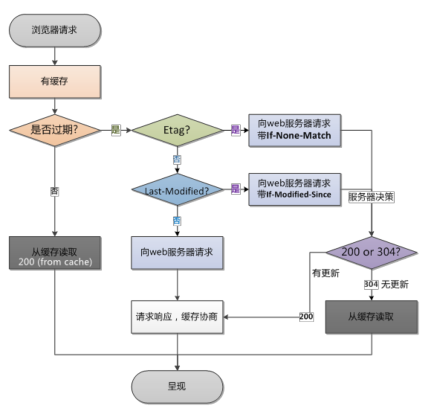
Etag 头部
Syntax: etag on | off;

Default: etag on;

Context: http, server, location
生成规则
ngx_sprintf(etag->value.data, "\"%xT-%xO\"",

r->headers_out.last_modified_time,

r->headers_out.content_length_n)
If-None-Match



Syntax: expires [modified] time;

expires epoch | max | off;   #指的一个绝对时间,表示缓存在这段时间内一直有效

Default: expires off;

Context: http, server, location, if in location

配置
[root@python vhast]# cat cache.conf

server {

	server_name cache.com;

	error_log logs/cacgeee.log;

	access_log logs/cache.log main;

	root html/;

	location /{

		etag on;  启用

		expires 1h;缓存1小时

		#expires -1h;

		#expires @20h30m;

		#if_modified_since off;

		#proxy_cache two;

		#proxy_cache_valid 100 10m;

		#add_header X-Cache-Status $upstream_cache_status;

		#proxy_cache_use_stale error timeout updating;

		#proxy_cache_revalidate on;

		#proxy_cache_background_update on;

		#proxy_hide_header	Set-Cookie;

		#proxy_ignore_headers	Set-Cookie;

		#proxy_force_ranges on;

		#proxy_pass http://127.0.0.1:8012;

		}

}
测试
[root@python vhast]# date -u

2019年 07月 17日 星期三 16:12:16 UTC

[root@python vhast]# curl cache.com/ -I

HTTP/1.1 200 OK

Server: nginx/1.15.9

Date: Wed, 17 Jul 2019 16:12:19 GMT

Content-Type: text/html

Content-Length: 612

Last-Modified: Wed, 10 Jul 2019 18:23:02 GMT

Connection: keep-alive

ETag: "5d262d06-264"

Expires: Wed, 17 Jul 2019 17:12:19 GMT

Cache-Control: max-age=3600

Accept-Ranges: bytes
配置
[root@python vhast]# cat cache.conf

server {

	server_name cache.com;

	error_log logs/cacgeee.log;

	access_log logs/cache.log main;

	root html/;

	location /{

		etag on;

		#expires 1h;

		expires -1h;  #设置前一小时失效

		#expires @20h30m;

		#if_modified_since off;

		#proxy_cache two;

		#proxy_cache_valid 100 10m;

		#add_header X-Cache-Status $upstream_cache_status;

		#proxy_cache_use_stale error timeout updating;

		#proxy_cache_revalidate on;

		#proxy_cache_background_update on;

		#proxy_hide_header	Set-Cookie;

		#proxy_ignore_headers	Set-Cookie;

		#proxy_force_ranges on;

		#proxy_pass http://127.0.0.1:8012;

		}

}
测试
[root@python vhast]# date -u

2019年 07月 17日 星期三 16:16:37 UTC

[root@python vhast]# curl cache.com/ -I

HTTP/1.1 200 OK

Server: nginx/1.15.9

Date: Wed, 17 Jul 2019 16:16:48 GMT

Content-Type: text/html

Content-Length: 612

Last-Modified: Wed, 10 Jul 2019 18:23:02 GMT

Connection: keep-alive

ETag: "5d262d06-264"

Expires: Wed, 17 Jul 2019 15:16:48 GMT

Cache-Control: no-cache  #缓存失效

Accept-Ranges: bytes
配置指的浏览器缓存到指定的时间
[root@python vhast]# cat cache.conf

server {

	server_name cache.com;

	error_log logs/cacgeee.log;

	access_log logs/cache.log main;

	root html/;

	location /{

		etag on;

		#expires 1h;

		#expires -1h;

		expires @20h30m; 缓存到最近的20点半

		#if_modified_since off;

		#proxy_cache two;

		#proxy_cache_valid 100 10m;

		#add_header X-Cache-Status $upstream_cache_status;

		#proxy_cache_use_stale error timeout updating;

		#proxy_cache_revalidate on;

		#proxy_cache_background_update on;

		#proxy_hide_header	Set-Cookie;

		#proxy_ignore_headers	Set-Cookie;

		#proxy_force_ranges on;

		#proxy_pass http://127.0.0.1:8012;

		}

}
测试
[root@python vhast]# date -u

2019年 07月 17日 星期三 16:18:54 UTC

[root@python vhast]# curl cache.com/ -I

HTTP/1.1 200 OK

Server: nginx/1.15.9

Date: Wed, 17 Jul 2019 16:18:57 GMT

Content-Type: text/html

Content-Length: 612

Last-Modified: Wed, 10 Jul 2019 18:23:02 GMT

Connection: keep-alive

ETag: "5d262d06-264"

Expires: Thu, 18 Jul 2019 12:30:00 GMT

Cache-Control: max-age=72663

Accept-Ranges: bytes
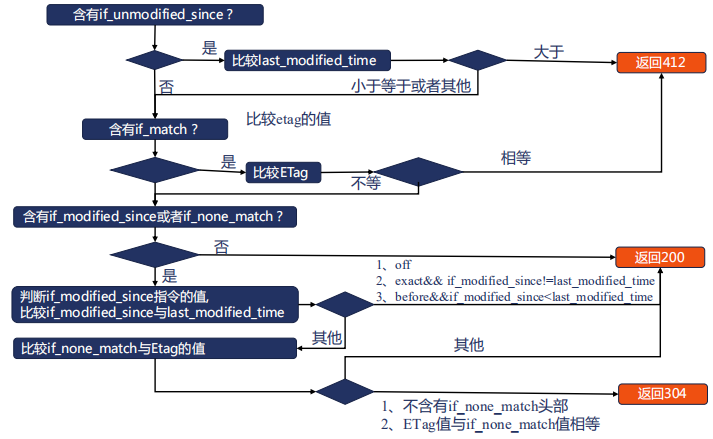
Syntax: if_modified_since off | exact | before;

Default: if_modified_since exact;

Context: http, server, location

测试
[root@python vhast]# curl cache.com/ -I

HTTP/1.1 200 OK

Server: nginx/1.15.9

Date: Wed, 17 Jul 2019 16:47:10 GMT

Content-Type: text/html

Content-Length: 612

Last-Modified: Wed, 10 Jul 2019 18:23:02 GMT

Connection: keep-alive

ETag: "5d262d06-264"

Expires: Thu, 18 Jul 2019 12:30:00 GMT

Cache-Control: max-age=70970

Accept-Ranges: bytes

[root@python vhast]# curl -H 'If_Modified_Since: Wed, 10 Jul 2019 18:23:02 GMT' -H 'If-None-Match: "5d262d06-264"' cache.com/ -I

HTTP/1.1 304 Not Modified#命中缓存

Server: nginx/1.15.9

Date: Wed, 17 Jul 2019 16:47:22 GMT

Last-Modified: Wed, 10 Jul 2019 18:23:02 GMT

Connection: keep-alive

ETag: "5d262d06-264"

Expires: Thu, 18 Jul 2019 12:30:00 GMT

Cache-Control: max-age=70958

[root@python vhast]# curl -H 'If_Modified_Since: Wed, 10 Jul 2019 18:23:02 GMT' -H 'If-None-Match: "5d262d06-267"' cache.com/ -I

HTTP/1.1 200 OK

Server: nginx/1.15.9

Date: Wed, 17 Jul 2019 16:48:12 GMT

Content-Type: text/html

Content-Length: 612

Last-Modified: Wed, 10 Jul 2019 18:23:02 GMT

Connection: keep-alive

ETag: "5d262d06-264"

Expires: Thu, 18 Jul 2019 12:30:00 GMT

Cache-Control: max-age=70908

Accept-Ranges: bytes


Syntax: proxy_cache zone | off;

Default: proxy_cache off;

Context: http, server, location

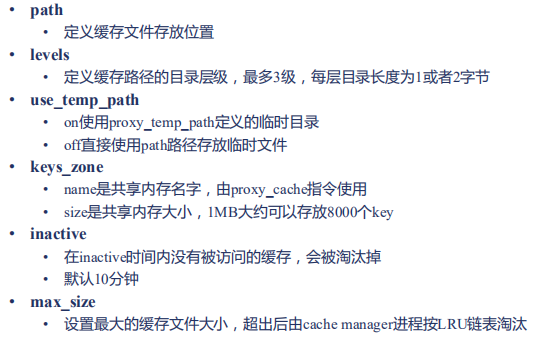
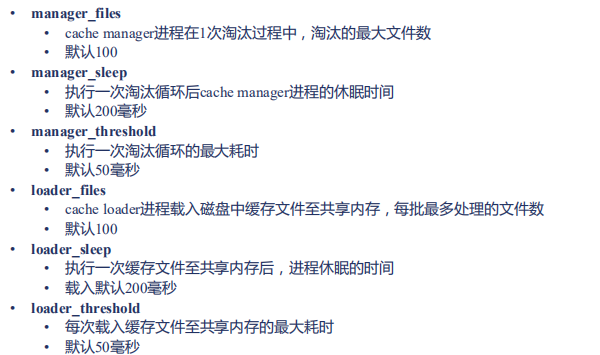
Syntax:

proxy_cache_path path [levels=levels] [use_temp_path=on|off]

keys_zone=name:size [inactive=time] [max_size=size] [manager_files=number]

[manager_sleep=time] [manager_threshold=time] [loader_files=number]

[loader_sleep=time] [loader_threshold=time] [purger=on|off] [purger_files=number]

[purger_sleep=time] [purger_threshold=time];

Default: —

Context: http
缓存关键字
Syntax: proxy_cache_key string;

Default: proxy_cache_key $scheme$proxy_host$request_uri;

Context: http, server, location
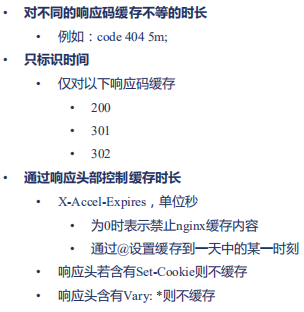
缓存什么样的响应
Syntax: proxy_cache_valid [code ...] time;

Default: —

Context: http, server, location
那些内容不使用缓存
参数为真时响应不存入缓存
Syntax: proxy_no_cache string ...;

Default: —

Context: http, server, location
参数为真时,不使用缓存内容
Syntax: proxy_cache_bypass string ...;

Default: —

Context: http, server, location
变更HEAD方法
Syntax: proxy_cache_convert_head on | off;

Default: proxy_cache_convert_head on;

Context: http, server, location
upstream_cache_status变量
缓存流程
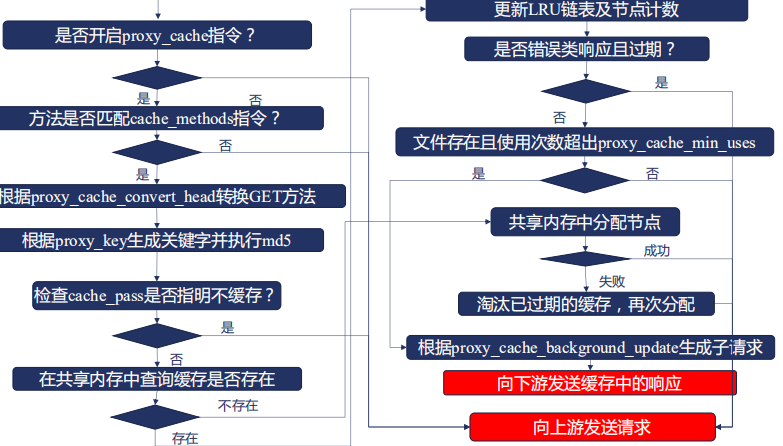
对那个method方法使用缓存返回响应
Syntax: proxy_cache_methods GET | HEAD | POST ...;

Default: proxy_cache_methods GET HEAD;

Context: http, server, location
配置
server {

	listen 8012;

	default_type text/plain;

	root html;

	location /{

		#add_header X-Accel-Limit-Rate 10;

	}

	location /test {

		return 200 '8012 server response.

uri: $uri

method: $request_method

requset: $request

http_name: $http_name

\n';

	}

}

[root@python vhast]# cat cache.conf

proxy_cache_path /data/web/cache levels=2:2 keys_zone=two:10m loader_threshold=300 loader_files=200 max_size=200m inactive=1m;

server {

	server_name cache.com;

	error_log logs/cacgeee.log;

	access_log logs/cache.log main;

	root html/;

	location /{

		etag on;

		#expires 1h;

		#expires -1h;

		#expires @20h30m;

		#if_modified_since off;

		proxy_cache two;

		proxy_cache_valid 200 1m;

		add_header X-Cache-Status $upstream_cache_status;

		#proxy_cache_use_stale error timeout updating;

		#proxy_cache_revalidate on;

		#proxy_cache_background_update on;

		#proxy_hide_header	Set-Cookie;

		#proxy_ignore_headers	Set-Cookie;

		#proxy_force_ranges on;

		proxy_pass http://127.0.0.1:8012;

		}

}
测试
[root@python vhast]# curl  cache.com/a.txt -I

HTTP/1.1 200 OK

Server: nginx/1.15.9

Date: Wed, 17 Jul 2019 17:23:40 GMT

Content-Type: text/plain

Content-Length: 23

Connection: keep-alive

Last-Modified: Fri, 12 Jul 2019 14:07:41 GMT

ETag: "5d28942d-17"

X-Cache-Status: MISS   第一次

Accept-Ranges: bytes

[root@python vhast]# curl  cache.com/a.txt -I

HTTP/1.1 200 OK

Server: nginx/1.15.9

Date: Wed, 17 Jul 2019 17:23:44 GMT

Content-Type: text/plain

Content-Length: 23

Connection: keep-alive

Last-Modified: Fri, 12 Jul 2019 14:07:41 GMT

ETag: "5d28942d-17"

X-Cache-Status: HIT  第二次

Accept-Ranges: bytes
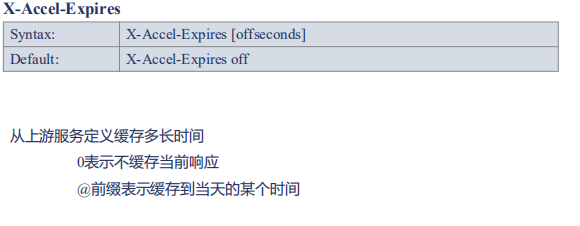
X-Accel-Expires头部
配置
server {

        listen 8012;

        default_type text/plain;

        #client_body_in_single_buffer on;

        #add_header Cache_Control 'max-age=3,stale-while-revalidate=3';

        #add_header Vary *;

        add_header X-Accel-Expires 3; #定义代理服务器缓存为3秒

        root html;

        location /{

                #add_header X-Accel-Limit-Rate 10;

        }

        location /test {

                return 200 '8012 server response.

uri: $uri

method: $request_method

requset: $request

http_name: $http_name

\n';

        }

}
测试
[root@python vhast]# curl  cache.com/a.txt -I

HTTP/1.1 200 OK

Server: nginx/1.15.9

Date: Wed, 17 Jul 2019 17:35:20 GMT

Content-Type: text/plain

Content-Length: 23

Connection: keep-alive

Last-Modified: Fri, 12 Jul 2019 14:07:41 GMT

ETag: "5d28942d-17"

X-Cache-Status: EXPIRED

Accept-Ranges: bytes

[root@python vhast]# curl  cache.com/a.txt -I

HTTP/1.1 200 OK

Server: nginx/1.15.9

Date: Wed, 17 Jul 2019 17:35:21 GMT

Content-Type: text/plain

Content-Length: 23

Connection: keep-alive

Last-Modified: Fri, 12 Jul 2019 14:07:41 GMT

ETag: "5d28942d-17"

X-Cache-Status: HIT

Accept-Ranges: bytes

[root@python vhast]# curl  cache.com/a.txt -I

HTTP/1.1 200 OK

Server: nginx/1.15.9

Date: Wed, 17 Jul 2019 17:35:22 GMT

Content-Type: text/plain

Content-Length: 23

Connection: keep-alive

Last-Modified: Fri, 12 Jul 2019 14:07:41 GMT

ETag: "5d28942d-17"

X-Cache-Status: HIT

Accept-Ranges: bytes

[root@python vhast]# curl  cache.com/a.txt -I

HTTP/1.1 200 OK

Server: nginx/1.15.9

Date: Wed, 17 Jul 2019 17:35:23 GMT

Content-Type: text/plain

Content-Length: 23

Connection: keep-alive

Last-Modified: Fri, 12 Jul 2019 14:07:41 GMT

ETag: "5d28942d-17"

X-Cache-Status: HIT

Accept-Ranges: bytes

[root@python vhast]# curl  cache.com/a.txt -I

HTTP/1.1 200 OK

Server: nginx/1.15.9

Date: Wed, 17 Jul 2019 17:35:25 GMT

Content-Type: text/plain

Content-Length: 23

Connection: keep-alive

Last-Modified: Fri, 12 Jul 2019 14:07:41 GMT

ETag: "5d28942d-17"

X-Cache-Status: EXPIRED

Accept-Ranges: bytes
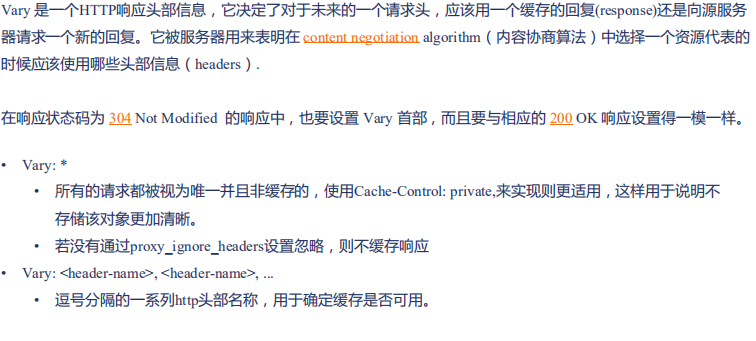
vary 头部
配置
server {

	listen 8012;

	default_type text/plain;

	#client_body_in_single_buffer on;

	#add_header Cache_Control 'max-age=3,stale-while-revalidate=3';

	add_header Vary *;  #配置代理不缓存

	add_header X-Accel-Expires 3; #定义上游服务器缓存为3

	root html;

	location /{

		#add_header X-Accel-Limit-Rate 10;

	}

	location /test {

		return 200 '8012 server response.

uri: $uri

method: $request_method

requset: $request

http_name: $http_name

\n';

	}

}
测试
[root@python vhast]# curl  cache.com/a.txt -I

HTTP/1.1 200 OK

Server: nginx/1.15.9

Date: Wed, 17 Jul 2019 17:38:23 GMT

Content-Type: text/plain

Content-Length: 23

Connection: keep-alive

Last-Modified: Fri, 12 Jul 2019 14:07:41 GMT

ETag: "5d28942d-17"

Vary: *

Accept-Ranges: bytes

X-Cache-Status: MISS

[root@python vhast]# curl  cache.com/a.txt -I

HTTP/1.1 200 OK

Server: nginx/1.15.9

Date: Wed, 17 Jul 2019 17:38:23 GMT

Content-Type: text/plain

Content-Length: 23

Connection: keep-alive

Last-Modified: Fri, 12 Jul 2019 14:07:41 GMT

ETag: "5d28942d-17"

Vary: *

Accept-Ranges: bytes

X-Cache-Status: MISS
Set-Cookie头部
Set-Cookie: <cookie-name>=<cookie-value>

Set-Cookie: <cookie-name>=<cookie-value>; Expires=<date>

Set-Cookie: <cookie-name>=<cookie-value>; Max-Age=<non-zero-digit>

Set-Cookie: <cookie-name>=<cookie-value>; Domain=<domain-value>

Set-Cookie: <cookie-name>=<cookie-value>; Path=<path-value>

Set-Cookie: <cookie-name>=<cookie-value>; Secure

Set-Cookie: <cookie-name>=<cookie-value>; HttpOnly

Set-Cookie: <cookie-name>=<cookie-value>; SameSite=Strict

Set-Cookie: <cookie-name>=<cookie-value>; SameSite=Lax

Set-Cookie: <cookie-name>=<cookie-value>; Domain=<domain-value>; Secure; HttpOnly
缓存流程:接收上游的响应

合并回源请求-减少峰值流量下的压力
Syntax: proxy_cache_lock on | off;

Default: proxy_cache_lock off;

Context: http, server, location

同一时间,仅第一个请求发往上游,其他请求等待第一个响应返回或者超时候,使用缓存响应客户端

Syntax: proxy_cache_lock_timeout time;

Default: proxy_cache_lock_timeout 5s;

Context: http, server, location

等待第一个请求返回响应的最大时间,到达后直接向上游发送请求,但不缓存响应

Syntax: proxy_cache_lock_age time;

Default: proxy_cache_lock_age 5s;

Context: http, server, location

上一个请求返回响应的超时时间,到达后再放行一个请求发送向上游
减少回源请求试图stale陈旧的缓存
Syntax: proxy_cache_use_stale error | timeout | invalid_header |

updating | http_500 | http_502 | http_503 | http_504 |

http_403 | http_404 | http_429 | off ...;

Default: proxy_cache_use_stale off;

Context: http, server, location

Syntax: proxy_cache_background_update on | off;

Default: proxy_cache_background_update off;

Context: http, server, location
proxy_cache_use_stale指定陈旧缓存的用法

缓存有问题时的响应
Syntax: proxy_cache_background_update on | off;

Default: proxy_cache_background_update off;

Context: http, server, location
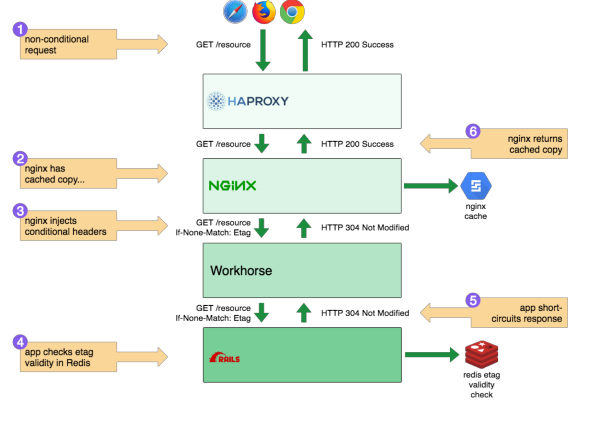
当使用proxy_cache_use_stale允许使用过期响应时,将同步生成一个子请求,通过访问上游服务更新过期的缓存
Syntax: proxy_cache_revalidate on | off;

Default: proxy_cache_revalidate off;

Context: http, server, location
更新缓存时,使用If-Modified-Since和If-None-Match作为请求头部,预期内容未发生变更时通过304来减少传输的内容
及时清除缓存
模块第三方模块ngx_cache_purge 地址 https://github.com/FRiCKLE/ngx_cache_purge
使用--add-module=指令编译添加到nginx中
功能:接收到指定HTTP请求后立刻清除缓存
•syntax: proxy_cache_purge on|off|<method> [from all|<ip> [.. <ip>]]

•default: none

•context: http, server, location

•syntax: proxy_cache_purge zone_name key

•default: none

•context: location
编译进第三方模块
git clone https://github.com/FRiCKLE/ngx_cache_purge.git

 cd nginx-1.15.9/

./configure --prefix=/data/web --sbin-path=/usr/bin --user=nginx --group=nginx --with-http_stub_status_module --with-http_auth_request_module --with-http_sub_module --add-module=/root/nginx-http-concat --with-http_addition_module --with-http_secure_link_module --with-http_geoip_module  --with-http_ssl_module  --add-module=/root/ngx_cache_purge

 make

mv /usr/bin/nginx{,.01.18.15.41}

cp objs/nginx /usr/bin/
配置
[root@python vhast]# cat cache.conf

proxy_cache_path /data/web/cache levels=2:2 keys_zone=two:10m loader_threshold=300 loader_files=200 max_size=200m inactive=1m;

server {

	server_name cache.com;

	error_log logs/cacgeee.log;

	access_log logs/cache.log main;

	root html/;

	location ~/purge(/.*) {

		proxy_cache_purge two $scheme$1;  匹配上的时候,就清空这个缓存

	}

	location /{

		etag on;

		#expires 1h;

		#expires -1h;

		#expires @20h30m;

		#if_modified_since off;

		proxy_cache two;

		proxy_cache_valid 200 1m;

		add_header X-Cache-Status $upstream_cache_status;

		#proxy_cache_use_stale error timeout updating;

		#proxy_cache_revalidate on;

		#proxy_cache_background_update on;

		#proxy_hide_header	Set-Cookie;

		#proxy_ignore_headers	Set-Cookie;

		#proxy_force_ranges on;

		proxy_cache_key $scheme$uri;

		proxy_pass http://127.0.0.1:8012;

		}

}
测试
[root@python vhast]# curl  cache.com/index.html -I

HTTP/1.1 200 OK

Server: nginx/1.15.9

Date: Wed, 17 Jul 2019 20:16:30 GMT

Content-Type: text/html

Content-Length: 612

Connection: keep-alive

Last-Modified: Wed, 10 Jul 2019 18:23:02 GMT

ETag: "5d262d06-264"

X-Cache-Status: MISS #未命中

Accept-Ranges: bytes

[root@python vhast]# curl  cache.com/index.html -I

HTTP/1.1 200 OK

Server: nginx/1.15.9

Date: Wed, 17 Jul 2019 20:16:31 GMT

Content-Type: text/html

Content-Length: 612

Connection: keep-alive

Last-Modified: Wed, 10 Jul 2019 18:23:02 GMT

ETag: "5d262d06-264"

X-Cache-Status: HIT   #命中

Accept-Ranges: bytes

[root@python vhast]# curl  cache.com/index.html -I

HTTP/1.1 200 OK

Server: nginx/1.15.9

Date: Wed, 17 Jul 2019 20:16:35 GMT

Content-Type: text/html

Content-Length: 612

Connection: keep-alive

Last-Modified: Wed, 10 Jul 2019 18:23:02 GMT

ETag: "5d262d06-264"

X-Cache-Status: HIT #命中

Accept-Ranges: bytes

[root@python vhast]# curl  cache.com/purge/index.html -I  #清除缓存

HTTP/1.1 200 OK

Server: nginx/1.15.9

Date: Wed, 17 Jul 2019 20:16:40 GMT

Content-Type: text/html

Content-Length: 270

Connection: keep-alive

[root@python vhast]# curl  cache.com/index.html -I

HTTP/1.1 200 OK

Server: nginx/1.15.9

Date: Wed, 17 Jul 2019 20:16:42 GMT

Content-Type: text/html

Content-Length: 612

Connection: keep-alive

Last-Modified: Wed, 10 Jul 2019 18:23:02 GMT

ETag: "5d262d06-264"

X-Cache-Status: MISS #未命中

Accept-Ranges: bytes
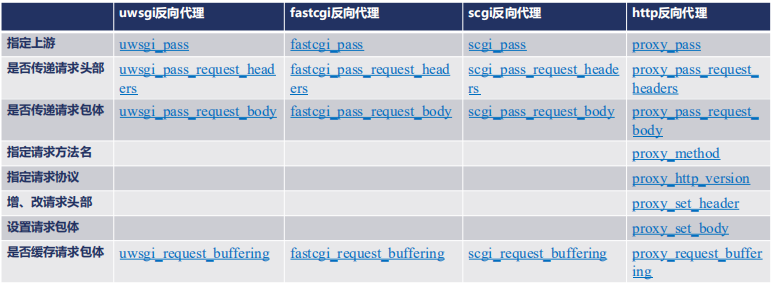
七层反向代理对照:构造请求内容
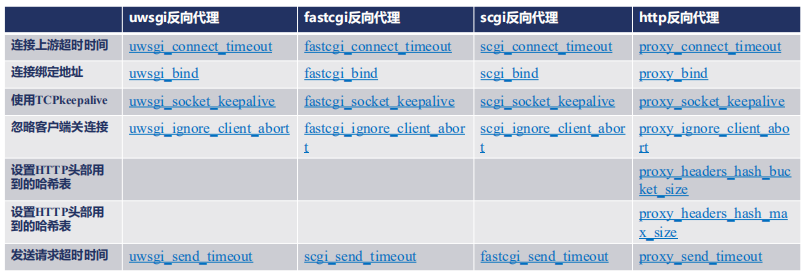
七层反向代理对照:建立连接并发送请求
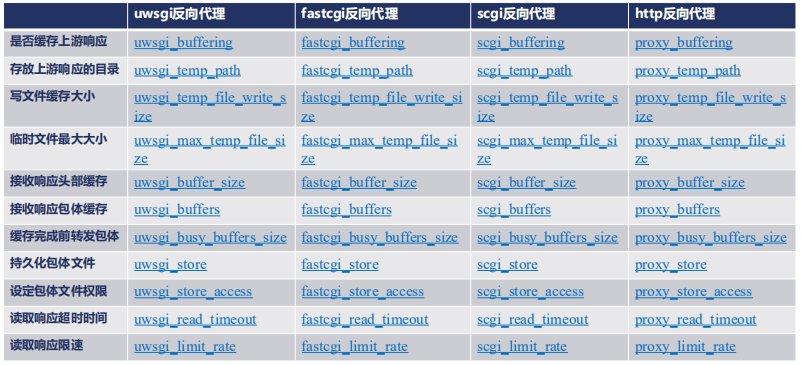
七层反向代理:接收上游响应
转发响应
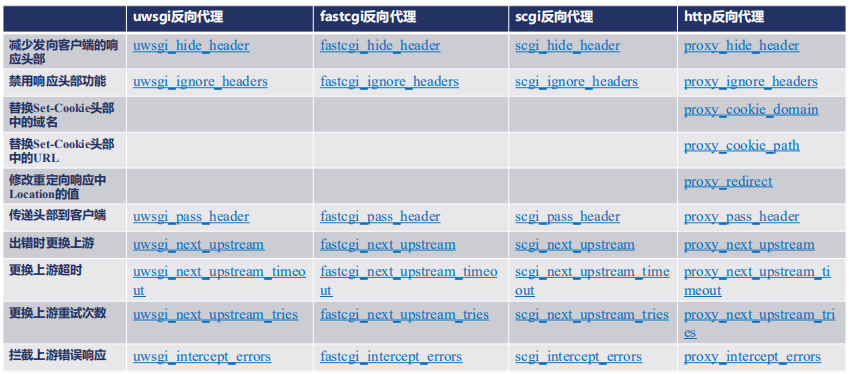
七层代理SSL
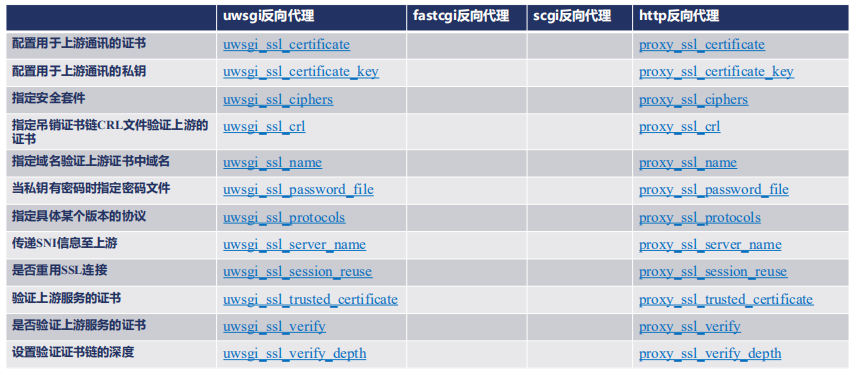
缓存类的指令
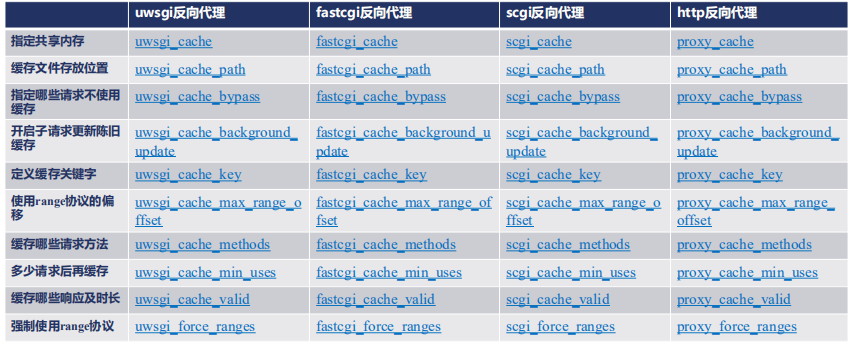

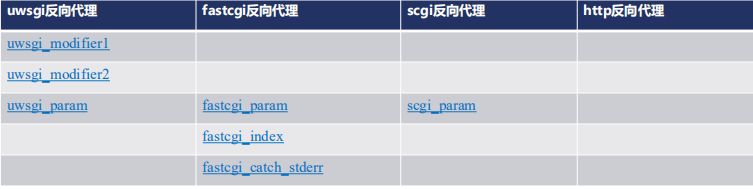
七层反代独有配置
nginx 缓存的更多相关文章
- ASP.NET Core 缓存技术 及 Nginx 缓存配置
前言 在Asp.Net Core Nginx部署一文中,主要是讲述的如何利用Nginx来实现应用程序的部署,使用Nginx来部署主要有两大好处,第一是利用Nginx的负载均衡功能,第二是使用Nginx ...
- nginx缓存设置proxy_cache
http://www.cnblogs.com/dudu/p/4597351.html http块: proxy_cache_path /tmp/cache levels=1:2 keys_zone=n ...
- nginx缓存配置的操作记录梳理
web缓存位于内容源Web服务器和客户端之间,当用户访问一个URL时,Web缓存服务器会去后端Web源服务器取回要输出的内容,然后,当下一个请求到来时,如果访问的是相同的URL,Web缓存服务器直接输 ...
- nginx 缓存机制
nginx 缓存机制 Nginx缓存的基本思路 利用请求的局部性原理,将请求过的内容在本地建立一个副本,下次访问时不再连接到后端服务器,直接响应本地内容 Nginx服务器启动后,会对本地磁盘上的缓 ...
- Nginx 缓存参数
看看这下面两个指令参数: ----------------------------------------------------------------- proxy_cache_path /ho ...
- 分布式Nginx缓存清理(PHP的socket编程)
最近,公司要使用康乐的几台自建CDN换成Nginx,在缓存配置上不会有很多的问题,纠结的问题是:Nginx的如何批量进行缓存清理 我们都知道Nginx提供了一个第三方的模块"nginx ng ...
- nginx缓存优先级(缓存问题者必看)
接触nginx的兄弟或多或少都有遇到缓存问题,要么是nginx为什么不缓存,要么就是nginx缓存很快就失效等等问题,在网上找了一遍nginx缓存优先级的文章,大家可以参考下. 架构图client端 ...
- Nginx实现负载均衡&Nginx缓存功能
一.Nginx是什么 Nginx (engine x) 是一个高性能的HTTP和反向代理服务器,也是一个IMAP/POP3/SMTP服务器.Nginx是由伊戈尔·赛索耶夫为俄罗斯访问量第二的Rambl ...
- 使用nginx缓存服务器上的静态文件
一.nginx缓存的优点 如图所示,nginx缓存,可以在一定程度上,减少源服务器的处理请求压力. 因为静态文件(比如css,js, 图片)中,很多都是不经常更新的.nginx使用proxy_cach ...
- nginx缓存设置(expires)
一.expires功能说明 nginx缓存的设置可以提高网站性能,对于网站的图片,尤其是新闻网站,图片一旦发布,改动的可能是非常小的,为了减小对服务器请求的压力,提高用户浏览速度,我们可以通过设置ng ...
随机推荐
- UVA 11384 Help is needed for Dexter(递归)
题目链接:https://vjudge.net/problem/UVA-11384 这道题要分析得透: 如果我们手模的话,会发现:如果先将大于$\frac{n}{2}$的数都减去$\frac{n}{2 ...
- Intersection over Union(IoU) algorithms
IoU算法可用与评估两个多维度数据的相似度,举一个实际应用,做CV,目标检测,我们需要评估模型的识别准确率,不同于二元类问题,普通的评估算法不合适,于是用到了这个算法,这个算法简单易懂,评估效果也不错 ...
- Unity UGUI事件接口概述
UGUI 系统虽然提供了很多封装好的组件,但是要实现一些特定的功能还是显得非常有限,这时候就需要使用事件接口来完成UI功能的实现.比如我们想实现鼠标移动到图片上时自动显示图片的文字介绍,一般思路会想到 ...
- inconsistent use of tabs and spaces in indentation
这个报错就是混用了tab和4个空格造成的,检查代码,要不全部用tab,要不全部用4个空格,或者用idle编辑器校正
- Spring Boot 操作 Excel
Excel 在日常操作中经常使用到,Spring Boot 中使用 POI 操作 Excel 本项目源码 github 下载 1 新建 Spring Boot Maven 示例工程项目 注意:本示例是 ...
- AcWing - 156 矩阵(二维哈希)
题目链接:矩阵 题意:给定一个$m$行$n$列的$01$矩阵$($只包含数字$0$或$1$的矩阵$)$,再执行$q$次询问,每次询问给出一个$a$行$b$列的$01$矩阵,求该矩阵是否在原矩阵中出现过 ...
- jq 获取input多选框
1.获取checkbox选中个数 $("input[name='ckb-jobid']:checked").length $("input[type='checkbox' ...
- 第八届极客大挑战 Web-php绕过
0x01.web-PHP的悖论1 题目: 链接:http://game.sycsec.com:2009/10111.php 解题思路: 1.首先,web对于选择二进制方向的我这个菜鸡绝对是十分懵逼的, ...
- next_permutation的使用-Hdu1027
Ignatius and the Princess II Time Limit: 2000/1000 MS (Java/Others) Memory Limit: 65536/32768 K ( ...
- 校准产品质量,把控出海航向,腾讯WeTest《2019中国移动游戏质量白皮书》正式开放预约
作者:wetest小编 商业转载请联系腾讯WeTest获得授权,非商业转载请注明出处. 原文链接:https://wetest.qq.com/lab/view/483.html 每当步入一个新的年份, ...