
go get 获得 golang.org 的项目
go get 用来动态获取远程代码包的,目前支持的有BitBucket、GitHub、Google Code和Launchpad。这个命令在内部实际上分成了两步操作:第一步是下载源码包,第二步是执行go install。下载源码包的go工具会自动根据不同的域名调用不同的源码工具,对应关系如下:
BitBucket (Mercurial Git)
GitHub (Git)
Google Code Project Hosting (Git, Mercurial, Subversion)
Launchpad (Bazaar)
go get 的参数说明:
-d 只下载不安装
-f 只有在你包含了-u参数的时候才有效,不让-u去验证import中的每一个都已经获取了,这对于本地fork的包特别有用
-fix 在获取源码之后先运行fix,然后再去做其他的事情
-t 同时也下载需要为运行测试所需要的包
-u 强制使用网络去更新包和它的依赖包
-v 显示执行的命令
注意,这里的 –v 参数对我们分析问题很有帮助。
参考:https://github.com/astaxie/build-web-application-with-golang/blob/master/zh/01.3.md
国内由于墙,我们会收到 unrecognized import path 的错误,这时候我们如何通过命令行来执行 go get 呢?
这时我们会获得类似如下错误:
go get -u -v golang.org/x/oauth2
Fetching https://golang.org/x/oauth2?go-get=1
https fetch failed.
import "golang.org/x/oauth2": https fetch: Get https://golang.org/x/oauth2?go-get=1: dial tcp 216.58.221.145:443: i/o timeout
package golang.org/x/oauth2: unrecognized import path "golang.org/x/oauth2"
localhost:~ ghj1976$
如果目录下有以前的版本,则是如下情况:
go get -u -v golang.org/x/oauth2
Fetching https://golang.org/x/oauth2?go-get=1
https fetch failed.
import "golang.org/x/oauth2": https fetch: Get https://golang.org/x/oauth2?go-get=1: dial tcp 216.58.221.145:443: i/o timeout
golang.org/x/oauth2 (download)
Fetching https://golang.org/x/net/context?go-get=1
https fetch failed.
import "golang.org/x/net/context": https fetch: Get https://golang.org/x/net/context?go-get=1: dial tcp 216.58.221.145:443: i/o timeout
golang.org/x/net (download)
Fetching https://golang.org/x/oauth2/internal?go-get=1
https fetch failed.
import "golang.org/x/oauth2/internal": https fetch: Get https://golang.org/x/oauth2/internal?go-get=1: dial tcp 216.58.221.145:443: i/o timeout
golang.org/x/net/context
golang.org/x/oauth2/internal
golang.org/x/oauth2
localhost:~ ghj1976$
这时候我们需要设置代理。代理工具我推荐用 lantern https://github.com/getlantern/lantern
需要注意的是,它的代理地址是: http://127.0.0.1:8787 而不是 http://127.0.0.1:16823/ ,后一个是它的配置网站地址。
以mac为例, 在命令行 Terminal 中设置网络代理,一般方法如下:
root@ed27c545f7af:~# cat ~/proxy.conf

export http_proxy=http://172.17.42.1:8118

export https_proxy=$http_proxy

export ftp_proxy=$http_proxy

export rsync_proxy=$http_proxy

export no_proxy="localhost,127.0.0.1,localaddress,.localdomain.com"参考:https://github.com/tools/godep/issues/154
win下 用 set 代理 export ,参考 https://groups.google.com/forum/#!topic/lantern-users-zh/FiywFrEHSHE
删除环境变量用
删除:unset 变量名 参考 http://blog.csdn.net/debug_cpp/article/details/2679991
当前系统上下文的环境设置可以用 env 命令查看。
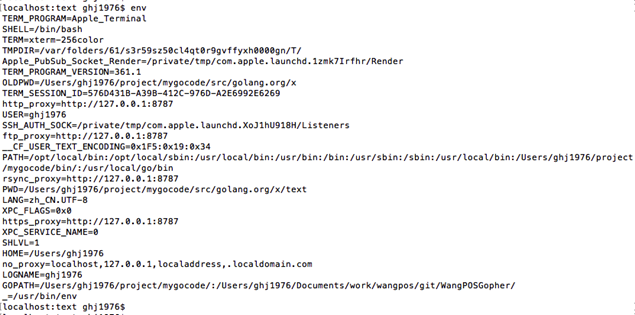
https://code.google.com/p/go/issues/detail?id=2919
这步代理设置后,我们可以用 wget 命令去试验效果。参考: https://github.com/getlantern/lantern/issues/3341
另外,go get 使用的 git 、mercurial、svn 设置代理的方法请参考:
https://github.com/golang/go/wiki/GoGetProxyConfig
以我们最常用的 git 为例,
在终端设置:
git config --global http.proxy http://127.0.0.1:1080
git config --global https.proxy https://127.0.0.1:1080
默认不设置代理:
git config --global --unset http.proxy
git config --global --unset https.proxy
查看已经设置的值:
git config http.proxy
参考: http://blog.csdn.net/dengbin9009/article/details/38058153
配置完成后,以下载 golang.org/x/net 为例,执行的返回值如下:
go get -u -v golang.org/x/net
Fetching https://golang.org/x/net?go-get=1
Parsing meta tags from https://golang.org/x/net?go-get=1 (status code 200)
get "golang.org/x/net": found meta tag main.metaImport{Prefix:"golang.org/x/net", VCS:"git", RepoRoot:"https://go.googlesource.com/net"} at https://golang.org/x/net?go-get=1
golang.org/x/net (download)
package golang.org/x/net: no buildable Go source files in /Users/ghj1976/project/mygocode/src/golang.org/x/net
localhost:text ghj1976$
我们可以看到其实是到 https://go.googlesource.com/text/ 这样的地址去下载源码的。中间涉及到跳转和git下载,所以 要注意, 网络请求的 http_proxy 和 git 的 代理 都需要设置才可以。
go get 获得 golang.org 的项目的更多相关文章
- Golang优秀开源项目汇总, 10大流行Go语言开源项目, golang 开源项目全集(golang/go/wiki/Projects), GitHub上优秀的Go开源项目
Golang优秀开源项目汇总(持续更新...)我把这个汇总放在github上了, 后面更新也会在github上更新. https://github.com/hackstoic/golang-open- ...
- golang多个项目时如何配置GOPATH,使用gb包依赖管理工具,不同项目配置不同的GOPATH的
golang多个项目时如何配置GOPATH,使用gb包依赖管理工具,不同项目配置不同的GOPATH的 1:执行脚本setGoPath.sh#!/bin/bashif [[ $GOPATH =~ .*$ ...
- Golang校招简历项目-简单的分布式缓存
前言 前段时间,校招投了golang岗位,但是没什么好的项目往简历上写,于是参考了许多网上资料,做了一个简单的分布式缓存项目. 现在闲下来了,打算整理下. github项目地址:https://git ...
- github上用golang写的项目
1.moby/moby docker的新马甲 2.kubernetes/kubernetes 分布式容器管理 3.grafana/grafana 一个可视化面板,有漂亮的仪表盘,多种数据来源,适合做系 ...
- Docker部署golang微服务项目
这篇博客是为了记录一下部署步骤. 因为实训需要,我要在服务器上用docker部署我们小组的微服务项目.我们的微服务有Gateway,User,Scene,Device四个部分,分别占用不同的端口,其中 ...
- Golang 开发框架 gin 项目时笔记
1.模板引入时报错: func main() { router := gin.Default() router.LoadHTMLGlob("templates/**/*") rou ...
- [Golang]一些书城项目中出现错误的原因和解决办法(三)
跟着B站尚硅谷的GoWeb教程写书城项目,整理一下自己写的时候出现的错误和解决办法. 错误五:订单管理界面无法显示订单内容. 解决办法:我是直接把 day06 里的 order 文件夹粘贴过来了,or ...
- [Golang]一些书城项目中出现错误的原因和解决办法(二)
跟着B站尚硅谷的GoWeb教程写书城项目,整理一下自己写的时候出现的错误和解决办法. 错误三:数据库的 cart_items 表中 total_count 始终为 0. 原因:更新购物车信息的 Upd ...
- [Golang]一些书城项目中出现错误的原因和解决办法(一)
跟着B站尚硅谷的GoWeb教程写书城项目,整理一下自己写的时候出现的错误和解决办法. 错误一:cartItem中只能加入一种书,SQL语句没有问题,但是购物车中的总金额和总数量正确: 原因:cartI ...
随机推荐
- Linux下升级python
本文的Linux系统为CentOS 7 64 在Linux系统的下载文件夹中邮件打开终端,输入命令: wget http://www.python.org/ftp/python/3.4.4/Pytho ...
- 2 TKinter绑定事件
通过command属性给button绑定事件 目的:点击一下按扭,在窗口中出现一行字 第一种方法(command): #!/usr/bin/env python # _*_ coding:utf-8 ...
- Nokia 的 Scrum标准
Nokia 的 Scrum标准:• 迭代要有固定时长(被称为“时间盒——timebox”),不能超过六个星期.• 在每一次迭代的结尾,代码都必须经过 QA 的测试,能够正常工作.• Scrum 团队必 ...
- Oracle内存参数配置及版本问题
Oracle的内存配置与Oracle性能息息相关.从总体上讲,可以分为两大块:共享部分(主要是SGA)和进程独享部分(主要是PGA).在 32 位操作系统下 的Oracle版本,不时有项目反馈关于内存 ...
- NFC会员管理-转载自http://technews.cn/2014/09/13/nfc-sticker/
基隆的百年名店“李鹄饼店”误用馊水油,客人纷纷上门退货,因退货条件宽松,客人一货两退,造成巨大的损失.为了平息客人的愤怒,店家允许客人凭发 票或商品办理退货,有的客人先用发票退一次钱,再用商品退一次钱 ...
- Quartz CronTrigger最完整配置说明
转:http://www.blogjava.net/xmatthew/archive/2009/02/15/253864.html Quartz CronTrigger最完整配置说明 CronTr ...
- 多线程编程之Linux环境下的多线程(一)
一.Linux环境下的线程 相对于其他操作系统,Linux系统内核只提供了轻量级进程的支持,并未实现线程模型.Linux是一种“多进程单线程”的操作系统,Linux本身只有进程的概念,而其所谓的“线程 ...
- jquery中关于append()的用法笔记---append()节点移动与复制之说
jquery中关于append()的用法笔记---append()节点移动与复制之说 今天看一本关于jquery的基础教程,看到其中一段代码关于append()的一行,总是百思不得其解.于是查了查官方 ...
- jQuery图片无缝滚动JS代码ul/li结构
<!DOCTYPE html PUBLIC "-//W3C//DTD XHTML 1.0 Transitional//EN" "http://www.w3.org/ ...
- SPOJ #429 Simple Numbers Conversion
This is simply a human work simulation - exactly reproducing how you do it by hand. Nothing special. ...