
install kinect driver for ARM---38
原创博客:转载请标明出处:http://www.cnblogs.com/zxouxuewei/
The video describes connecting a Microsoft Kinect to the NVIDIA Jetson TK1 Development Kit.
The Kinect provides 3D depth information about a scene. This is commonly referred to as a RGBD device because the depth information is returned encoded in an RGB image, with the color of each pixel representing how far away an object is from the sensor. Red is close, green is in the middle, blue is furthest away.
The demonstration shows a Microsoft Kinect 360 model 1414, the original XBOX 360 sensor. The Jetson and the Kinect are plugged into a 7 port USB hub, along with a keyboard and a mouse.
Some more information about Kinect
first install the libusb,By means of manual compilation
Download the libusb-master.zip or Can contact me via email 1192916972@qq.com
sudo ./autogen.sh
sudo make
sudo make install
sudo ldconfig
Installing the OpenKinect Drivers
Installing the OpenKinect libraries (libfreenect) is straightforward. A prerequisite for this installation is Internet access and installation of the Universe package repositories. These commands are entered using the ‘Terminal’ app, which is commonly referred to as the command line.
Universe packages can be added with:
$ sudo apt-add-repository universe
$ sudo apt-get update$sudo apt-get install ros-indigo-openni*
To build the freenect library, first make sure that you have the build tools and library dependencies installed:
$ sudo apt-get install
cmake
freeglut3-dev
pkg-config
build-essential
libxmu-dev
libxi-dev
libusb-1.0-0-dev
Then Git clone the libfreenect repository:
$ git clone git://github.com/OpenKinect/libfreenect.git
Build libfreenect
To build the libfreenect library, start in the Home directory at the command line. Then enter the following commands:
$ cd libfreenect
$ mkdir build
$ cd build
$ cmake ..
$ make
$ sudo make install
NOTE: If you would like to uninstall libfreenect at some later time, go the ‘build’ directory:
$ sudo make uninstall
USB Autosuspend
As noted in the video, there is an issue with the default setting for
USB ports being turned off when not in use. The Jetson does this to
save energy. If this happens when the Kinect is connected, the Jetson
will not recognize the Kinect. A solution is to execute commands
automatically on every boot-up that alter this behavior. You can put
your commands into the “/etc/rc.local” boot up script. For example, run
this on your board:
$ sudo gedit /etc/rc.local
Then add this near the bottom of the file but before the “exit” line:
# Disable USB auto-suspend, since it disconnects some devices such as webcams on Jetson TK1.
echo -1 > /sys/module/usbcore/parameters/autosuspend
Save the file.
You then reboot the machine so that the changes take effect.
$ sudo reboot
NOTE: If you would like to do this more selectively, you can enter this command on the command line:
sudo bash -c ‘echo -1 > /sys/module/usbcore/parameters/autosuspend’
which will cause autosuspend to be turned off until the next boot cycle.
Sample Programs
Once the Jetson powers back up, and the Desktop appears on the screen. Plug in the Kinect to the USB hub. NOTE:You
may have to unplug then plug back in the Kinect on every boot. The
auto-suspension does not appear to take effect until after the port is
powered down the first time. Navigate to the bin directory where the samples reside:
cd libfreenect/build/bin
and run one of the sample programs:
sudo ./freenect-glview
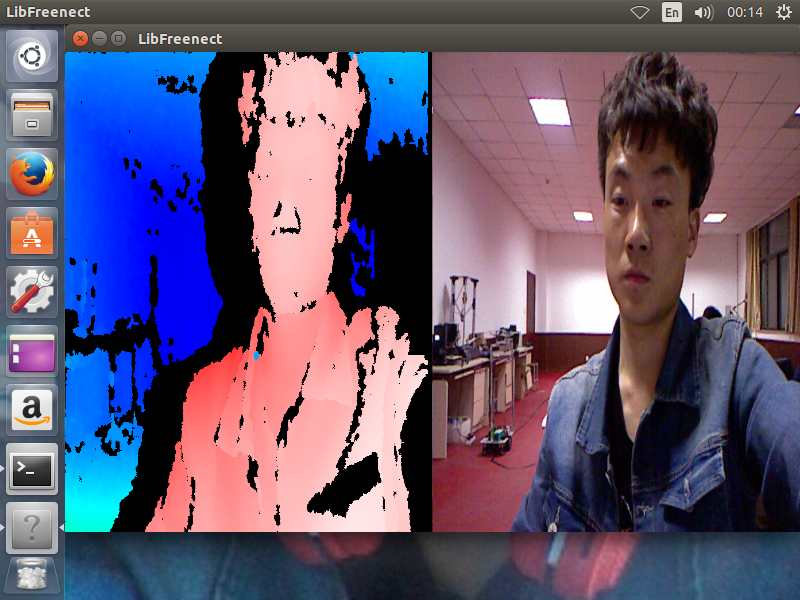
Then you are ready to play and have some fun!
Permissions
If you do not want to run your programs using sudo, you can add rules
to your udev rules directory. Place the file ’51-kinect.rules’ into
/etc/udev/rules.d directory, and set the video permissions.
First change your directory to your libfreenect/platform/linux/udev directory, then:
$ sudo adduser $USER video
$ sudo cp 51-kinect.rules /etc/udev/rules.d/51-kinect.rules
Make sure to log out and then log back in.
install kinect driver for ARM---38的更多相关文章
- ubuntu14.04 and ros indigo install kinect driver--16
摘要: 原创博客:转载请表明出处:http://www.cnblogs.com/zxouxuewei/ 今日多次测设ros indigo install kinect driver ,提示各种失败,然 ...
- kinect driver install (ubuntu 14.04 & ros-indigo)
kinect driver 安装过程: 1.在ubuntu上安装kinect驱动比较繁琐,需要安装以下3个驱动包, OpenNI-Bin-Dev-Linux-x64-v1.5.7.10 NITE-Bi ...
- Install Nvidia driver 367.18 or later
Install Nvidia driver 367.18 or later from ppa:graphics-drivers/ppa as follows: sudo add-apt-reposit ...
- Ubuntu 16.04 Install NVidia Driver (download from nvidia official site)
sudo apt-get update sudo apt-mark hold libreoffice sudo apt-get update && sudo apt-get upgra ...
- Install MongoDB driver for PHP on XAMPP for Mac OSX
试了不少方法,最后还是这个最有效. [转自:http://thatsimplecode.com/install-mongodb-driver-for-php-on-xampp-for-mac-osx] ...
- centos install rtl8188ce driver
1.导入公钥,注意大小写. rpm --import http://elrepo.org/RPM-GPG-KEY-elrepo.org 2.安装ELRepo库. rpm -Uvh http://elr ...
- ubuntu 15.10 install nvidia driver
先添加源sudo add-apt-repository ppa:graphics-drivers/ppa 更新一下:sudo apt-get update (附原始链接:http://www.omgu ...
- Scania SDP3 2.38.2.37.0 Download, Install, Activate: Confirmed
Download: Scania Diagnos & Programmer SDP3 2.38.2.37.0 free version and tested version SDP3 2.38 ...
- 【转】install intel wireless 3165 driver for ubuntu 14.04.3
[转]install intel wireless 3165 driver for ubuntu 14.04.3 Ubuntu 14.04.3 with 3.19 kernel can’t drive ...
随机推荐
- RM报表里的变量
// RMVariables['JEDT']:= InvoiceJeDx('123.55', 1); 这个是整个程序的全局变量 // RMReport2.Dictionary.Variables['J ...
- 房子里的K2 BPM业务流程管理
房…子这件事上,尴尬实在太多. ಥ_ಥ 职场新人,租房很尴尬: 未婚男女,婚房很尴尬: 有下一代的,学区房很尴尬: 耄耋之年,养老房很尴尬... ▽ 甭管买房.租房.装修.设计,关于房子的尴尬事,三天 ...
- powershell玩转litedb数据库
powershell可以玩nosql数据库吗?答案是肯定的.只要这个数据库兼容.net,就可以很容易地被powershell使用. 发文初衷:世界上几乎没有讲powershell调用nosql的帖子, ...
- DotNetBar v12.2.0.7 Fully Cracked
PS: 博客园的程序出现问题,导致我的博客不能访问(转到登录页),而我自己由于 Cookies 问题,一直可以访问,所以一直未发现该问题. 感谢冰河之刃告知,thx! 更新信息: http://www ...
- STM32之延时秒,毫秒,微秒
#include "delay.h" #include "stdint.h" #include "stm32f10x.h" ; //us延时 ...
- java基础-004
---恢复内容开始--- 14.Java集合类框架的基本接口 集合类接口指定了一组叫做元素的对象.集合类接口的每一种具体的实现类都可以选择以它自己的方式对元素进行保存和排序.有的集合类允许重复的键,有 ...
- HTML--7JavaScript的DOM操作
1.DOM的基本概念 DOM是文档对象模型,这种模型为树模型:文档是指标签文档:对象是指文档中每个元素:模型是指抽象化的东西. 2.Window对象操作 一.属性和方法: 属性(值或者子对象): op ...
- explain分析查询
参考以下文章,在此非常感谢原作者 explain分析查询
- 极客DIY:RFID飞贼打造一款远距离渗透利器
本文使用最新的渗透工具RFID飞贼(Tastic RFID Thief)和RFID感应破解技术来获取一些拥有安防的建筑物的访问权限. Tastic RFID Thief是一个无声远距离RFID读卡器, ...
- Ubuntu安装Fcitx(小企鹅五笔输入法)
安装配置如下: 1. 安装 fcitx sudo apt-get install fcitx 2. 配置默认输入法为 fcitx im-switch -s fcitx // 注意无须加 sudo 3. ...