
Android PopupWindows使用

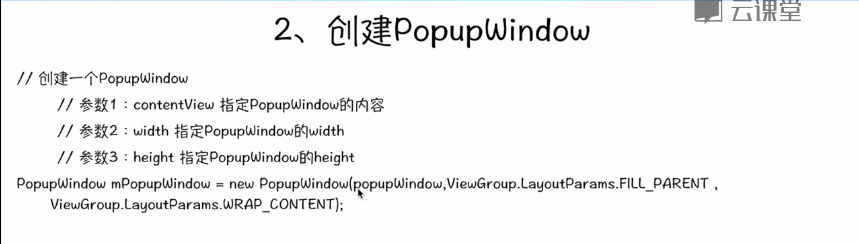
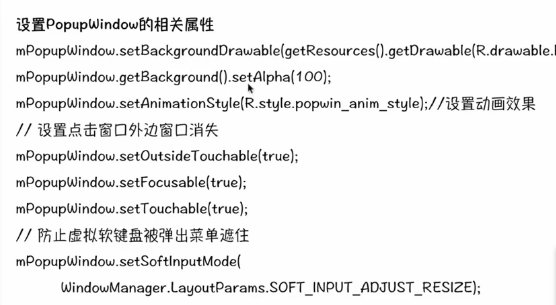
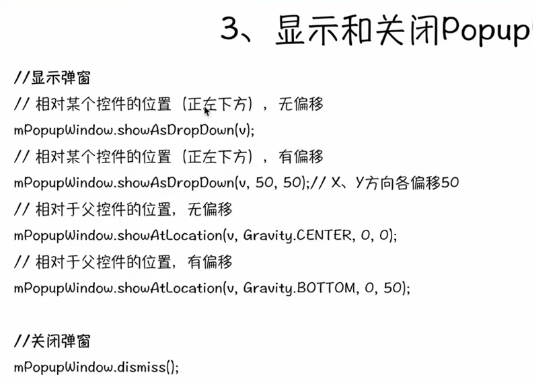

源码测试示例:
package com.example.popupwindown;

import android.os.Bundle;

import android.app.Activity;

import android.view.Gravity;

import android.view.Menu;

import android.view.View;

import android.view.View.OnClickListener;

import android.view.ViewGroup.LayoutParams;

import android.view.WindowManager;

import android.widget.Button;

import android.widget.PopupWindow;

import android.widget.TextView;

import android.widget.Toast;

public class MainActivity extends Activity {

    @Override

    protected void onCreate(Bundle savedInstanceState) {

        super.onCreate(savedInstanceState);

        setContentView(R.layout.activity_main);

    }

    public void showWindow(View v){

        View view=getLayoutInflater().inflate(R.layout.pop, null);

        Button button = (Button) view.findViewById(R.id.operate);

        final TextView textview=(TextView) view.findViewById(R.id.textView1);

        button.setOnClickListener(new OnClickListener() {

            @Override

            public void onClick(View v) {

                /*Toast.makeText(MainActivity.this, "button is pressed",

                        Toast.LENGTH_SHORT).show();*/

                textview.setText("变了");

            }

        });

        PopupWindow pop=new PopupWindow(view, LayoutParams.MATCH_PARENT,LayoutParams.WRAP_CONTENT);

        pop.setBackgroundDrawable(getResources().getDrawable(android.R.drawable.btn_default));

        pop.setAnimationStyle(android.R.style.Animation_Translucent);

        pop.getBackground().setAlpha();

        pop.setTouchable(true);//如果需要按钮单击事件,必须有

        pop.setOutsideTouchable(true);

        pop.setFocusable(true);

        pop.setSoftInputMode(WindowManager.LayoutParams.SOFT_INPUT_ADJUST_RESIZE);

        pop.showAtLocation(v,Gravity.CENTER, ,);

    }

    @Override

    public boolean onCreateOptionsMenu(Menu menu) {

        // Inflate the menu; this adds items to the action bar if it is present.

        getMenuInflater().inflate(R.menu.main, menu);

        return true;

    }

}
MainActivity.xml布局文件:
<RelativeLayout xmlns:android="http://schemas.android.com/apk/res/android"

    xmlns:tools="http://schemas.android.com/tools"

    android:layout_width="match_parent"

    android:layout_height="match_parent"

    android:paddingBottom="@dimen/activity_vertical_margin"

    android:paddingLeft="@dimen/activity_horizontal_margin"

    android:paddingRight="@dimen/activity_horizontal_margin"

    android:paddingTop="@dimen/activity_vertical_margin"

    tools:context=".MainActivity" >

    <Button

        android:id="@+id/button1"

        android:layout_width="wrap_content"

        android:layout_height="wrap_content"

        android:layout_alignParentLeft="true"

        android:layout_alignParentTop="true"

        android:layout_marginLeft="43dp"

        android:layout_marginTop="23dp"

        android:text="弹出窗口"

        android:onClick="showWindow" />

</RelativeLayout>
还需要一个pop.xml文件,用它来显示弹出窗口的布局:
<?xml version="1.0" encoding="utf-8"?>

<LinearLayout xmlns:android="http://schemas.android.com/apk/res/android"

    android:layout_width="match_parent"

    android:layout_height="match_parent"

    android:orientation="vertical" >

    <TextView

        android:id="@+id/textView1"

        android:layout_width="wrap_content"

        android:layout_height="wrap_content"

        android:text="TextView" />

    <Button

        android:id="@+id/operate"

        android:layout_width="wrap_content"

        android:layout_height="wrap_content"

        android:text="操作" />

</LinearLayout>
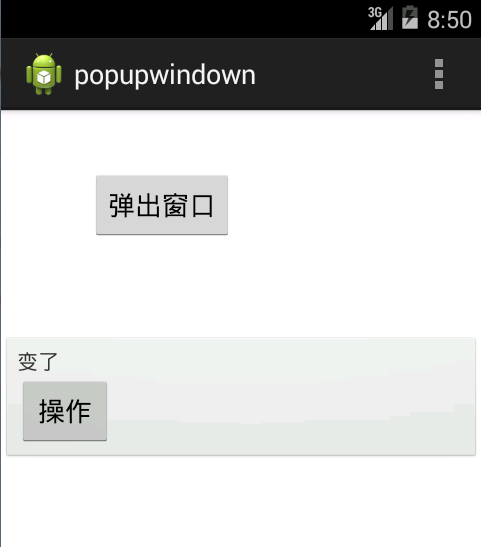
运行结果:
Android PopupWindows使用的更多相关文章
- Android PopupWindows
今天了解到PopupWindows这个布局,PopupWindow这个类用来实现一个弹出框,能够使用随意布局的View作为其内容,这个弹出框是悬浮在当前activity之上的. 以下是一个实例 xml ...
- Android高手速成--第一部分 个性化控件(View)
第一部分 个性化控件(View) 主要介绍那些不错个性化的View,包括ListView.ActionBar.Menu.ViewPager.Gallery.GridView.ImageView.Pro ...
- 据说年薪30万的Android程序员必须知道的帖子
Android中国开发精英 目前包括: Android开源项目第一篇--个性化控件(View)篇 包括ListView.ActionBar.Menu.ViewPager.Gallery.G ...
- Android开源项目分类汇总
目前包括: Android开源项目第一篇——个性化控件(View)篇 包括ListView.ActionBar.Menu.ViewPager.Gallery.GridView.ImageView. ...
- android 很多牛叉布局github地址(转)
原文地址 http://blog.csdn.net/luo15309823081/article/details/41449929 点击可到达github-------https://github.c ...
- GitHub上史上最全的Android开源项目分类汇总 (转)
GitHub上史上最全的Android开源项目分类汇总 标签: github android 开源 | 发表时间:2014-11-23 23:00 | 作者:u013149325 分享到: 出处:ht ...
- !! 据说年薪30万的Android程序员必须知道事
http://www.th7.cn/Program/Android/201512/742423.shtml Android中国开发精英 目前包括: Android开源项目第一篇——个性化控件(View ...
- 【Android】Android开源项目分类汇总
第一部分 个性化控件(View) 主要介绍那些不错个性化的View,包括ListView.ActionBar.Menu.ViewPager.Gallery.GridView.ImageView.Pro ...
- GitHub 优秀的 Android 开源项目(转)
今天查找资源时看到的一篇文章,总结了很多实用资源,十分感谢原作者分享. 转自:http://blog.csdn.net/shulianghan/article/details/18046021 主要介 ...
随机推荐
- [UML]转:UML类图集中关系的总结
转:http://blog.csdn.net/dragonpeng2008/article/details/6836448 在UML类图中,常见的有以下几种关系: 泛化(Generalization) ...
- 关于匿名类无法转换为object
缘由,不能在Razor中使用匿名类, 先事先封装了一个方法,用于Razor给cshtml模板返回页面. 在ashx一般处理程序中,是这样调用的 匿名类的格式如下:(只看格式,不看具体内容) 调用这样 ...
- B类地址
从 128.0.0.0 到 191.255.255.254 的单址广播 IP 地址.前两个八位字节指明网络,后两个八位字节指明网络上的主机.B类地址范围:128.0.0.1到191.255.255.2 ...
- android FragmentPagerAdapter getItem方法没有执行
转自 http://blog.csdn.net/getchance/article/details/40263505 在一个 Android 应用中,我使用 FragmentPagerAdapter ...
- SDUT 2623:The number of steps
The number of steps Time Limit: 1000ms Memory limit: 65536K 有疑问?点这里^_^ 题目描述 Mary stands in a stra ...
- springMVC中传值的时候的乱码问题
springMVC在传值的时候有时候回出现中文乱码的情况.有一种可能就是service的设置的问题. 打开工程中的tomcat中的servers 打开上述文件,找到下面并加上红色字体 <Conn ...
- c#播放器
using System; using System.Collections.Generic; using System.ComponentModel; using System.Data; usin ...
- ResultSetMetaData和DatabaseMetaData实现数据库中属性,属性值,属性所赋值的获取等
----------------------------------------------有些类下面代码中有; public class Test1 { TestDAO t=new TestDAO( ...
- Check the difficulty of problems
Check the difficulty of problems Time Limit: 2000MS Memory Limit: 65536K Total Submissions: 5830 Acc ...
- 使用oracle写if判断
DECLARE L_X INT; BEGIN SELECT COUNT(*) INTO L_X FROM SYSTEMROLEFUNCTION WHERE ROLEID = '1'; IF L_X & ...