
Android PopupWindows使用

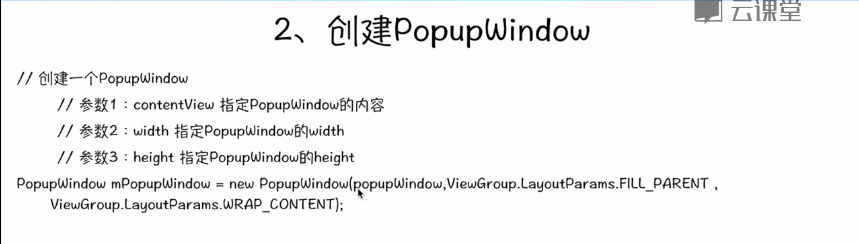
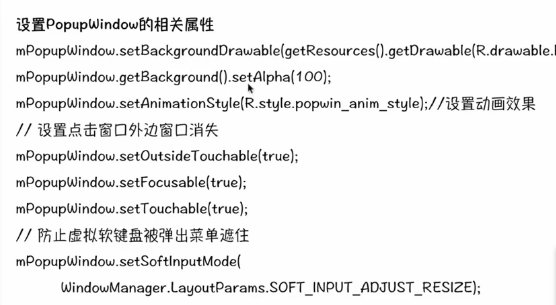
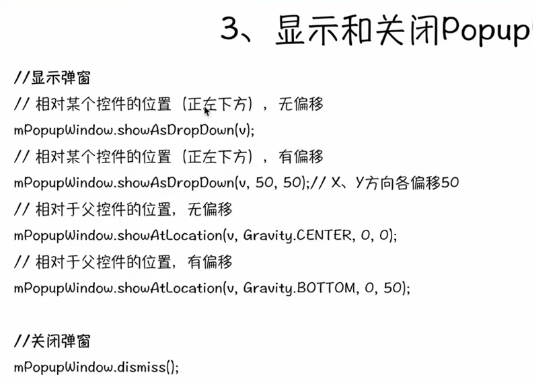

源码测试示例:
package com.example.popupwindown;

import android.os.Bundle;

import android.app.Activity;

import android.view.Gravity;

import android.view.Menu;

import android.view.View;

import android.view.View.OnClickListener;

import android.view.ViewGroup.LayoutParams;

import android.view.WindowManager;

import android.widget.Button;

import android.widget.PopupWindow;

import android.widget.TextView;

import android.widget.Toast;

public class MainActivity extends Activity {

    @Override

    protected void onCreate(Bundle savedInstanceState) {

        super.onCreate(savedInstanceState);

        setContentView(R.layout.activity_main);

    }

    public void showWindow(View v){

        View view=getLayoutInflater().inflate(R.layout.pop, null);

        Button button = (Button) view.findViewById(R.id.operate);

        final TextView textview=(TextView) view.findViewById(R.id.textView1);

        button.setOnClickListener(new OnClickListener() {

            @Override

            public void onClick(View v) {

                /*Toast.makeText(MainActivity.this, "button is pressed",

                        Toast.LENGTH_SHORT).show();*/

                textview.setText("变了");

            }

        });

        PopupWindow pop=new PopupWindow(view, LayoutParams.MATCH_PARENT,LayoutParams.WRAP_CONTENT);

        pop.setBackgroundDrawable(getResources().getDrawable(android.R.drawable.btn_default));

        pop.setAnimationStyle(android.R.style.Animation_Translucent);

        pop.getBackground().setAlpha();

        pop.setTouchable(true);//如果需要按钮单击事件,必须有

        pop.setOutsideTouchable(true);

        pop.setFocusable(true);

        pop.setSoftInputMode(WindowManager.LayoutParams.SOFT_INPUT_ADJUST_RESIZE);

        pop.showAtLocation(v,Gravity.CENTER, ,);

    }

    @Override

    public boolean onCreateOptionsMenu(Menu menu) {

        // Inflate the menu; this adds items to the action bar if it is present.

        getMenuInflater().inflate(R.menu.main, menu);

        return true;

    }

}
MainActivity.xml布局文件:
<RelativeLayout xmlns:android="http://schemas.android.com/apk/res/android"

    xmlns:tools="http://schemas.android.com/tools"

    android:layout_width="match_parent"

    android:layout_height="match_parent"

    android:paddingBottom="@dimen/activity_vertical_margin"

    android:paddingLeft="@dimen/activity_horizontal_margin"

    android:paddingRight="@dimen/activity_horizontal_margin"

    android:paddingTop="@dimen/activity_vertical_margin"

    tools:context=".MainActivity" >

    <Button

        android:id="@+id/button1"

        android:layout_width="wrap_content"

        android:layout_height="wrap_content"

        android:layout_alignParentLeft="true"

        android:layout_alignParentTop="true"

        android:layout_marginLeft="43dp"

        android:layout_marginTop="23dp"

        android:text="弹出窗口"

        android:onClick="showWindow" />

</RelativeLayout>
还需要一个pop.xml文件,用它来显示弹出窗口的布局:
<?xml version="1.0" encoding="utf-8"?>

<LinearLayout xmlns:android="http://schemas.android.com/apk/res/android"

    android:layout_width="match_parent"

    android:layout_height="match_parent"

    android:orientation="vertical" >

    <TextView

        android:id="@+id/textView1"

        android:layout_width="wrap_content"

        android:layout_height="wrap_content"

        android:text="TextView" />

    <Button

        android:id="@+id/operate"

        android:layout_width="wrap_content"

        android:layout_height="wrap_content"

        android:text="操作" />

</LinearLayout>
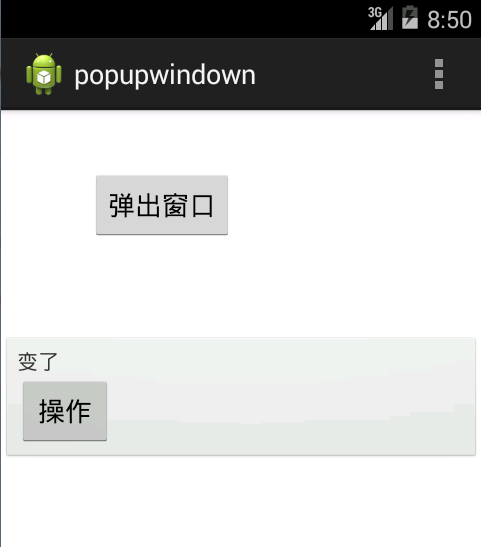
运行结果:
Android PopupWindows使用的更多相关文章
- Android PopupWindows
今天了解到PopupWindows这个布局,PopupWindow这个类用来实现一个弹出框,能够使用随意布局的View作为其内容,这个弹出框是悬浮在当前activity之上的. 以下是一个实例 xml ...
- Android高手速成--第一部分 个性化控件(View)
第一部分 个性化控件(View) 主要介绍那些不错个性化的View,包括ListView.ActionBar.Menu.ViewPager.Gallery.GridView.ImageView.Pro ...
- 据说年薪30万的Android程序员必须知道的帖子
Android中国开发精英 目前包括: Android开源项目第一篇--个性化控件(View)篇 包括ListView.ActionBar.Menu.ViewPager.Gallery.G ...
- Android开源项目分类汇总
目前包括: Android开源项目第一篇——个性化控件(View)篇 包括ListView.ActionBar.Menu.ViewPager.Gallery.GridView.ImageView. ...
- android 很多牛叉布局github地址(转)
原文地址 http://blog.csdn.net/luo15309823081/article/details/41449929 点击可到达github-------https://github.c ...
- GitHub上史上最全的Android开源项目分类汇总 (转)
GitHub上史上最全的Android开源项目分类汇总 标签: github android 开源 | 发表时间:2014-11-23 23:00 | 作者:u013149325 分享到: 出处:ht ...
- !! 据说年薪30万的Android程序员必须知道事
http://www.th7.cn/Program/Android/201512/742423.shtml Android中国开发精英 目前包括: Android开源项目第一篇——个性化控件(View ...
- 【Android】Android开源项目分类汇总
第一部分 个性化控件(View) 主要介绍那些不错个性化的View,包括ListView.ActionBar.Menu.ViewPager.Gallery.GridView.ImageView.Pro ...
- GitHub 优秀的 Android 开源项目(转)
今天查找资源时看到的一篇文章,总结了很多实用资源,十分感谢原作者分享. 转自:http://blog.csdn.net/shulianghan/article/details/18046021 主要介 ...
随机推荐
- PMO究竟啥样?(3)
PMO究竟啥样?(3) 继续上一篇,PMO究竟啥样?到这篇,这篇文章就完毕啦. 超卓基地COE,4大典型责任 我们知道全部的公司,它都是要不断地继续改善和优化,包括公司内安排级的项目处理的机制,也需求 ...
- 【转】SVN建库方法
转载地址:http://blog.csdn.net/winonatong/article/details/5791919 SVN全名Subversion,即版本控制系统.SVN与CVS一样,是一个跨平 ...
- java中文件的读取和写入
//首先要顶一个file文件用来存放要读取的文件 File f=new File("c:/test/aa.txt"); //在实例化一个输入流,并把文件对象传到里面 FileInp ...
- 我的CSS样式记事本(1)
文本 行高: line-height 对齐方式: text-align 字符间距: letter-spacing 文本修饰: text-decoration字体 设置字体所有: font 字体类型: ...
- 转载-python学习笔记之文件I/O
Python 文件I/O 本章只讲述所有基本的的I/O函数,更多函数请参考Python标准文档. 打印到屏幕 最简单的输出方法是用print语句,你可以给它传递零个或多个用逗号隔开的表达式.此函数把你 ...
- C#自动化IO/XML作业
PS:这是我们公司自动化测试留的一个作业,虽然我不是自动化的,但是也做了一下. Friday, November 28, 2014 这个也是我根据自动化部门的那次作业自己分析写的,没有写打log的过 ...
- Java中的String、StringBuilder、StringBuffer
可以证明,字符串操作是计算机程序设计中最常见的行为. 一.String 首先我们要明确,String并不是基本数据类型,而是一个对象,并且是不可变的对象.查看源码就会发现String类为final型的 ...
- 【Java】聊聊常用的摘要算法,比如MD5
摘要算法的特性 摘要算法的目的的将信息进行简单地摘要,将任意长的信息摘要成固定长的信息.比如MD5,将任意长的信息摘要成128位的摘要. 不可逆的,将报文摘要成一段信息后,无法通过摘要信息还原会报文. ...
- 年轻的团队Mono玩转Dalvik
真的很羡慕这样的一个团队,年轻充满斗志. 甲骨文和谷歌正就谷歌在Android中使用Java一案展开一场10亿美元的大较量.但是Java并非在Android中建立本地应用的唯一方法.事实上,它甚至不是 ...
- GZFramwork数据库层《一》普通表增删改查
运行结果: 使用代码生成器(GZCodeGenerate)生成tb_MyUser的Model 生成器源代码下载地址: https://github.com/GarsonZhang/GZCode ...